
花屋向けAI写真編集:売れるアレンジメントを魅せる
AI写真編集でフラワーアレンジメントをオンラインで美しく見せましょう。散らかった背景を除去、照明を修正、不要物を消去し、花屋のウェブサイトやソーシャルメディア向けに一貫した商品写真を作成します。

Content Lead
レビュー担当 Magic Eraser Editorial ·
目次
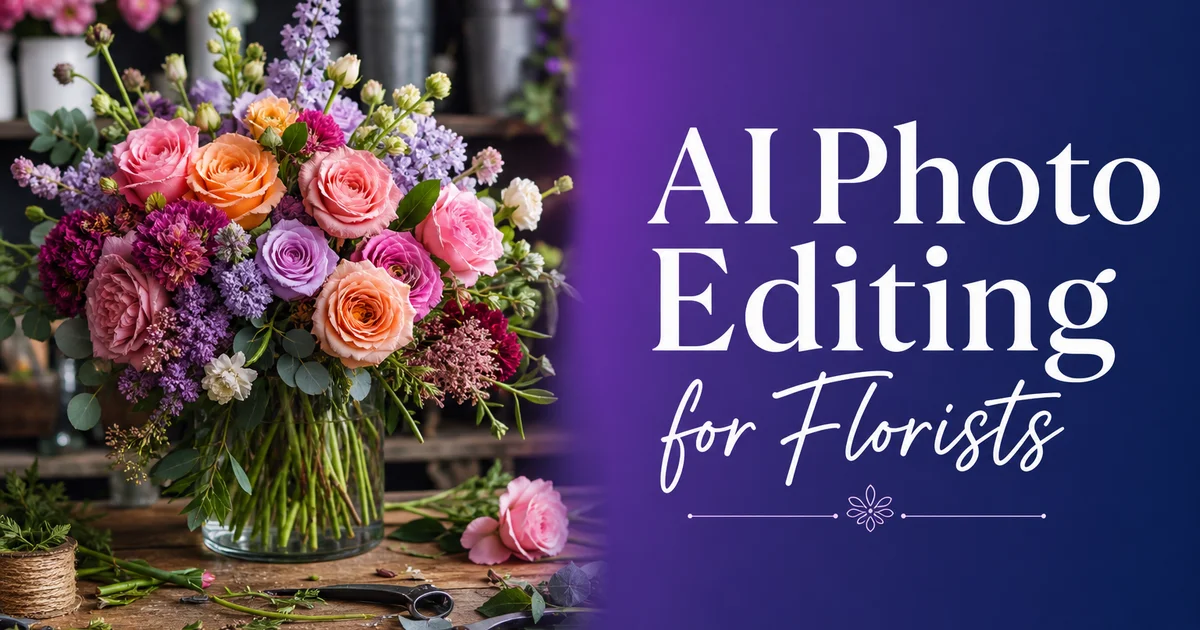
花は、人々が行う購入の中で最も視覚に左右されるものの一つです。顧客がオンラインで誕生日の花束を注文する場合でも、結婚式のインスピレーションを求めてあなたのInstagramを閲覧する場合でも、Googleで店を比較する場合でも、あなたのアレンジメントの写真は、誰かが説明文を一言読む前から販売を行っています。Shopifyの調査は常に、商品写真の品質がオンライン購入の意思決定における最大の要因であることを示しています。Society of American Floristsは、デジタルチャネルが今や毎年、花の販売の拡大する割合を占めていると報告しています。
しかし、ほとんどの花屋は、散らかった作業台の上、不均一な店内照明の下、ハサミやリボンの巻き芯とともに作品を撮影します。背景には葉の切れ端が見えています。アレンジメントは実物では美しく見えますが、写真はその魅力を十分に伝えていません。あなたの掲載写真を、清潔で明るく一貫した画像を持つ競合と比較する顧客は、より専門的に見える店に引き寄せられます。たとえあなたの花の方が優れていても。
AI写真編集は、アレンジメントが実物で見える姿とオンラインで見える姿の間のギャップを解消します。かつてはスタジオのセットアップや専門的な照明が必要でした。何時間もの手作業のレタッチが、今やビジネスの運営にすでに使っているのと同じスマートフォンやタブレットで数分でできるようになりました。
- 背景除去は、店の散らかり、冷蔵棚、作業台の乱雑さからアレンジメントを数秒で切り離します。
- AI色補正は、蛍光灯の店内照明や不均一な自然光で失われた本来の花びらの色を復元します。
- オブジェクト除去は、散らばった切れ端、輪ゴム、値札、道具を、アレンジメントに影響を与えることなく消去します。
- ウェブサイト、Instagram、Pinterest、注文プラットフォーム全体で一貫した写真品質が、ブランドの信頼を築きます。
- 一人の編集者が、丸一日分のアレンジメントを1時間以内で処理できます。
- より良い写真は、オンライン注文プラットフォームでのコンバージョン率の向上と、ソーシャルメディアでのエンゲージメントの増加につながります。
フラワー写真撮影が独自の課題を持つ理由
花は、ほとんどの商品カテゴリーにはない撮影上の課題をもたらします。花びらの色は、深いバーガンディのダリアから淡いブラッシュのバラ、鮮やかなオレンジのラナンキュラスまで、可視スペクトル全体に及びます。カメラは混合照明の下でこれらの色合いを日常的に誤って描写します。冷蔵庫の蛍光灯は緑がかった色味を加え、温かい白熱灯の作業台ランプはすべてを黄色寄りにシフトさせます。冷蔵庫から自然な窓の光への素早い移行は、同じアレンジメントの2枚の写真が全く異なって見えることを意味します。
質感を捉えることも同じく難しいです。ガーデンローズの花びらの透き通った質感、ラナンキュラスのビロードのような表面、熱帯の葉の蝋のような光沢。これらの細部こそが、実物でアレンジメントを上質に感じさせるものですが、照明の悪い写真では平板になったり消えたりします。顧客はオンラインで花に触れることができないので、写真は光と細部を通じて質感を十分に伝えなければなりません。
タイミングがプレッシャーを加えます。花は傷みやすいものです。結婚式のテーブル装花は、花びらが開きすぎたり葉がしおれたりする前の狭い時間枠で完璧に見えます。バレンタインデーの店は、一日で何百ものアレンジメントを処理しています。写真スタジオを準備し、照明を調整し、Photoshopで各カットを丁寧に編集する時間はありません。撮影は素早く行う必要があり、編集はさらに素早く行う必要があります。
- 冷蔵庫、作業台ランプ、窓からの混合照明は、写真全体で一貫しない色を作り出します。
- 繊細な花びらの質感と透き通った特質は、照明条件が悪いと平板になります。
- 傷みやすさが時間的プレッシャーを生み出します — アレンジメントは鮮度のピークを過ぎる前に素早く撮影しなければなりません。
- 工房環境は本質的に散らかっており、専用の撮影スペースがあることはまれです。
背景の置き換え:作業台からショーケースへ
花の撮影に対して行える最大の改善は、背景を除去することです。茎の切れ端の山とフローラルテープのロールの隣の散らかった作業台で撮影された豪華なシャクヤクのアレンジメントは、完成品ではなく作りかけのように見えます。同じアレンジメントが清潔な白や柔らかなパステルの背景の上にあると、雑誌に載っているように見えます。
Background Eraserを使って、撮影された場所がどこであれアレンジメントを切り離します。AIは複雑な縁取りをなぞります。個々の花びら、繊細なカスミソウ、垂れ下がる緑のリボン — 人間の編集者が1枚あたり20〜30分の丁寧なマスキングを要する精度で。切り離したら、選んだ背景にアレンジメントを配置します。白はeコマースプラットフォームとオンライン注文に適しています。柔らかなセージやダスティローズのグラデーションは、ソーシャルメディアに温かみを加えます。店のロゴ入りのブランド背景は、価格表やカタログに適しています。
鍵は一貫性です。ウェブサイト上のすべてのアレンジメントが同じ清潔な背景の上、同じ視覚的処理の下にあるとき、あなたの店は丁寧に整えられ、専門的に見えます。ギャラリーを閲覧する顧客は、まとまりのあるブランドを見るのであって、別々の日に店の別々の角で撮られた写真のランダムな寄せ集めではありません。
本来の花びらの色調を保つ色補正
色の正確さは花屋にとって信頼の問題です。顧客がウェブサイトの写真に基づいてブラッシュピンクのアレンジメントを注文し、サーモンや藤色に近いものを受け取った場合、第一印象は失望です。たとえ花が客観的に美しくても。問題はほとんどの場合、花ではなく写真にあります。
AI Enhanceは、アレンジメント内の自然な色の関係を保ちながら、ホワイトバランスと露出を補正します。冷蔵庫の照明による緑がかった色味を除去し、白熱電球による暖かいシフトを中和します。明るい花と影になった内側の茎の間の露出のバランスを取ります。画像全体をプリセットの雰囲気にシフトさせる単純なInstagramフィルターとは異なり、AI Enhanceは写真の各領域を個別に分析するので、白い花は白いまま、深い赤は濁ることなく彩度を保ちます。緑の葉は黄ばんで見えるのではなく、新鮮に見えます。
ワークフローの標準ステップとして、すべての写真をAI Enhanceに通しましょう。まともに見える写真でさえ、露出のバランスから恩恵を受けます。強調する前には見えなかった、密集した花束の中心や影の部分の細部に気づくでしょう。一貫した色処理はまた、あなたのアレンジメント写真が互いにトーンで一致することを意味します。ギャラリーやInstagramのグリッドで隣り合って表示されるときに重要です。
- 冷蔵庫の照明による緑がかった色味と、白熱灯の作業台ランプによる暖かいシフトを補正します。
- 均一なフィルターを適用するのではなく、自然な花びらの色の関係を保ちます。
- 密集した花束の中心や影になった茎の部分の細部を明らかにします。
- ギャラリー全体での一貫した色が、まとまりのある専門的なブランド印象を作り出します。
アレンジメントの細部をきれいにする
フラワーアレンジメントは手作りであり、手作りの仕事は痕跡を残します。手束ねの花束をまとめている見える輪ゴム、テーブルの上の葉の切れ端、花瓶の水滴、茎の間から突き出たフローラルピックの先端、またはアレンジメントに差し込まれた値札。これらの細部は、忙しい店の一日で素早く動いているときには見えませんが、写真ではくっきりと現れます。
Magic Eraserはこれらのクリーンアップ作業を数秒で処理します。輪ゴムの上をブラシで塗ると、AIが自然な茎の質感で置き換えます。水滴の上をブラシで塗ると、ガラスが清潔に見えます。周囲の花や葉に影響を与えることなく、散らばった切れ端、見える仕組み、値札を除去します。目標は、顧客が受け取るとおりにアレンジメントを提示することです。完成され、清潔で、飾る準備が整った状態 — 作業台の上で組み立て途中だった姿ではなく。
何を除去するかについては慎重に考えてください。見える仕組みや付随的な散らかりを編集で消すことは標準的な慣行です。古い在庫のしおれた花びらや傷んだ茎を編集で消すことは、虚偽表示に踏み込みます。良い基準は、顧客にアレンジメントを手渡す前にそれを片付けるなら、写真からそれを編集で消すのは妥当だということです。
ソーシャルメディアと季節のマーケティング
花屋は視覚的なソーシャルプラットフォームに大きく依存しています。InstagramとPinterestは発見を促進し、写真の品質は、誰かがあなたのアカウントをフォローするか、ピンを保存するか、スクロールし続けるかを直接決定します。Social Media Examinerの調査は、一貫した高品質の視覚コンテンツを持つ小規模ビジネスが、一貫しないまたは低品質の画像を持つビジネスよりも測定可能なほど高いエンゲージメント率を見せることを示しています。
AI写真編集は、繁忙期でもその一貫性を維持することを現実的にします。バレンタインデー、母の日、プロムシーズン、秋の結婚式ラッシュはすべて、毎日何十ものアレンジメントを制作し配達する時期を作り出します。合理化された編集ワークフローがなければ、最も印象的な作品を見せられるまさにそのときに、ソーシャルメディアへの投稿が滞ります。AIツールがあれば、各アレンジメントを撮影し、写真を背景除去と強調に2分以内で通すことができます。配達ドライバーが出発する前に投稿しましょう。
Pinterestは、ユーザーが積極的に花のインスピレーションを検索するため、花屋にとって特に価値があります。ウェディングブーケ、テーブル装花、お悔やみのアレンジメント、季節のディスプレイ。清潔な背景と正確な色でピン留めする各写真は、何ヶ月も何年もあなたのウェブサイトにトラフィックを誘導する発見可能な資産になります。各写真を編集する投資は、花がしおれてから長い間、配当をもたらします。
- InstagramとPinterestは花屋にとって主要な発見チャネルです — 写真の品質が直接エンゲージメントを促進します。
- AI編集は、バレンタインデーや母の日のような繁忙期でも、投稿スケジュールを一貫して保ちます。
- 清潔で十分に照らされたアレンジメント写真のPinterestピンは、あなたのウェブサイトへの長期的なトラフィックを促進します。
- ソーシャルプラットフォーム全体での一貫した視覚的ブランディングは、潜在顧客との認知と信頼を築きます。
オンライン注文とEコマース商品ページ
あなたの店がオンライン注文を提供している場合。自社のウェブサイト、BloomNation、Lovingly、または別のプラットフォームを通じて — 写真の品質はコンバージョン率に直接影響します。65ドルの花束と85ドルの花束の間で選ぶ顧客は、ほぼ完全に写真に基づいてその決定を下しています。85ドルのアレンジメントが下手に撮影され、65ドルのものが見事に見えるなら、アップセルを失います。
オンラインカタログ内のすべてのアレンジメントは、同じ視覚的処理を持つべきです。清潔な背景、補正された色、一貫した照明、散らかりなし。これは写真を人工的に完璧に見せることではありません。一部の写真を他より悪く見せる変数を取り除くことです。すべての商品写真が同じAI編集ワークフローを通るとき、掲載品の間で異なる唯一のものはアレンジメントそのものです。それこそが顧客が比較すべきものです。
商品写真はサムネイルサイズでも機能する必要があります。オンライン注文プラットフォームやGoogle Shoppingの結果は、わずか200ピクセル四方の画像を表示します。散らかった背景のアレンジメントは、そのサイズでは判読不能な塊になります。同じアレンジメントが清潔な白い背景の上にタイトなトリミングであれば、サムネイルとしても鮮明で魅力的なままです。
How to do it
- 1
Photograph arrangements in the best available light
Shoot bouquets and arrangements near a large window or outdoors in open shade. Natural, diffused light reveals petal texture and true color without harsh shadows. Capture each arrangement from multiple angles: straight-on, 45 degrees above, and a tight detail shot of the focal bloom.
- 2
Remove background clutter with Background Eraser
Open each photo in Background Eraser to isolate the arrangement from your workbench, cooler shelves, or shop interior. Replace the background with a clean white, soft pastel, or branded gradient so the flowers are the sole focal point. This gives every listing and social post a consistent, expert look.
- 3
Erase distracting elements with Magic Eraser
Brush over stray leaf trimmings on the table, visible rubber bands holding stems, price tags, water droplets on the vase exterior. Any tools visible in the frame. The AI reconstructs clean surfaces and natural textures so the arrangement looks like it was photographed in a studio.
- 4
Enhance color and lighting with AI Enhance
Run each image through AI Enhance to correct white balance, boost petal vibrancy without oversaturation. Lift shadows in dense arrangements where inner blooms go dark. A single pass restores the true colors your customers see in person.
- 5
Crop and resize for each platform
Save a square crop for Instagram, a 2:3 vertical for Pinterest and Stories. A full-resolution version for your website and online ordering platform. Consistent sizing eliminates awkward auto-cropping that can cut off key blooms.
- 6
Upload to your website, social channels, and ordering platforms
Post the edited images across your website, Instagram, Pinterest, Google Business Profile, and online ordering systems like BloomNation or Lovingly. Consistent, high-quality photos across every touchpoint build trust and drive more orders.
参考資料
- 2025 Floral Industry Trends Report — Society of American Florists
- Visual Content and Consumer Buying Behavior in E-Commerce — Shopify
- The State of Social Media Marketing for Small Businesses — Social Media Examiner