
How to Convert Photos to Illustrations with AI: Cartoon, Sketch, and Watercolor Styles
Step-by-step tutorial on transforming photographs into illustration styles using AI filters. Including cartoon, pen-and-ink sketch, watercolor, vector, and manga styles for creative projects and marketing.
SEO & Growth
Reviewed by Magic Eraser Editorial ·
Table of Contents
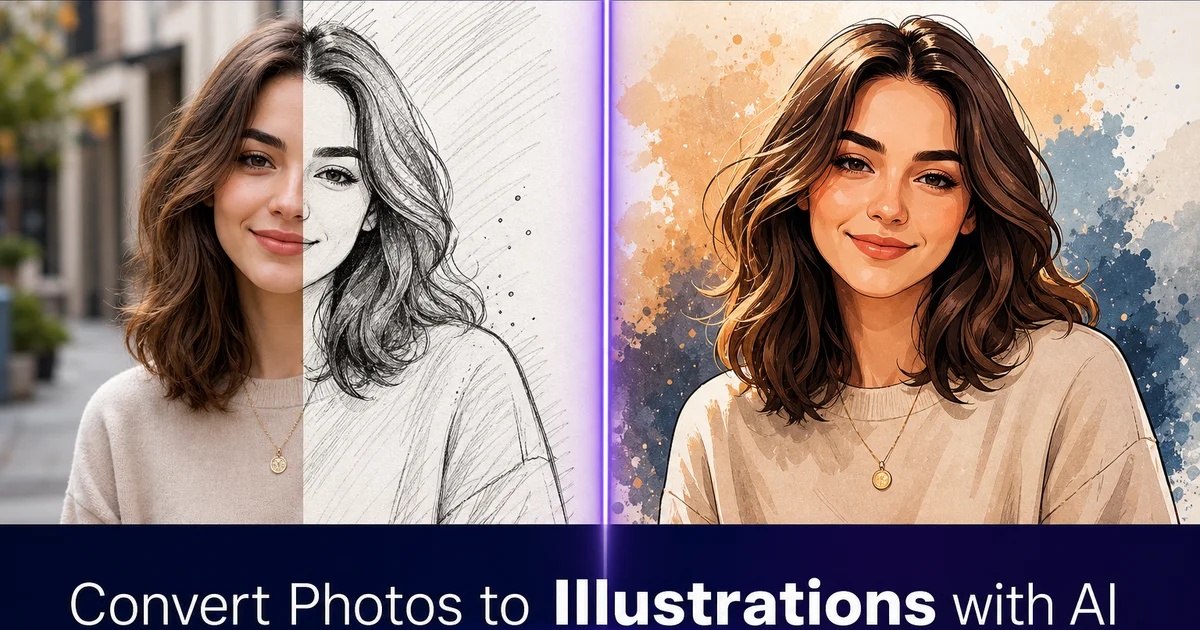
There was a time when turning a photograph into an illustration required either a skilled artist spending hours with a drawing tablet or an expensive commission. The photograph would serve as a reference, and the illustrator would reinterpret it by hand. Choosing which details to emphasize, which to simplify, and which to omit fully. The result was a piece of art that captured the essence of the photo while existing in a completely different visual language.
AI style transfer has made this change accessible to anyone with a photograph and a few minutes. Modern AI filters can convert a photo into a convincing line drawing, a watercolor painting, a flat vector illustration, a manga-style rendering, or a vintage comic book panel. The technology uses neural networks trained on millions of illustrations in each style, so it understands not just the visual surface. The line weights, the color palettes, the texture patterns — but the compositional logic of how illustrators simplify and interpret photographic reality.
This tutorial walks through the process of converting photographs into various illustration styles, covering how to choose source photos that translate well, how to select and apply styles, how to refine the results. How to use the output for creative projects, marketing materials, and personal art. The goal is not to replace illustrators. It is to make illustration-style visuals available for contexts where commissioning original artwork is not practical.
- AI filters convert photographs into illustration styles including line drawing, watercolor, vector, manga, and comic book.
- Photos with strong composition, clear subjects, and good edge contrast translate best into illustration styles.
- AI Create adds custom illustration elements to refine areas where automated conversion produces artifacts.
- Illustration-style images work well for social media branding, editorial content, merchandise, and personal art.
- The simplified shapes and flat colors of illustration styles are more forgiving of scaling than photographs.
Why photo-to-illustration conversion works so well
The reason AI can convert photographs to illustrations convincingly is that illustration is at its core an act of interpretation and simplification. When a human illustrator draws a portrait, they do not reproduce every pore and hair follicle. They select the features that define the face, simplify them into lines and shapes, and apply a consistent visual style. This process of selection and simplification is exactly what neural style transfer does: the AI identifies the important structural elements of the photograph and re-renders them using the visual vocabulary of the target style.
This means that photo-to-illustration conversion is not just a surface-level filter like adjusting contrast or adding a color overlay. The AI makes compositional decisions: which edges to emphasize and which to soften, how to handle gradients versus flat color areas, where to add stylistic details like cross-hatching or paint texture. How to simplify complex textures into their illustrated equivalents. A photograph of a tree with thousands of individual leaves becomes an illustration with simplified leaf clusters, each rendered in the style's trait shapes and colors.
The quality of the conversion depends heavily on the match between the source photo and the target style. Portraits with clean lighting convert beautifully into line drawings and cartoon styles because facial features provide strong, well-defined edges. Landscape photos work exceptionally well with watercolor and impressionist styles because the natural gradients of sky, water. Terrain translate naturally into painted washes. Urban scenes suit vector and comic book styles where the strong geometric lines of buildings and streets become the visual backbone of the illustration.
- Illustration is an act of interpretation and simplification — exactly what neural style transfer does.
- AI makes compositional decisions about edge emphasis, color simplification, and stylistic detail placement.
- Portraits with clean lighting work best for line drawing and cartoon conversion.
- Landscapes translate naturally to watercolor; urban scenes suit vector and comic book styles.
Choosing the right illustration style for your project
The illustration style you choose should serve the end use, not just look visually interesting. A pen-and-ink line drawing conveys seriousness, craft, and editorial authority. It works for book covers, magazine features, and content that wants to feel literary or journalistic. A flat vector illustration shares modernity, clarity, and brand-consciousness. It belongs in app interfaces, marketing materials, and social media branding where the visual needs to feel designed rather than drawn. A watercolor style suggests warmth, artistry, and impermanence. It suits greeting cards, wedding invitations, and lifestyle content where emotional tone matters more than precision.
Cartoon and manga styles occupy their own territory. Cartoon conversion simplifies features, enlarges eyes, rounds shapes, and applies bright, saturated colors. It produces playful, approachable images that work for children's content, casual social media, and any context where you want to lower the visual seriousness of a photograph. Manga-style conversion applies the specific visual conventions of Japanese illustration: trait eye shapes, simplified noses, stylized hair. The particular line weight variation that manga readers recognize instantly. This style has a dedicated audience and works well for content targeting anime and manga communities.
Consider also whether you need the result to read as an illustration at every viewing distance, or whether it can reveal its photographic origins on close inspection. Some styles — flat vector, comic book — produce results that are unambiguously illustrations at any scale. Others — painterly, impressionist, soft watercolor — produce results that look like illustrations at thumbnail size but reveal photographic detail when viewed large. Both approaches are valid, but they serve different purposes, and choosing on purpose produces better results than choosing randomly.
- Line drawing styles convey editorial authority and suit book covers, magazine content, and literary contexts.
- Flat vector styles communicate modernity and work in app interfaces, branding, and marketing materials.
- Watercolor styles suggest warmth and artistry for greeting cards, invitations, and lifestyle content.
- Cartoon and manga styles create playful, approachable visuals for casual and community-specific content.
Refining AI illustration output for professional quality
The initial AI conversion is rarely the final result for expert applications. Like any automated tool, AI illustration filters handle some areas of the image better than others. The difference between a quick conversion and a polished final piece lies in identifying and fixing the weak spots. The most common issues are facial feature distortion in stylized conversions, artifacts in fine-detail areas like hair and foliage, inconsistent line weight or color fill in complex regions. Background areas that convert into visual noise rather than clean illustrated space.
AI Create fills the gap. If the automated conversion produced a strong illustration of the main subject but left the background messy, use AI Create to generate a clean illustrated background that matches the style. If a face converted with one eye slightly off, use AI Create to regenerate that specific area. If the illustration needs text — a title, a caption, a brand name — AI Create can render it in a hand-lettered style that matches the illustration rather than looking like a typed overlay on a drawing.
The refinement pass also involves quality decisions that the AI cannot make for you. Should the illustration retain the photograph's original color palette, or should you shift it to better suit the illustration style? Should fine details like jewelry, buttons, and fabric patterns be visible, or should they be simplified away to keep the illustration clean? These are artistic choices, and making them intentionally. Rather than accepting whatever the first AI pass produced — is what separates a expert illustration from a filtered snapshot.
- Common conversion issues include facial distortion, fine-detail artifacts, and noisy background areas.
- AI Create generates clean replacement elements — backgrounds, facial corrections, hand-lettered text — matching the illustration style.
- Color palette and detail-level decisions should be made intentionally, not accepted from the default conversion.
- The refinement pass is what separates professional illustration output from filtered snapshots.
Practical applications for illustration-style images
Social media branding is one of the strongest use cases. A consistent illustration style applied to all your photos creates immediate visual recognition in crowded feeds. A food blogger who converts all recipe photos into a warm watercolor style stands out against the sea of standard food photography. A travel content creator who renders landscape photos as vintage poster illustrations creates a distinctive brand that followers recognize before reading the caption. The consistency matters more than the specific style — pick one that fits your brand and apply it to everything.
Merchandise and print products are another natural fit. Photo-to-illustration conversion produces images that work on products where photographs do not: t-shirts, tote bags, stickers, phone cases, posters, and greeting cards. A photograph printed on a t-shirt looks like a photograph printed on a t-shirt. An illustration derived from a photograph looks like original artwork. The commercial value of the same image increases greatly when it exists in illustration form. Print-on-demand services make it easy to test products without inventory investment.
Editorial and content marketing benefit from illustrations because they can share concepts that photographs cannot. A photograph shows what something looks like. An illustration shows what something means. Converting a photograph into a simplified illustration and then adding elements. Arrows, labels, abstract shapes, stylized effects — creates explanatory visuals that work in blog posts, displays, whitepapers, and educational content. The illustration style gives you permission to simplify reality in ways that a photograph does not. Viewers understand that an illustration is an interpretation, not a document.
- Consistent illustration style across social media creates instant brand recognition in crowded feeds.
- Illustration-style images suit merchandise better than photographs — they read as original artwork on products.
- Editorial illustrations communicate concepts and meaning that photographs limited to literal representation cannot.
- Print-on-demand services allow testing illustration merchandise without inventory investment.
How to do it
- 1
Choose a source photo with strong composition and clear subjects
Select a photograph with a well-defined subject, good contrast between foreground and background, and clean composition. Photos with strong edges and distinct shapes translate best into illustration styles because the AI uses those edges to define the drawn lines, color regions, and shading boundaries. Cluttered backgrounds, low contrast, and overlapping subjects create muddy results regardless of the illustration style you choose.
- 2
Select an illustration style that matches your creative goal
Use AI Filter to browse available illustration styles. From pen-and-ink line drawing and watercolor wash to flat vector illustration, vintage comic book, manga, and children's book styles. Each style interprets the photograph differently. Line drawings emphasize edges and contours while discarding color and shading. Watercolor styles preserve color relationships but add paint texture and soft bleeding edges. Flat vector styles simplify shapes and apply solid color fills. Choose based on your end use: editorial illustration, social media branding, merchandise, or personal art.
- 3
Apply the AI filter and review the initial conversion
Run the selected filter on your photo and examine the result at full resolution. Pay attention to how the AI handled facial features (if present), fine details like hair and fabric texture. The transition between foreground subject and background. Most styles handle the main subject well but may produce artifacts in complex areas like tree branches against a sky, fine text, or intricate patterns. Identify any areas that need adjustment before committing to the final output.
- 4
Refine with AI Create for custom illustration elements
Use AI Create to add or modify illustration elements that the automated conversion missed or handled poorly. Add hand-drawn-style text, decorative borders, or background patterns that complement the illustration style. Replace complex background areas that converted poorly with cleaner illustrated equivalents. AI Create lets you blend generated illustration elements seamlessly with the converted photo, producing a result that looks like a unified illustration rather than a filtered photograph.
- 5
Export at the appropriate resolution for your use case
For print applications — posters, greeting cards, merchandise — export at the highest available resolution. Illustration styles are more forgiving of upscaling than photographs because the simplified shapes and flat colors scale cleanly. Starting with maximum resolution gives you the most flexibility. For digital use — social media posts, blog headers, app interfaces — export at the platform's recommended dimensions. Save a layered version if your workflow supports it, so you can adjust individual elements later.