
Magic Eraser + Photoshop: Schnelle Bereinigung, umfassende Bearbeitung
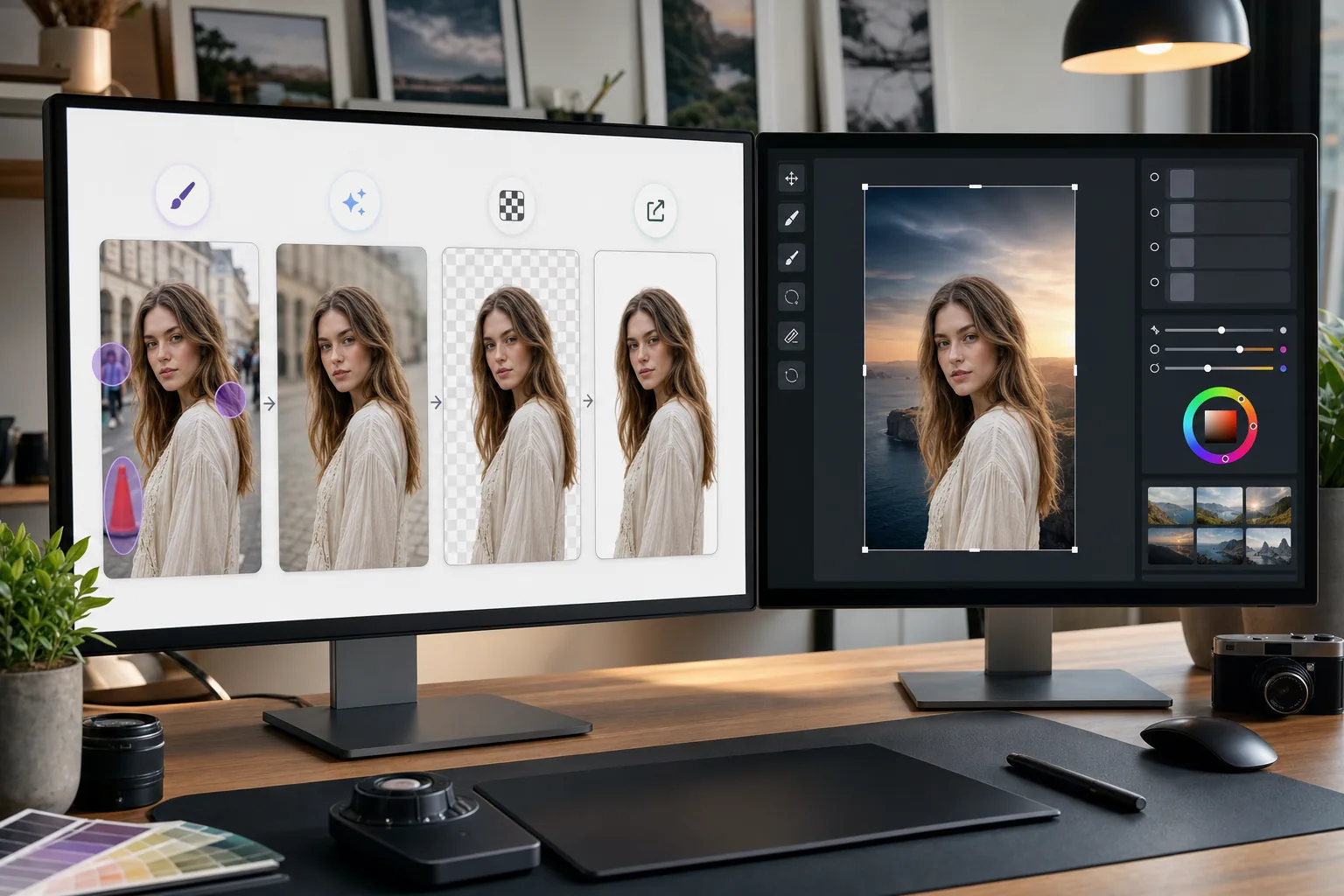
Photoshop ist der Industriestandard für detaillierte Bildbearbeitung. Magic Eraser übernimmt die schnellen Bereinigungsaufgaben – das Entfernen von Hintergründen, das Löschen von Objekten und das Füllen von Lücken mit KI –, sodass Sie direkt mit der Feinarbeit in Photoshop beginnen können.
Über Adobe Photoshop
Adobe Photoshop ist die professionelle Bildbearbeitungssoftware, die von Fotografen, Designern und Digitalkünstlern weltweit verwendet wird. Es bietet erweiterte Tools für Compositing, Retusche, Color correction und Bearbeitung auf Pixelebene.
Vorteile
Schnellere Bereinigung vor der detaillierten Bearbeitung
Entfernen Sie unerwünschte Objekte und Ablenkungen in Sekundenschnelle mit Magic Eraser, anstatt Zeit mit dem Klonstempel oder dem Reparaturpinsel von Photoshop für einfache Aufgaben zu verschwenden.
Hintergrundentfernung mit einem Klick
Isolieren Sie Motive sofort mit der KI-gestützten Hintergrundentfernung von Magic Eraser. Importieren Sie das transparente PNG in Photoshop für Compositing und erweiterte Maskierung.
KI-gestütztes Füllen fehlender Bereiche
Verwenden Sie die KI-Füllung von Magic Eraser, um Bereiche nach dem Entfernen von Objekten intelligent zu rekonstruieren. Die Ergebnisse bieten einen sauberen Ausgangspunkt für die Verfeinerung von Photoshop.
Zugängliche Alternative für einfache Aufgaben
Nicht jedes Bild benötigt die volle Leistung von Photoshop. Verwenden Sie Magic Eraser im Browser für schnelle Korrekturen und reservieren Sie Photoshop für Arbeiten, die das erweiterte Toolset erfordern.
So verwenden Sie Magic Eraser mit Photoshop
Hochladen auf Magic Eraser
Öffnen Sie Magic Eraser in Ihrem Browser und laden Sie das Bild hoch, das vor der Photoshop-Bearbeitung zunächst bereinigt werden muss.
Führen Sie eine schnelle Bereinigung durch
Entfernen Sie Hintergründe, löschen Sie unerwünschte Objekte oder verwenden Sie die KI-Füllung, um einfache Bearbeitungen durchzuführen, die in Photoshop länger dauern würden.
Exportieren Sie in voller Qualität
Laden Sie das bereinigte Bild als PNG herunter, um die Transparenz beizubehalten, oder als hochwertiges JPEG für nicht transparente Bilder.
Für Detailarbeiten in Photoshop öffnen
Importieren Sie das bearbeitete Bild in Photoshop und fahren Sie mit der erweiterten Bearbeitung, Retusche, Komposition oder Farbkorrektur fort.
Häufig gestellte Fragen
Lässt sich Magic Eraser direkt in Photoshop integrieren?
+
Nein. Diese Seite beschreibt einen manuellen Export-Import-Workflow, kein Photoshop-Plug-in und keine direkte Integration. Bearbeiten Sie das Bild in Magic Eraser, laden Sie es als PNG oder JPEG herunter und öffnen Sie die Datei anschließend in Photoshop.
Warum Magic Eraser verwenden, wenn ich bereits Photoshop habe?
+
Magic Eraser erledigt einfache Bereinigungsaufgaben in Sekundenschnelle, ohne Photoshop zu starten. Das Entfernen des Hintergrunds, das Löschen von Objekten und die grundlegende Bereinigung geht schneller, sodass Sie Photoshop für die Arbeit verwenden können, die es tatsächlich erfordert.
Ersetzt Magic Eraser Photoshop?
+
Nein. Magic Eraser ergänzt Photoshop, indem es schnelle, KI-gesteuerte Aufgaben erledigt. Photoshop bleibt für detaillierte Retusche, Compositing, Farbarbeit und Bearbeitung auf Pixelebene unverzichtbar.
Welche Dateiformate funktionieren zwischen den beiden Tools?
+
Export aus Magic Eraser als PNG (mit Transparenz) oder hochwertiges JPEG. Beide Formate werden direkt in Photoshop importiert, wobei die volle Qualität erhalten bleibt.
Ist die Hintergrundentfernung von Magic Eraser genauso genau wie die von Photoshop?
+
Bei den meisten Motiven führt die KI-Hintergrundentfernung von Magic Eraser mit einem Klick zu sauberen Ergebnissen. Bei Bildern mit extrem feinen Details wie z. B. dünnen Haaren möchten Sie die Kanten möglicherweise in Photoshop weiter verfeinern.
Kann ich Magic Eraser für eine PSD-Datei verwenden?
+
Magic Eraser funktioniert mit Standardbildformaten wie JPEG, PNG und WebP. Exportieren Sie ein reduziertes Bild aus Photoshop, verarbeiten Sie es in Magic Eraser und fügen Sie es dann wieder in Ihr PSD-Projekt ein.
Beschleunigen Sie Ihren Photoshop-Workflow
Testen Sie Magic Eraser kostenlos für die schnelle Hintergrundentfernung, Objektlöschung und KI-Füllung, bevor Sie sich in die detaillierte Photoshop-Bearbeitung stürzen.
Testen Sie Magic Eraser kostenlosVerwandte Anwendungsfälle
Erfahren Sie, wie Profis diese Tools in realen Workflows einsetzen.
Exposé-Fotos voller persönlicher Gegenstände, geparkter Autos oder Baustellenmaterial schrecken Käufer ab. Magic Eraser räumt Ihre Immobilienfotos per KI blitzschnell auf — ganz ohne Photoshop-Kenntnisse.
Unscharfe Hintergründe und unaufgeräumte Produktbilder kosten Sie jeden Tag Umsatz. Magic Eraser erstellt professionelle Produktbilder in Sekunden — ganz ohne Photoshop-Kenntnisse. Hochladen, Störendes entfernen, mit Vertrauen einstellen.
Fremde Personen ruinieren deine Reisefotos? Unordentliche Hintergründe verderben deine Selfies? Schluss mit stundenlangem Photoshop. Magic Eraser entfernt Störungen, räumt Hintergründe auf und passt Fotos an jedes Format an — mit einem Klick.
Verwandte Vergleiche
Sehen Sie, wie Magic Eraser im Vergleich zu ähnlichen Tools abschneidet.
TouchRetouch ist eine beliebte kostenpflichtige mobile App zur Entfernung von Objekten und Makeln. Magic Eraser bietet kostenlose KI-Bearbeitung auf jedem Gerät ohne Installation. Vergleichen Sie Funktionen, Preise und Benutzerfreundlichkeit.
Cleanup.pictures ist ein kostenloses Web-Tool zur schnellen Objektentfernung. Magic Eraser bietet 8 KI-Bearbeitungstools, mobile Apps und erweiterte Verarbeitung. Sehen Sie den Vergleich.
remove.bg ist Marktführer für Hintergrundentfernung mit leistungsstarker API und Photoshop-/Figma-Plugins. Magic Eraser bietet acht KI-Werkzeuge — von Objektentfernung und generativer Füllung bis hin zu KI-Verbesserung und Design — alles in einem Editor.
Zwei leistungsstarke KI-Fotoeditoren mit unterschiedlichen Stärken. Magic Eraser bietet ein breiteres Set generativer KI-Tools, während Photoroom bei E-Commerce-Produktfotografie und Stapelverarbeitung glänzt. Finden Sie heraus, was zu Ihrem Workflow passt.
Verwandte Artikel
Tipps, Anleitungen und Tutorials zu diesem Thema.
Lerne, wie du mit Magic Eraser Objekte, Personen, Text und störende Details aus Fotos entfernst und sauberere KI-Ergebnisse erzielst.
Person aus Foto entfernen mit KI in Sekunden. Anleitung für Reisefotos, Immobilienbilder und Produktfotos.
Anleitung zum Entfernen von Wasserzeichen aus eigenen Fotos mit KI. Wann es angemessen ist, Techniken und Tipps.
Weitere Integrationen
Entdecken Sie weitere Plattformen, die mit Magic Eraser funktionieren.