
Real Estate Photo Editing
Produce listing photos that sell properties faster. This intermediate course teaches you how to evaluate listing imagery, declutter interiors, clean up exterior shots, replace dull skies, and introduce virtual staging elements — all using AI-powered editing tools that save hours compared to traditional retouching.
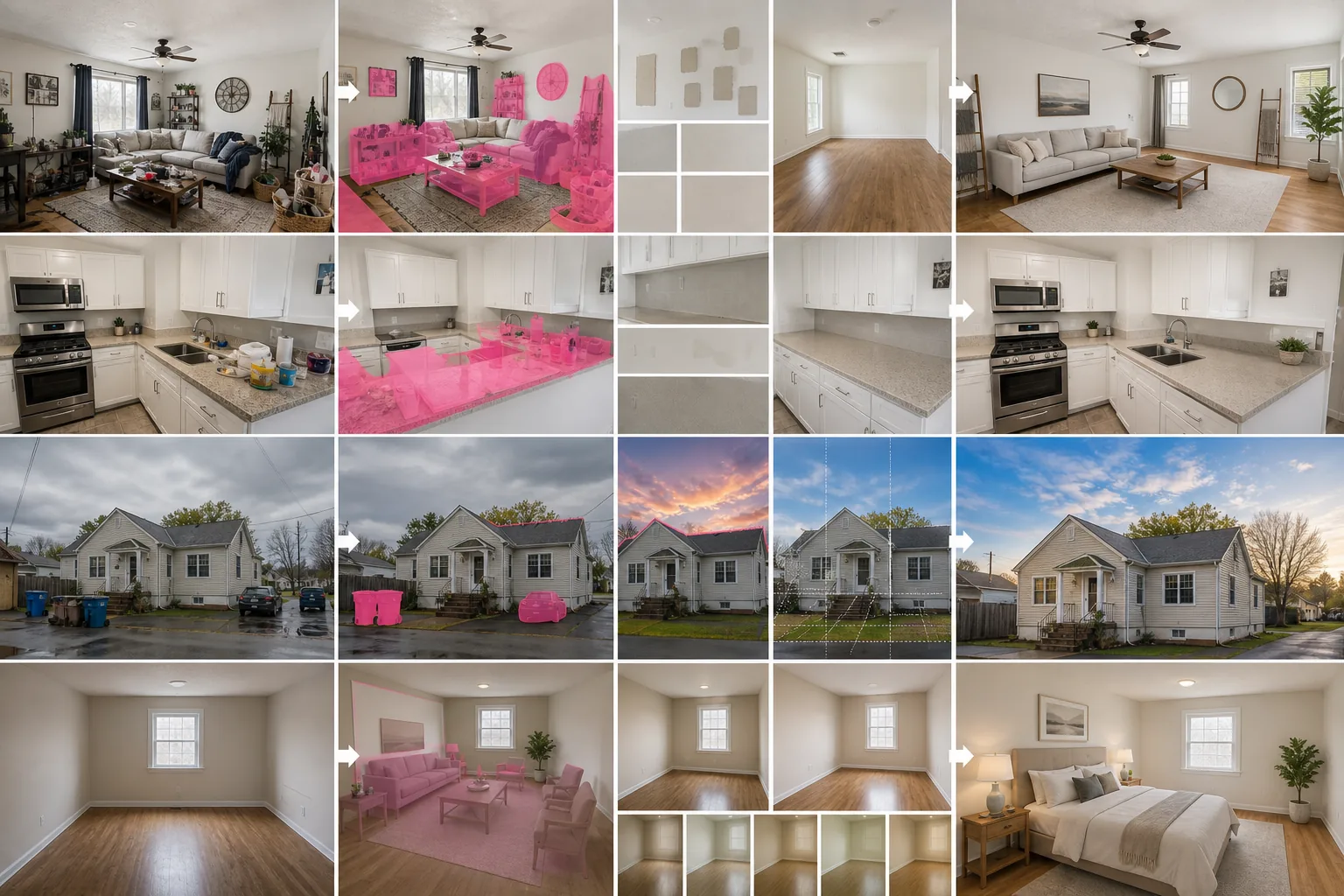
Course Overview
This course is designed for real-estate agents, photographers, and marketing teams who want to produce compelling property visuals without outsourcing to expensive retouching services. You will learn practical AI editing techniques that transform ordinary listing shots into images that attract more clicks, showings, and offers.
Course Lessons
What Makes a Great Listing Photo
Understand the measurable qualities that separate high-performing listing photos from average ones.
Removing Clutter from Interior Shots
Digitally declutter rooms by removing personal items, excess furniture, and visual distractions.
Cleaning Up Exterior and Neighborhood Views
Improve curb appeal by digitally removing common exterior distractions from property photos.
Replacing Overcast Skies with Blue Skies
Transform dull exterior photos by replacing gray skies with realistic blue sky and cloud compositions.
Introduction to Virtual Staging
Add digital furniture and decor to empty rooms to help buyers visualize the potential of a space.
Frequently Asked Questions
Is virtual staging considered misleading?
+
Not when properly disclosed. Most real-estate boards require a label indicating that staging is virtual. Transparent disclosure builds buyer trust while still showcasing the property's potential.
How much time does AI editing save compared to manual retouching?
+
AI-powered tools typically reduce editing time by 80-90% compared to manual Photoshop retouching. A full set of listing photos that once took two hours can be processed in 15-20 minutes.
Can I use these techniques for commercial real estate too?
+
Yes. The same principles apply to commercial listings, office spaces, and retail properties. Adjust the staging style to match the intended commercial use rather than residential decor.
Make Your Listings Stand Out
Upload a listing photo and experience how AI-powered editing transforms ordinary property images into buyer magnets in minutes.
Try Magic Eraser freeMore Courses
Continue learning with more photo editing courses.
Master the essential skills of removing unwanted objects from any photo. This beginner-friendly course walks you through AI selection tools, complex scene handling, and batch workflows so you can clean up images with confidence.
BeginnerLearn everything about removing, replacing, and perfecting photo backgrounds. From one-click removal to fine edge work and creative backdrop swaps, this course gives you the skills to produce studio-quality images from any source photo.
IntermediateTurn ordinary product snapshots into professional e-commerce listings. This intermediate course covers marketplace requirements, white-background techniques, lifestyle-to-studio conversions, batch catalog editing, and image optimization strategies that drive higher conversion rates.
BeginnerCreate scroll-stopping social media visuals in minutes, not hours. This course teaches you platform-specific image rules, attention-grabbing editing techniques, brand-consistent content creation, batch workflows for weekly scheduling, and vertical-format optimization for Stories and Reels.
IntermediateLearn professional portrait retouching techniques that preserve natural skin texture while removing distractions. This course covers everything from subtle skin smoothing to efficient group portrait editing using AI-powered tools.
BeginnerUnderstand the fundamentals of AI-powered photo enhancement and learn to fix common image problems automatically. This beginner-friendly course covers lighting correction, sharpening, color grading, and intelligent upscaling.