
Portrait Retouching
Learn professional portrait retouching techniques that preserve natural skin texture while removing distractions. This course covers everything from subtle skin smoothing to efficient group portrait editing using AI-powered tools.
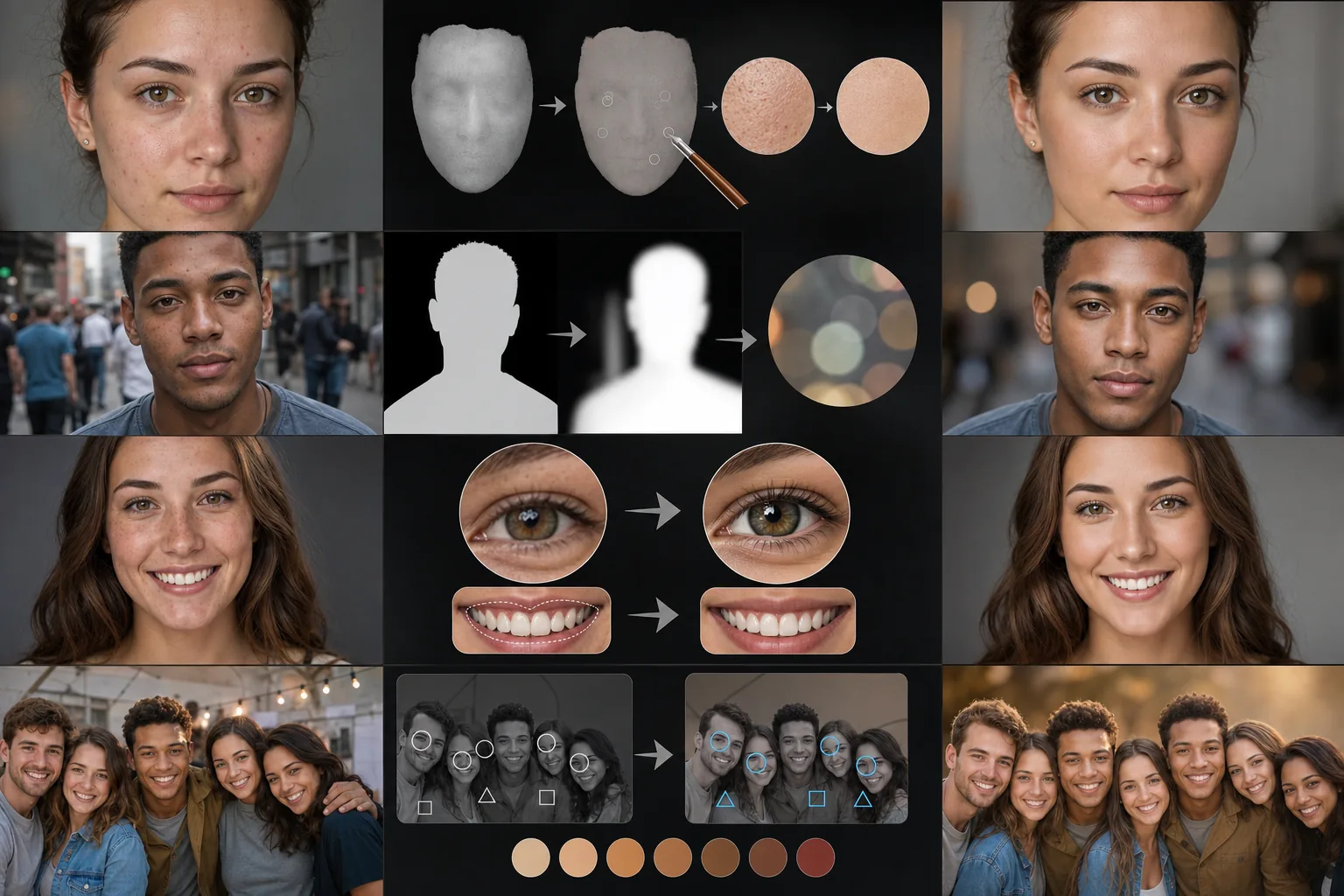
Course Overview
This intermediate course teaches you how to retouch portraits like a professional without making subjects look artificial. You will master skin correction, blemish removal, background separation, and facial feature enhancement using AI-assisted workflows.
Course Lessons
Natural Skin Smoothing Techniques
Discover how to smooth skin naturally without creating a plastic or over-processed appearance.
Removing Blemishes and Imperfections
Learn targeted removal of blemishes, spots, and temporary imperfections while keeping permanent features intact.
Creating Professional Background Blur
Add convincing depth-of-field effects to portraits by separating the subject from the background with realistic bokeh blur.
Enhancing Teeth and Eyes Naturally
Brighten teeth and enhance eyes in portraits with subtle adjustments that look natural and avoid the over-whitened or over-saturated look.
Editing Group Portraits Efficiently
Master time-saving workflows for retouching group photos with multiple subjects, consistent color grading, and distraction removal.
Frequently Asked Questions
How do I avoid making skin look plastic when retouching portraits?
+
The key is to preserve skin texture while only smoothing tone and color. Use frequency separation techniques or AI tools that separate texture from color information. Always work at 100% zoom, apply smoothing gradually, and toggle the before-and-after comparison frequently to catch over-processing early.
Can I use these techniques on photos taken with a phone camera?
+
Absolutely. Phone cameras capture enough detail for professional retouching, and AI-powered tools like Magic Eraser work equally well on phone photos. The background blur feature is especially useful for phone portraits since phone lenses have a deeper depth of field than professional cameras.
How long does it typically take to retouch a portrait with AI tools?
+
With AI-assisted tools, a standard portrait retouch takes two to five minutes compared to thirty minutes or more with manual techniques. Group portraits take longer depending on the number of subjects, but batch face detection and preset application can keep editing time under ten minutes for most group shots.
Start Retouching Portraits Like a Pro
Put these portrait retouching techniques into practice with Magic Eraser's AI-powered editing tools. Get professional results in minutes, not hours.
Try Magic Eraser freeMore Courses
Continue learning with more photo editing courses.
Master the essential skills of removing unwanted objects from any photo. This beginner-friendly course walks you through AI selection tools, complex scene handling, and batch workflows so you can clean up images with confidence.
BeginnerLearn everything about removing, replacing, and perfecting photo backgrounds. From one-click removal to fine edge work and creative backdrop swaps, this course gives you the skills to produce studio-quality images from any source photo.
IntermediateTurn ordinary product snapshots into professional e-commerce listings. This intermediate course covers marketplace requirements, white-background techniques, lifestyle-to-studio conversions, batch catalog editing, and image optimization strategies that drive higher conversion rates.
BeginnerCreate scroll-stopping social media visuals in minutes, not hours. This course teaches you platform-specific image rules, attention-grabbing editing techniques, brand-consistent content creation, batch workflows for weekly scheduling, and vertical-format optimization for Stories and Reels.
IntermediateProduce listing photos that sell properties faster. This intermediate course teaches you how to evaluate listing imagery, declutter interiors, clean up exterior shots, replace dull skies, and introduce virtual staging elements — all using AI-powered editing tools that save hours compared to traditional retouching.
BeginnerUnderstand the fundamentals of AI-powered photo enhancement and learn to fix common image problems automatically. This beginner-friendly course covers lighting correction, sharpening, color grading, and intelligent upscaling.