
Magic Eraser + Photoshop: pulizia rapida, editing approfondito
Photoshop è lo standard industriale per l'editing dettagliato delle immagini. Magic Eraser gestisce le attività di pulizia rapida, rimuovendo sfondi, cancellando oggetti e colmando le lacune con l'intelligenza artificiale, così puoi passare direttamente al lavoro raffinato in Photoshop.
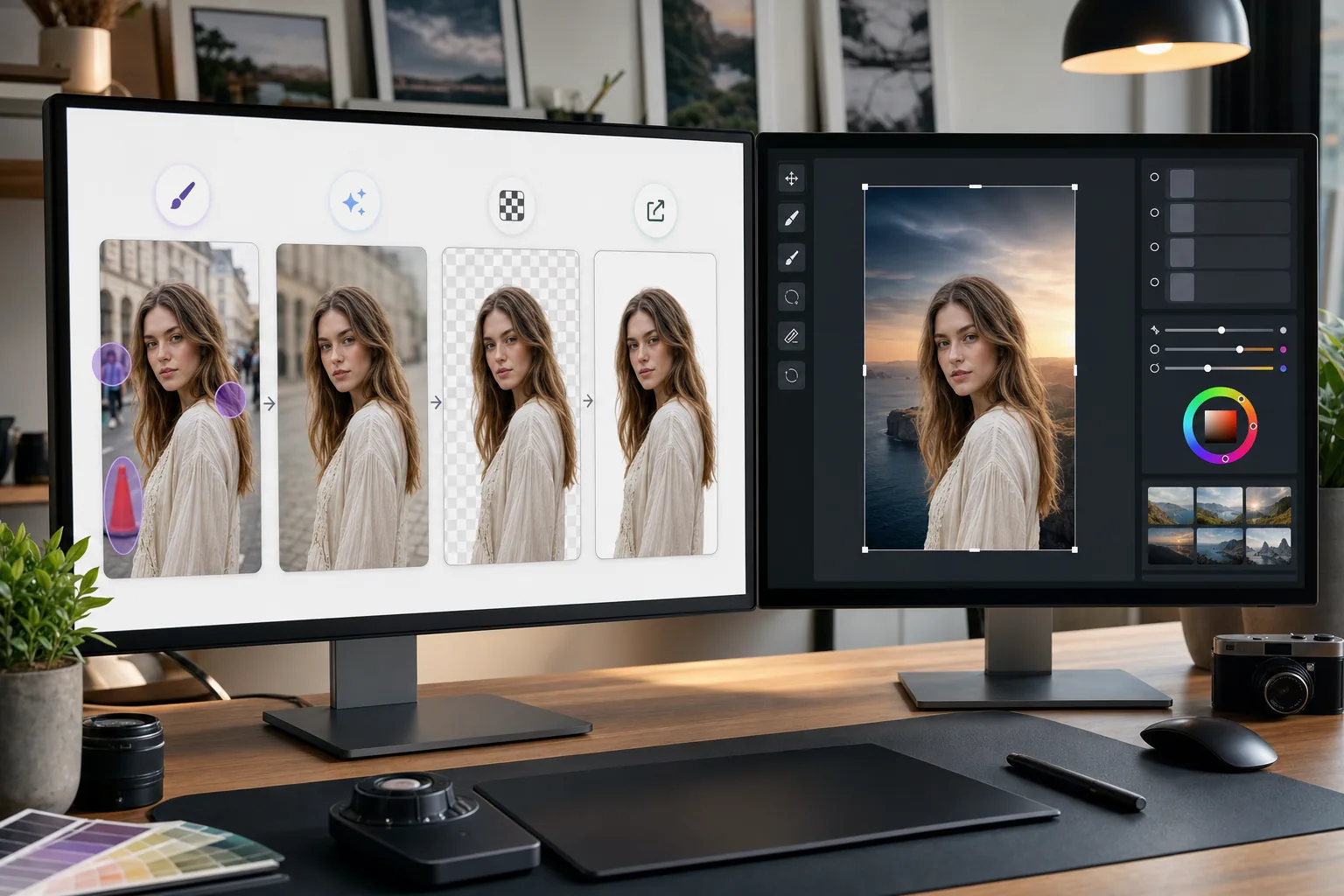
Informazioni su Adobe Photoshop
Adobe Photoshop è il software professionale di editing delle immagini utilizzato da fotografi, designer e artisti digitali in tutto il mondo. Fornisce strumenti avanzati per la composizione, il ritocco, Color correction e l'editing a livello di pixel.
Vantaggi
Pulizia più rapida prima della modifica dettagliata
Rimuovi oggetti indesiderati e distrazioni in pochi secondi con Magic Eraser invece di perdere tempo con il timbro clone o il pennello correttivo di Photoshop in attività semplici.
Rimozione dello sfondo con un clic
Isola istantaneamente i soggetti con la rimozione dello sfondo basata sull'intelligenza artificiale di Magic Eraser. Importa il PNG trasparente in Photoshop per la composizione e il mascheramento avanzato.
Riempimento basato sull'intelligenza artificiale per le aree mancanti
Utilizza il riempimento AI di Magic Eraser per ricostruire in modo intelligente le aree dopo aver rimosso gli oggetti. I risultati forniscono un punto di partenza chiaro per il perfezionamento di Photoshop.
Alternativa accessibile per compiti semplici
Non tutte le immagini necessitano della piena potenza di Photoshop. Utilizza Magic Eraser nel browser per soluzioni rapide e riserva Photoshop per lavori che richiedono il suo set di strumenti avanzati.
Come utilizzare Magic Eraser con Photoshop
Carica su Magic Eraser
Apri Magic Eraser nel tuo browser e carica l'immagine che necessita di una pulizia iniziale prima della modifica in Photoshop.
Eseguire una pulizia rapida
Rimuovi sfondi, cancella oggetti indesiderati o utilizza il riempimento AI per gestire le modifiche semplici che richiederebbero più tempo in Photoshop.
Esportazione alla massima qualità
Scarica l'immagine pulita come PNG per preservare la trasparenza o come JPEG di alta qualità per le immagini non trasparenti.
Apri in Photoshop per lavorare sui dettagli
Importa l'immagine elaborata in Photoshop e continua con l'editing avanzato, il ritocco, la composizione o la gradazione del colore.
Strumenti
Domande frequenti
Magic Eraser si integra direttamente con Photoshop?
+
No. Questa pagina descrive un flusso manuale di esportazione e importazione, non un plugin per Photoshop né un’integrazione diretta. Modifica l’immagine in Magic Eraser, scaricala in formato PNG o JPEG e poi apri il file in Photoshop.
Perché usare Magic Eraser se ho già Photoshop?
+
Magic Eraser gestisce semplici attività di pulizia in pochi secondi senza avviare Photoshop. È più veloce per la rimozione dello sfondo, la cancellazione degli oggetti e la pulizia di base, consentendoti di utilizzare Photoshop per il lavoro che lo richiede effettivamente.
Magic Eraser sostituisce Photoshop?
+
No. Magic Eraser integra Photoshop gestendo attività rapide e basate sull'intelligenza artificiale. Photoshop rimane essenziale per il ritocco dettagliato, la composizione, il lavoro sui colori e l'editing a livello di pixel.
Quali formati di file funzionano tra i due strumenti?
+
Esporta da Magic Eraser come PNG (con trasparenza) o JPEG di alta qualità. Entrambi i formati vengono importati direttamente in Photoshop mantenendo la massima qualità.
La rimozione dello sfondo di Magic Eraser è precisa quanto quella di Photoshop?
+
Per la maggior parte dei soggetti, la rimozione dello sfondo AI di Magic Eraser produce risultati puliti con un clic. Per immagini con dettagli estremamente fini come i capelli sottili, potresti voler rifinire ulteriormente i bordi in Photoshop.
Posso utilizzare Magic Eraser su un file PSD?
+
Magic Eraser funziona con formati immagine standard come JPEG, PNG e WebP. Esporta un'immagine appiattita da Photoshop, elaborala in Magic Eraser, quindi riportala nel tuo progetto PSD.
Velocizza il tuo flusso di lavoro con Photoshop
Prova Magic Eraser gratuitamente per la rimozione rapida dello sfondo, la cancellazione degli oggetti e il riempimento AI prima di tuffarti nell'editing dettagliato di Photoshop.
Prova Magic Eraser gratuitamenteCasi d'uso correlati
Scopri come i professionisti utilizzano questi strumenti nei flussi di lavoro reali.
Le foto degli annunci piene di oggetti personali, auto parcheggiate o materiali di cantiere allontanano gli acquirenti. Magic Eraser usa l'IA per ripulire le foto dei tuoi immobili all'istante — senza bisogno di Photoshop.
Sfondi disordinati e foto prodotto trascurate ti costano vendite ogni giorno. Magic Eraser ti aiuta a creare immagini prodotto professionali in pochi secondi — senza competenze di Photoshop. Carica, cancella le distrazioni e pubblica con sicurezza.
Sconosciuti che rovinano le tue foto di viaggio? Sfondi disordinati che uccidono i tuoi selfie? Basta sprecare ore su Photoshop. Magic Eraser rimuove le distrazioni, pulisce le immagini e adatta le foto a qualsiasi formato — tutto con un tocco.
Confronti correlati
Scopri come Magic Eraser si confronta con strumenti simili.
TouchRetouch è una popolare app mobile a pagamento per rimuovere oggetti e imperfezioni. Magic Eraser offre editing IA gratuito su qualsiasi dispositivo senza installazione. Confronta funzionalità, prezzi e facilità d'uso.
Cleanup.pictures è uno strumento web gratuito per rimuovere rapidamente gli oggetti. Magic Eraser offre 8 strumenti di editing IA, app mobili e un'elaborazione avanzata. Scopri il confronto.
remove.bg è il leader di mercato per la rimozione sfondo, con una potente API e integrazioni con Photoshop e Figma. Magic Eraser offre otto strumenti IA — dalla rimozione oggetti e riempimento generativo al miglioramento IA e design — tutto in un unico editor.
Due potenti editor foto IA con punti di forza diversi. Magic Eraser offre un set più ampio di strumenti IA generativi, mentre Photoroom eccelle nella fotografia di prodotti e-commerce e nell'elaborazione batch. Scopri quale si adatta al tuo flusso di lavoro.
Articoli correlati
Consigli, guide e tutorial su questo argomento.
Scopri come usare Magic Eraser per rimuovere oggetti, persone, testo e distrazioni dalle foto con risultati AI più puliti.
Scopri come rimuovere persone dalle foto con l'IA in pochi secondi. Guida per foto di viaggio, immobiliari e prodotti.
Guida passo passo per rimuovere filigrane dalle tue foto con l'IA. Quando è appropriato, tecniche e consigli.
Altre integrazioni
Esplora altre piattaforme che funzionano con Magic Eraser.