Skip to content

Creare visual più forti con AI Fill

Usa AI Fill come parte di un workflow di editing più ampio dentro Magic Eraser.

Magic Eraser AI Fill è uno strumento AI che consente agli utenti di sostituire aree selezionate e ricostruire contenuto mancante. Usi comuni: editing prodotto, creatività social, riparazione scena e cleanup di campagna.

Creare visual più forti con AI Fill

AI Fill aiuta a produrre più velocemente quando servono visual più puliti e workflow di pubblicazione più fluidi.

Prova AI Fill
AI Fill
AI Fill

Velocizzare workflow di editing pratici

AI Fill aiuta a produrre più velocemente quando servono visual più puliti e workflow di pubblicazione più fluidi.

Prova AI Fill
AI Fill
AI Fill

Usare AI Fill per ecommerce, social e marketing

AI Fill aiuta a produrre più velocemente quando servono visual più puliti e workflow di pubblicazione più fluidi.

Prova AI Fill
AI Fill
AI Fill

Collegare AI Fill al resto di Magic Eraser

AI Fill aiuta a produrre più velocemente quando servono visual più puliti e workflow di pubblicazione più fluidi.

Prova AI Fill
AI Fill
AI Fill

Come usare AI Fill

Passo 1

AI Fill

Parti da un'immagine sorgente adatta al tuo workflow.

Passo 2

AI Fill

Applica l'azione principale di AI Fill per ottenere un risultato più rapidamente.

Passo 3

AI Fill

Controlla l'output e rifinisci i dettagli se necessario.

Passo 4

AI Fill

Esporta l'immagine o continua a modificarla con altri strumenti Magic Eraser.

Capacità chiave di AI Fill

Usa AI Fill come parte di un workflow di editing più ampio dentro Magic Eraser.

AI Fill

AI Fill aiuta a produrre più velocemente quando servono visual più puliti e workflow di pubblicazione più fluidi.

Rimuovi oggetti

AI Fill aiuta a produrre più velocemente quando servono visual più puliti e workflow di pubblicazione più fluidi.

Rimuovi sfondo

AI Fill aiuta a produrre più velocemente quando servono visual più puliti e workflow di pubblicazione più fluidi.

AI Enhance

AI Fill aiuta a produrre più velocemente quando servono visual più puliti e workflow di pubblicazione più fluidi.

AI Expand

AI Fill aiuta a produrre più velocemente quando servono visual più puliti e workflow di pubblicazione più fluidi.

Editor di design

AI Fill aiuta a produrre più velocemente quando servono visual più puliti e workflow di pubblicazione più fluidi.

AI Filter

AI Fill aiuta a produrre più velocemente quando servono visual più puliti e workflow di pubblicazione più fluidi.

AI Create

AI Fill aiuta a produrre più velocemente quando servono visual più puliti e workflow di pubblicazione più fluidi.

Come i team usano AI Fill

Questi esempi riflettono workflow comuni in cui AI Fill aiuta i team a produrre immagini più velocemente.

"AI Fill ha aiutato il nostro team a ridurre il tempo di editing manuale mantenendo un output più coerente."

A. Nguyen
Workflow contenuto

"Usiamo AI Fill quando dobbiamo produrre più velocemente senza aggiungere complessità agli strumenti."

Linh Tran
Workflow marketing

"AI Fill si inserisce bene nei nostri workflow di contenuto, immagini prodotto e asset di campagna."

Minh Pham
Workflow ecommerce

"Il valore principale è la velocità: dall'immagine sorgente all'asset utilizzabile ci arriviamo molto più in fretta."

Hoang Le
Operazioni creative

Domande frequenti

AI Fill è progettato per aiutare gli utenti a sostituire aree selezionate e ricostruire contenuto mancante.

AI Fill funziona bene per editing prodotto, creatività social, riparazione scena e cleanup di campagna.

Sì. Molti team combinano AI Fill con workflow di cleanup, enhancement, generation e design nello stesso stack.

Sì. AI Fill è utile quando serve una produzione visuale più veloce e coerente per contenuti e marketing.

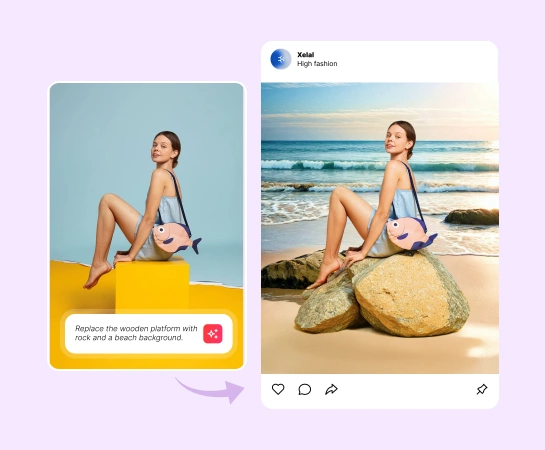
Il flusso tipico è semplice: partire da un'immagine, selezionare la zona, descrivere la sostituzione e lasciare che l'IA la ricrei, controllare il risultato e poi esportare o continuare la modifica.

Altri confronti

Scopri come Magic Eraser si confronta con altri strumenti di editing fotografico.

Migliori editor foto AI nel 2025 — A confronto

Abbiamo testato e confrontato i migliori strumenti di editing foto AI per te. Dalla rimozione di oggetti alla sostituzione dello sfondo, scopri quale editor offre i risultati migliori per il tuo flusso di lavoro.

Magic Eraser vs Photoshop: Which Photo Editor Fits Faster Workflows?

Photoshop is the industry standard for deep image editing, but many people only need fast object removal, clean backgrounds, and AI-powered fixes. Magic Eraser focuses on those jobs with a lighter workflow that works in seconds on web and mobile.

Magic Eraser vs Inpaint: Which Tool Removes Distractions More Efficiently?

Inpaint is a recognizable name for removing unwanted objects from photos. Magic Eraser builds on that workflow with broader AI editing tools, faster cross-device access, and more useful cleanup features beyond a single task.

The Faster Photoshop Alternative for Everyday Photo Editing

Adobe Photoshop is powerful, but most people only use a fraction of its features. Magic Eraser delivers the photo cleanup tools you actually need — object removal, background removal, AI enhancement, and generative fill — in a simpler interface that works on web and mobile with no subscription required to start.

Magic Eraser vs Adobe Express: Which Is Better for Photo Cleanup?

Adobe Express bundles photo editing inside a design and content-creation suite tied to Adobe Firefly. Magic Eraser is purpose-built for AI photo cleanup: object removal, background replacement, generative fill, and enhancement. This comparison shows where each tool fits best.

Magic Eraser vs Pixelcut: Which AI Photo Editor Should You Pick?

Magic Eraser and Pixelcut both offer AI-powered photo editing across web, iOS, and Android with free tiers and paid Pro tiers. Pixelcut leans heavily into e-commerce product photos with templates. Magic Eraser is purpose-built for AI cleanup tasks across the full range of photo work. This comparison shows where each tool wins.

Casi d'uso correlati

Scopri come i professionisti utilizzano questi strumenti nei flussi di lavoro reali.

Rimuovi oggetti indesiderati dalle foto immobiliari in pochi secondi

Le foto degli annunci piene di oggetti personali, auto parcheggiate o materiali di cantiere allontanano gli acquirenti. Magic Eraser usa l'IA per ripulire le foto dei tuoi immobili all'istante — senza bisogno di Photoshop.

Rimuovi testo, didascalie, date e sovrapposizioni da qualsiasi foto

Hai screenshot pieni di didascalie, vecchie foto con date impresse o immagini coperte di testo? Lo strumento di rimozione testo IA di Magic Eraser cancella qualsiasi testo indesiderato e ricostruisce lo sfondo in modo naturale, rendendo le tue foto pulite e professionali.

Yearbook Photo Editing with AI Tools

Yearbook photos need consistent backgrounds, even lighting, and clean portraits. Magic Eraser helps schools, studios, and parents get professional-looking results without expensive retouching workflows.

Food Photography Cleanup with AI Editing

Great food photos drive orders and engagement, but messy tables, utensils, and background clutter ruin the shot. Magic Eraser helps restaurants, food bloggers, and delivery platforms clean up food images fast.

Pet Photo Editing with AI Tools

Pet photos rarely come out the way you want. The dog moves, the cat is half in shadow, the background is full of clutter. Magic Eraser handles all of that in seconds — background swaps, leash removal, blur cleanup, sharper fur — without manual masking or expensive software.

Virtual Staging with AI

Empty listings sit on the market longer because buyers struggle to visualize the space. Virtual staging with AI fills the rooms with furniture in the style your buyer wants — modern, transitional, coastal, traditional — in minutes per room instead of days. Magic Eraser handles the pre-staging cleanup (paint touch-ups, painter's tape, debris) and the post-staging polish (lighting refinement, edge cleanup).

Restaurant Menu Photo Editing

Dish photos move delivery and dine-in revenue more than menu copy ever will. Magic Eraser turns phone-shot food photos into delivery-platform-ready images: clean the cluttered table, enhance the dish, swap to a brand-consistent background, and export to DoorDash, Uber Eats, Yelp, and Instagram specs without a food photographer.

YouTube Thumbnail Editing for Creators

YouTube thumbnails decide 50-70% of the click decision in the first 1-2 seconds of feed exposure. Magic Eraser handles the workflow that lets creators ship higher-CTR thumbnails in 25-40 minutes per video: subject isolation via Background Eraser, dark-mode-feed color contrast via AI Filter, clean text-overlay surfaces via AI Fill, and 2-3 distinct variants ready for YouTube's native Test & Compare in under 30 minutes.

Travel Photo Editing for Trip Recaps and Memory Books

Travel photos are the most-edited and most-shared images on most cameras — and the hardest to fix manually. Crowds at every landmark, harsh midday sun, lens glare from phone cameras pressed against bus windows, dim interiors, and decades-old film scans that finally need restoration. Magic Eraser handles every common travel-photo failure mode in seconds, on the same phone you took the photo with.

Pinterest Pin Design for Bloggers, Creators, and Small Brands

Pinterest is a visual search engine, not a social feed — pins keep earning impressions for 6-18 months on evergreens and 2-5 years on seasonal evergreens like holiday recipes and gift guides. That long-tail traffic only compounds if every pin is built for the 2:3 vertical canvas at 1000×1500 displayed at ~320px on mobile (85%+ of Pinterest traffic). Magic Eraser's AI tools turn a landscape source photo library into pin-ready vertical compositions in 2-3 minutes per pin instead of 20-40 minutes in Photoshop.

Online Course Creator Photo Workflow: Sales Page to Last Lesson

Online course businesses live or die by their visual production quality. The sales-page hero photo, the instructor headshot in the bio section, the in-lesson screenshots, the social-promo carousels driving traffic to the sales page, and the email-newsletter inline imagery in the launch sequence — every one of those surfaces directly affects conversion, completion, and refund rates. Magic Eraser handles the full course-creator image workflow without a designer on staff, on the same laptop or phone you record courses with.

Podcaster Photo Workflow: Cover Art, Guest Graphics, Per-Season Refresh

Podcasting is a uniquely visual-poor medium that lives or dies by its visual surfaces. The cover art is the most-viewed surface of every podcast brand, displayed at 56-100px in feed where new listeners decide whether to tap in under a second. The supporting graphic set per episode (Instagram squares, Stories, TikTok, YouTube audiogram covers, email-newsletter inline imagery) is where the show's growth happens between episodes. Magic Eraser handles the full podcaster visual stack — 3000×3000 cover art, host-portrait libraries, per-episode guest graphics, per-season AI refreshes, supporting graphic sets — without a designer on staff, on the laptop or phone you record episodes with.

Self-Published Author Photo Workflow: Covers, Headshots, BookTok, Series

Indie authors compete with traditional publishing on Amazon's discovery surface where the same algorithms, the same readers, and the same 100-150px mobile-thumbnail decision window apply equally to both. The difference is the production budget — traditional publishers have in-house art departments and marketing teams; indie authors have to handle covers, author headshots, BookTok and Instagram promo, A+ Content modules, and series-consistent visual identity themselves. Magic Eraser preps the full self-published author visual stack — book covers that survive the thumbnail render, author headshots for back covers and bios, social-promo across BookTok / Instagram / Pinterest, Amazon A+ Content modules, and series-consistent presets across 3-12 books — in minutes per asset instead of $400-1500 of designer time per book.

Newsletter Writer Photo Workflow: Hero Images, Inline Imagery, Notes, Author Photos

Newsletter writing in 2026 is platform-fragmented across Substack (35M+ subscribers), beehiiv, ConvertKit, Ghost, and Beehiiv-adjacent indie tools — and the visual surfaces have multiplied with each platform's discovery features (Substack Notes, beehiiv Boost, Ghost's recommendation network). Newsletter writers need post hero images that survive every platform's render pipeline, author photos that work across bylines and email signatures, microblog imagery for the discovery-driving feed surfaces, and email-newsletter inline graphics that render across Gmail / Apple Mail / Outlook. Magic Eraser preps the full newsletter visual stack — phone-to-publish in minutes per asset — without a designer on staff.

Interior Design Portfolio: Clean Rooms, Correct Lighting & Extend Compositions

An interior designer's portfolio is the primary sales tool for landing new clients — prospective homeowners and commercial clients evaluate design sensibility, style range, and attention to detail entirely through project photography. The challenge is that completed projects are photographed in occupied spaces where client belongings, everyday clutter, power cords, and personal items compete with the design work for visual attention. Magic Eraser removes the distractions that undermine design photography, AI Enhance corrects the mixed-lighting conditions endemic to interior spaces, and AI Fill extends tight compositions to show the full spatial context of the design.

Common removals with this tool

Quick guides for specific things people remove most often.

Guide correlate

Esplora altre guide e contenuti editoriali relativi a questo flusso di lavoro.

AI Fill - Magic Eraser