
YouTube Channel Art
Design YouTube channel banners that look sharp on every screen — from 2560px desktop monitors to mobile phone crops. This template handles the tricky safe-zone math so your branding, text, and creator photo display correctly on TV, desktop, tablet, and mobile without getting cut off.
Try this template freeSocial Media template preview
What this template does
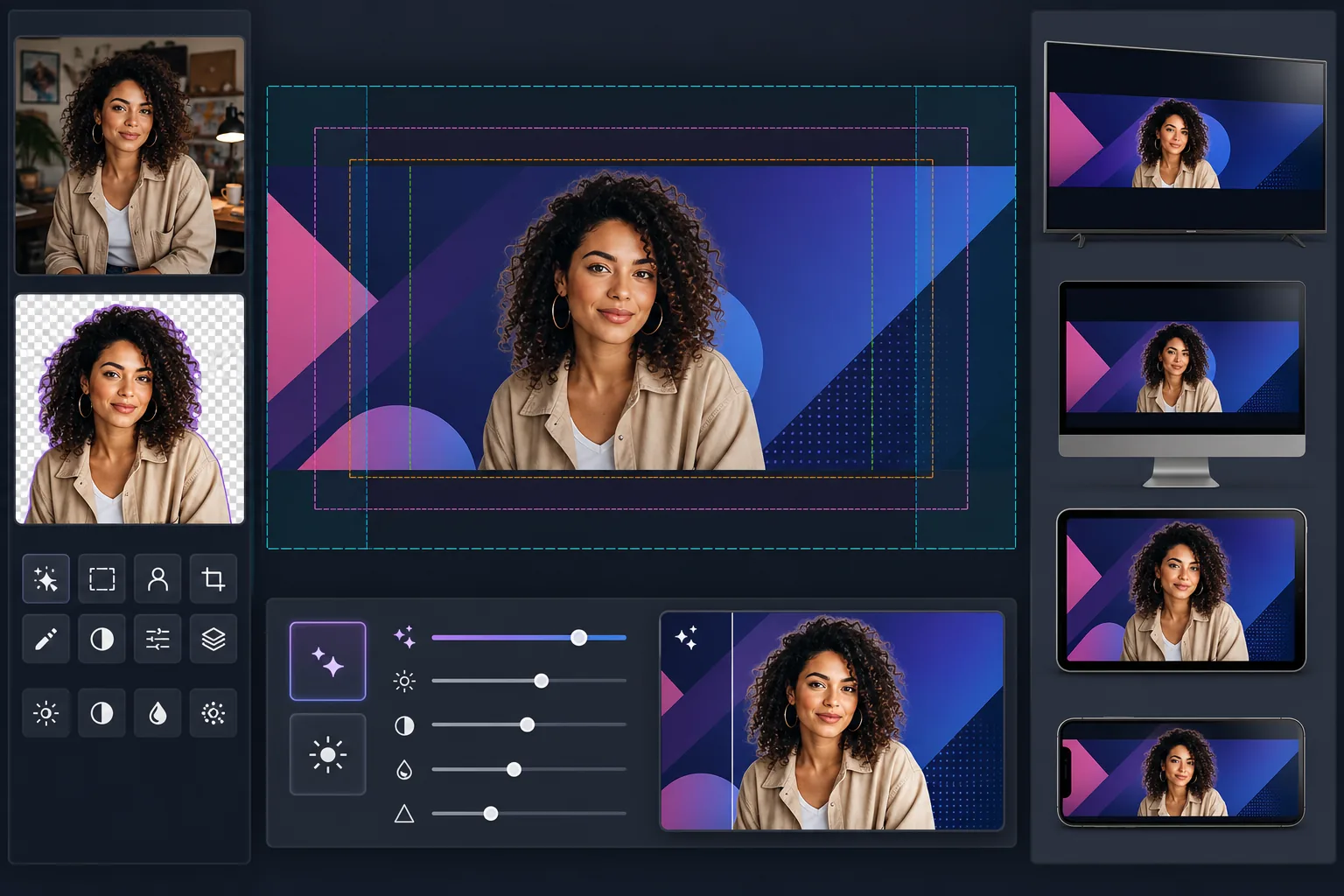
Creates YouTube channel art at the full 2560×1440px canvas size with content positioned within YouTube's safe zones. Background Eraser cleanly extracts creator portraits for compositing over branded backgrounds, and AI Enhance ensures the final banner stays crisp at YouTube's high-resolution display size. The template accounts for the four different crop zones YouTube applies across TV, desktop, tablet, and mobile devices.
Template settings
| Canvas size | 2560×1440px (YouTube's required upload size) |
| Safe zone (all devices) | 1546×423px center area (always visible) |
| Desktop visible area | 2560×423px (full width, center strip) |
| Color space | sRGB (web standard for consistent YouTube display) |
| File format | PNG for graphics/text, JPEG 95% for photographic banners |
| Max file size | 6MB (YouTube's upload limit) |
How to use this template
Upload your creator photo or brand assets
Upload a portrait photo, logo, or brand imagery. For creator-focused channels, a clean headshot or upper-body photo works best. Background Eraser will separate you from any background for flexible positioning.
Extract and position your subject
Background Eraser removes the original background, giving you a clean cutout. Position your creator photo or logo within the 1546×423px safe zone — the center area that is guaranteed to be visible on every device, from phones to smart TVs.
Enhance resolution and clarity
AI Enhance upscales and sharpens the final composition to look crisp at 2560px width. Text edges stay sharp, gradients stay smooth, and photographic elements maintain natural detail at YouTube's full display resolution.
Preview and export
Preview how the banner will appear on mobile (1546×423px crop), desktop (2560×423px crop), and TV (full 2560×1440px display). Export as PNG for text-heavy designs or JPEG for photographic banners, staying under YouTube's 6MB file-size limit.
Pro tips for best results
- ✓Keep all critical elements — your face, channel name, and tagline — within the center 1546×423px safe zone. This is the only area guaranteed visible on every device. Anything outside it will be cropped on mobile.
- ✓Avoid placing text or logos in the bottom-right corner of the banner. YouTube overlays your profile picture and subscribe button in that area on desktop, which can obscure your content.
- ✓Use high-contrast colors and large bold fonts for any text in your banner. YouTube compresses channel art aggressively, and thin or low-contrast text becomes unreadable, especially on mobile devices.
- ✓Design the outer areas (beyond the safe zone) as an extension of your background — solid colors, gradients, or blurred versions of your main image work well. These areas appear on TV and wide desktop monitors but should not contain essential information.
Common questions
Why does YouTube need such a large image for a thin banner?
+
YouTube uses one image across wildly different devices. TVs display the full 2560×1440px canvas. Desktop shows a 2560×423px horizontal strip. Tablets show slightly less, and mobile crops to just the center 1546×423px. The large canvas ensures your art looks sharp on every screen without requiring separate uploads.
Will my channel name get cut off on mobile?
+
Not if you keep it within the safe zone. The template marks the 1546×423px center area that is visible on every device. Position your channel name, tagline, and any important branding within this zone, and it will display correctly everywhere.
Can I update my channel art for seasonal campaigns?
+
Yes. Keep a base template with your brand colors and logo placement, then swap the background imagery or accent colors for seasonal updates, video launches, or milestones. The safe-zone positioning stays consistent across versions.
Build a YouTube banner that works on every screen
Upload your photo or brand assets and create device-optimized channel art in minutes. No design software needed.
Try it freeRelated templates
More social media templates for your workflow.
Instagram-optimized square crop template at 1080×1080px. Clean backgrounds, vibrant colors, and the sharp detail that stands out in the feed.
Facebook cover photo template at 820×312px for desktop and 640×360px mobile crop. Clean brand images with proper safe zones for profile picture overlap and CTA button placement.
Create professional Twitter/X header images at the exact 1500×500px dimension. Accounts for profile picture overlap, works in both dark mode and light mode.
Enhance dating profile photos with natural skin smoothing, background cleanup, lighting correction, and subtle color grading that looks authentic — not filtered.
Create scroll-stopping Pinterest pin images with clean backgrounds, optimal 2:3 vertical dimensions, vibrant color enhancement, and pin-ready composition.
Create eye-catching TikTok video cover photos with clean backgrounds, bold subject framing, and optimized 9:16 vertical dimensions for profile grid consistency.