
Twitter/X Header Photo
Design a header image that looks polished on every device and in every mode. This template handles the exact 1500×500px dimensions Twitter requires, accounts for the profile picture overlap zone so critical content is never hidden, and ensures your banner looks great in both dark mode and light mode.
Try this template freeSocial Media template preview
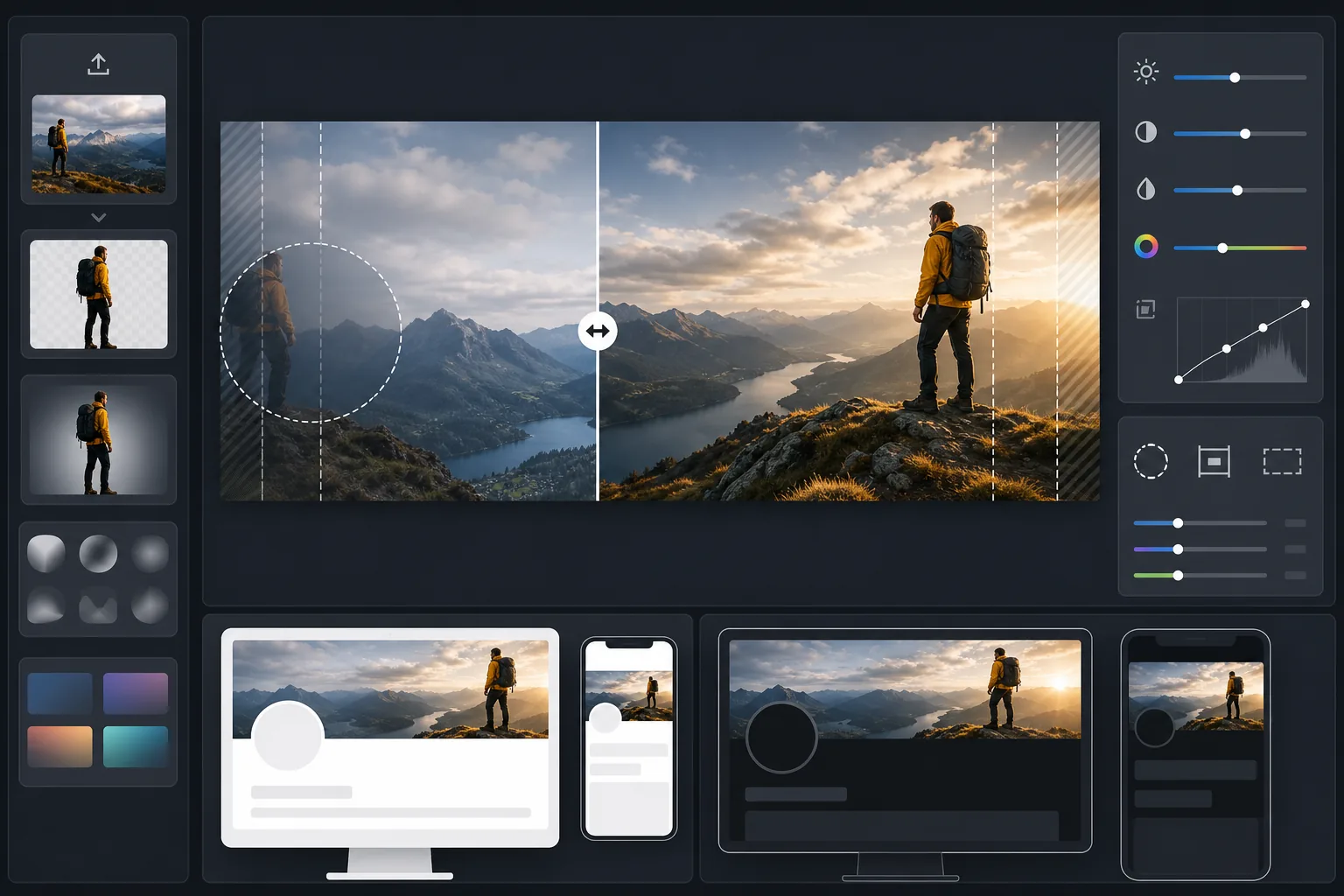
What this template does
Processes your photo into the precise 1500×500px banner size that Twitter/X requires, with intelligent cropping that keeps faces and key content in the visible safe zone. Background Eraser can isolate subjects for clean compositions, while AI Enhance optimizes contrast and color for both the dark and light mode backgrounds your followers will see.
Template settings
| Output size | 1500×500px (3:1 Twitter/X header ratio) |
| Safe zone | Left 25% reserved — avoids profile picture overlap on desktop and mobile |
| Edge blending | Soft fade to dark or light (adapts to mode) |
| Color optimization | Dual-tested for dark mode (#15202B) and light mode (#FFFFFF) contrast |
| File format | JPEG at 92% quality (under Twitter's 5MB upload limit) |
| Text safe area | Central 50% horizontal band — avoids top/bottom crop on mobile |
How to use this template
Upload your source image
Use a landscape-oriented photo or graphic. Wide panoramic shots, cityscapes, and horizontal compositions work best. The template will crop to the extreme 3:1 aspect ratio, so avoid tall subjects or vertically-centered content.
Position key content in the safe zone
The template marks the left 25% as the profile picture overlap area and the outer edges as mobile crop zones. Your most important visual content should sit in the right-center area of the banner.
Optimize for dark and light mode
AI Enhance adjusts contrast so the banner avoids harsh edges against both dark mode's near-black background and light mode's white background. Edge blending creates a smooth transition rather than a hard cutoff.
Export and upload
Download the optimized 1500×500px JPEG and upload directly to Twitter/X. The file is sized to stay well under the 5MB limit while maintaining crisp detail on retina displays.
Pro tips for best results
- ✓Preview your header on both a phone and desktop before finalizing — Twitter crops the top and bottom edges more aggressively on mobile, cutting roughly 10% from each edge.
- ✓Avoid placing text or faces in the lower-left quadrant where your profile picture, name, and bio overlay on desktop.
- ✓Use colors that contrast with both #15202B (dark mode) and #FFFFFF (light mode) along the banner edges — medium-tone blues, greens, and warm grays work well in both contexts.
- ✓If using a photo with a person, position them on the right third of the frame so they remain visible alongside your profile picture on the left.
Common questions
Where exactly does the profile picture overlap?
+
On desktop, your circular profile picture overlaps the lower-left corner of the header, covering roughly the bottom 60% of the leftmost 20% of the banner. On mobile, the overlap is similar but shifted slightly. The template's safe zone accounts for both layouts.
Will my header look good in dark mode?
+
Yes. The template tests your banner against both the dark mode background (#15202B) and light mode background (#FFFFFF). Edge blending ensures smooth transitions in both modes, so you avoid the jarring hard-edge effect that unoptimized headers show.
What if Twitter changes the header dimensions?
+
The 1500×500px specification has been stable since 2017 and through the rebrand to X. If dimensions change, we will update the template. The current output also downscales cleanly to any smaller banner size.
Stand out on every Twitter profile visit
Upload your image and get a perfectly sized, dark-mode-ready Twitter header in seconds. No Photoshop, no guessing at dimensions.
Try it freeRelated templates
More social media templates for your workflow.
Instagram-optimized square crop template at 1080×1080px. Clean backgrounds, vibrant colors, and the sharp detail that stands out in the feed.
YouTube banner template at 2560×1440px with safe-zone guides. Clean background removal for creator photos, device-aware layout, and brand-consistent channel art.
Facebook cover photo template at 820×312px for desktop and 640×360px mobile crop. Clean brand images with proper safe zones for profile picture overlap and CTA button placement.
Enhance dating profile photos with natural skin smoothing, background cleanup, lighting correction, and subtle color grading that looks authentic — not filtered.
Create scroll-stopping Pinterest pin images with clean backgrounds, optimal 2:3 vertical dimensions, vibrant color enhancement, and pin-ready composition.
Create eye-catching TikTok video cover photos with clean backgrounds, bold subject framing, and optimized 9:16 vertical dimensions for profile grid consistency.