
TikTok Cover Photo
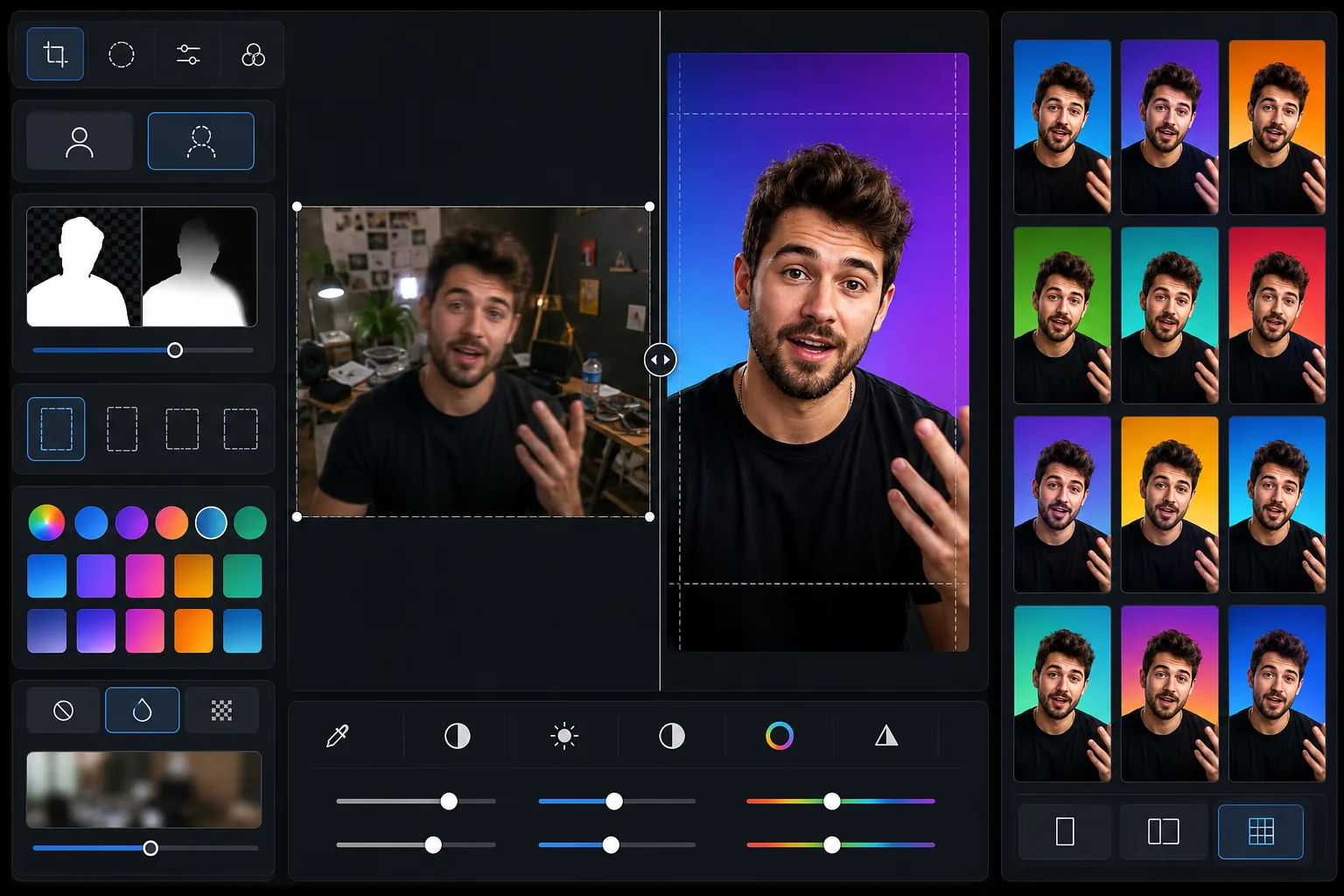
Design consistent, attention-grabbing cover photos for your TikTok video grid. This template removes busy backgrounds from video stills, optimizes framing for the 9:16 cover display, boosts contrast and color for small thumbnail visibility, and creates a cohesive visual identity across your profile.
Try this template freeSocial Media template preview
What this template does
Creates polished cover images for TikTok videos that make your profile grid look professional and cohesive. Most creators leave auto-generated covers, which results in a chaotic, unprofessional profile grid that discourages follows. This template lets you take a still from your video or upload a separate photo, remove the background, place yourself against a clean or branded backdrop, and adjust framing so your face and key visual elements are visible even at thumbnail size. The contrast and saturation boost ensures your covers pop against neighboring thumbnails on the For You Page and on your profile grid.
Template settings
| Aspect ratio | 9:16 vertical (1080 × 1920 px — TikTok native) |
| Background option | Solid color, gradient, or blurred version of original |
| Thumbnail optimization | Contrast +15%, saturation +10% for small-size visibility |
| Subject framing | Face centered in upper third (visible at grid thumbnail size) |
| Output format | JPEG at 95% quality (TikTok upload optimized) |
How to use this template
Upload a video still or photo
Take a screenshot from your TikTok video at the most visually compelling moment, or upload a separate photo that represents the video content. The template works with any aspect ratio input and will reframe to 9:16 with smart cropping.
Clean up the background
Background Eraser removes the original background and replaces it with a solid color, gradient, or softly blurred version of the original scene. Choose a consistent background color across all your covers to create a branded profile grid that viewers recognize instantly.
Optimize for thumbnail visibility
The template frames your face in the upper third of the image where it remains visible in the small grid thumbnail. Contrast and color saturation are boosted so key visual elements are distinguishable even at 150px width on a mobile profile grid.
Export and upload to TikTok
Download at 1080 × 1920 px in JPEG format. In TikTok, edit the published video and select 'Edit cover' to upload the custom cover image. The dimensions match TikTok's native resolution for sharp display on all devices.
Pro tips for best results
- ✓Choose a single background color or a two-color gradient and use it consistently across all your covers. This creates a recognizable brand grid that encourages profile visitors to scroll through your content and follow.
- ✓Include your face in the cover whenever possible. TikTok's algorithm and human psychology both favor faces — covers with visible faces get higher tap-through rates than those with only text or objects.
- ✓Keep the lower third of the cover relatively simple because TikTok overlays the video description text there. Important visual elements (face, key product, text overlay) should be positioned in the upper two-thirds.
- ✓Process covers in batches of 10–20 videos at a time for a quick profile refresh. A cohesive grid overhaul can increase your profile's follow-through rate by 30% or more compared to random auto-generated covers.
Common questions
Can I add text to the cover?
+
The template focuses on image composition and background optimization. For text overlays, export the image and add text in a design tool like Canva or directly in TikTok's built-in cover editor. The template leaves clean space in the center for text.
Does TikTok allow custom covers?
+
Yes. After publishing a video, tap the three dots, select 'Edit cover,' and you can upload a custom image from your camera roll. The 1080 × 1920 px output from this template is the exact native resolution TikTok expects.
Should I use the same cover style for all videos?
+
For personal brands and businesses, yes — a consistent cover style creates a professional grid that encourages follows. For entertainment accounts, some variety is fine, but keeping a consistent color scheme or layout pattern still helps visual cohesion.
Build a TikTok profile grid that gets followers
Upload video stills and get polished, consistent cover photos that make your profile look professional and scroll-worthy.
Try it freeRelated templates
More social media templates for your workflow.
Instagram-optimized square crop template at 1080×1080px. Clean backgrounds, vibrant colors, and the sharp detail that stands out in the feed.
YouTube banner template at 2560×1440px with safe-zone guides. Clean background removal for creator photos, device-aware layout, and brand-consistent channel art.
Facebook cover photo template at 820×312px for desktop and 640×360px mobile crop. Clean brand images with proper safe zones for profile picture overlap and CTA button placement.
Create professional Twitter/X header images at the exact 1500×500px dimension. Accounts for profile picture overlap, works in both dark mode and light mode.
Enhance dating profile photos with natural skin smoothing, background cleanup, lighting correction, and subtle color grading that looks authentic — not filtered.
Create scroll-stopping Pinterest pin images with clean backgrounds, optimal 2:3 vertical dimensions, vibrant color enhancement, and pin-ready composition.