
Pinterest Pin Image
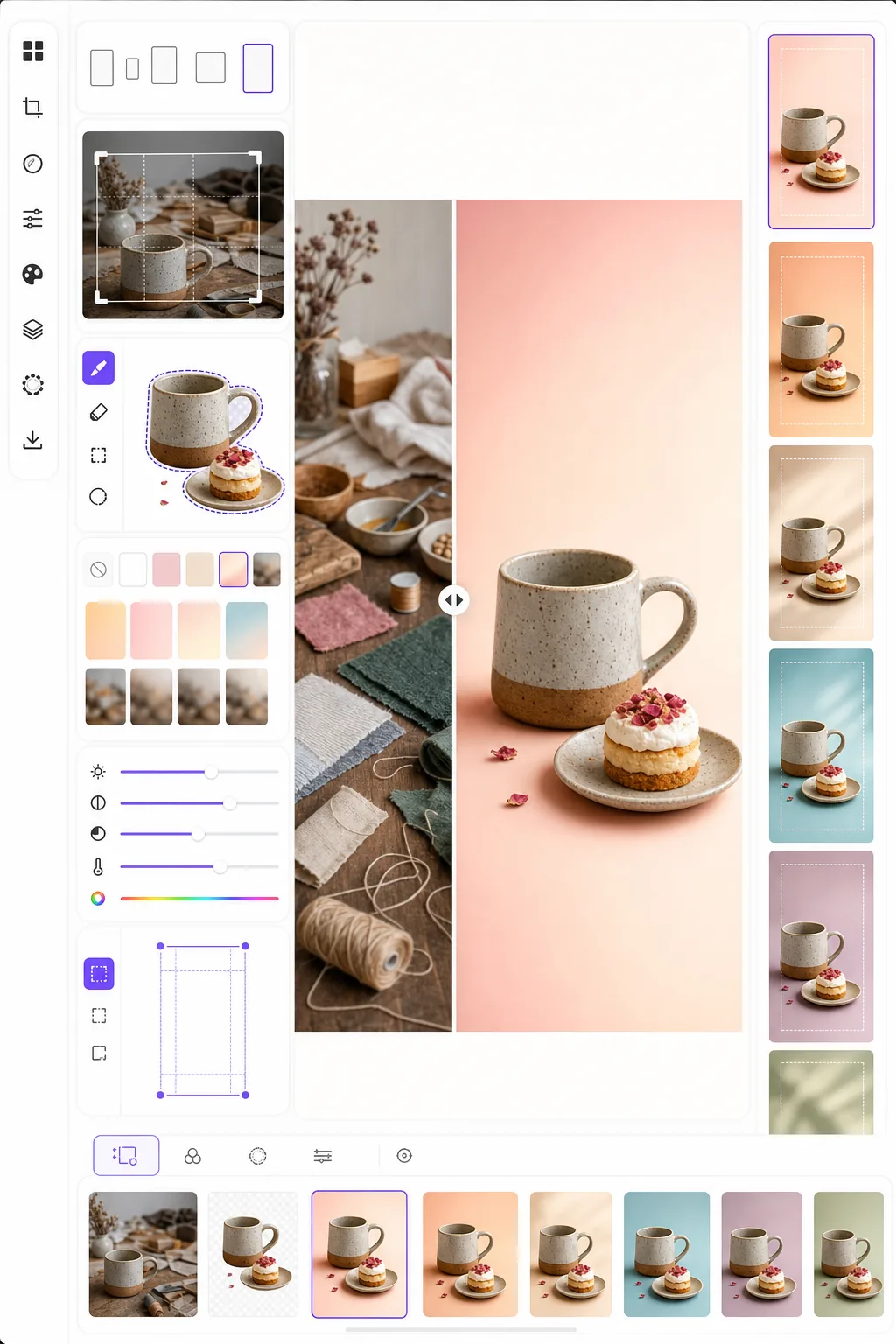
Create pin images that stop the scroll and drive saves. This template formats photos to Pinterest's optimal 2:3 vertical ratio, removes busy backgrounds for clean product-focused compositions, boosts color vibrancy for the Pinterest feed, and outputs pin-ready images that look sharp on both mobile and desktop.
Try this template freeSocial Media template preview
What this template does
Optimizes images for maximum engagement on Pinterest where tall, visually striking pins outperform standard landscape photos by three to five times in save rate. Background Eraser isolates your subject — product, recipe dish, outfit, or craft — and places it on a clean, colored, or gradient background that makes the subject pop in a crowded feed. Color vibrancy is boosted to match Pinterest's tendency to favor bright, saturated content in its algorithm. The template outputs at 1000 × 1500 px, the exact dimensions Pinterest recommends for standard pins.
Template settings
| Aspect ratio | 2:3 vertical (1000 × 1500 px — Pinterest standard) |
| Background options | Clean white, solid color, soft gradient, or blurred original |
| Color boost | +20% saturation for feed visibility (adjustable) |
| Subject framing | Auto-center with 10% padding for text overlay space |
| Output format | PNG (for text overlay) or JPEG (for direct upload) |
How to use this template
Upload your source image
Upload a product photo, recipe shot, outfit photo, or any image you want to turn into a Pinterest pin. The template accepts landscape, square, or portrait images and will reframe them to the optimal 2:3 vertical ratio with smart cropping that keeps the subject centered.
Background and composition
Background Eraser isolates your subject and places it on a clean background. Choose from pure white, a solid brand color, a soft gradient, or a blurred version of the original background. The subject is automatically positioned to leave space at the top and bottom for text overlays.
Color and sharpness optimization
Colors are boosted by 20% saturation to stand out in the Pinterest feed, where muted images tend to be scrolled past. Sharpness is enhanced for the subject while the background remains soft, creating visual depth that draws the eye to the main subject.
Export your pin
Download at 1000 × 1500 px as PNG (if you plan to add text overlays in Canva or another editor) or JPEG (for direct upload to Pinterest). The color profile is set to sRGB for accurate display across all devices and browsers.
Pro tips for best results
- ✓Leave the top 20% and bottom 15% of the pin relatively clean for text overlays. The template positions your subject to leave this space, but choosing a solid or gradient background in these areas makes text more readable than a busy photographic background.
- ✓Use warm-toned backgrounds (blush, terracotta, cream) for lifestyle and food pins, and cool neutrals (white, light gray, pale blue) for product and tech pins. Pinterest engagement data consistently shows that pins with intentional color palettes outperform those with random backgrounds.
- ✓Create multiple pin versions for the same content — same subject with different background colors and crops. Pinterest rewards content variety, and testing two to three pin designs per piece of content helps identify which visual style resonates with your audience.
Common questions
Can I add text to the pin?
+
The template outputs a clean image optimized for text overlay but does not add text directly. Export as PNG and add text in Canva, Photoshop, or any design tool. The subject is positioned to leave space for headlines at the top and calls to action at the bottom.
What about Idea Pins (video)?
+
This template is for standard static pins. Idea Pins (formerly Story Pins) use video and multi-page formats that require different tools. The template outputs work well as cover frames for Idea Pins if you need a static thumbnail.
Does this work for infographic-style pins?
+
For infographic pins, the template is best used to prepare individual images or product shots that you then arrange in a taller infographic layout (1000 × 2100 px or taller). Each element can be processed separately and then combined in a design tool.
Create Pinterest pins that stop the scroll
Upload any image and get a pin-ready vertical composition with clean backgrounds and optimized colors for maximum saves and clicks.
Try it freeRelated templates
More social media templates for your workflow.
Instagram-optimized square crop template at 1080×1080px. Clean backgrounds, vibrant colors, and the sharp detail that stands out in the feed.
YouTube banner template at 2560×1440px with safe-zone guides. Clean background removal for creator photos, device-aware layout, and brand-consistent channel art.
Facebook cover photo template at 820×312px for desktop and 640×360px mobile crop. Clean brand images with proper safe zones for profile picture overlap and CTA button placement.
Create professional Twitter/X header images at the exact 1500×500px dimension. Accounts for profile picture overlap, works in both dark mode and light mode.
Enhance dating profile photos with natural skin smoothing, background cleanup, lighting correction, and subtle color grading that looks authentic — not filtered.
Create eye-catching TikTok video cover photos with clean backgrounds, bold subject framing, and optimized 9:16 vertical dimensions for profile grid consistency.