
Tinder Profile Photo
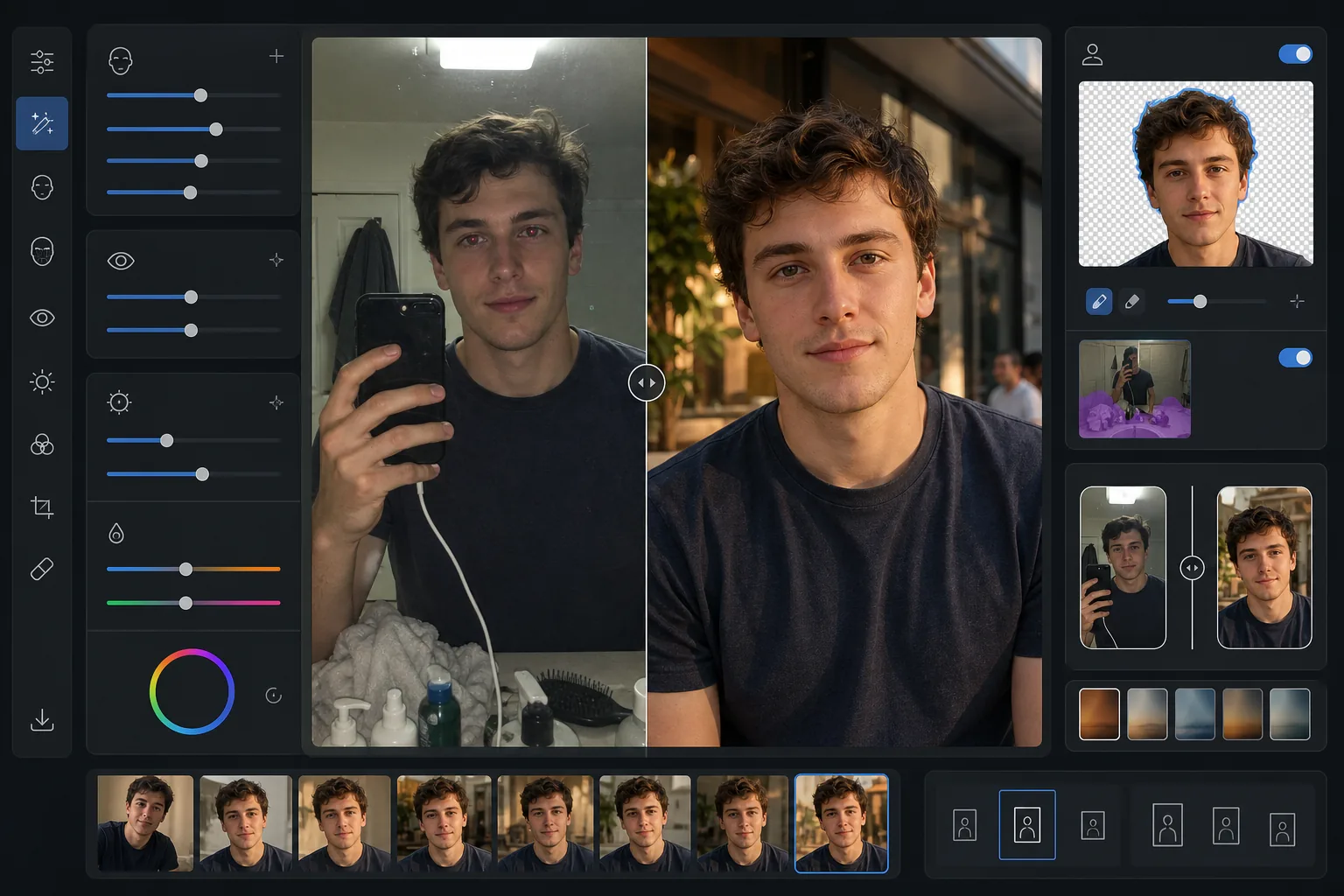
Make your dating profile photos look naturally attractive without appearing over-edited. This template enhances lighting and skin tone, removes distracting backgrounds, fixes red-eye and harsh flash shadows, and applies subtle color grading that flatters without looking filtered.
Try this template freeSocial Media template preview
What this template does
Optimizes photos specifically for dating apps like Tinder, Bumble, and Hinge where first impressions happen in under two seconds. The template applies natural-looking enhancements that make you look your best without the obvious filtered look that signals inauthenticity. AI Enhance brightens under-eye areas, evens skin tone, and corrects harsh lighting from flash or overhead fluorescents. Background Eraser can swap a cluttered bathroom mirror selfie background for a clean, neutral setting that keeps the focus on you. The result looks like a great candid photo taken in flattering natural light.
Template settings
| Skin enhancement | Natural smoothing (retains pores and texture, reduces blemishes) |
| Eye enhancement | Subtle brightening + red-eye correction |
| Lighting correction | Simulated golden hour fill light (soft directional warmth) |
| Background option | Clean or swap to outdoor/urban/neutral setting |
| Output dimensions | 1080 × 1350 px (4:5 portrait, dating app optimal) |
| Color grade | Warm natural (subtle — not visibly filtered) |
How to use this template
Upload your photo
Upload a selfie, portrait, or full-body shot. The template works best with photos where your face is clearly visible and in focus. Group photos can be used — select yourself and the template will isolate you from the group and enhance the image.
Natural enhancement
AI Enhance evens skin tone, reduces temporary blemishes, subtly brightens eyes, and corrects unflattering flash or overhead lighting. The enhancement retains natural skin texture including pores and fine lines — the goal is to look like yourself on your best day, not like a different person.
Background cleanup or swap
Choose to clean up your existing background (remove clutter, other people, mess) or replace it entirely with a clean outdoor, cafe, or urban setting. Background Eraser creates natural-looking edge transitions at hair and clothing boundaries so the swap looks seamless.
Export for your profile
Download at 1080 × 1350 px in the 4:5 portrait ratio that dating apps display best. The image is optimized for mobile screens where most swiping happens, with detail preserved in both highlights and shadows for any screen brightness setting.
Pro tips for best results
- ✓Use a photo taken in natural daylight near a window for the most flattering starting point. The template can correct harsh artificial lighting, but natural light photos require less correction and produce the most authentic-looking final result.
- ✓Avoid heavy sunglasses in your primary profile photo. The template can enhance eye area brightness, but this only works when eyes are visible. Sunglasses also make it harder for potential matches to feel a personal connection.
- ✓Upload at least one full-body photo alongside headshots. Dating app research shows profiles with a mix of face and full-body photos receive significantly more right-swipes than those with only close-up selfies.
- ✓Skip the group shot as your first photo. Even though the template can isolate you from a group, the cropping required for a single-person frame may reduce image quality compared to starting with a solo shot.
Common questions
Will the enhancement look obvious?
+
No. The template is specifically calibrated for subtlety. It retains natural skin texture, pores, and fine lines while reducing only temporary blemishes and evening out uneven lighting. The result looks like a genuinely good photo, not a retouched one.
Can I use a bathroom mirror selfie?
+
Yes. The template can replace the bathroom background with a cleaner setting. However, the mirror selfie pose and the phone in your hand will remain — for the best result, crop tightly or use a photo taken by someone else or with a timer.
Does this work for all skin tones?
+
The AI enhancement model is trained on diverse skin tones and works accurately across the full spectrum. Color correction and skin smoothing adapt to the specific tone in your photo rather than applying a one-size-fits-all filter.
Look your natural best on every dating app
Upload your photos and get naturally enhanced, background-optimized profile images that attract more matches.
Try it freeRelated templates
More social media templates for your workflow.
Instagram-optimized square crop template at 1080×1080px. Clean backgrounds, vibrant colors, and the sharp detail that stands out in the feed.
YouTube banner template at 2560×1440px with safe-zone guides. Clean background removal for creator photos, device-aware layout, and brand-consistent channel art.
Facebook cover photo template at 820×312px for desktop and 640×360px mobile crop. Clean brand images with proper safe zones for profile picture overlap and CTA button placement.
Create professional Twitter/X header images at the exact 1500×500px dimension. Accounts for profile picture overlap, works in both dark mode and light mode.
Create scroll-stopping Pinterest pin images with clean backgrounds, optimal 2:3 vertical dimensions, vibrant color enhancement, and pin-ready composition.
Create eye-catching TikTok video cover photos with clean backgrounds, bold subject framing, and optimized 9:16 vertical dimensions for profile grid consistency.