
Twitch Banner Photo
Design a professional Twitch channel banner that makes your stream look established from the first visit. This template isolates your portrait from any background, places it on gaming-themed or brand-colored backdrops, and outputs at Twitch's exact banner dimensions with safe zones for the profile picture overlay and channel navigation elements.
Try this template freeSocial Media template preview
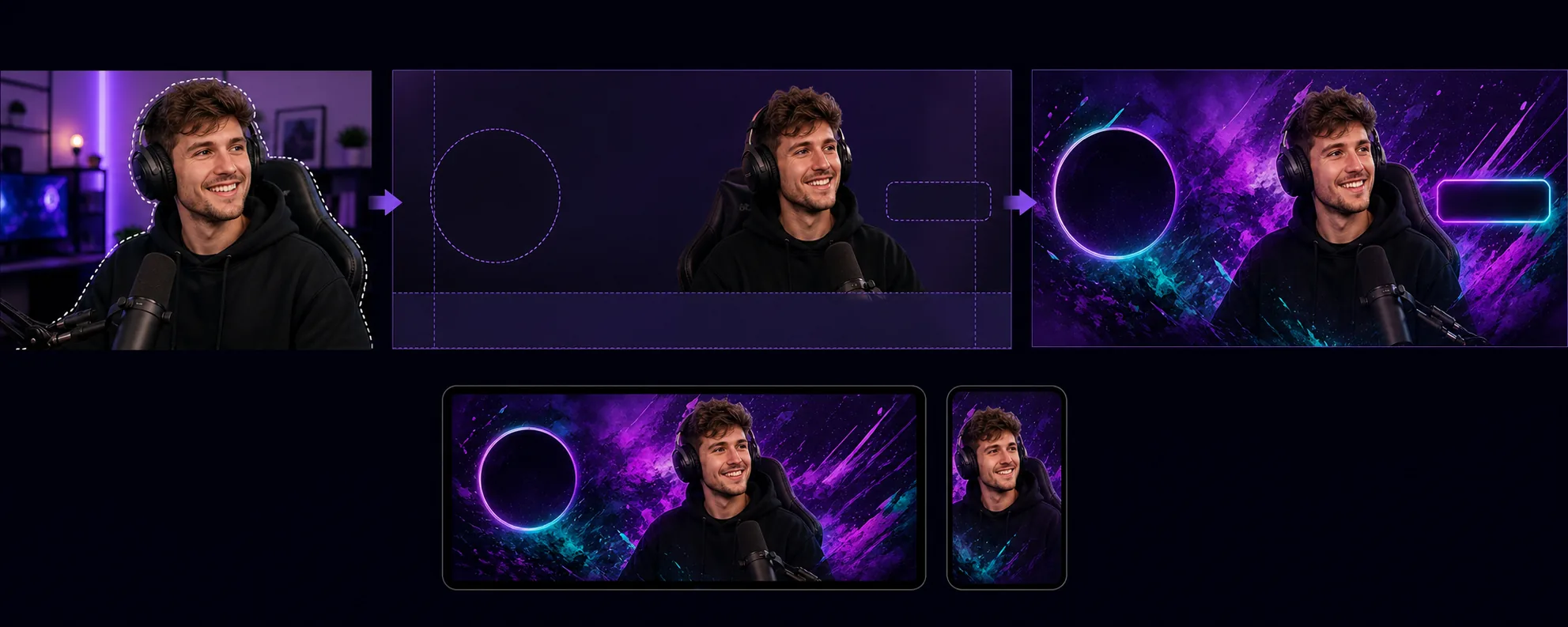
What this template does
Creates channel banners optimized for Twitch's unique layout requirements where the profile picture, follow button, and channel navigation overlay specific areas of the banner. Background Eraser isolates your streamer portrait or team photo from any environment and places it on a background that matches your channel's visual identity — solid brand colors, gradient sweeps, abstract gaming themes, or subtle patterns. The template respects Twitch's safe zones so critical visual content is never hidden behind the profile picture circle (left side) or the channel point/subscribe buttons (right side). The output is sized at 1200×480px (the recommended banner dimension) and tuned for visibility on both desktop browser views and mobile app headers where the banner is cropped differently.
Template settings
| Banner size | 1200×480px (Twitch recommended profile banner) |
| Safe zones | Left 250px (profile overlay), right 200px (buttons), bottom 80px (nav bar) |
| Background | Solid color, gradient, abstract gaming pattern, or custom image |
| Portrait placement | Right-center or center, avoiding profile picture overlap zone |
| Color vibrancy | Enhanced for visibility against Twitch's dark purple interface |
How to use this template
Upload your streamer photo
Upload a photo of yourself, your streaming setup, or your team. Upper body shots with expressive poses work best for banners. The template handles webcam captures, phone selfies, and professional photos.
Isolate and position
Background Eraser removes the original background and positions your portrait within the banner's safe zones. The left 250 pixels are kept clear for the profile picture circle overlay, and the bottom 80 pixels avoid the navigation bar. Your image is placed where it will have maximum visual impact on both desktop and mobile.
Apply background and branding
Choose a background that matches your channel identity. Bold gradients and gaming-themed patterns read well against Twitch's dark purple chrome. If your channel has established brand colors, use those to reinforce recognition when viewers land on your channel page.
Export and upload
Download at 1200×480px optimized for Twitch. The file is under 10MB (Twitch's limit) and compressed to load quickly for viewers on slower connections. Preview how the banner looks with the profile picture and navigation overlaid before uploading to your channel.
Pro tips for best results
- ✓Use a photo with an expressive or energetic pose — pointing at the camera, celebrating, or leaning forward. Static poses disappear in the narrow banner format, while dynamic poses create visual energy that makes viewers want to stick around.
- ✓Test your banner on both desktop and mobile. Twitch crops the banner differently on mobile, showing mainly the center portion. Place your most important visual content in the center 700 pixels for cross-device compatibility.
- ✓Match your banner colors to your Twitch accent color setting. When the banner gradient transitions into the same accent color used for your channel's subscribe button and highlighted text, the entire page feels cohesive and professionally branded.
Common questions
What dimensions does Twitch require for banners?
+
Twitch recommends 1200×480 pixels for profile banners. The maximum file size is 10MB. The template outputs at exactly these dimensions with appropriate compression.
Can I include text on the banner?
+
The template produces the visual layout without text overlay. You can add your channel name, schedule, or social handles using any image editor afterward. The safe zone guides show exactly where text will remain visible and not be covered by Twitch's UI elements.
Does this work for Twitch offline screens too?
+
The template is sized for the profile banner. Twitch offline screen images use a 16:9 aspect ratio (1920×1080). You can use a similar workflow — isolate portrait, apply background — but should select the offline screen dimensions separately.
Make your Twitch channel look established from day one
Upload a photo and get a professional channel banner that respects Twitch's layout and makes your stream stand out.
Try it freeRelated templates
More social media templates for your workflow.
Instagram-optimized square crop template at 1080×1080px. Clean backgrounds, vibrant colors, and the sharp detail that stands out in the feed.
YouTube banner template at 2560×1440px with safe-zone guides. Clean background removal for creator photos, device-aware layout, and brand-consistent channel art.
Facebook cover photo template at 820×312px for desktop and 640×360px mobile crop. Clean brand images with proper safe zones for profile picture overlap and CTA button placement.
Create professional Twitter/X header images at the exact 1500×500px dimension. Accounts for profile picture overlap, works in both dark mode and light mode.
Enhance dating profile photos with natural skin smoothing, background cleanup, lighting correction, and subtle color grading that looks authentic — not filtered.
Create scroll-stopping Pinterest pin images with clean backgrounds, optimal 2:3 vertical dimensions, vibrant color enhancement, and pin-ready composition.