
Real Estate Virtual Staging
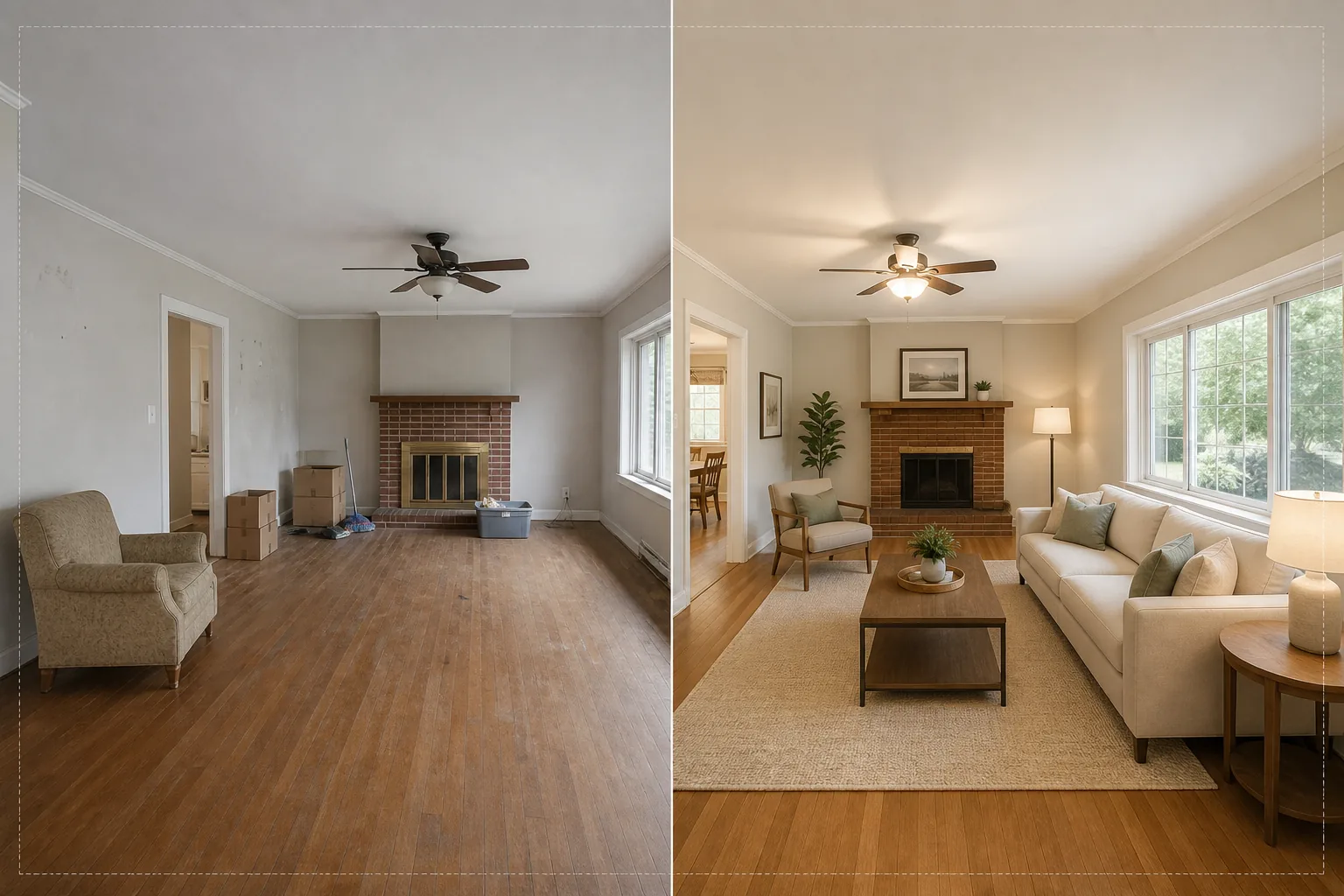
Stage empty rooms with photorealistic furniture and decor without moving a single piece of physical furniture. This template uses AI Fill to place sofas, tables, rugs, and artwork into vacant rooms while Magic Eraser removes existing clutter, old furniture, and personal items before staging begins. The result is a warm, inviting listing photo that helps buyers visualize themselves living in the space.
Try this template freeReal Estate template preview
What this template does
Solves the biggest challenge in real estate photography: making empty or cluttered rooms feel like home. Magic Eraser first removes any existing clutter — old furniture, moving boxes, personal belongings, wall marks, and scuff marks on floors. AI Fill then places contextually appropriate furniture into the cleaned room, matching the style to the architecture. A modern loft receives mid-century modern pieces with industrial accents, while a traditional colonial gets classic upholstered furniture and warm wood tones. Lighting and shadows on the virtual furniture are calculated from the existing window light in the photo so the staging looks physically present rather than pasted on.
Template settings
| Staging style | Modern, Traditional, Scandinavian, Mid-Century, or Coastal |
| Room type | Auto-detected (living room, bedroom, dining, office, kitchen) |
| Clutter removal | Auto-remove boxes, personal items, and old furniture before staging |
| Shadow rendering | Matched to existing window light direction and intensity |
| Output resolution | 4000×3000px (MLS-compliant at 300 DPI) |
| Color temperature | Warm interior (3200K–4000K to match typical indoor lighting) |
How to use this template
Upload the empty or cluttered room photo
Upload a wide-angle photo of the room. Shoot from a corner to capture two walls and the floor for the most realistic staging. The template works with photos from smartphones, DSLRs, and professional real estate cameras including ultra-wide lenses.
Remove existing clutter
Magic Eraser automatically detects and removes moving boxes, old furniture, personal photos on walls, and floor clutter. The AI reconstructs the flooring, wall paint, and baseboards behind removed objects so the room appears clean and vacant.
Stage with virtual furniture
AI Fill places furniture appropriate to the detected room type and selected style. A living room gets a sofa, coffee table, rug, side tables, and wall art. A bedroom receives a bed, nightstands, lamps, and accent pillows. Furniture scales to the room dimensions and casts realistic shadows.
Export for MLS and listings
Download the staged photo at 4000×3000px, ready for MLS uploads, Zillow, Realtor.com, and print brochures. The image includes metadata tags for easy cataloging in your listing management system.
Pro tips for best results
- ✓Shoot from a corner at about 4 feet high — this captures two walls and enough floor area for the AI to place furniture with proper perspective and ground contact shadows.
- ✓Turn on all the lights in the room before photographing. The AI uses visible light sources and window highlights to calculate where shadows should fall on staged furniture.
- ✓For multi-room listings, use the same staging style across all rooms to create a cohesive design story that feels like a real decorator furnished the entire home.
Tools
Common questions
Is virtual staging compliant with MLS rules?
+
Most MLS systems allow virtually staged photos as long as they are labeled as such. The template does not add the label automatically — check your local MLS rules and add a disclosure caption like 'Virtually Staged' when uploading.
Can I stage an outdoor patio or balcony?
+
Yes. The template detects outdoor living spaces and stages them with appropriate patio furniture, planters, and outdoor rugs. Lighting calculations account for the open sky and direct sunlight rather than indoor ambient light.
How realistic is the furniture?
+
The staged furniture casts shadows that match the room's existing light direction, sits on the floor plane with correct perspective, and reflects ambient color from surrounding walls. From a normal viewing distance, the staging is indistinguishable from a furnished photograph.
Stage any room in seconds, not hours
Upload empty room photos and get beautifully furnished listing images that help buyers fall in love with every space.
Try it freeRelated templates
More real estate templates for your workflow.
Professional real estate photo template for MLS listings. HDR-like enhancement, sky replacement, clutter removal, and color correction for property photos that sell faster.
Enhance architecture exterior photos with vertical line correction, sky replacement, car and pedestrian removal, and golden hour color grading for listings and portfolios.
Transform Airbnb and vacation rental photos with room brightening, clutter removal, color correction, and wide-angle lens distortion fix for higher booking rates.
Enhance interior design portfolio photos with room brightening, clutter removal, material texture sharpening, and color-accurate rendering of finishes and fabrics.
Enhance drone aerial photography with sky replacement, property boundary highlighting, color vibrancy boost, and distraction removal for real estate and land surveys.
Clean, enhance, and standardize floor plan images for real estate listings with stain removal, line sharpening, and consistent styling.