
Airbnb Listing Photo
Turn smartphone interior shots into bright, inviting Airbnb listing photos that drive bookings. This template brightens underexposed rooms, removes personal clutter and toiletries, corrects wide-angle lens distortion, and enhances natural light to make spaces feel open and welcoming.
Try this template freeReal Estate template preview
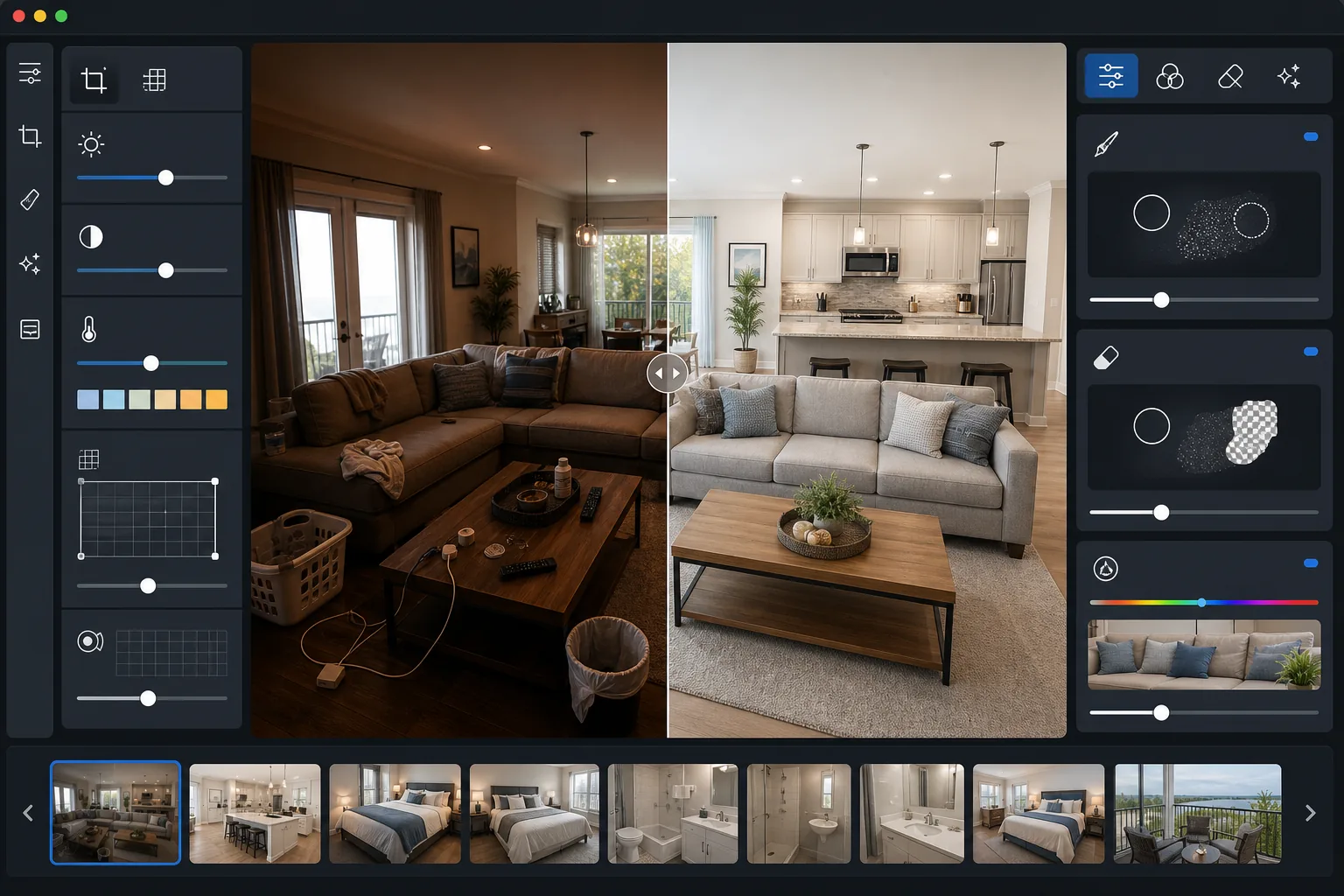
What this template does
Optimizes interior and exterior property photos for Airbnb, VRBO, and vacation rental platforms. Poorly lit smartphone photos are the number one reason listings underperform — this template corrects exposure and white balance to make rooms appear bright and naturally lit, even when shot on cloudy days or with mixed artificial lighting. Magic Eraser removes personal items, toiletries, charging cables, and other clutter that makes spaces feel lived-in rather than guest-ready. AI Enhance sharpens textures in fabrics, wood floors, and stone countertops while correcting the barrel distortion common in smartphone wide-angle photos.
Template settings
| Room brightening | Adaptive exposure lift (shadow recovery + highlight preservation) |
| White balance | Auto-correct mixed lighting to neutral daylight (5500K) |
| Lens correction | Barrel distortion fix for smartphone wide-angle (auto-detect) |
| Clutter removal | Auto-detect and remove personal items, cables, and toiletries |
| Output resolution | 3000px long edge (Airbnb maximum upload quality) |
| Color vibrancy | Natural +15% saturation boost on fabrics and foliage |
How to use this template
Upload your property photos
Upload interior shots of bedrooms, living areas, kitchens, bathrooms, and outdoor spaces. The template handles photos from smartphones, point-and-shoot cameras, and DSLRs. For best results, open curtains and turn on all lights before shooting to give the AI the most available light data to work with.
Brighten and correct colors
The template lifts shadows in dark corners, recovers blown-out windows, and corrects the orange or green color casts from artificial lighting. Rooms appear naturally bright as if photographed on a sunny day with curtains open, regardless of actual shooting conditions.
Remove clutter and personal items
Magic Eraser removes personal belongings, phone chargers, toiletries, trash cans, laundry, and other items that make spaces feel cluttered. The AI fills the removed areas with the surrounding wall, floor, or surface texture for a clean, staged appearance.
Export for your listing
Download brightened, decluttered photos at 3000px long edge in JPEG format. Images are optimized for fast loading on Airbnb while maintaining enough quality for full-screen viewing on desktop and mobile. Upload directly to your listing photo gallery.
Pro tips for best results
- ✓Shoot each room from the doorway or a corner to capture the widest possible view. The template corrects lens distortion, but starting with a wide perspective gives potential guests the best sense of room size and layout.
- ✓Photograph bathrooms and kitchens after clearing countertops completely. While the template can remove individual items, a pre-cleared surface produces a cleaner result with more consistent counter and tile textures.
- ✓Include at least one photo of the view from a window or balcony. The template can balance interior and exterior exposure in the same shot, which is particularly effective for properties with scenic views that would otherwise appear as blown-out white rectangles.
Common questions
Can this fix photos taken at night?
+
Photos taken at night with interior lights on can be significantly improved. The template corrects the warm yellow cast from incandescent bulbs and the green tint from fluorescent lights. However, windows will appear as dark rectangles rather than bright outdoor views — for the most appealing results, shoot during daytime.
Will this make my space look misleading?
+
The template enhances what is already there — it brightens real light, sharpens real textures, and removes clutter you would clear before a guest arrives. It does not add furniture, change room dimensions, or alter the fundamental appearance of the space. The result looks like your property photographed by a professional on its best day.
How many photos should I upload per listing?
+
Airbnb recommends at least 20 photos per listing for maximum booking conversion. Process all of them through this template for a consistent, professional look across your entire gallery. Consistency in brightness and color tone across photos builds guest confidence.
Get more bookings with listing photos that shine
Upload your property photos and get bright, decluttered, professionally enhanced images ready for Airbnb and vacation rental platforms.
Try it freeRelated templates
More real estate templates for your workflow.
Professional real estate photo template for MLS listings. HDR-like enhancement, sky replacement, clutter removal, and color correction for property photos that sell faster.
Enhance architecture exterior photos with vertical line correction, sky replacement, car and pedestrian removal, and golden hour color grading for listings and portfolios.
Enhance interior design portfolio photos with room brightening, clutter removal, material texture sharpening, and color-accurate rendering of finishes and fabrics.
Enhance drone aerial photography with sky replacement, property boundary highlighting, color vibrancy boost, and distraction removal for real estate and land surveys.
Virtually stage empty rooms with realistic furniture, decor, and lighting. Help buyers visualize living spaces without physical staging costs.
Clean, enhance, and standardize floor plan images for real estate listings with stain removal, line sharpening, and consistent styling.