
Interior Design Portfolio
Present interior design projects with the visual quality they deserve. This template brightens rooms to show natural light flow, removes construction debris and personal items, enhances material textures for wood, stone, and fabric, and corrects color accuracy so finishes appear true to the designer's specification.
Try this template freeReal Estate template preview
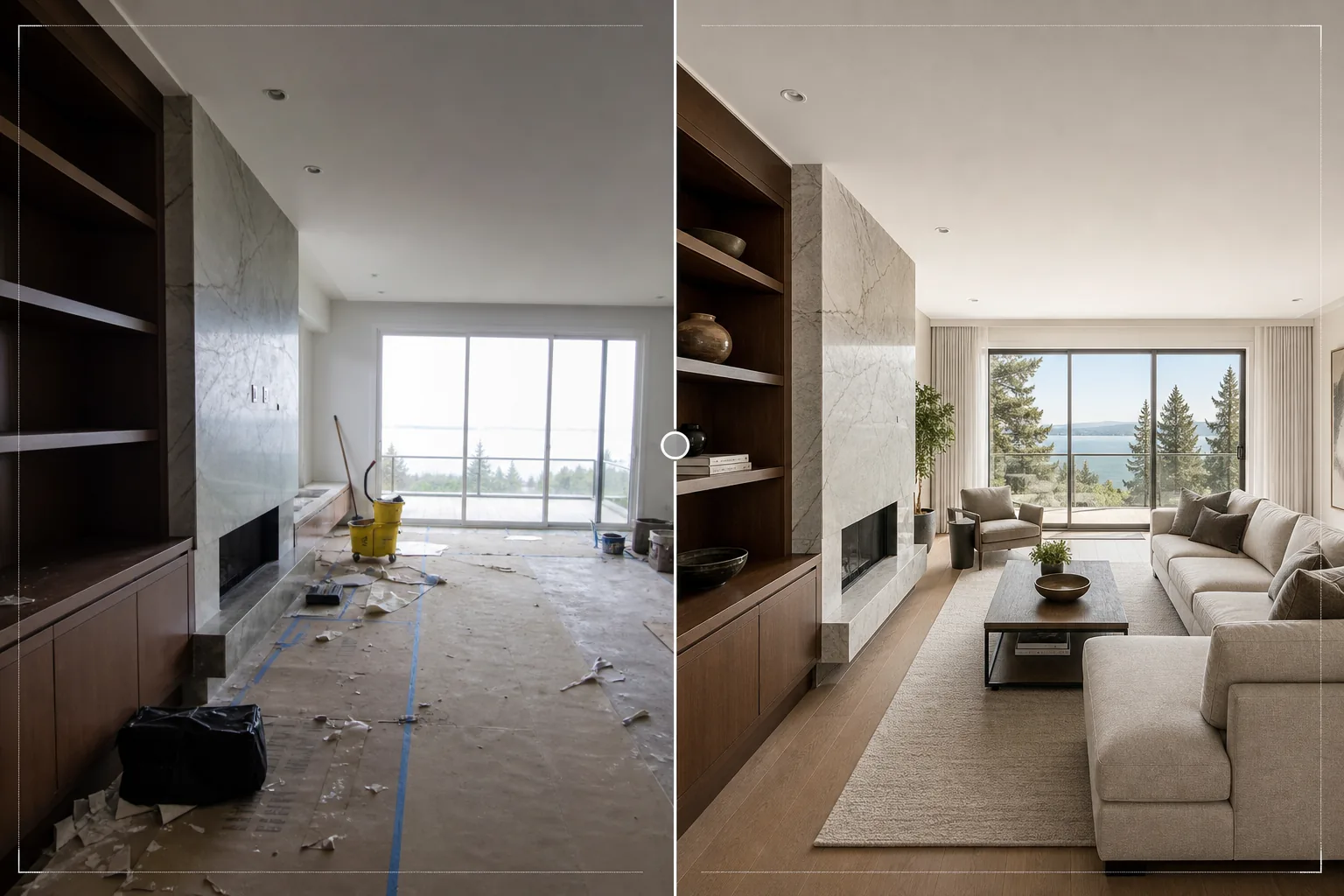
What this template does
Polishes interior design project photos for portfolios, Houzz profiles, Instagram feeds, and client presentations. Interior design photography requires accurately representing the designer's material and color choices — a walnut floor should look like walnut, not mahogany. This template uses AI Enhance to apply color-accurate correction that preserves the true tones of wood grains, stone veining, fabric textures, and paint colors as specified by the designer. Magic Eraser removes construction debris left from recent installation, client personal items that were not cleared before the photo shoot, visible power outlets and switches that interrupt clean wall planes, and any other elements that detract from the design itself. Room brightening ensures spaces appear naturally lit and open.
Template settings
| Room brightening | Shadow fill + window exposure recovery (natural light look) |
| Material accuracy | Color-correct rendering for wood, stone, tile, and fabric |
| Texture sharpening | Grain, weave, and veining detail enhancement |
| Clutter removal | Remove personal items, construction debris, and distractions |
| Output resolution | 6000px long edge (portfolio print and Houzz upload ready) |
| Lens correction | Vertical straightening and wide-angle barrel distortion fix |
How to use this template
Upload your interior photo
Upload room photos from any stage of the project — freshly completed installation, styled photo shoot, or even a work-in-progress if the design elements are in place. The template handles photos from smartphones, interchangeable lens cameras, and tilt-shift architectural lenses.
Brighten and correct color
The template lifts room brightness to show the full spatial quality of the design, recovers overexposed windows to show the view beyond, and corrects color temperature so material finishes appear true to their real-world appearance. Vertical lines are straightened and wide-angle distortion is corrected.
Remove distractions
Magic Eraser removes personal belongings, construction tools, cleaning supplies, visible electrical outlets, and other elements that interrupt the designed space. The AI reconstructs the wall, floor, or surface behind removed objects using the surrounding material pattern.
Export for portfolio
Download at 6000px long edge for portfolio prints, Houzz project uploads, and high-resolution presentations. The Adobe RGB output preserves the subtle color differences between similar finishes that are important in interior design documentation.
Pro tips for best results
- ✓Photograph during the day with all curtains and blinds open. Natural daylight shows how a designed space actually feels to inhabitants and reveals the true colors of finishes. The template enhances natural light but cannot replicate the quality of real daylight in a nighttime photo.
- ✓Include both wide room shots and tight detail vignettes of material combinations — where the wood floor meets the stone fireplace surround, where the backsplash meets the countertop. The template sharpens these material intersections that showcase the designer's specification expertise.
- ✓Turn off all artificial lights if possible and rely on daylight only. Mixed lighting (daylight from windows plus warm artificial light) creates color temperature zones in the room that the template must average, potentially compromising the accuracy of material colors in either zone.
Common questions
Can this virtually stage an empty room?
+
No. The template enhances photos of rooms that already contain the design elements — furniture, finishes, fixtures. It does not add virtual furniture or accessories to empty spaces. For virtual staging, use a dedicated staging service and then process the result through this template for color and lighting refinement.
How accurately does it reproduce material colors?
+
The template uses daylight-balanced color correction that preserves the specific undertones of materials — warm versus cool grays, red versus golden wood tones, blue versus green stone veining. On a calibrated monitor, processed images match the in-person material appearance closely enough for portfolio and specification use.
What about bathroom and kitchen tile work?
+
Tile grout lines and patterns are sharpened to show installation quality. The template handles both large-format tiles and detailed mosaic patterns, enhancing the geometric precision that demonstrates quality craftsmanship.
Show every project at its designed best
Upload interior photos and get portfolio-grade images with accurate material colors, bright natural light, and distraction-free compositions.
Try it freeRelated templates
More real estate templates for your workflow.
Professional real estate photo template for MLS listings. HDR-like enhancement, sky replacement, clutter removal, and color correction for property photos that sell faster.
Enhance architecture exterior photos with vertical line correction, sky replacement, car and pedestrian removal, and golden hour color grading for listings and portfolios.
Transform Airbnb and vacation rental photos with room brightening, clutter removal, color correction, and wide-angle lens distortion fix for higher booking rates.
Enhance drone aerial photography with sky replacement, property boundary highlighting, color vibrancy boost, and distraction removal for real estate and land surveys.
Virtually stage empty rooms with realistic furniture, decor, and lighting. Help buyers visualize living spaces without physical staging costs.
Clean, enhance, and standardize floor plan images for real estate listings with stain removal, line sharpening, and consistent styling.