
Architecture Exterior
Transform building exterior photos into portfolio-grade architectural images. This template corrects converging vertical lines from tilted cameras, replaces overcast or blown-out skies with clean blue or golden hour alternatives, removes parked cars and pedestrians from the scene, and applies color grading that highlights material textures in stone, glass, and metal.
Try this template freeReal Estate template preview
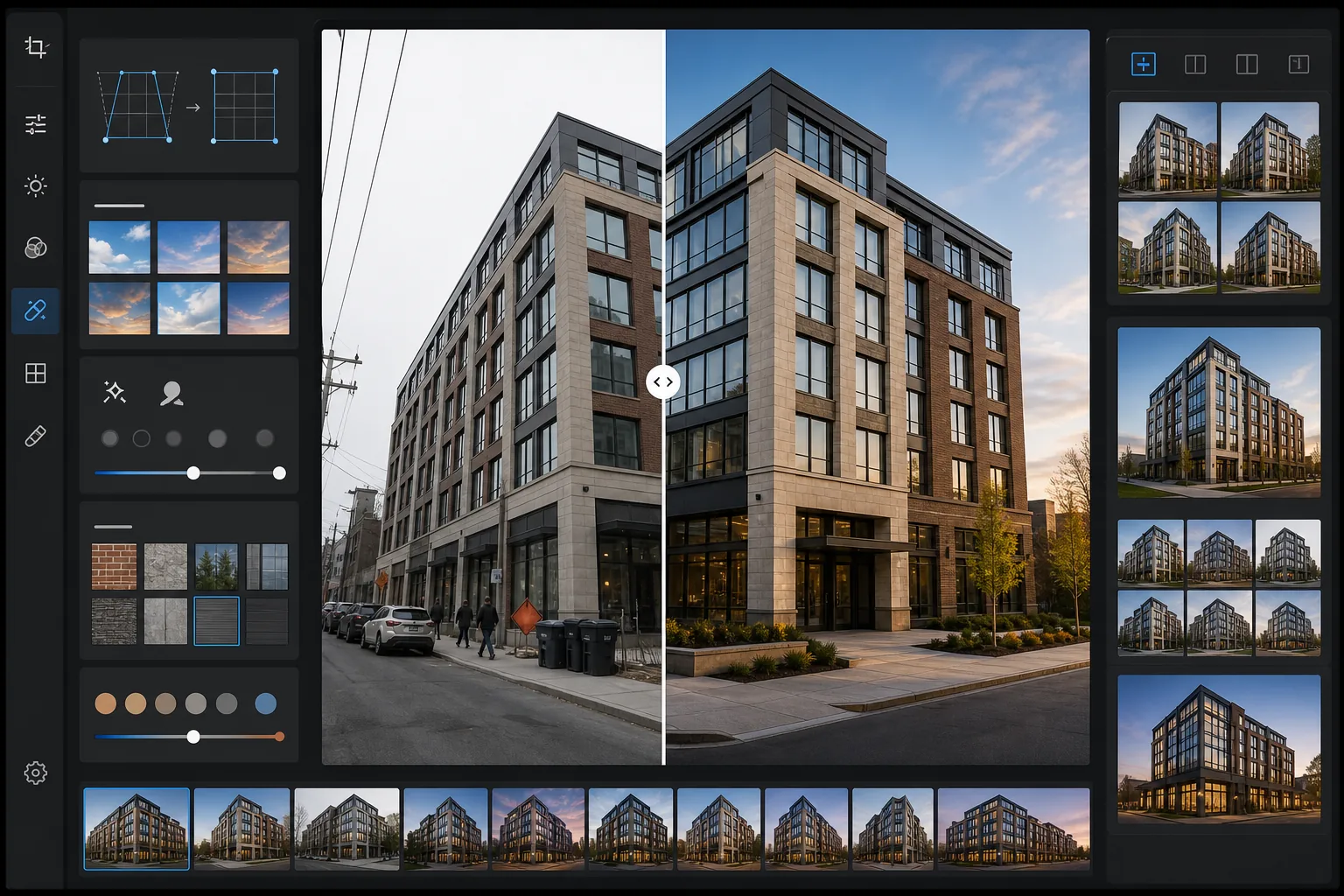
What this template does
Solves the most common problems in architectural exterior photography. Converging verticals — where building edges lean inward because the camera was tilted up — are corrected to make walls perfectly straight. Blown-out white skies from overcast days are replaced with natural blue-sky or golden hour alternatives that match the existing light direction on the building. Magic Eraser removes parked cars, pedestrians, trash bins, construction equipment, and temporary signage that clutter the composition. AI Enhance applies subtle color grading that brings out the warmth of brick, the reflectivity of glass curtain walls, and the texture of concrete and stone facades.
Template settings
| Vertical correction | Automatic keystone adjustment (±15° tilt correction) |
| Sky replacement | Natural blue sky with matching light direction (or golden hour) |
| Material enhancement | Texture sharpening for brick, stone, glass, and metal |
| Color grade | Warm architectural (golden hour tones on facades, cool shadows) |
| Distraction removal | Auto-detect and remove vehicles, pedestrians, and bins |
| Output resolution | 6000px long edge (portfolio and print at 300 DPI up to 20×13) |
How to use this template
Upload your exterior photo
Upload a photo of the building exterior taken from street level, elevated position, or drone. The template handles images from smartphones, DSLRs, and wide-angle lenses. Wide-angle barrel distortion is corrected automatically along with vertical keystone distortion.
Correct perspective and sky
Vertical lines are straightened so the building edges are parallel and true. If the original sky is blown out white or dull overcast, it is replaced with a natural sky that matches the light direction already visible on the building facade. You can choose between clear blue sky and warm golden hour tones.
Remove scene clutter
Magic Eraser removes parked cars, pedestrians, trash containers, temporary signage, construction scaffolding, and overhead power lines. The AI reconstructs the sidewalk, landscaping, and building surfaces behind removed objects using surrounding context.
Export for portfolio or listing
Download the corrected image at 6000px long edge for architectural portfolio prints, real estate listings, or developer marketing materials. The color profile is set to Adobe RGB for print or sRGB for web, depending on your intended output.
Pro tips for best results
- ✓For the most natural sky replacement, shoot with the building occupying no more than 60-70% of the frame height. This leaves enough original sky area for the AI to match the replacement lighting angle and gradient direction to the existing scene.
- ✓When photographing glass-heavy facades, the reflection in the windows affects the sky replacement. If the original overcast sky is visible as a reflection in the glass, the replacement sky will not alter the reflections — so heavily glazed buildings look most natural when shot on days with at least some blue sky.
- ✓Remove cars and people from one side of the frame at a time. For complex scenes like a parking lot full of cars in front of a building, the AI produces cleaner results when you work in sections rather than selecting the entire foreground at once.
- ✓Shoot during the morning or late afternoon golden hour if possible. The template can apply a golden hour color grade to midday photos, but real golden hour light creates directional shadows on building facades that add depth and dimension no color grade can replicate.
Common questions
How much vertical tilt can be corrected?
+
The template corrects up to 15 degrees of vertical keystone distortion, which covers most handheld shots taken from street level while looking up at a building. Extreme tilt beyond 15 degrees can be corrected but may crop significant portions of the image edges, reducing the usable frame area.
Will the replaced sky look natural?
+
The replacement sky is matched to the direction of light already falling on the building. If sunlight is coming from the left in the original photo, the replacement sky gradient and cloud placement are oriented consistently. The horizon transition where sky meets roofline is blended to match the original atmospheric haze and edge softness.
Can this remove scaffolding from a building under renovation?
+
Scaffolding that covers a small section of the facade (up to about 20% of the building surface) can be removed, with the AI reconstructing the building material and window pattern behind it. Full-building scaffolding is too extensive for clean removal because there is not enough visible facade for the AI to reference when reconstructing.
Present every building at its architectural best
Upload exterior photos and get perspective-corrected, sky-enhanced, clutter-free images ready for portfolios, listings, and developer marketing.
Try it freeRelated templates
More real estate templates for your workflow.
Professional real estate photo template for MLS listings. HDR-like enhancement, sky replacement, clutter removal, and color correction for property photos that sell faster.
Transform Airbnb and vacation rental photos with room brightening, clutter removal, color correction, and wide-angle lens distortion fix for higher booking rates.
Enhance interior design portfolio photos with room brightening, clutter removal, material texture sharpening, and color-accurate rendering of finishes and fabrics.
Enhance drone aerial photography with sky replacement, property boundary highlighting, color vibrancy boost, and distraction removal for real estate and land surveys.
Virtually stage empty rooms with realistic furniture, decor, and lighting. Help buyers visualize living spaces without physical staging costs.
Clean, enhance, and standardize floor plan images for real estate listings with stain removal, line sharpening, and consistent styling.