
YouTube-Kanalgrafik
Gestalten Sie YouTube-Kanalbanner, die auf jedem Bildschirm gestochen scharf aussehen — von 2560px-Desktop-Monitoren bis zu Zuschnitten auf dem Mobiltelefon. Diese Vorlage übernimmt die kniffligen Berechnungen der sicheren Zone, sodass Ihr Branding, Ihr Text und Ihr Creator-Foto auf TV, Desktop, Tablet und Mobilgerät korrekt angezeigt werden, ohne abgeschnitten zu werden.
Diese Vorlage kostenlos testenSocial Media template preview
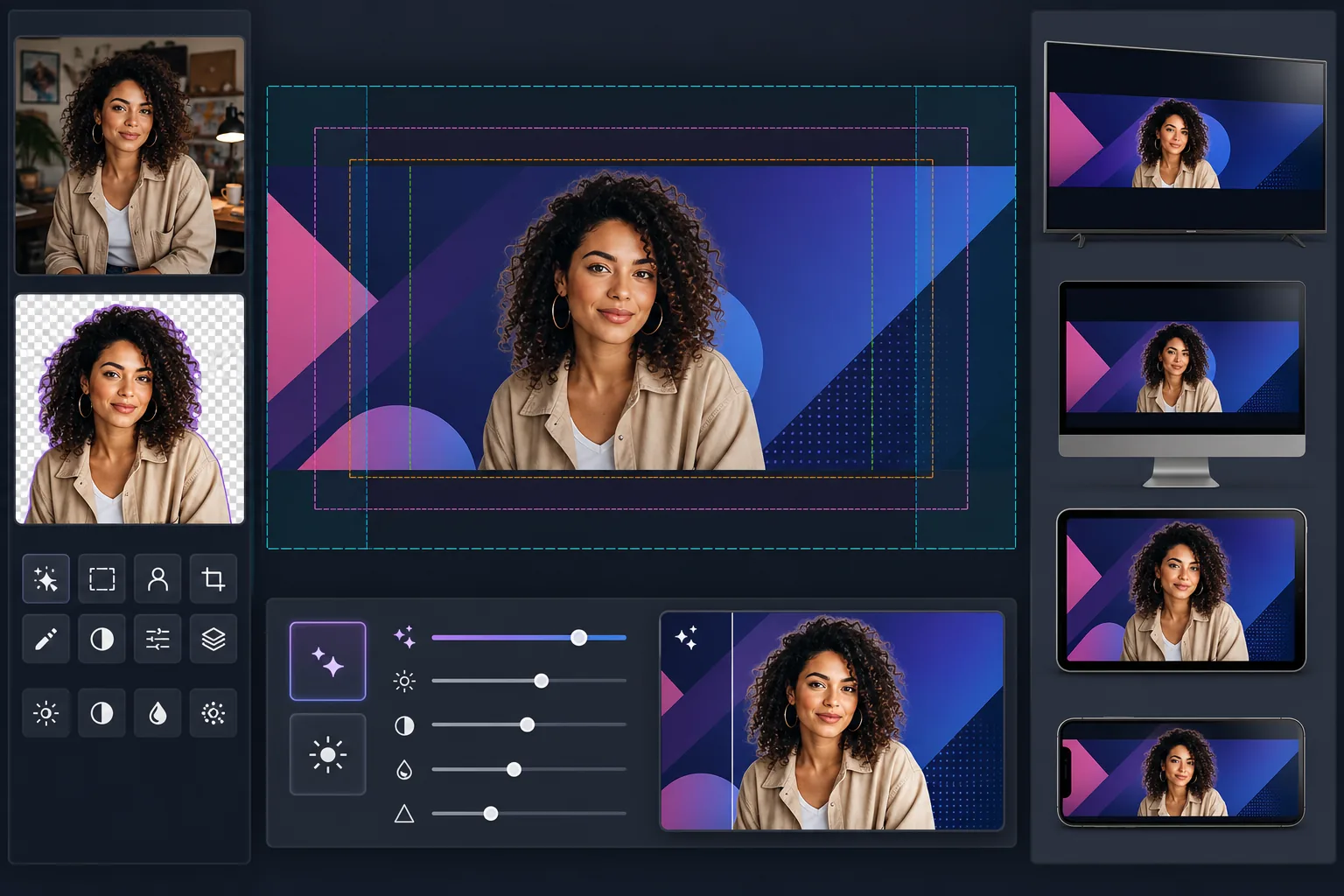
Was diese Vorlage leistet
Erstellt YouTube-Kanalgrafiken in der vollen Leinwandgröße von 2560×1440px, wobei die Inhalte innerhalb der sicheren Zonen von YouTube platziert werden. Background Eraser extrahiert Creator-Porträts sauber, um sie über Markenhintergründen zu komponieren, und AI Enhance sorgt dafür, dass das endgültige Banner bei der hochauflösenden Anzeigegröße von YouTube scharf bleibt. Die Vorlage berücksichtigt die vier verschiedenen Zuschnittzonen, die YouTube auf TV, Desktop, Tablet und Mobilgeräten anwendet.
Vorlageneinstellungen
| Leinwandgröße | 2560×1440px (von YouTube geforderte Uploadgröße) |
| Sichere Zone (alle Geräte) | Mittlerer Bereich 1546×423px (immer sichtbar) |
| Sichtbarer Bereich auf dem Desktop | 2560×423px (volle Breite, mittlerer Streifen) |
| Farbraum | sRGB (Webstandard für eine einheitliche YouTube-Anzeige) |
| Dateiformat | PNG für Grafiken/Text, JPEG 95% für fotografische Banner |
| Maximale Dateigröße | 6MB (Upload-Limit von YouTube) |
So verwenden Sie diese Vorlage
Laden Sie Ihr Creator-Foto oder Ihre Markenelemente hoch
Laden Sie ein Porträtfoto, ein Logo oder Markenbilder hoch. Für Creator-orientierte Kanäle eignet sich ein sauberes Kopfporträt oder ein Foto des Oberkörpers am besten. Background Eraser trennt Sie für eine flexible Positionierung von jedem Hintergrund.
Extrahieren und positionieren Sie Ihr Motiv
Background Eraser entfernt den ursprünglichen Hintergrund und liefert Ihnen einen sauberen Ausschnitt. Positionieren Sie Ihr Creator-Foto oder Logo innerhalb der sicheren Zone von 1546×423px — dem mittleren Bereich, der garantiert auf jedem Gerät sichtbar ist, von Smartphones bis zu Smart-TVs.
Verbessern Sie Auflösung und Schärfe
AI Enhance skaliert und schärft die endgültige Komposition, damit sie bei 2560px Breite gestochen scharf aussieht. Textkanten bleiben scharf, Verläufe bleiben weich, und fotografische Elemente behalten bei der vollen Anzeigeauflösung von YouTube ihre natürlichen Details.
Vorschau und Export
Sehen Sie sich in der Vorschau an, wie das Banner auf dem Mobilgerät (Zuschnitt 1546×423px), dem Desktop (Zuschnitt 2560×423px) und dem TV (volle 2560×1440px-Anzeige) erscheint. Exportieren Sie als PNG für textlastige Designs oder als JPEG für fotografische Banner und bleiben Sie dabei unter dem 6MB-Dateigrößenlimit von YouTube.
Profi-Tipps für beste Ergebnisse
- ✓Halten Sie alle wichtigen Elemente — Ihr Gesicht, den Kanalnamen und den Slogan — innerhalb der mittleren sicheren Zone von 1546×423px. Dies ist der einzige Bereich, der garantiert auf jedem Gerät sichtbar ist. Alles außerhalb davon wird auf Mobilgeräten abgeschnitten.
- ✓Vermeiden Sie es, Text oder Logos in der unteren rechten Ecke des Banners zu platzieren. YouTube blendet auf dem Desktop in diesem Bereich Ihr Profilbild und den Abonnieren-Button ein, was Ihre Inhalte verdecken kann.
- ✓Verwenden Sie für jeden Text in Ihrem Banner kontrastreiche Farben und große, fette Schriften. YouTube komprimiert Kanalgrafiken stark, und dünner oder kontrastarmer Text wird unleserlich, besonders auf Mobilgeräten.
- ✓Gestalten Sie die äußeren Bereiche (jenseits der sicheren Zone) als Erweiterung Ihres Hintergrunds — einfarbige Flächen, Verläufe oder unscharfe Versionen Ihres Hauptbildes funktionieren gut. Diese Bereiche erscheinen auf TV und breiten Desktop-Monitoren, sollten aber keine wesentlichen Informationen enthalten.
Häufige Fragen
Warum benötigt YouTube ein so großes Bild für ein schmales Banner?
+
YouTube verwendet ein einziges Bild auf völlig unterschiedlichen Geräten. TVs zeigen die volle Leinwand von 2560×1440px. Der Desktop zeigt einen horizontalen Streifen von 2560×423px. Tablets zeigen etwas weniger, und Mobilgeräte schneiden nur den mittleren Bereich von 1546×423px zu. Die große Leinwand stellt sicher, dass Ihre Grafik auf jedem Bildschirm scharf aussieht, ohne dass separate Uploads erforderlich sind.
Wird mein Kanalname auf dem Mobilgerät abgeschnitten?
+
Nicht, wenn Sie ihn innerhalb der sicheren Zone halten. Die Vorlage markiert den mittleren Bereich von 1546×423px, der auf jedem Gerät sichtbar ist. Positionieren Sie Ihren Kanalnamen, Ihren Slogan und jedes wichtige Branding innerhalb dieser Zone, dann wird es überall korrekt angezeigt.
Kann ich meine Kanalgrafik für saisonale Kampagnen aktualisieren?
+
Ja. Behalten Sie eine Basisvorlage mit Ihren Markenfarben und der Logoplatzierung bei und tauschen Sie dann die Hintergrundbilder oder Akzentfarben für saisonale Aktualisierungen, Videoveröffentlichungen oder Meilensteine aus. Die Positionierung der sicheren Zone bleibt über alle Versionen hinweg einheitlich.
Erstellen Sie ein YouTube-Banner, das auf jedem Bildschirm funktioniert
Laden Sie Ihr Foto oder Ihre Markenelemente hoch und erstellen Sie in wenigen Minuten geräteoptimierte Kanalgrafiken. Keine Designsoftware erforderlich.
Kostenlos testenRelated templates
More social media templates for your workflow.
Für Instagram optimierte quadratische Zuschnittvorlage mit 1080 x 1080 Pixel. Klare Hintergründe, lebendige Farben und scharfe Details, die im Feed hervorstechen.
Facebook-Titelbildvorlage mit 820×312 Pixel für den Desktop und 640×360 Pixel für den mobilen Zuschnitt. Saubere Markenbilder mit geeigneten sicheren Zonen für die Überlappung von Profilbildern und die Platzierung von CTA-Buttons.
Erstellen Sie professionelle Twitter/X-Header-Bilder mit der exakten Größe 1500×500 Pixel. Berücksichtigt die Überlappung von Profilbildern und funktioniert sowohl im dunklen als auch im hellen Modus.
Verbessern Sie Dating-Profilfotos mit natürlicher Hautglättung, Hintergrundbereinigung, Beleuchtungskorrektur und subtiler Farbkorrektur, die authentisch aussieht – nicht gefiltert.
Erstellen Sie fesselnde Pinterest-Pin-Bilder mit klarem Hintergrund, optimalen vertikalen Abmessungen von 2:3, lebendiger Farbverstärkung und pin-bereiter Komposition.
Erstellen Sie auffällige Titelfotos für TikTok-Videos mit klaren Hintergründen, kräftigem Motivrahmen und optimierten vertikalen Abmessungen von 9:16 für ein einheitliches Profilraster.