
Facebook-Titelbild
Erstellen Sie Facebook-Titelbilder, die sowohl auf dem Desktop als auch auf dem Mobilgerät gepflegt aussehen. Diese Vorlage bewältigt den kniffligen Unterschied zwischen der Desktop-Anzeige mit 820×312px und dem mobilen Zuschnitt mit 640×360px – so bleiben Ihre Markenbotschaft, Bilder und Handlungsaufforderung auf jedem Gerät sichtbar, ohne hinter dem Profilbild oder den Aktionsschaltflächen verborgen zu sein.
Diese Vorlage kostenlos testenSocial Media template preview
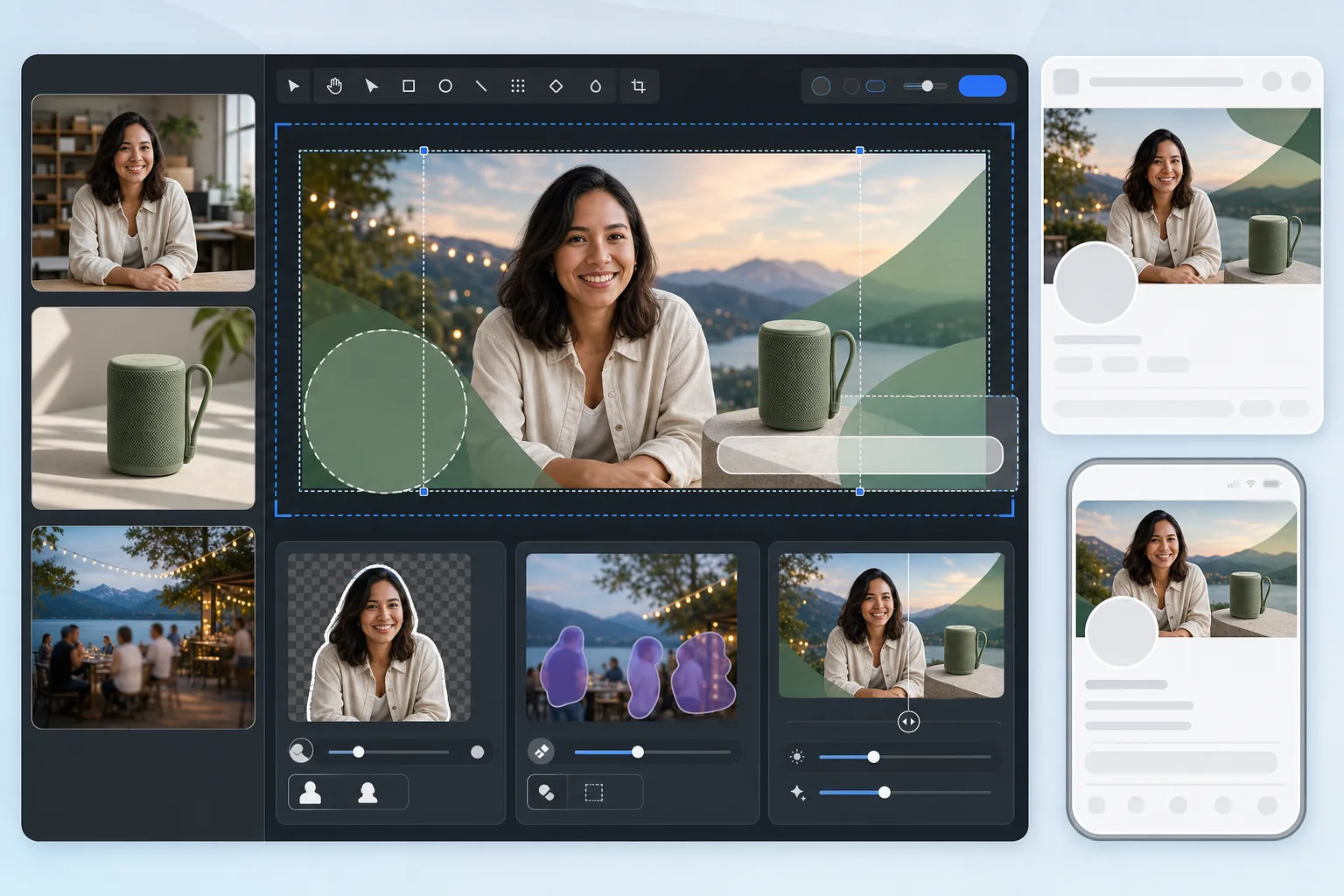
Was diese Vorlage macht
Erstellt ein Facebook-Titelbild, das sowohl für die Desktop-Anzeige (820×312px) als auch für die mobile Anzeige (640×360px) optimiert ist. Die Vorlage berücksichtigt die Überlappung des Profilbilds auf der linken Seite, die Aktionsschaltflächen auf der rechten Seite und die unterschiedlichen Seitenverhältnisse zwischen den Geräten. Background Eraser stellt Personen oder Produkte sauber für die Montage frei, Magic Eraser entfernt störende Elemente aus landschaftlichen Hintergründen und AI Enhance hält das Bild auch nach der Komprimierung durch Facebook gestochen scharf.
Vorlageneinstellungen
| Upload-Arbeitsfläche | 820×360px (deckt sowohl Desktop- als auch mobile Zuschnitte ab) |
| Sichtbarer Bereich auf dem Desktop | 820×312px (breiter, niedriger) |
| Sichtbarer Bereich auf dem Mobilgerät | 640×360px (schmaler, höher – mittiger Zuschnitt) |
| Profilbild-Überlappung | 170×170px Kreis unten links (Desktop) |
| Dateiformat | PNG für Grafiken, JPEG 85 % für Fotos (Vorkomprimierung) |
| Farbprofil | sRGB (Facebook entfernt andere Profile beim Hochladen) |
So verwenden Sie diese Vorlage
Laden Sie Ihr Titelbild hoch
Beginnen Sie mit einem Foto, einer Markengrafik oder einem Porträt, das Sie einfügen möchten. Fotos im Querformat mit mindestens 820px Breite funktionieren am besten. Die Vorlage zeigt Ihnen, wo Inhalte sicher platziert werden können.
Bereinigen Sie die Komposition
Verwenden Sie Background Eraser, um Personen oder Produkte freizustellen und über einen Markenhintergrund zu platzieren. Magic Eraser entfernt unerwünschte Elemente wie Bildstörer, Beschilderung oder Unordnung aus Landschafts- oder Veranstaltungsfotos.
Platzieren Sie Inhalte in sicheren Zonen
Halten Sie wesentliche Inhalte – Text, Gesichter, Logos – im zentralen Bereich, der sowohl auf dem Desktop als auch auf dem Mobilgerät sichtbar ist. Vermeiden Sie die untere linke Ecke (Profilbild-Überlappung auf dem Desktop) und den rechten Rand (Aktionsschaltflächen).
Exportieren Sie mit Vorkomprimierung
Die Vorlage gibt mit 820×360px und optimierten Komprimierungseinstellungen aus. Facebook komprimiert alle Uploads erneut, daher wendet der Export eine leichte Vorschärfung und eine sorgfältige JPEG-Qualität an, um die doppelte Komprimierung ohne Streifenbildung oder Unschärfe zu überstehen.
Profi-Tipps für beste Ergebnisse
- ✓Gestalten Sie auf der 820×360px-Arbeitsfläche, platzieren Sie aber alle wichtigen Inhalte innerhalb einer zentralen Zone von 580×280px. Dies ist der Überlappungsbereich, der sowohl auf dem Desktop als auch auf dem Mobilgerät sichtbar ist, ohne durch Profilbilder oder Schaltflächen verdeckt zu werden.
- ✓Vermeiden Sie es, Text kleiner als 24px auf Ihrem Titelbild zu platzieren. Facebook komprimiert Titelbilder stark, und kleiner Text wird nach dem Hochladen unscharf und unleserlich – besonders auf mobilen Bildschirmen.
- ✓Stimmen Sie bei Unternehmensseiten Ihr Titelbild mit der CTA-Schaltflache ('Jetzt buchen', 'Jetzt kaufen' usw.) ab, die auf der rechten Seite erscheint. Lassen Sie visuellen Platz für die Schaltflache, damit sie Ihr Design nicht überlappt.
- ✓Aktualisieren Sie Ihr Titelbild für Kampagnen, Jahreszeiten oder Veranstaltungen. Facebook zeigt den Titelbild-Upload in der Chronik Ihrer Seite als Beitrag an, was dem Update zusätzliche organische Reichweite über den Seitenkopf hinaus verleiht.
Häufige Fragen
Warum sieht mein Titelbild auf dem Mobilgerät anders aus?
+
Facebook schneidet Titelbilder je nach Gerät unterschiedlich zu. Der Desktop zeigt 820×312px (breit und kurz), während das Mobilgerät einen mittigen Zuschnitt von 640×360px zeigt (schmaler, aber höher). Inhalte ganz links und rechts sind auf dem Desktop sichtbar, werden aber auf dem Mobilgerät abgeschnitten. Die Sicherheitszonen-Anleitung der Vorlage stellt sicher, dass Ihre wichtigen Inhalte beide Zuschnitte überstehen.
Wird Facebook mein Titelbild unscharf machen?
+
Facebook komprimiert jedes hochgeladene Bild erneut. Die Vorlage wirkt dem entgegen, indem sie eine leichte Vorschärfung anwendet und eine optimale JPEG-Qualitätsstufe verwendet, die die doppelte Komprimierung übersteht. Das Hochladen als PNG statt als JPEG hilft ebenfalls, da die serverseitige Umwandlung von Facebook aus einer PNG oft bessere Ergebnisse liefert als die erneute Komprimierung einer bereits komprimierten JPEG.
Kann ich Text auf meinem Facebook-Titelbild verwenden?
+
Ja, Facebook hat die '20-%-Textregel' für Titelbilder abgeschafft. Halten Sie den Text wegen der Komprimierung von Facebook jedoch groß (mindestens 24px) und kontrastreich. Verwenden Sie die Sicherheitszonen-Überlagerung der Vorlage, um sicherzustellen, dass Ihr Text auf dem Desktop nicht hinter dem Profilbild verborgen oder auf dem Mobilgerät abgeschnitten wird.
Erstellen Sie ein Facebook-Titelbild, das auf jedem Gerät funktioniert
Laden Sie Ihr Foto oder Ihre Markenelemente hoch und erhalten Sie in Sekunden ein Titelbild, das für die Desktop- und mobile Anzeige optimiert ist.
Kostenlos testenRelated templates
More social media templates for your workflow.
Für Instagram optimierte quadratische Zuschnittvorlage mit 1080 x 1080 Pixel. Klare Hintergründe, lebendige Farben und scharfe Details, die im Feed hervorstechen.
YouTube-Bannervorlage mit 2560 x 1440 Pixeln und Anleitungen für sichere Zonen. Saubere Hintergrundentfernung für Erstellerfotos, gerätespezifisches Layout und markenkonsistente Kanalgrafiken.
Erstellen Sie professionelle Twitter/X-Header-Bilder mit der exakten Größe 1500×500 Pixel. Berücksichtigt die Überlappung von Profilbildern und funktioniert sowohl im dunklen als auch im hellen Modus.
Verbessern Sie Dating-Profilfotos mit natürlicher Hautglättung, Hintergrundbereinigung, Beleuchtungskorrektur und subtiler Farbkorrektur, die authentisch aussieht – nicht gefiltert.
Erstellen Sie fesselnde Pinterest-Pin-Bilder mit klarem Hintergrund, optimalen vertikalen Abmessungen von 2:3, lebendiger Farbverstärkung und pin-bereiter Komposition.
Erstellen Sie auffällige Titelfotos für TikTok-Videos mit klaren Hintergründen, kräftigem Motivrahmen und optimierten vertikalen Abmessungen von 9:16 für ein einheitliches Profilraster.