
Tinder-Profilfoto
Lassen Sie Ihre Dating-Profilfotos natürlich attraktiv wirken, ohne überbearbeitet auszusehen. Diese Vorlage verbessert Beleuchtung und Hautton, entfernt störende Hintergründe, behebt rote Augen und harte Blitzschatten und wendet eine subtile Farbkorrektur an, die schmeichelt, ohne gefiltert auszusehen.
Diese Vorlage kostenlos testenSocial Media template preview
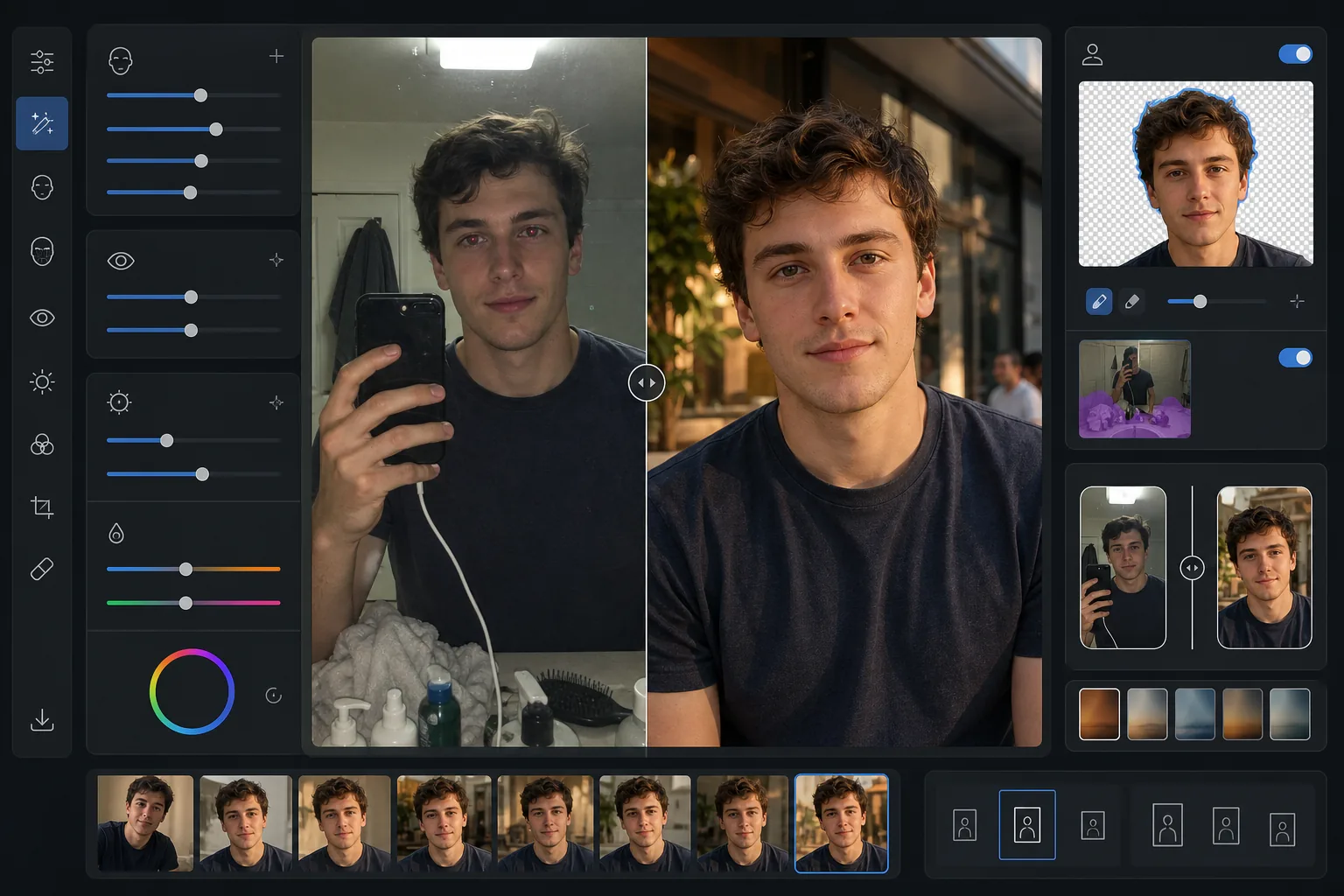
Was diese Vorlage macht
Optimiert Fotos speziell für Dating-Apps wie Tinder, Bumble und Hinge, bei denen der erste Eindruck in weniger als zwei Sekunden entsteht. Die Vorlage wendet natürlich wirkende Verbesserungen an, die Sie von Ihrer besten Seite zeigen, ohne den offensichtlich gefilterten Look, der Unechtheit signalisiert. AI Enhance hellt die Augenpartie auf, gleicht den Hautton aus und korrigiert hartes Licht von Blitz oder Deckenleuchtstoffröhren. Background Eraser kann den unaufgeräumten Hintergrund eines Badezimmer-Spiegelselfies durch eine saubere, neutrale Umgebung ersetzen, die den Fokus auf Sie richtet. Das Ergebnis sieht aus wie ein großartiges Schnappschussfoto, das in schmeichelndem natürlichem Licht aufgenommen wurde.
Vorlageneinstellungen
| Hautverbesserung | Natürliche Glättung (behält Poren und Textur, reduziert Unreinheiten) |
| Augenverbesserung | Subtile Aufhellung + Rote-Augen-Korrektur |
| Beleuchtungskorrektur | Simuliertes Aufhelllicht zur goldenen Stunde (sanfte, gerichtete Wärme) |
| Hintergrundoption | Bereinigen oder Wechsel zu Außen-/Stadt-/neutraler Umgebung |
| Ausgabeabmessungen | 1080 × 1350 px (4:5 Hochformat, optimal für Dating-Apps) |
| Farbkorrektur | Warm natürlich (subtil — nicht sichtbar gefiltert) |
So verwenden Sie diese Vorlage
Foto hochladen
Laden Sie ein Selfie, Porträt oder eine Ganzkörperaufnahme hoch. Die Vorlage funktioniert am besten mit Fotos, auf denen Ihr Gesicht deutlich sichtbar und scharf ist. Gruppenfotos können verwendet werden — wählen Sie sich selbst aus, und die Vorlage isoliert Sie aus der Gruppe und verbessert das Bild.
Natürliche Verbesserung
AI Enhance gleicht den Hautton aus, reduziert vorübergehende Unreinheiten, hellt die Augen subtil auf und korrigiert unvorteilhaftes Blitz- oder Deckenlicht. Die Verbesserung behält die natürliche Hauttextur einschließlich Poren und feiner Linien bei — das Ziel ist, wie Sie selbst an Ihrem besten Tag auszusehen, nicht wie eine andere Person.
Hintergrund bereinigen oder wechseln
Wählen Sie, ob Sie Ihren vorhandenen Hintergrund bereinigen (Unordnung, andere Personen, Chaos entfernen) oder ihn vollständig durch eine saubere Außen-, Café- oder Stadtkulisse ersetzen möchten. Background Eraser erzeugt natürlich wirkende Kantenübergänge an Haar- und Kleidungsgrenzen, sodass der Wechsel nahtlos aussieht.
Für Ihr Profil exportieren
Laden Sie in 1080 × 1350 px im Hochformat 4:5 herunter, das Dating-Apps am besten darstellen. Das Bild ist für Mobilbildschirme optimiert, auf denen das meiste Swipen stattfindet, wobei Details sowohl in den Lichtern als auch in den Schatten für jede Bildschirmhelligkeit erhalten bleiben.
Profi-Tipps für beste Ergebnisse
- ✓Verwenden Sie ein Foto, das bei natürlichem Tageslicht in Fensternähe aufgenommen wurde, für den schmeichelhaftesten Ausgangspunkt. Die Vorlage kann hartes Kunstlicht korrigieren, aber Fotos bei natürlichem Licht benötigen weniger Korrektur und liefern das authentischste Endergebnis.
- ✓Vermeiden Sie auffällige Sonnenbrillen auf Ihrem Hauptprofilfoto. Die Vorlage kann die Helligkeit der Augenpartie verbessern, aber das funktioniert nur, wenn die Augen sichtbar sind. Sonnenbrillen erschweren es potenziellen Matches außerdem, eine persönliche Verbindung zu spüren.
- ✓Laden Sie neben Porträtaufnahmen mindestens ein Ganzkörperfoto hoch. Untersuchungen zu Dating-Apps zeigen, dass Profile mit einer Mischung aus Gesichts- und Ganzkörperfotos deutlich mehr Rechts-Swipes erhalten als solche mit nur Nahaufnahmen-Selfies.
- ✓Verzichten Sie auf das Gruppenfoto als erstes Foto. Auch wenn die Vorlage Sie aus einer Gruppe isolieren kann, kann der für einen Einzelausschnitt nötige Zuschnitt die Bildqualität im Vergleich zu einer Einzelaufnahme von Anfang an verringern.
Häufige Fragen
Wird die Verbesserung offensichtlich aussehen?
+
Nein. Die Vorlage ist gezielt auf Dezenz abgestimmt. Sie behält natürliche Hauttextur, Poren und feine Linien bei und reduziert nur vorübergehende Unreinheiten und gleicht ungleichmäßige Beleuchtung aus. Das Ergebnis sieht aus wie ein wirklich gutes Foto, nicht wie ein retuschiertes.
Kann ich ein Badezimmer-Spiegelselfie verwenden?
+
Ja. Die Vorlage kann den Badezimmerhintergrund durch eine sauberere Umgebung ersetzen. Allerdings bleiben die Spiegelselfie-Pose und das Telefon in Ihrer Hand erhalten — für das beste Ergebnis schneiden Sie eng zu oder verwenden Sie ein Foto, das jemand anderes oder ein Selbstauslöser aufgenommen hat.
Funktioniert das für alle Hauttöne?
+
Das KI-Verbesserungsmodell ist auf vielfältige Hauttöne trainiert und arbeitet über das gesamte Spektrum hinweg präzise. Farbkorrektur und Hautglättung passen sich dem spezifischen Ton in Ihrem Foto an, anstatt einen Einheitsfilter anzuwenden.
Zeigen Sie sich in jeder Dating-App von Ihrer natürlich besten Seite
Laden Sie Ihre Fotos hoch und erhalten Sie natürlich verbesserte, hintergrundoptimierte Profilbilder, die mehr Matches anziehen.
Kostenlos testenRelated templates
More social media templates for your workflow.
Für Instagram optimierte quadratische Zuschnittvorlage mit 1080 x 1080 Pixel. Klare Hintergründe, lebendige Farben und scharfe Details, die im Feed hervorstechen.
YouTube-Bannervorlage mit 2560 x 1440 Pixeln und Anleitungen für sichere Zonen. Saubere Hintergrundentfernung für Erstellerfotos, gerätespezifisches Layout und markenkonsistente Kanalgrafiken.
Facebook-Titelbildvorlage mit 820×312 Pixel für den Desktop und 640×360 Pixel für den mobilen Zuschnitt. Saubere Markenbilder mit geeigneten sicheren Zonen für die Überlappung von Profilbildern und die Platzierung von CTA-Buttons.
Erstellen Sie professionelle Twitter/X-Header-Bilder mit der exakten Größe 1500×500 Pixel. Berücksichtigt die Überlappung von Profilbildern und funktioniert sowohl im dunklen als auch im hellen Modus.
Erstellen Sie fesselnde Pinterest-Pin-Bilder mit klarem Hintergrund, optimalen vertikalen Abmessungen von 2:3, lebendiger Farbverstärkung und pin-bereiter Komposition.
Erstellen Sie auffällige Titelfotos für TikTok-Videos mit klaren Hintergründen, kräftigem Motivrahmen und optimierten vertikalen Abmessungen von 9:16 für ein einheitliches Profilraster.