
Twitter/X-Header-Foto
Gestalten Sie ein Header-Bild, das auf jedem Gerät und in jedem Modus erstklassig aussieht. Diese Vorlage berücksichtigt die exakten Maße von 1500×500px, die Twitter erfordert, beachtet den Überlappungsbereich des Profilbilds, damit wichtige Inhalte nie verdeckt werden, und sorgt dafür, dass Ihr Banner sowohl im dunklen als auch im hellen Modus großartig aussieht.
Diese Vorlage kostenlos testenSocial Media template preview
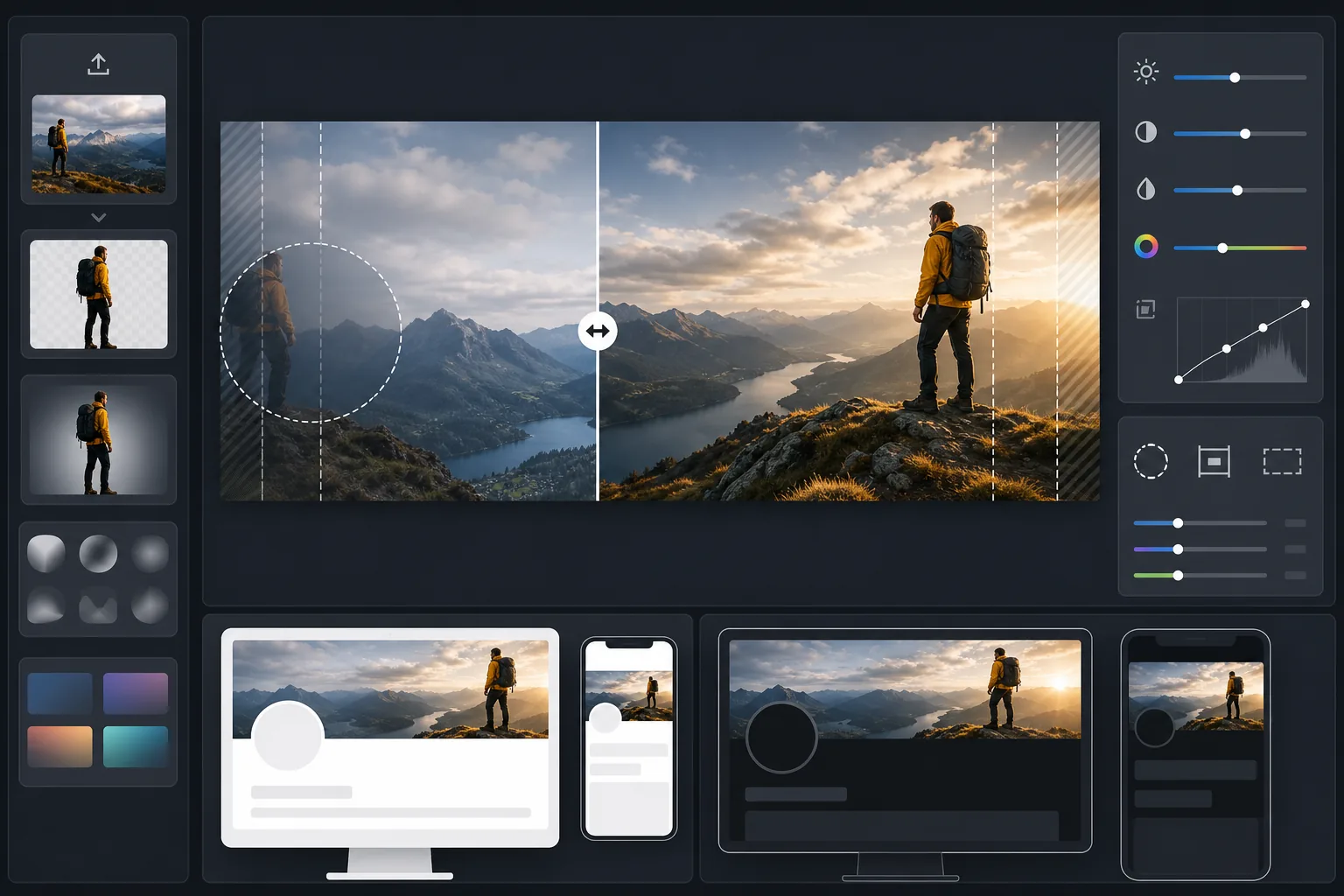
Was diese Vorlage leistet
Verarbeitet Ihr Foto in die exakte Bannergröße von 1500×500px, die Twitter/X erfordert, mit intelligentem Zuschnitt, der Gesichter und wichtige Inhalte im sichtbaren sicheren Bereich hält. Background Eraser kann Motive für saubere Kompositionen freistellen, während AI Enhance Kontrast und Farbe für die dunklen und hellen Hintergründe optimiert, die Ihre Follower sehen werden.
Vorlageneinstellungen
| Ausgabegröße | 1500×500px (3:1 Twitter/X-Header-Verhältnis) |
| Sicherer Bereich | Linke 25% reserviert — vermeidet Überlappung des Profilbilds auf Desktop und Mobilgerät |
| Kantenüberblendung | Sanftes Verlaufen nach Dunkel oder Hell (passt sich dem Modus an) |
| Farboptimierung | Doppelt geprüfter Kontrast für dunklen Modus (#15202B) und hellen Modus (#FFFFFF) |
| Dateiformat | JPEG mit 92% Qualität (unter Twitters Upload-Grenze von 5 MB) |
| Sicherer Textbereich | Zentrales horizontales Band von 50% — vermeidet oberen/unteren Zuschnitt auf Mobilgeräten |
So verwenden Sie diese Vorlage
Quellbild hochladen
Verwenden Sie ein Foto oder eine Grafik im Querformat. Breite Panoramaaufnahmen, Stadtansichten und horizontale Kompositionen eignen sich am besten. Die Vorlage schneidet auf das extreme Seitenverhältnis 3:1 zu, vermeiden Sie daher hohe Motive oder vertikal zentrierte Inhalte.
Wichtige Inhalte im sicheren Bereich platzieren
Die Vorlage markiert die linken 25% als Überlappungsbereich des Profilbilds und die äußeren Ränder als mobile Zuschnittzonen. Ihre wichtigsten visuellen Inhalte sollten im rechten mittleren Bereich des Banners liegen.
Für dunklen und hellen Modus optimieren
AI Enhance passt den Kontrast an, damit das Banner sowohl gegen den nahezu schwarzen Hintergrund des dunklen Modus als auch gegen den weißen Hintergrund des hellen Modus keine harten Kanten zeigt. Die Kantenüberblendung erzeugt einen sanften Übergang statt eines harten Abschnitts.
Exportieren und hochladen
Laden Sie das optimierte 1500×500px-JPEG herunter und laden Sie es direkt auf Twitter/X hoch. Die Datei ist so dimensioniert, dass sie deutlich unter der 5-MB-Grenze bleibt und dennoch gestochen scharfe Details auf Retina-Displays bewahrt.
Profi-Tipps für beste Ergebnisse
- ✓Sehen Sie sich Ihren Header vor dem Fertigstellen sowohl auf dem Smartphone als auch auf dem Desktop an — Twitter schneidet die oberen und unteren Ränder auf Mobilgeräten aggressiver zu und entfernt etwa 10% an jedem Rand.
- ✓Platzieren Sie keinen Text und keine Gesichter im unteren linken Quadranten, wo auf dem Desktop Ihr Profilbild, Ihr Name und Ihre Bio überlagert werden.
- ✓Verwenden Sie an den Bannerrändern Farben, die sowohl mit #15202B (dunkler Modus) als auch mit #FFFFFF (heller Modus) kontrastieren — mitteltonige Blautöne, Grüntöne und warme Grautöne wirken in beiden Kontexten gut.
- ✓Wenn Sie ein Foto mit einer Person verwenden, platzieren Sie diese im rechten Drittel des Bildes, damit sie neben Ihrem Profilbild links sichtbar bleibt.
Häufige Fragen
Wo genau überlappt das Profilbild?
+
Auf dem Desktop überlappt Ihr rundes Profilbild die untere linke Ecke des Headers und bedeckt etwa die unteren 60% der äußersten linken 20% des Banners. Auf dem Mobilgerät ist die Überlappung ähnlich, aber leicht verschoben. Der sichere Bereich der Vorlage berücksichtigt beide Layouts.
Sieht mein Header im dunklen Modus gut aus?
+
Ja. Die Vorlage testet Ihr Banner sowohl gegen den Hintergrund des dunklen Modus (#15202B) als auch gegen den des hellen Modus (#FFFFFF). Die Kantenüberblendung sorgt in beiden Modi für sanfte Übergänge, sodass Sie den störenden Hartkanten-Effekt vermeiden, den nicht optimierte Header zeigen.
Was, wenn Twitter die Header-Maße ändert?
+
Die Spezifikation von 1500×500px ist seit 2017 und über den Markenwechsel zu X hinweg stabil. Sollten sich die Maße ändern, aktualisieren wir die Vorlage. Die aktuelle Ausgabe lässt sich zudem sauber auf jede kleinere Bannergröße herunterskalieren.
Heben Sie sich bei jedem Besuch Ihres Twitter-Profils ab
Laden Sie Ihr Bild hoch und erhalten Sie in Sekunden einen perfekt dimensionierten, für den dunklen Modus geeigneten Twitter-Header. Kein Photoshop, kein Raten bei den Maßen.
Kostenlos testenRelated templates
More social media templates for your workflow.
Für Instagram optimierte quadratische Zuschnittvorlage mit 1080 x 1080 Pixel. Klare Hintergründe, lebendige Farben und scharfe Details, die im Feed hervorstechen.
YouTube-Bannervorlage mit 2560 x 1440 Pixeln und Anleitungen für sichere Zonen. Saubere Hintergrundentfernung für Erstellerfotos, gerätespezifisches Layout und markenkonsistente Kanalgrafiken.
Facebook-Titelbildvorlage mit 820×312 Pixel für den Desktop und 640×360 Pixel für den mobilen Zuschnitt. Saubere Markenbilder mit geeigneten sicheren Zonen für die Überlappung von Profilbildern und die Platzierung von CTA-Buttons.
Verbessern Sie Dating-Profilfotos mit natürlicher Hautglättung, Hintergrundbereinigung, Beleuchtungskorrektur und subtiler Farbkorrektur, die authentisch aussieht – nicht gefiltert.
Erstellen Sie fesselnde Pinterest-Pin-Bilder mit klarem Hintergrund, optimalen vertikalen Abmessungen von 2:3, lebendiger Farbverstärkung und pin-bereiter Komposition.
Erstellen Sie auffällige Titelfotos für TikTok-Videos mit klaren Hintergründen, kräftigem Motivrahmen und optimierten vertikalen Abmessungen von 9:16 für ein einheitliches Profilraster.