
Pinterest-Pin-Bild
Erstellen Sie Pin-Bilder, die das Scrollen stoppen und Speicherungen fördern. Diese Vorlage formatiert Fotos auf das optimale vertikale 2:3-Verhältnis von Pinterest, entfernt überladene Hintergründe für klare, produktorientierte Kompositionen, verstärkt die Farbbrillanz für den Pinterest-Feed und gibt pin-bereite Bilder aus, die auf Mobilgeräten und Desktops gleichermaßen scharf aussehen.
Diese Vorlage kostenlos testenSocial Media template preview
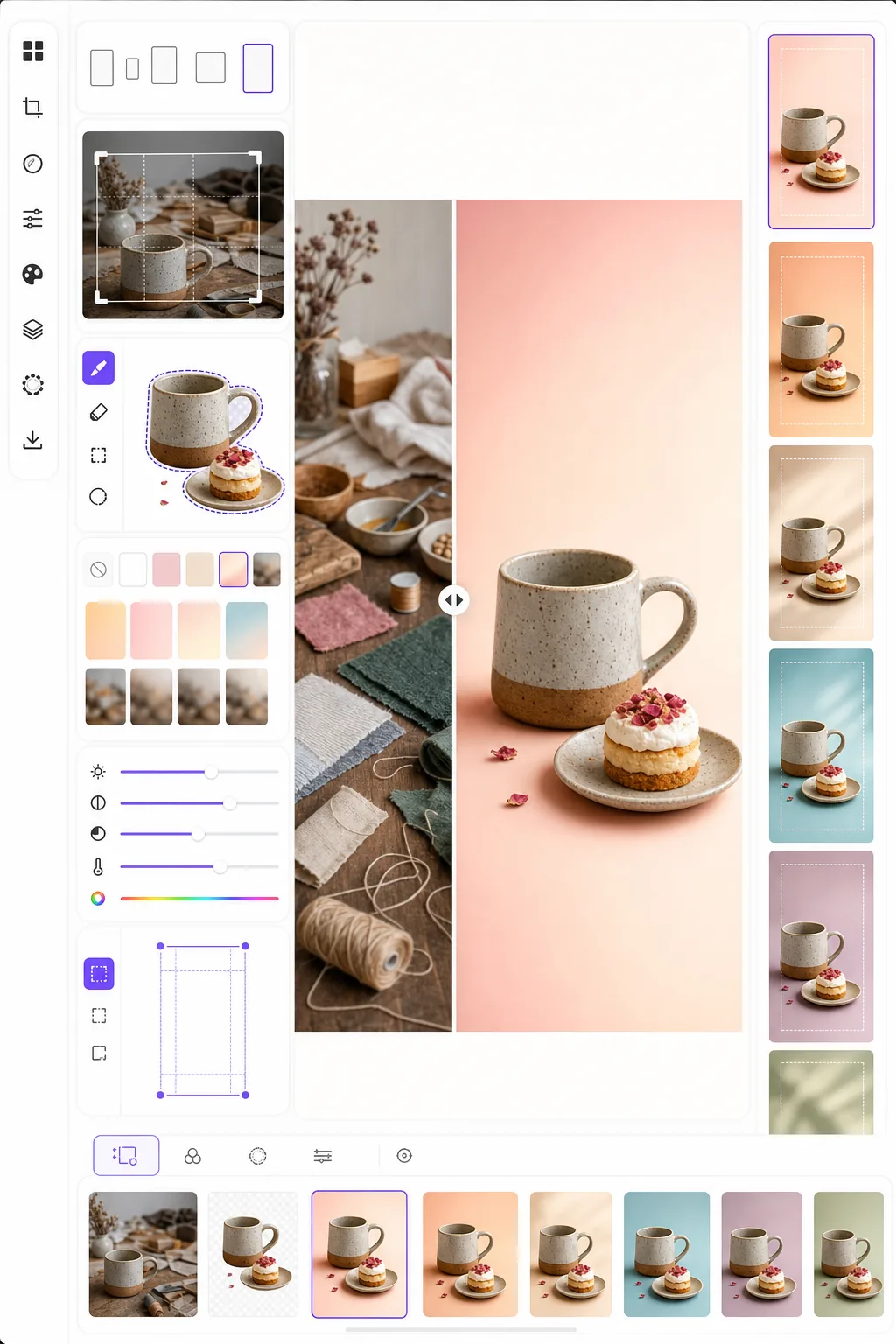
Was diese Vorlage macht
Optimiert Bilder für maximales Engagement auf Pinterest, wo hohe, visuell auffällige Pins standardmäßige Querformatfotos bei der Speicherrate um das Drei- bis Fünffache übertreffen. Background Eraser isoliert Ihr Motiv — Produkt, Gericht, Outfit oder Bastelarbeit — und platziert es auf einem klaren, farbigen oder verlaufenden Hintergrund, der das Motiv in einem überfüllten Feed hervorhebt. Die Farbbrillanz wird verstärkt, um der Tendenz des Pinterest-Algorithmus zu entsprechen, helle, gesättigte Inhalte zu bevorzugen. Die Vorlage gibt Bilder in 1000 × 1500 px aus, genau den Abmessungen, die Pinterest für Standard-Pins empfiehlt.
Vorlageneinstellungen
| Seitenverhältnis | 2:3 vertikal (1000 × 1500 px — Pinterest-Standard) |
| Hintergrundoptionen | Sauberes Weiß, einfarbig, sanfter Verlauf oder verschwommenes Original |
| Farbverstärkung | +20% Sättigung für Sichtbarkeit im Feed (anpassbar) |
| Motivausrichtung | Automatische Zentrierung mit 10% Abstand für Textüberlagerungen |
| Ausgabeformat | PNG (für Textüberlagerung) oder JPEG (für direkten Upload) |
So verwenden Sie diese Vorlage
Laden Sie Ihr Quellbild hoch
Laden Sie ein Produktfoto, ein Gerichtfoto, ein Outfit-Foto oder ein beliebiges Bild hoch, das Sie in einen Pinterest-Pin verwandeln möchten. Die Vorlage akzeptiert Quer-, Quadrat- oder Hochformatbilder und rahmt sie mit intelligentem Zuschnitt, der das Motiv zentriert hält, auf das optimale vertikale 2:3-Verhältnis neu ein.
Hintergrund und Komposition
Background Eraser isoliert Ihr Motiv und platziert es auf einem klaren Hintergrund. Wählen Sie zwischen reinem Weiß, einer einfarbigen Markenfarbe, einem sanften Verlauf oder einer verschwommenen Version des ursprünglichen Hintergrunds. Das Motiv wird automatisch so positioniert, dass oben und unten Platz für Textüberlagerungen bleibt.
Farb- und Schärfeoptimierung
Die Farben werden um 20% Sättigung verstärkt, um im Pinterest-Feed hervorzustechen, in dem matte Bilder oft überscrollt werden. Die Schärfe wird für das Motiv verbessert, während der Hintergrund weich bleibt, was eine visuelle Tiefe erzeugt, die den Blick auf das Hauptmotiv lenkt.
Exportieren Sie Ihren Pin
Laden Sie in 1000 × 1500 px als PNG (wenn Sie Textüberlagerungen in Canva oder einem anderen Editor hinzufügen möchten) oder JPEG (für den direkten Upload zu Pinterest) herunter. Das Farbprofil ist auf sRGB eingestellt, um eine genaue Darstellung auf allen Geräten und Browsern zu gewährleisten.
Profi-Tipps für beste Ergebnisse
- ✓Lassen Sie die oberen 20% und unteren 15% des Pins für Textüberlagerungen relativ frei. Die Vorlage positioniert Ihr Motiv so, dass dieser Platz frei bleibt, aber die Wahl eines einfarbigen oder verlaufenden Hintergrunds in diesen Bereichen macht Text lesbarer als ein überladener fotografischer Hintergrund.
- ✓Verwenden Sie warmtonige Hintergründe (Rosé, Terrakotta, Creme) für Lifestyle- und Food-Pins und kühle Neutraltöne (Weiß, Hellgrau, Blassblau) für Produkt- und Tech-Pins. Die Engagement-Daten von Pinterest zeigen durchweg, dass Pins mit gezielten Farbpaletten jene mit zufälligen Hintergründen übertreffen.
- ✓Erstellen Sie mehrere Pin-Versionen für denselben Inhalt — dasselbe Motiv mit verschiedenen Hintergrundfarben und Zuschnitten. Pinterest belohnt inhaltliche Vielfalt, und das Testen von zwei bis drei Pin-Designs pro Inhalt hilft zu erkennen, welcher visuelle Stil bei Ihrem Publikum Anklang findet.
Häufige Fragen
Kann ich dem Pin Text hinzufügen?
+
Die Vorlage gibt ein klares, für Textüberlagerung optimiertes Bild aus, fügt aber keinen Text direkt hinzu. Exportieren Sie als PNG und fügen Sie Text in Canva, Photoshop oder einem beliebigen Designtool hinzu. Das Motiv ist so positioniert, dass oben Platz für Überschriften und unten für Handlungsaufrufe bleibt.
Was ist mit Idea Pins (Video)?
+
Diese Vorlage ist für standardmäßige statische Pins gedacht. Idea Pins (früher Story Pins) verwenden Video- und mehrseitige Formate, die andere Werkzeuge erfordern. Die Ausgaben der Vorlage eignen sich gut als Titelbilder für Idea Pins, wenn Sie ein statisches Vorschaubild benötigen.
Funktioniert das für Pins im Infografik-Stil?
+
Für Infografik-Pins eignet sich die Vorlage am besten, um einzelne Bilder oder Produktaufnahmen vorzubereiten, die Sie dann in einem höheren Infografik-Layout (1000 × 2100 px oder höher) anordnen. Jedes Element kann separat verarbeitet und anschließend in einem Designtool kombiniert werden.
Erstellen Sie Pinterest-Pins, die das Scrollen stoppen
Laden Sie ein beliebiges Bild hoch und erhalten Sie eine pin-bereite vertikale Komposition mit klaren Hintergründen und optimierten Farben für maximale Speicherungen und Klicks.
Kostenlos testenRelated templates
More social media templates for your workflow.
Für Instagram optimierte quadratische Zuschnittvorlage mit 1080 x 1080 Pixel. Klare Hintergründe, lebendige Farben und scharfe Details, die im Feed hervorstechen.
YouTube-Bannervorlage mit 2560 x 1440 Pixeln und Anleitungen für sichere Zonen. Saubere Hintergrundentfernung für Erstellerfotos, gerätespezifisches Layout und markenkonsistente Kanalgrafiken.
Facebook-Titelbildvorlage mit 820×312 Pixel für den Desktop und 640×360 Pixel für den mobilen Zuschnitt. Saubere Markenbilder mit geeigneten sicheren Zonen für die Überlappung von Profilbildern und die Platzierung von CTA-Buttons.
Erstellen Sie professionelle Twitter/X-Header-Bilder mit der exakten Größe 1500×500 Pixel. Berücksichtigt die Überlappung von Profilbildern und funktioniert sowohl im dunklen als auch im hellen Modus.
Verbessern Sie Dating-Profilfotos mit natürlicher Hautglättung, Hintergrundbereinigung, Beleuchtungskorrektur und subtiler Farbkorrektur, die authentisch aussieht – nicht gefiltert.
Erstellen Sie auffällige Titelfotos für TikTok-Videos mit klaren Hintergründen, kräftigem Motivrahmen und optimierten vertikalen Abmessungen von 9:16 für ein einheitliches Profilraster.