
Oldtimer-Show-Foto
Fangen Sie die Schönheit klassischer Automobile ein, ohne die Menschenmengen der Show. Diese Vorlage entfernt Zuschauer, benachbarte Fahrzeuge und störendes Drumherum aus Ihren Show-Fotos, hebt anschließend Chromdetails hervor, vertieft den Lackglanz und wendet eine epochengerechte Farbkorrektur an, die jeden Oldtimer aussehen lässt, als wäre er gerade aus dem Ausstellungsraum gerollt.
Diese Vorlage kostenlos testenPersonal template preview
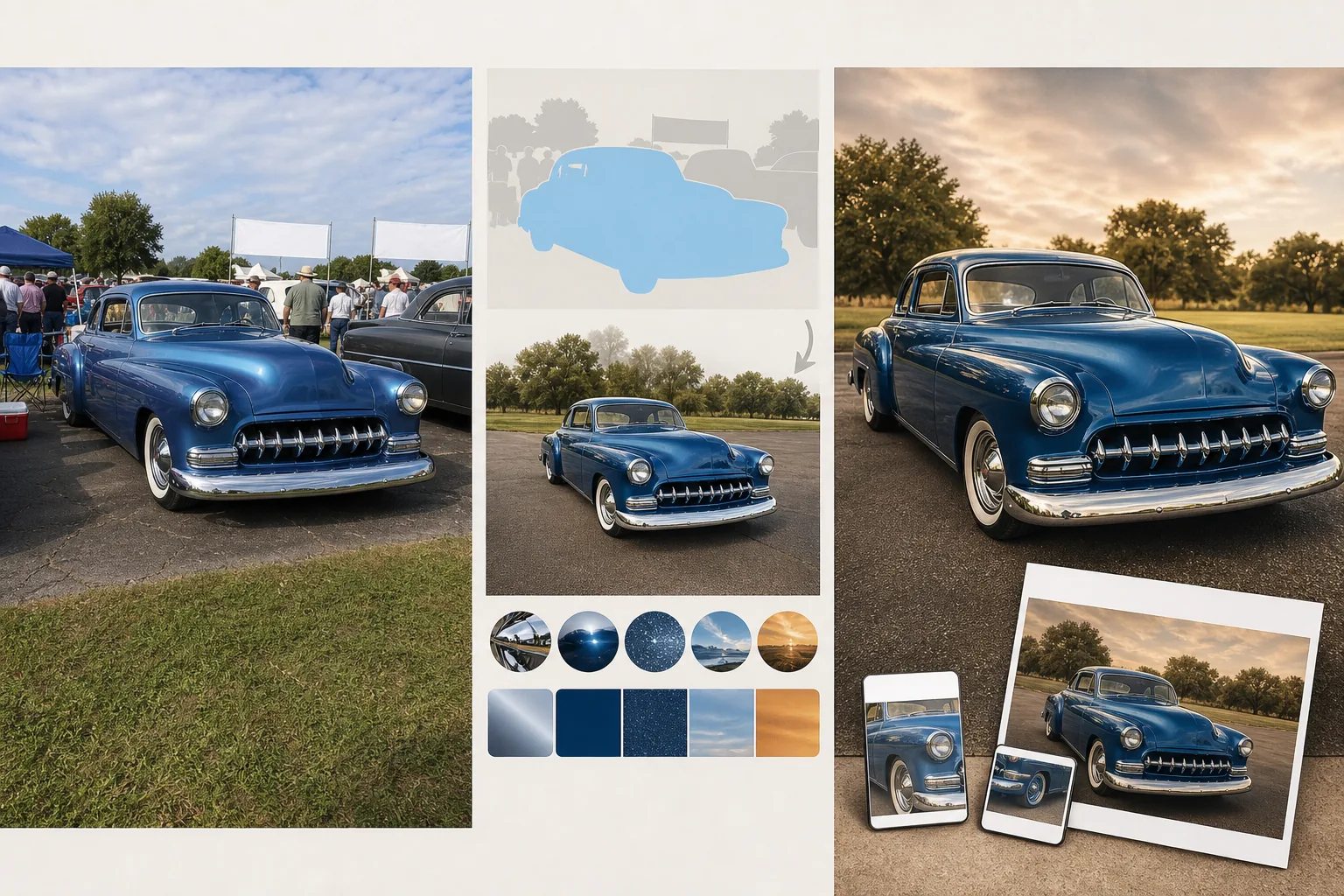
Was diese Vorlage leistet
Löst die grundlegende Herausforderung der Oldtimer-Show-Fotografie: Sie sind von Hunderten von Menschen umgeben, andere Fahrzeuge stehen nur Zentimeter entfernt, dazu Veranstaltungszelte und Sponsorenbanner — nichts davon gehört in ein Foto, das das Auto selbst feiern soll. Magic Eraser entfernt Zuschauer, die sich an benachbarte Autos lehnen, Stoßstange an Stoßstange geparkte Fahrzeuge, Klappstühle, Kühlboxen und Veranstaltungsschilder. Die KI rekonstruiert Asphalt und Rasen hinter den entfernten Elementen und schafft so einen aufgeräumten Hintergrund. AI Enhance tut dann genau das, wofür der Besitzer Hunderte Stunden in der Garage verbracht hat — es bringt die Oberfläche zum Glänzen. Verchromte Stoßstangen, Kühlergrills und Zierleisten werden zu spiegelnder Schärfe nachgeschärft. Die Lacktiefe wird gesteigert, sodass Metallic-Flakes funkeln und Candy-Lacke ihre Farbwechselschichten zeigen. Epochengerechte Farbkorrektur-Optionen passen sich der Ästhetik der jeweiligen Ära an, von der gesättigten Kodachrome-Wärme der 1950er bis zu den gedämpften Erdtönen der 1970er.
Vorlageneinstellungen
| Entfernung von Menschenmengen | Zuschauer und störendes Drumherum rund um das Auto automatisch erkennen und entfernen |
| Chrom-Verbesserung | Spiegelnde Schärfung an Stoßstangen, Kühlergrills und Zierleisten |
| Lack-Verbesserung | Metallic-Flakes, Candy-Lackschichten und Klarlack-Reflexionen vertiefen |
| Farbkorrektur | Epochengerecht (Kodachrome 1950er, Ektachrome 1960er, Erdtöne 1970er oder neutral) |
| Entfernung benachbarter Fahrzeuge | Im Bild geparkte Nachbarfahrzeuge entfernen |
| Ausgabeauflösung | 5000×3333px (Querformat 3:2 für Drucke und Liebhabermagazine) |
So verwenden Sie diese Vorlage
Laden Sie Ihr Show-Foto hoch
Laden Sie Fotos hoch, die auf Oldtimer-Shows, Cruise-ins und Concours-Veranstaltungen aufgenommen wurden. Die Vorlage bewältigt die anspruchsvollen Bedingungen solcher Shows — Menschenmengen, enge Abstände zwischen Fahrzeugen, gemischtes Licht im Freien und unter Zelten sowie Spiegelungen benachbarter Autos in Lack und Chrom des Hauptfahrzeugs.
Menschenmengen und Drumherum entfernen
Magic Eraser entfernt Zuschauer, benachbarte Fahrzeuge, Klappstühle, Kühlboxen, Veranstaltungszelte und Sponsorenbanner. Die KI rekonstruiert die Bodenfläche — ob Asphalt, Rasen oder Kies — hinter den entfernten Elementen. Bei Autos, die in sehr engen Räumen fotografiert wurden, erzeugt die KI eine plausible Fortsetzung des Hintergrunds.
Chrom und Lack verbessern
Verchromte Stoßstangen, Kühlergrills, Türgriffe und Zierleisten werden zu einer spiegelnden Schärfe nachgeschärft, die jede Spiegelung und jedes Glanzlicht zeigt. Der Lack wird so verbessert, dass die volle Tiefe der Oberfläche sichtbar wird — Metallic-Flake-Partikel, Candy-Farbwechselschichten und der nass wirkende Glanz eines frisch aufbereiteten Klarlacks.
Farbkorrektur anwenden und exportieren
Wählen Sie eine epochengerechte Farbkorrektur, die zur Ära des Autos passt, oder verwenden Sie die neutrale Option, die Detailtreue und Farbgenauigkeit maximiert. Exportieren Sie in 5000×3333px für Drucke, Beiträge in Autoforen und Magazineinreichungen. Die hohe Auflösung erfasst jedes Detail handwerklicher Restaurierungskunst.
Profi-Tipps für beste Ergebnisse
- ✓Fotografieren Sie aus dem Dreiviertel-Frontwinkel, der den ganzen Kühlergrill, einen Scheinwerfer und die seitliche Karosserielinie zeigt. Dieser klassische Automobil-Aufnahmewinkel zeigt das meiste Chrom und die längste Lackfläche in einem einzigen Bild und maximiert so die Wirkung der KI-Verbesserung.
- ✓Fotografieren Sie in der ersten Stunde der Show, wenn die Menschenmenge am dünnsten ist. Weniger zu entfernende Personen bedeuten eine sauberere Bodenrekonstruktion, und Morgenlicht ist weicher und schmeichelt Chrom und Lack mehr als die harte Mittagssonne.
- ✓Gehen Sie tief — fotografieren Sie auf Stoßstangenhöhe oder noch niedriger. Ein niedriger Winkel lässt das Auto imposant wirken und verringert die sichtbare Bodenfläche hinter dem Auto, was beim Entfernen von Menschenmengen und Nachbarfahrzeugen weniger Rekonstruktion erfordert.
Häufige Fragen
Kann damit die Spiegelung anderer Autos im Lack entfernt werden?
+
Die Chrom- und Lack-Verbesserung verringert die Sichtbarkeit unerwünschter Spiegelungen, indem sie die zugrunde liegende Lackfarbe und die metallische Tiefe verstärkt. Starke Spiegelungen benachbarter Fahrzeuge auf hochglänzenden Oberflächen werden jedoch nur teilweise reduziert — ein in einer weißen Türverkleidung gespiegeltes leuchtend rotes Auto wird abgemildert, kann aber schwach sichtbar bleiben.
Beeinträchtigt die Epochen-Farbkorrektur die Lackgenauigkeit?
+
Die Epochen-Farbkorrekturen verschieben den Gesamtton des Bildes passend zu zeittypischen Filmmaterialien, verändern aber die grundlegende Lackfarbe nicht. Ein candy-apfelroter Chevrolet von 1957 erscheint unter der Kodachrome-Korrektur der 1950er weiterhin rot — die Korrektur fügt Wärme und einen gesättigten Charakter hinzu, bewahrt aber den konkreten Farbton.
Kann ich Fotos von Motorrädern und Lkw bearbeiten?
+
Ja. Die Vorlage bewältigt klassische Motorräder, Oldtimer-Lkw, Hot Rods und individuelle Umbauten. Die Chrom- und Lack-Verbesserung funktioniert auf jeder Fahrzeugoberfläche, und die Entfernung von Menschenmengen arbeitet unabhängig vom Fahrzeugtyp gleich.
Zeigen Sie jeden Oldtimer in seiner allerbesten Form
Laden Sie Show-Fotos hoch und erhalten Sie menschenleere, chromperfekte Bilder, die Ihrer Restaurierungsarbeit würdig sind.
Kostenlos testenRelated templates
More personal templates for your workflow.
Erstellen Sie konforme Ausweisfotos für Visa, Führerscheine und Personalausweise mit der richtigen Hintergrundfarbe, Kopfgröße und Gesichtsausdrucksanforderungen.
Verbessern Sie Ihre Abschlussfotos durch Hintergrundbereinigung, Kappen- und Talarkorrektur, Entfernung von Fehlern und druckfertige Schärfung von Rahmen und Ankündigungen.
Verbessern Sie Konzert- und Veranstaltungsfotos mit Rauschunterdrückung bei schlechten Lichtverhältnissen, Bühnenbeleuchtung Farbkorrektur, Entfernung von Ablenkungen durch Menschenmengen und Detailwiederherstellung aus Aufnahmen an dunklen Veranstaltungsorten.
Erstellen Sie wunderschöne Fotos für die Geburtsankündigungskarte mit weichem Hintergrund, sanfter Farbabstufung, Beseitigung von Unordnung im Krankenhaus und druckfertigen Abmessungen für den Versand.
Bereiten Sie Familien- und Porträtfotos für Feiertagsgrußkarten mit festlichem Hintergrund, warmen Farbabstufungen, Schneeeffekten und Standardkartengrößen zum Drucken vor.
Stellen Sie Erinnerungsfotos wieder her und verbessern Sie sie mit sanfter Retusche, Vereinfachung des Hintergrunds, warmer, respektvoller Farbabstufung und druckfertigen Abmessungen für Gottesdienste.