
Ausweisfoto-Vorlage
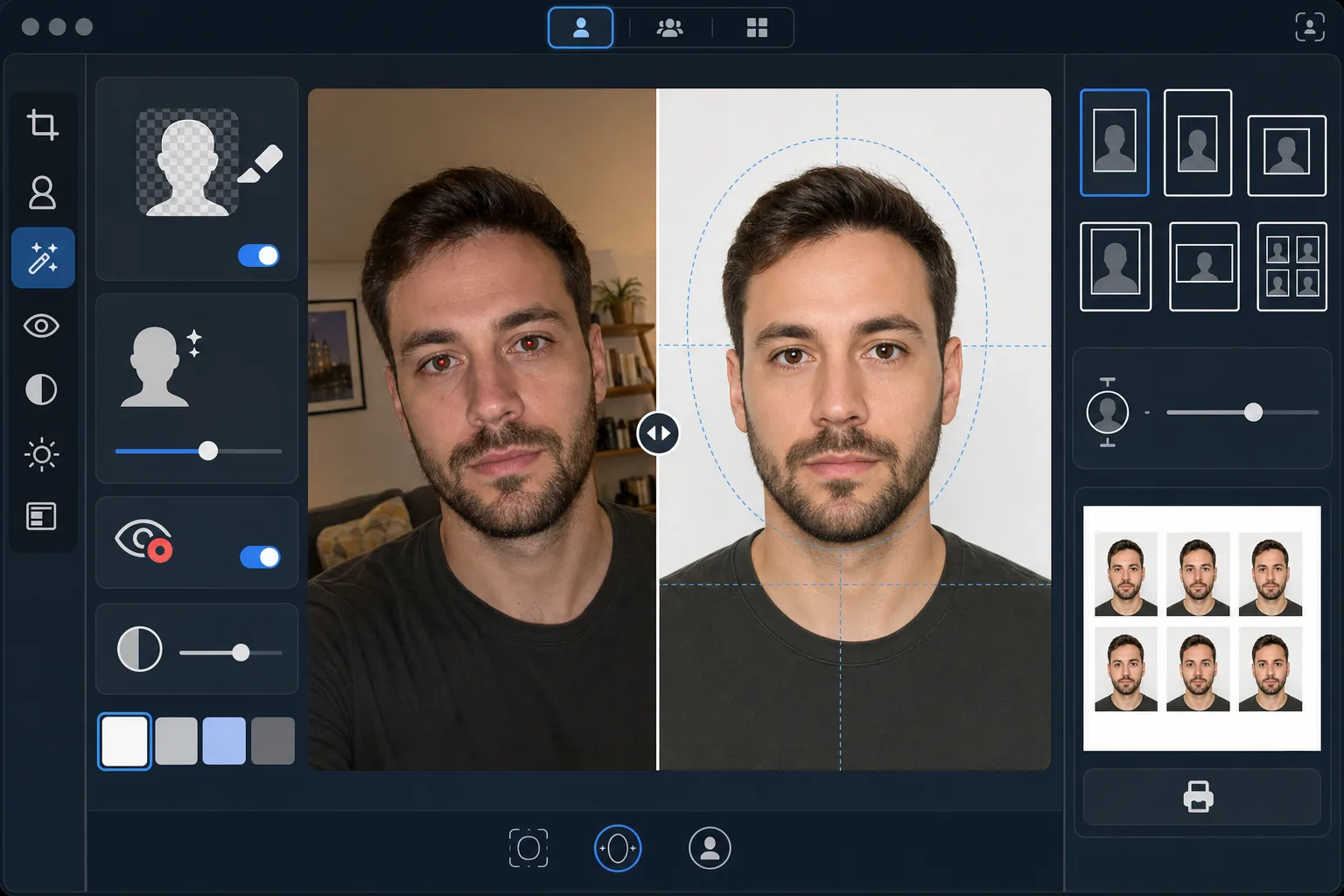
Erstellen Sie aus jedem Selfie oder Porträt konforme Ausweisfotos für Visa, Führerscheine, Personalausweise und Mitarbeiterausweise. Diese Vorlage ersetzt den Hintergrund durch die erforderliche einfarbige Fläche, passt Kopfgröße und Positionierung an die offiziellen Vorgaben an, korrigiert die Beleuchtung für eine gleichmäßige Ausleuchtung des Gesichts und gibt das Bild in den exakt erforderlichen Druckmaßen aus.
Diese Vorlage kostenlos testenPersonal template preview
Was diese Vorlage leistet
Wandelt jedes Porträtfoto in ein behördenkonformes Ausweisfoto um. Verschiedene Dokumente erfordern unterschiedliche Vorgaben — US-Reisepässe benötigen einen weißen Hintergrund mit einer Kopfhöhe zwischen 25 und 35 mm auf einem 2×2-Zoll-Abzug, während Schengen-Visa einen hellgrauen oder weißen Hintergrund im Format 35×45 mm verlangen. Diese Vorlage verarbeitet die gängigsten Ausweisfoto-Standards automatisch. Background Eraser entfernt den ursprünglichen Hintergrund und ersetzt ihn durch die erforderliche einfarbige Fläche. AI Enhance korrigiert ungleichmäßige Beleuchtung, entfernt rote Augen durch Blitzlicht und sorgt dafür, dass das Gesicht gleichmäßig ausgeleuchtet ist, ohne harte Schatten auf einer Seite — ein häufiger Ablehnungsgrund bei Behörden.
Vorlageneinstellungen
| Hintergrundfarbe | Weiß (#FFFFFF) oder Hellgrau (#E5E5E5) — je nach Ausweistyp wählbar |
| Kopfgröße | Automatische Anpassung der Kopfhöhe auf 70–80 % des Bildes (je nach Standard einstellbar) |
| Druckmaße | 2×2 in (USA), 35×45 mm (EU/Schengen), 33×48 mm (UK) — wählbar |
| Beleuchtungskorrektur | Gleichmäßige Gesichtsausleuchtung — keine Schatten auf beiden Seiten |
| Ausgabeauflösung | 600 DPI für den Fotodruck (kompatibel mit Kiosk und Heimdrucker) |
So verwenden Sie diese Vorlage
Laden Sie ein Frontalfoto hoch
Laden Sie ein scharfes, frontales Porträt hoch, das auf Augenhöhe aufgenommen wurde. Das Foto sollte Ihr ganzes Gesicht und den oberen Schulterbereich mit neutralem Ausdruck und beiden geöffneten Augen zeigen. Nehmen Sie Brille, Hüte und Kopfbedeckungen (sofern nicht aus religiösen Gründen getragen) vor der Aufnahme ab.
Wählen Sie Ihren Ausweistyp
Wählen Sie den Dokumenttyp — US-Reisepass, EU/Schengen-Visum, UK-Reisepass, Führerschein oder Personalausweis. Die Vorlage passt Hintergrundfarbe, Kopfgröße, Druckmaße und Seitenverhältnis automatisch an die offiziellen Anforderungen des gewählten Dokuments an.
Hintergrund- und Beleuchtungskorrektur
Background Eraser entfernt den ursprünglichen Hintergrund und ersetzt ihn durch die erforderliche einfarbige Fläche. AI Enhance korrigiert ungleichmäßige Beleuchtung, sodass beide Gesichtshälften gleichmäßig ausgeleuchtet sind, und entfernt jeden Farbstich durch künstliches Licht. Rote Augen durch Blitzlicht werden automatisch korrigiert.
Für den Druck exportieren
Laden Sie das Bild mit 600 DPI in den exakt für Ihren Dokumenttyp erforderlichen Druckmaßen herunter. Die Ausgabe ist für handelsübliches 4×6-Zoll-Fotopapier formatiert, mit mehreren auf einem Blatt angeordneten Ausweisfotos — für den Druck zu Hause, an einem Foto-Kiosk in der Apotheke oder in einem professionellen Druckshop.
Profi-Tipps für beste Ergebnisse
- ✓Machen Sie Ihr Foto vor einer schlichten Wand in einem gut beleuchteten Raum mit Blick zum Fenster. Auch wenn die Vorlage den Hintergrund ersetzt, liefert ein gleichmäßiges natürliches Licht auf dem Gesicht von Anfang an ein besseres Ergebnis als das Korrigieren harter Schatten durch künstliches Licht.
- ✓Behalten Sie einen neutralen Ausdruck mit geschlossenem Mund und beiden geöffneten Augen bei. Behördliche Vorgaben für Ausweisfotos lehnen Fotos mit Lächeln, zusammengekniffenen Augen oder offenem Mund konsequent ab — diese Regeln werden bei vielen Behörden durch automatische Fotoprüfsysteme durchgesetzt.
- ✓Achten Sie darauf, dass keine Haare ins Gesicht fallen oder die Augenbrauen verdecken. Das Gesicht muss vom unteren Kinn bis zum oberen Stirnrand vollständig sichtbar sein. Stecken Sie vor der Aufnahme alle ins Gesicht fallenden Haare zurück.
- ✓Tragen Sie ein Oberteil, das mit der Hintergrundfarbe kontrastiert. Ist der Hintergrund weiß, vermeiden Sie weiße Kleidung — ein dunkles oder farbiges Oberteil sorgt für eine saubere Kantentrennung und verhindert, dass Ihre Schultern mit dem Hintergrund verschmelzen.
Häufige Fragen
Wird dieses Foto bei Behörden akzeptiert?
+
Die Vorlage folgt den offiziellen Vorgaben für jeden Dokumenttyp (ICAO 9303 für internationale Reisedokumente, spezifische nationale Anforderungen für inländische Ausweise). Die endgültige Annahme liegt jedoch im Ermessen des prüfenden Sachbearbeiters. Die Vorlage stellt sicher, dass Maße, Hintergrundfarbe, Kopfgröße und Beleuchtung den veröffentlichten Anforderungen entsprechen.
Darf ich auf dem Foto eine Brille tragen?
+
Die meisten Länder (darunter die USA seit 2016) verlangen mittlerweile, dass die Brille für Reisepass- und Visafotos abgenommen wird. Die Vorlage entfernt die Brille nicht digital — nehmen Sie sie vor der Aufnahme des Ausgangsfotos ab. Religiöse Kopfbedeckungen sind in den meisten Rechtsordnungen erlaubt.
Wie drucke ich das Ergebnis aus?
+
Die Vorlage gibt ein 4×6-Zoll-Blatt mit mehreren in der richtigen Größe angeordneten Ausweisfotos aus. Drucken Sie an jedem Foto-Kiosk einer Apotheke (CVS, Walgreens, Boots), zu Hause auf Fotopapier mit 600 DPI oder in einem professionellen Druckshop. Verwenden Sie glänzendes oder mattes Fotopapier — kein normales Druckerpapier.
Erhalten Sie konforme Ausweisfotos, ohne das Haus zu verlassen
Laden Sie ein Selfie hoch und erhalten Sie behördenkonforme, druckfertige Ausweisfotos — für Reisepässe, Visa, Führerscheine und mehr.
Kostenlos testenRelated templates
More personal templates for your workflow.
Verbessern Sie Ihre Abschlussfotos durch Hintergrundbereinigung, Kappen- und Talarkorrektur, Entfernung von Fehlern und druckfertige Schärfung von Rahmen und Ankündigungen.
Verbessern Sie Konzert- und Veranstaltungsfotos mit Rauschunterdrückung bei schlechten Lichtverhältnissen, Bühnenbeleuchtung Farbkorrektur, Entfernung von Ablenkungen durch Menschenmengen und Detailwiederherstellung aus Aufnahmen an dunklen Veranstaltungsorten.
Erstellen Sie wunderschöne Fotos für die Geburtsankündigungskarte mit weichem Hintergrund, sanfter Farbabstufung, Beseitigung von Unordnung im Krankenhaus und druckfertigen Abmessungen für den Versand.
Bereiten Sie Familien- und Porträtfotos für Feiertagsgrußkarten mit festlichem Hintergrund, warmen Farbabstufungen, Schneeeffekten und Standardkartengrößen zum Drucken vor.
Stellen Sie Erinnerungsfotos wieder her und verbessern Sie sie mit sanfter Retusche, Vereinfachung des Hintergrunds, warmer, respektvoller Farbabstufung und druckfertigen Abmessungen für Gottesdienste.
Verwandeln Sie Fotos von Tierheimen und Rettungstieren mit Hintergrundersetzung, Lichtkorrektur und Verbesserung der Felldetails, damit Tiere schneller ihr Zuhause finden.