
Geburtsankündigungskarte
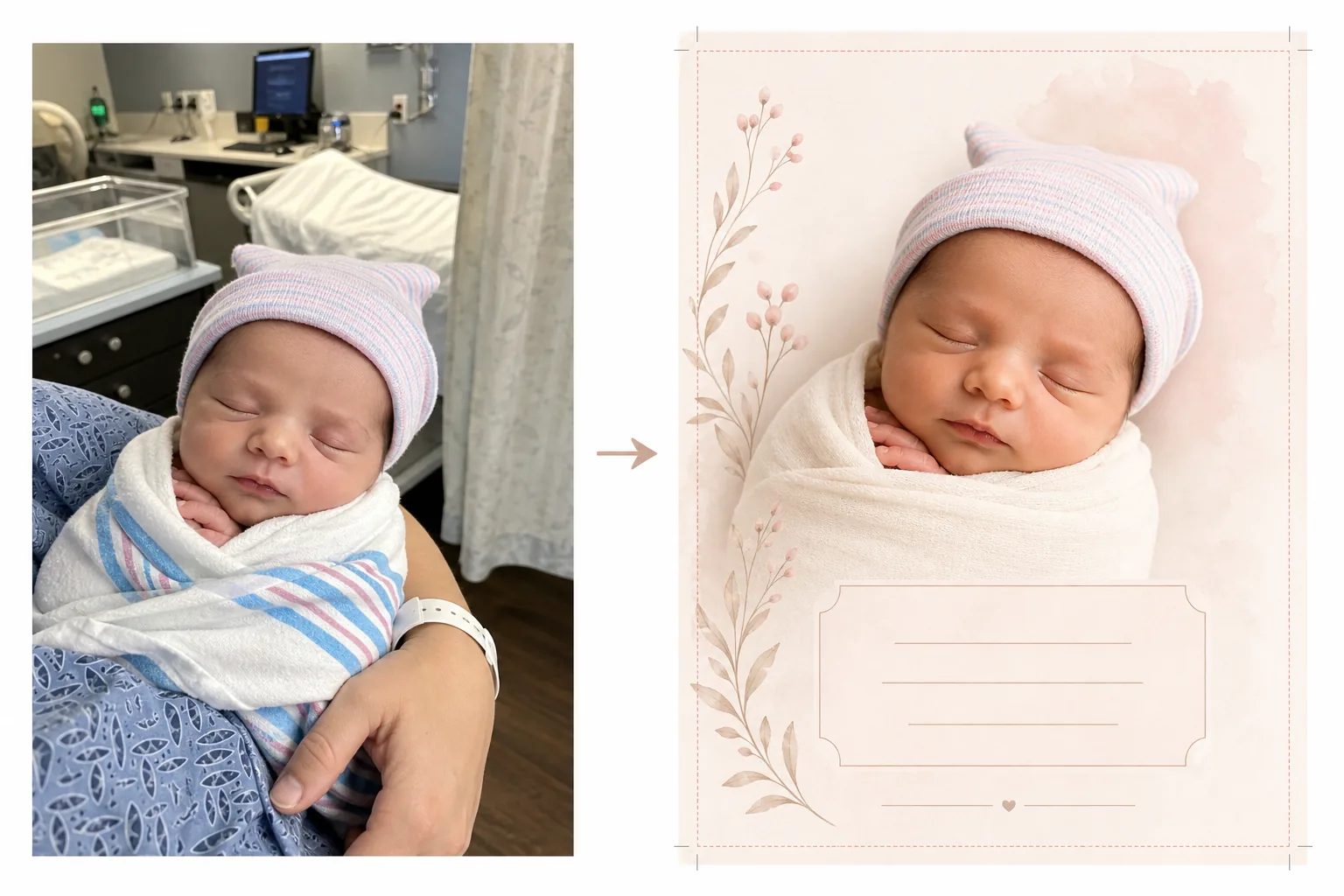
Verwandeln Sie Fotos aus dem Krankenhaus und vom ersten Tag in wunderschöne Bilder für Ankündigungskarten. Diese Vorlage entfernt die Unordnung im Krankenhaushintergrund, wendet eine sanfte, warme Farbabstufung an, stellt das Neugeborene vor sauberen oder pastellfarbenen Hintergrund frei und gibt druckfertige Bilder in den üblichen Kartenabmessungen für den postalischen Versand und das digitale Teilen aus.
Diese Vorlage kostenlos testenPersonal template preview
Was diese Vorlage leistet
Bereitet Fotos von Neugeborenen für Geburtsankündigungskarten vor, indem Schnappschüsse aus dem Krankenzimmer in saubere, zarte Bilder verwandelt werden, die sich sowohl für gedruckte Karten als auch für digitale Ankündigungen eignen. Krankenzimmer haben medizinische Geräte, Neonbeleuchtung und institutionelle Hintergründe, die die Intimität eines Neugeborenenfotos beeinträchtigen. Background Eraser stellt das Baby frei und ersetzt die Krankenhausumgebung durch einen weichen, sauberen Hintergrund in Weiß-, Creme- oder Pastelltönen. AI Enhance korrigiert die kalte Neonbeleuchtung des Krankenhauses zu warmen, sanften Tönen, die die Haut gesund und natürlich aussehen lassen. Das Ergebnis ist ein ankündigungswürdiges Foto, das sich ganz auf den Neuankömmling konzentriert, ohne sichtbaren medizinischen Kontext.
Vorlageneinstellungen
| Hintergrund | Sanftes Weiß, Creme, Zartrosa oder Salbeigrün (für Ankündigungskarten geeignet) |
| Farbabstufung | Warme, sanfte Töne (korrigiert das Krankenhaus-Neonlicht zu natürlicher Wärme) |
| Hautton | Natürliche Verbesserung der Neugeborenenhaut (weich, warm, gesund) |
| Kartenabmessungen | 5×7 in, 4×6 in oder A6 (übliche Ankündigungskartengrößen) |
| Ausgabeauflösung | 300 DPI in Kartengröße (bereit für Druckerei und Heimdrucker) |
So verwenden Sie diese Vorlage
Foto des Neugeborenen hochladen
Laden Sie ein Foto des Neugeborenen hoch — im Krankenhausbettchen, in den Armen eines Elternteils oder in eine Decke gewickelt. Die Vorlage bewältigt verschiedene Bildkompositionen, darunter Nahaufnahmen des Gesichts, Ganzkörper-Wickelposen und Eltern-Kind-Porträts. Krankenhauskittel, Monitore und am Elternteil sichtbare Armbänder werden automatisch bereinigt.
Hintergrund- und Farbumwandlung
Background Eraser entfernt das Krankenzimmer und ersetzt es durch einen weichen, sauberen Hintergrund in der von Ihnen gewählten Farbe. Die kalte Neonbeleuchtung wird zu warmen, natürlichen Tönen korrigiert. Die Haut wird sanft verbessert, damit sie gesund und natürlich aussieht, mit dem weichen, warmen Schimmer, der mit der Neugeborenenfotografie verbunden wird.
Kartenformatierung
Das Bild wird auf die von Ihnen gewählten Kartenabmessungen mit passenden Beschnittzugaben für den professionellen Druck formatiert. Es wird Platz für Textüberlagerungen reserviert — Name, Datum, Gewicht und Länge — angeordnet nach üblichen Layouts für Ankündigungskarten, mit dem Babyfoto als visuellem Mittelpunkt.
Für Druck und Teilen exportieren
Laden Sie das Bild mit 300 DPI in der von Ihnen gewählten Kartengröße herunter, um es bei einer professionellen Druckerei, einem Online-Kartendienst oder einem Heimdrucker zu drucken. Eine für das Web optimierte Version wird ebenfalls für E-Mail-Ankündigungen und das Teilen in sozialen Medien bereitgestellt.
Profi-Tipps für beste Ergebnisse
- ✓Für das brauchbarste Foto einer Ankündigungskarte machen Sie eine Nahaufnahme des Gesichts des Neugeborenen, während es schläft. Schlafende Babys haben entspannte, gelassene Gesichtsausdrücke, die sich wunderschön fotografieren lassen und gut als Blickfang eines Kartenlayouts funktionieren.
- ✓Wickeln Sie das Baby vor dem Fotografieren in eine weiße oder hellfarbige Wickeldecke. Das schafft eine saubere visuelle Grenze zwischen Baby und Hintergrund, die Background Eraser hilft, die sauberste mögliche Kante zu erzeugen, besonders um winzige Finger und feines Haar herum.
- ✓Wenn die Hände oder Arme eines Elternteils zu sehen sind, das das Baby hält, ist das in Ordnung — die Vorlage verbessert auch die Hauttöne der Eltern. Krankenhausarmbänder am Handgelenk des Elternteils werden automatisch entfernt, für ein saubereres Ergebnis.
- ✓Machen Sie mehrere Fotos und wählen Sie das mit dem besten Gesichtsausdruck und der besten Handposition. Neugeborene bewegen sich unvorhersehbar — mehrere Optionen aufzunehmen stellt sicher, dass Sie eine Aufnahme haben, in der winzige Finger, Mund und Augen am fotogensten aussehen.
Häufige Fragen
Kann damit medizinische Ausrüstung aus dem Hintergrund entfernt werden?
+
Ja. Die Vorlage ist speziell für diesen Zweck konzipiert — sie entfernt Krankenhausbettchen, Monitore, Infusionsständer, Vorhänge und Neonröhren an der Decke und ersetzt sie durch einen sauberen, für Ankündigungen geeigneten Hintergrund. Das Baby und jedes haltende Elternteil werden von der medizinischen Umgebung getrennt.
Welche Kartengrößen sind verfügbar?
+
Übliche Ankündigungskartengrößen werden unterstützt: 5×7 Zoll (am beliebtesten für per Post versandte Ankündigungen), 4×6 Zoll (Postkartenstil) und A6 (internationaler Standard). Die Ausgabe enthält passende Beschnittzugaben für den professionellen Druck.
Kann ich der Karte Text hinzufügen?
+
Die Vorlage bereitet das Foto mit reserviertem Platz für Textüberlagerungen vor, fügt aber keinen Text direkt hinzu. Verwenden Sie das exportierte Bild in Canva, Shutterfly, Minted oder einem beliebigen Kartendesign-Dienst, um den Namen des Babys, das Geburtsdatum, das Gewicht, die Länge und eine persönliche Nachricht hinzuzufügen.
Kündigen Sie Ihren Neuankömmling mit einem wunderschönen Foto an
Laden Sie Fotos aus dem Krankenhaus oder vom ersten Tag hoch und erhalten Sie weiche, warme, druckfertige Bilder, die perfekt für Geburtsankündigungskarten sind.
Kostenlos testenRelated templates
More personal templates for your workflow.
Erstellen Sie konforme Ausweisfotos für Visa, Führerscheine und Personalausweise mit der richtigen Hintergrundfarbe, Kopfgröße und Gesichtsausdrucksanforderungen.
Verbessern Sie Ihre Abschlussfotos durch Hintergrundbereinigung, Kappen- und Talarkorrektur, Entfernung von Fehlern und druckfertige Schärfung von Rahmen und Ankündigungen.
Verbessern Sie Konzert- und Veranstaltungsfotos mit Rauschunterdrückung bei schlechten Lichtverhältnissen, Bühnenbeleuchtung Farbkorrektur, Entfernung von Ablenkungen durch Menschenmengen und Detailwiederherstellung aus Aufnahmen an dunklen Veranstaltungsorten.
Bereiten Sie Familien- und Porträtfotos für Feiertagsgrußkarten mit festlichem Hintergrund, warmen Farbabstufungen, Schneeeffekten und Standardkartengrößen zum Drucken vor.
Stellen Sie Erinnerungsfotos wieder her und verbessern Sie sie mit sanfter Retusche, Vereinfachung des Hintergrunds, warmer, respektvoller Farbabstufung und druckfertigen Abmessungen für Gottesdienste.
Verwandeln Sie Fotos von Tierheimen und Rettungstieren mit Hintergrundersetzung, Lichtkorrektur und Verbesserung der Felldetails, damit Tiere schneller ihr Zuhause finden.