
Verbesserung von Abschlussfotos
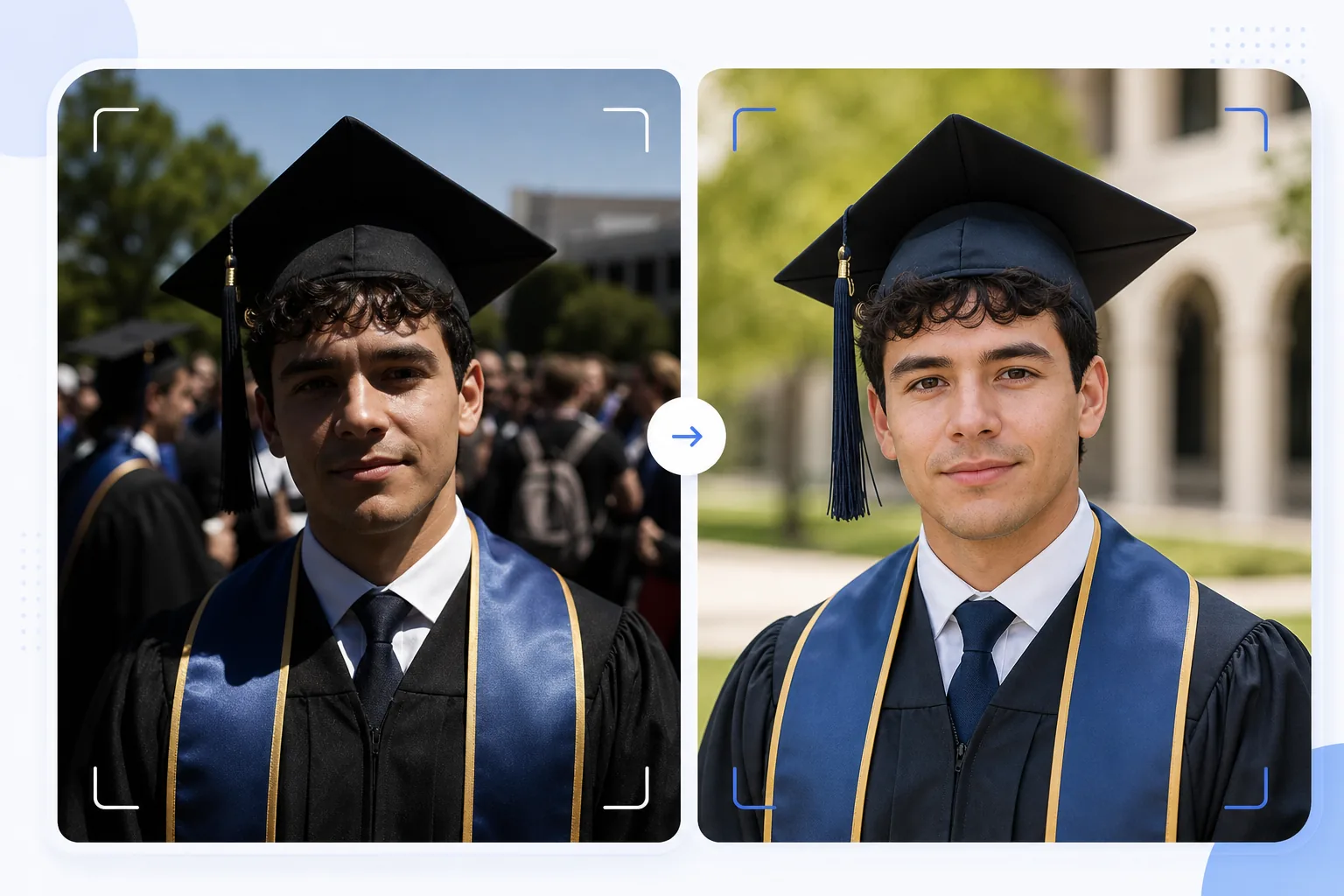
Verwandeln Sie spontane Schnappschüsse von der Abschlussfeier in rahmenwürdige Porträts. Diese Vorlage korrigiert das harte Außenlicht, das bei Abschlussfeiern üblich ist, entfernt Bildstörer und das Gewimmel der Menge hinter dem Absolventen, hebt die Farben von Kappe und Talar hervor und schärft das Bild für den Druck in großen Formaten für Wände und Kaminsimse.
Diese Vorlage kostenlos testenPersonal template preview
Was diese Vorlage macht
Verwandelt schnelle Schnappschüsse vom Tag der Abschlussfeier in gepflegte Porträts, die sich zum Rahmen, für Ankündigungen und zum Teilen in sozialen Medien eignen. Abschlussfeiern werden unter schwierigen Bedingungen fotografiert: Die harte Mittagssonne erzeugt unter dem Schirm der Kappe Schatten wie Augenringe, der Hintergrund der Menge ist chaotisch und die Talarfarben wirken in direktem Sonnenlicht ausgewaschen. AI Enhance korrigiert die Belichtung, um die Schatten unter der Kappe aufzuhellen, stellt satte Farben von Talaren und Schärpen wieder her und schärft Gesichtsdetails, die bei hastigen Aufnahmen im Gedränge weich werden. Magic Eraser entfernt Bildstörer, im Hintergrund sichtbare Personen, störende Schilder und anderes Durcheinander der Feier, um den Absolventen vor einem saubereren Hintergrund freizustellen.
Vorlageneinstellungen
| Schattenwiederherstellung | Aufhellung der Schatten unter der Kappe (hellt das Gesicht auf, ohne Lichter auszubrennen) |
| Verbesserung der Talarfarbe | Wiederherstellung der Stofffarbe für schwarze, marineblaue, kardinalrote und goldene Talare |
| Hautglättung | Leichte Reduzierung von Unreinheiten bei Erhalt der natürlichen Hauttextur |
| Hintergrundbereinigung | Bildstörer und Personen hinter dem Absolventen entfernen |
| Ausgabeauflösung | 5000px lange Kante (druckfertig bei 300 DPI bis 16×12 Zoll) |
| Schärfung | Für Porträts optimierte Schärfung (Gesichtsdetails + Talarstofftextur) |
So verwenden Sie diese Vorlage
Laden Sie Ihr Abschlussfoto hoch
Laden Sie ein beliebiges Foto der Abschlussfeier hoch: ein gestelltes Porträt, eine Aufnahme beim Gang über die Bühne, den Hutwurf oder einen spontanen Moment der Feier. Die Vorlage verarbeitet Fotos von Smartphones und Spiegelreflexkameras, die unter allen Lichtverhältnissen aufgenommen wurden, von hellem Sonnenlicht im Freien bis zu schwach beleuchteten Aulen in Innenräumen.
Beleuchtung und Farbe korrigieren
AI Enhance korrigiert die harten Schatten des viereckigen Huts, die normalerweise die Augen und die obere Gesichtspartie des Absolventen verdunkeln. Die Farben von Talar und Schärpe werden in ihren echten, satten Tönen wiederhergestellt: Schwarze Talare gewinnen an Tiefe, statt dunkelgrau zu wirken, und Ehrenschärpen zeigen ihre volle Farbsättigung.
Ablenkungen entfernen
Magic Eraser entfernt Personen aus der Menge, andere Absolventen, Klappstühle und Schilder, die hinter dem Motiv sichtbar sind. Die KI rekonstruiert den Hintergrund mit einer sauberen Version des Veranstaltungsorts (Rasen, Gebäudefassade oder Vorhang) und schafft so aus einer Menschenmenge eine porträtartige Komposition.
Für Druck und Weitergabe exportieren
Laden Sie mit 5000px langer Kante für gerahmte Drucke bis 16×12 Zoll bei 300 DPI herunter oder mit 2000px für soziale Medien und digitale Ankündigungen. Das Farbprofil ist auf sRGB für die Bildschirmanzeige oder Adobe RGB für professionellen Druck eingestellt.
Profi-Tipps für beste Ergebnisse
- ✓Wenn Sie vorausplanen können, nehmen Sie das offizielle Porträt direkt nach der Feier in einem schattigen Bereich statt in direkter Sonne auf. Schatten beseitigt die harten Kappenschatten, die am schwierigsten zu korrigieren sind. Die Vorlage kann Sonnenschatten korrigieren, aber Schatten liefert das natürlichste Ergebnis.
- ✓Nehmen Sie sowohl ein traditionelles gestelltes Porträt als auch einen spontanen Moment der Feier auf (Umarmung der Familie, Hutwurf). Die Vorlage verbessert beide Stile, und eine gepflegte Version von jedem gibt Ihnen die Wahl zwischen gerahmten Drucken und Beiträgen in sozialen Medien.
- ✓Positionieren Sie den Absolventen bei Gruppenfotos mit der Familie etwas vor der Gruppe. Das schafft eine natürliche Tiefentrennung, die Magic Eraser dabei hilft, Ablenkungen im Hintergrund freizustellen und zu entfernen, ohne die Familienmitglieder zu beeinträchtigen.
Häufige Fragen
Kann das unscharfe Abschlussfotos korrigieren?
+
AI Enhance kann Fotos mit leichter Unschärfe durch ein leichtes Verwackeln oder einen geringfügig danebenliegenden Autofokus schärfen. Stark unscharfe Fotos durch starke Bewegungsunschärfe (wie eine aus der Ferne aufgenommene Aufnahme beim Gang über die Bühne) können jedoch nicht vollständig wiederhergestellt werden: Die Vorlage verbessert Details, kann aber keine Schärfe erzeugen, die nie erfasst wurde.
Was ist mit Fotos von Feiern in Innenräumen?
+
Abschlussfotos in Innenräumen mit Aula-Beleuchtung (warmes Gelb oder gemischtes Leuchtstofflicht) werden in der Farbtemperatur korrigiert. Die Vorlage passt den Weißabgleich an, sodass Hauttöne natürlich aussehen und Talarfarben echt wirken. Bildrauschen bei wenig Licht durch hohe ISO-Einstellungen wird reduziert, während Gesichtsdetails erhalten bleiben.
Kann ich den Hintergrund vollständig entfernen?
+
Ja. Sie können die Hintergrundbereinigung verwenden, um alle Hintergrundelemente zu entfernen und durch eine einfarbige Fläche oder einen Farbverlauf für eine Studio-Porträt-Optik zu ersetzen. Das funktioniert gut, wenn der ursprüngliche Hintergrund der Feier für eine selektive Entfernung zu unübersichtlich ist.
Rahmenwürdige Abschlussporträts aus Schnappschüssen der Feier
Laden Sie Ihre Fotos vom Tag der Abschlussfeier hoch und erhalten Sie druckfertige, verbesserte Porträts mit sauberen Hintergründen und leuchtenden Kappen- und Talarfarben.
Kostenlos testenRelated templates
More personal templates for your workflow.
Erstellen Sie konforme Ausweisfotos für Visa, Führerscheine und Personalausweise mit der richtigen Hintergrundfarbe, Kopfgröße und Gesichtsausdrucksanforderungen.
Verbessern Sie Konzert- und Veranstaltungsfotos mit Rauschunterdrückung bei schlechten Lichtverhältnissen, Bühnenbeleuchtung Farbkorrektur, Entfernung von Ablenkungen durch Menschenmengen und Detailwiederherstellung aus Aufnahmen an dunklen Veranstaltungsorten.
Erstellen Sie wunderschöne Fotos für die Geburtsankündigungskarte mit weichem Hintergrund, sanfter Farbabstufung, Beseitigung von Unordnung im Krankenhaus und druckfertigen Abmessungen für den Versand.
Bereiten Sie Familien- und Porträtfotos für Feiertagsgrußkarten mit festlichem Hintergrund, warmen Farbabstufungen, Schneeeffekten und Standardkartengrößen zum Drucken vor.
Stellen Sie Erinnerungsfotos wieder her und verbessern Sie sie mit sanfter Retusche, Vereinfachung des Hintergrunds, warmer, respektvoller Farbabstufung und druckfertigen Abmessungen für Gottesdienste.
Verwandeln Sie Fotos von Tierheimen und Rettungstieren mit Hintergrundersetzung, Lichtkorrektur und Verbesserung der Felldetails, damit Tiere schneller ihr Zuhause finden.