
Feiertagsgrußkarte
Erstellen Sie kartenwürdige Feiertagsfotos aus alltäglichen Familienschnappschüssen. Diese Vorlage entfernt störende Hintergründe und ersetzt sie durch festliche, saisonale Kulissen, wendet eine warme Feiertags-Farbabstufung an, verschönert die Gesichter der ganzen Familie und gibt das Ergebnis in den Standardmaßen einer Grußkarte aus, bereit zum Drucken und Versenden.
Diese Vorlage kostenlos testenPersonal template preview
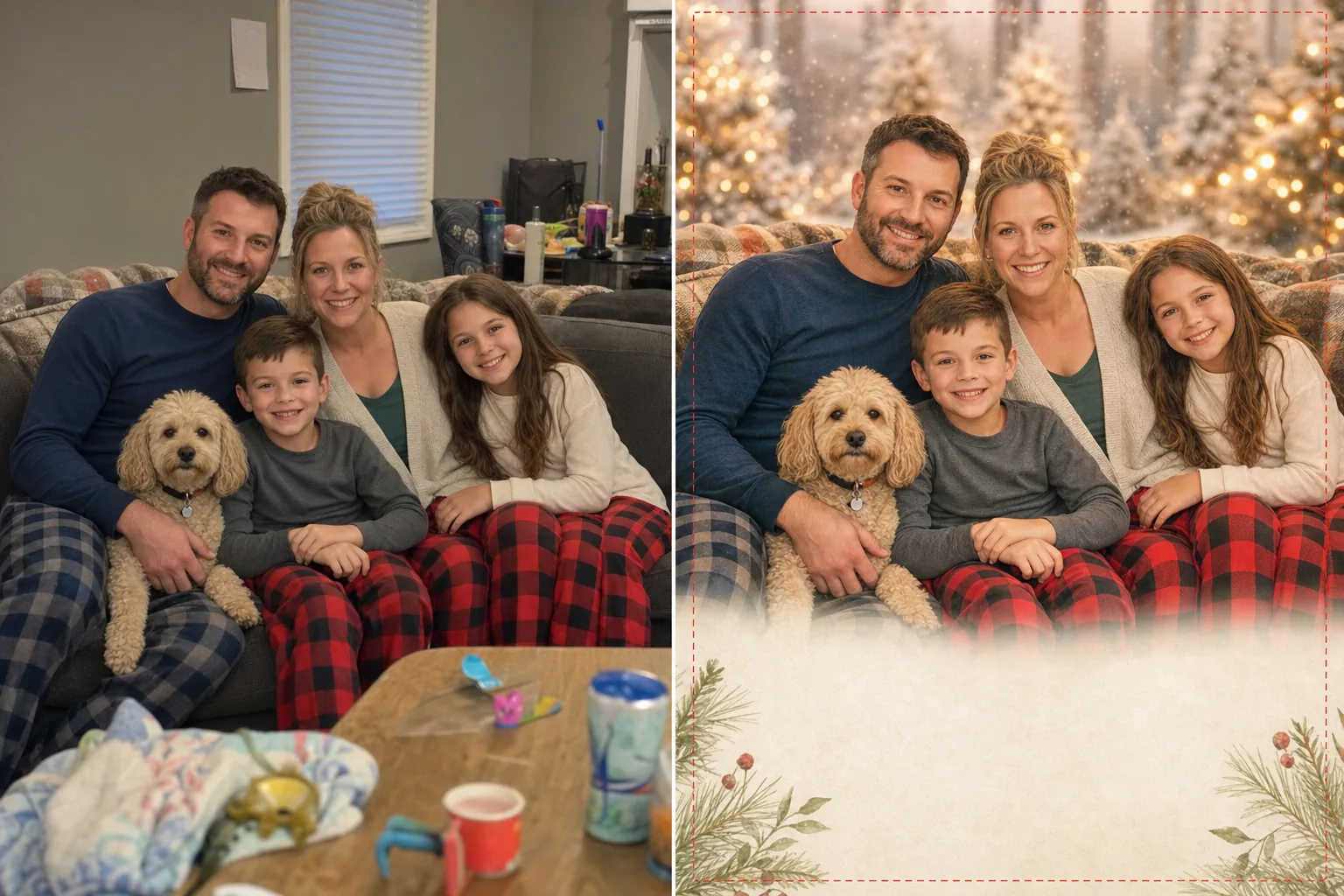
Was diese Vorlage macht
Verwandelt beiläufige Familienfotos in Feiertagsgrußkarten-Bilder, die für Weihnachten, Chanukka, Neujahr und saisonale Karten geeignet sind. Die meisten Familien planen kein professionelles Feiertags-Fotoshooting — sie müssen mit dem besten Schnappschuss von einem Treffen, einem Ausflug oder einem spontanen Moment arbeiten. Background Eraser entfernt den ursprünglichen Hintergrund (Wohnzimmer, Garten, Restaurant) und ersetzt ihn durch eine festliche, saisonale Option: warmes Bokeh aus Feiertagslichtern, eine verschneite Szene im Freien, eine elegante Volltonfarbe mit dezenter Textur oder eine Winterlandschaft. AI Enhance gleicht die Belichtung über alle Familienmitglieder hinweg aus, korrigiert Blitz und Innenbeleuchtung und wendet eine warme Feiertags-Farbabstufung an, die der gesamten Karte ein stimmiges, bewusstes Aussehen verleiht.
Vorlageneinstellungen
| Hintergrundoptionen | Feiertags-Bokeh-Lichter, verschneite Szene, elegante Volltonfarbe oder Winterlandschaft |
| Farbabstufung | Warme Feiertage (goldene Töne, dezente Wärme, festliche Atmosphäre) |
| Gesichtsverschönerung | Ausgeglichene Belichtung pro Gesicht, Reduzierung von Hautunreinheiten und Aufhellung der Augen |
| Kartenmaße | 5×7 in (flache Karte), 4×6 in (Postkarte), A5 (Klappkarte) |
| Ausgabeauflösung | 300 DPI in Kartengröße mit 1/8" Beschnittrand |
So verwenden Sie diese Vorlage
Laden Sie Ihr Familienfoto hoch
Laden Sie ein Familienfoto, ein Paarporträt, ein Haustierfoto oder ein beliebiges Bild hoch, das Sie als Mittelpunkt Ihrer Feiertagskarte verwenden möchten. Das Foto muss kein Feiertagsmotiv haben — die Vorlage fügt die saisonale Stimmung hinzu. Wählen Sie die Aufnahme, auf der alle am besten aussehen, unabhängig vom Hintergrund.
Festlichen Hintergrund anwenden
Background Eraser stellt die Motive frei und platziert sie vor einem festlichen Feiertagshintergrund. Wählen Sie zwischen warmen Bokeh-Lichtern, einer verschneiten Szene im Freien, einer eleganten, strukturierten Volltonfarbe oder einer Winterlandschaft. Der Hintergrund wird an die Lichtrichtung des Originalfotos angepasst, um eine natürliche Komposition zu erzielen.
Feiertags-Farbabstufung und Verschönerung
Eine warme Feiertags-Farbabstufung wird angewendet — goldene Hauttöne, satte Kleidungsfarben und eine festliche Wärme, die die Motive mit dem saisonalen Hintergrund verbindet. Jedes Gesicht erhält einen individuellen Belichtungsausgleich, eine sanfte Reduzierung von Hautunreinheiten und eine Aufhellung der Augen für ein gepflegtes Familienporträt.
In Kartenmaßen exportieren
Laden Sie in 300 DPI in der von Ihnen gewählten Kartengröße mit passenden Beschnitträndern herunter. Das Ergebnis ist bereit zum Hochladen bei Shutterfly, Minted, Snapfish, Vistaprint oder jedem anderen Kartendruckdienst. Eine für das Web optimierte Version ist für Feiertagsgrüße per E-Mail und in sozialen Medien enthalten.
Profi-Tipps für beste Ergebnisse
- ✓Stimmen Sie die Farben der Familienoutfits aufeinander ab — Erdtöne, Juwelentöne oder das klassische Rot und Grün — für das gepflegteste Kartenbild. Die Vorlage verstärkt die Kleidungsfarben, und aufeinander abgestimmte Outfits wirken bewusster als zufällige Alltagskleidung.
- ✓Nehmen Sie Haustiere mit aufs Foto. Feiertagskarten mit Haustieren erhalten von den Empfängern durchweg positivere Reaktionen. Die Vorlage behandelt die Fellkanten von Haustieren beim Entfernen des Hintergrunds mit der gleichen Präzision wie menschliches Haar.
- ✓Wenn Ihre Familie über mehrere Orte verteilt ist, verarbeiten Sie einzelne Fotos mit demselben Hintergrund und denselben Einstellungen über die Vorlage und kombinieren Sie sie anschließend in einem Kartenlayout. Der einheitliche Hintergrund und die einheitliche Farbbehandlung lassen separat fotografierte Familienmitglieder so aussehen, als wären sie zusammen gewesen.
Häufige Fragen
Kann ich ein Sommerfoto für eine winterliche Feiertagskarte verwenden?
+
Ja. Die Vorlage ersetzt den Hintergrund vollständig, sodass ein Strandurlaubsfoto vor einer verschneiten Kulisse platziert werden kann. Der wichtigste Punkt ist die Kleidung — Shorts und Trägertops vor einem verschneiten Hintergrund wirken unstimmig. Wählen Sie ein Foto, auf dem die Kleidung saisonal neutral oder passend ist.
Was, wenn ich den ursprünglichen Hintergrund behalten möchte?
+
Sie können das Ersetzen des Hintergrunds überspringen und nur die Funktionen zur Farbabstufung und Gesichtsverschönerung verwenden. Das funktioniert gut, wenn der ursprüngliche Hintergrund bereits festlich ist (vor einem Weihnachtsbaum, an einem Kamin) und nur die feiertägliche Wärmebehandlung benötigt.
Welche Druckdienste sind kompatibel?
+
Die Ausgabe mit 300 DPI und Beschnitträndern ist mit allen großen Kartendruckdiensten kompatibel, darunter Shutterfly, Minted, Snapfish, Vistaprint, Costco Photo und Walgreens. Die Standardmaße 5×7 und 4×6 Zoll entsprechen den beliebtesten Kartenformaten dieser Dienste.
Feiertagskarten, die aussehen, als hätten Sie einen Fotografen engagiert
Laden Sie ein beliebiges Familienfoto hoch und erhalten Sie ein festliches, gepflegtes, druckfertiges Grußkartenbild, das Feiertagsfreude verbreitet.
Kostenlos testenRelated templates
More personal templates for your workflow.
Erstellen Sie konforme Ausweisfotos für Visa, Führerscheine und Personalausweise mit der richtigen Hintergrundfarbe, Kopfgröße und Gesichtsausdrucksanforderungen.
Verbessern Sie Ihre Abschlussfotos durch Hintergrundbereinigung, Kappen- und Talarkorrektur, Entfernung von Fehlern und druckfertige Schärfung von Rahmen und Ankündigungen.
Verbessern Sie Konzert- und Veranstaltungsfotos mit Rauschunterdrückung bei schlechten Lichtverhältnissen, Bühnenbeleuchtung Farbkorrektur, Entfernung von Ablenkungen durch Menschenmengen und Detailwiederherstellung aus Aufnahmen an dunklen Veranstaltungsorten.
Erstellen Sie wunderschöne Fotos für die Geburtsankündigungskarte mit weichem Hintergrund, sanfter Farbabstufung, Beseitigung von Unordnung im Krankenhaus und druckfertigen Abmessungen für den Versand.
Stellen Sie Erinnerungsfotos wieder her und verbessern Sie sie mit sanfter Retusche, Vereinfachung des Hintergrunds, warmer, respektvoller Farbabstufung und druckfertigen Abmessungen für Gottesdienste.
Verwandeln Sie Fotos von Tierheimen und Rettungstieren mit Hintergrundersetzung, Lichtkorrektur und Verbesserung der Felldetails, damit Tiere schneller ihr Zuhause finden.