
Konzert- & Veranstaltungsfoto
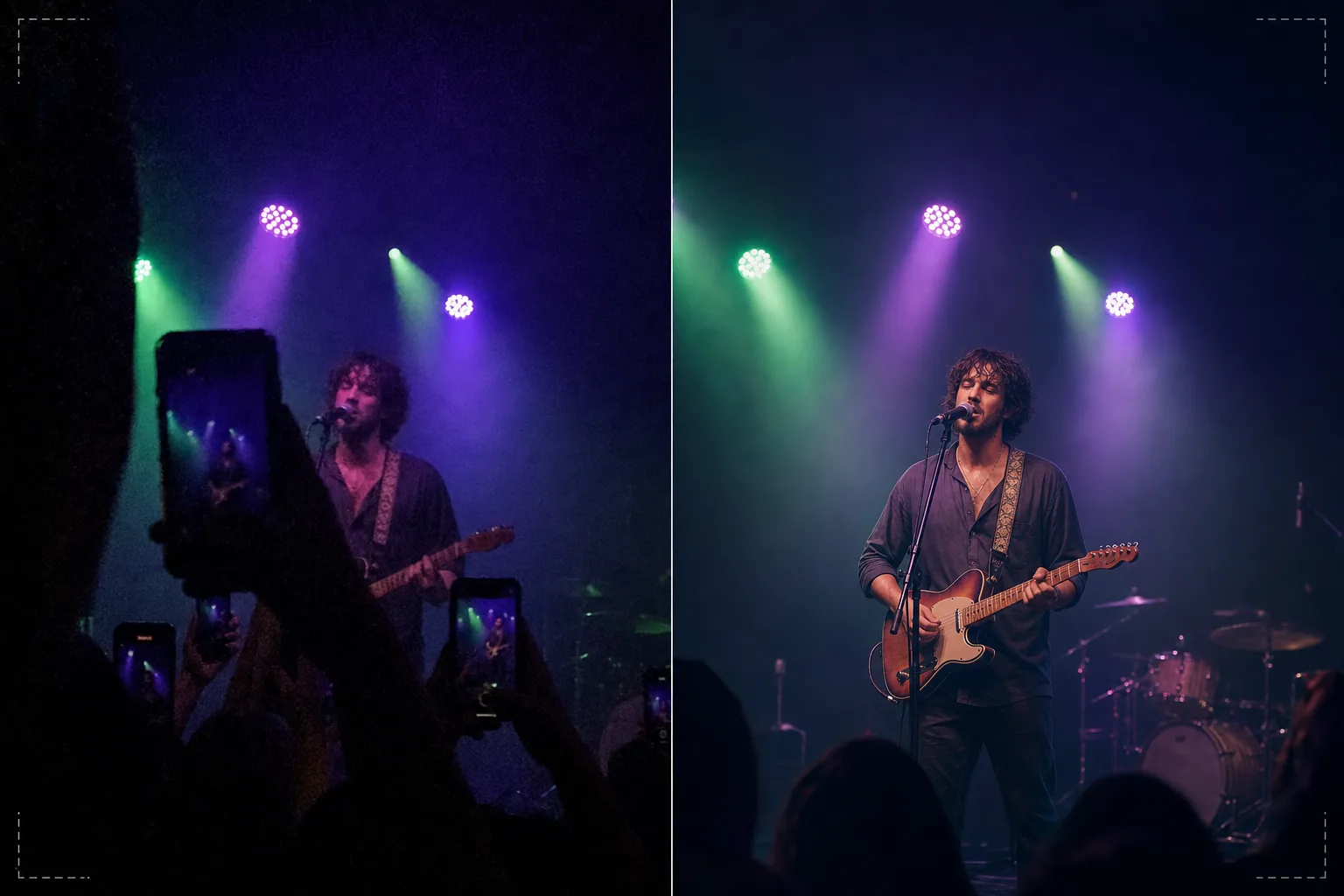
Retten Sie dunkle, verrauschte Konzert- und Veranstaltungsfotos und verwandeln Sie sie in teilbare Erinnerungen. Diese Vorlage reduziert das Rauschen bei schlechten Lichtverhältnissen drastisch, stellt Details aus unterbelichteten Aufnahmen wieder her, korrigiert aggressive Farbstiche der Bühnenbeleuchtung, entfernt Arme und Telefone, die Ihre Sicht versperren, und schärft den Künstler oder das Veranstaltungsmotiv.
Diese Vorlage kostenlos testenPersonal template preview
Was diese Vorlage leistet
Rettet die schwierigen Fotos, die bei Konzerten, Festivals, Sportveranstaltungen und Hallenaufführungen entstehen, wo die Lichtverhältnisse Smartphone-Kameras überfordern. Konzertfotos sind die technisch anspruchsvollsten Aufnahmen, die Menschen regelmäßig machen — extrem schwaches Licht erzwingt hohes ISO-Rauschen, gemischtes farbiges Bühnenlicht erzeugt bizarre Farbstiche, und die Entfernung zur Bühne lässt Gesichter und Details klein und weich erscheinen. AI Enhance wendet eine intelligente Rauschunterdrückung an, die das Kornmuster entfernt und gleichzeitig die zugrunde liegenden Details wiederherstellt, korrigiert die violetten, grünen und roten Farbstiche der Bühnenbeleuchtung, um natürliche Haut- und Instrumententöne zum Vorschein zu bringen, und schärft den Künstler, um Gesichtsausdrücke und Instrumentendetails hervorzuheben. Magic Eraser entfernt erhobene Arme, Telefone und Köpfe anderer Zuschauer, die Ihre Sicht versperren.
Vorlageneinstellungen
| Rauschunterdrückung | KI-Entrauschung (stellt Details aus hohem ISO-Korn bis ISO 12800 wieder her) |
| Farbkorrektur | Entfernung von Bühnenlicht-Farbstichen (Violett, Grün, Rot, Blau neutralisiert) |
| Schattenwiederherstellung | Unterbelichtete Bereiche um bis zu 3 Blendenstufen anheben |
| Entfernung der Menschenmenge | Erhobene Arme, Telefone und störende Köpfe entfernen |
| Motivschärfung | Selektive Schärfung von Künstler/Bühne (bewahrt die Bokeh-Atmosphäre) |
So verwenden Sie diese Vorlage
Laden Sie Ihr Konzertfoto hoch
Laden Sie Handy- oder Kamerafotos von Konzerten, Festivals, Theateraufführungen, Comedy-Shows oder Sportveranstaltungen hoch. Die Vorlage bewältigt die extremen Bedingungen dieser Veranstaltungsorte — nahezu dunkle Belichtungen, stark farbiges Bühnenlicht, Bewegungsunschärfe sich bewegender Künstler und durch Zuschauer verdeckte Sichten.
Rauschunterdrückung und Detailwiederherstellung
AI Enhance entfernt das Korn des hohen ISO-Rauschens und bewahrt dabei die zugrunde liegenden Bilddetails. Unterbelichtete Schatten werden angehoben, um Gesichter, Instrumente und Bühnenelemente zum Vorschein zu bringen, die in der Originalaufnahme nahezu unsichtbar waren. Die Rauschunterdrückung ist so kalibriert, dass die atmosphärische Qualität des Veranstaltungsorts erhalten bleibt, anstatt das Bild künstlich glatt aussehen zu lassen.
Farb- und Beleuchtungskorrektur
Aggressive Farbstiche der Bühnenbeleuchtung werden korrigiert, sodass Hauttöne, Kleidung und Instrumente in erkennbaren Farben erscheinen. Sie können wählen, ob Sie das Bühnenlicht für einen natürlichen Look vollständig neutralisieren oder teilweise korrigieren, um einen Teil der atmosphärischen Farbbeleuchtung zu bewahren und gleichzeitig die extremsten Farbstiche zu reduzieren.
Exportieren Sie Ihre verbesserten Erinnerungen
Laden Sie das verbesserte Foto zum Teilen in sozialen Medien, für persönliche Archive oder zum Drucken herunter. Das Ergebnis bewahrt die atmosphärische Qualität der Live-Veranstaltung und macht das Bild zugleich klar genug, dass Gesichter, Ausdrücke und Momente sichtbar und als Andenken bedeutungsvoll sind.
Profi-Tipps für die besten Ergebnisse
- ✓Fotografieren Sie in Momenten heller Bühnenbeleuchtung — Scheinwerfer, Pyrotechnik, Bildschirmübergänge — anstatt während dunkler, atmosphärischer Abschnitte. Die Vorlage kann erhebliche Schattendetails wiederherstellen, aber Fotos, die in den hellsten Momenten aufgenommen wurden, verfügen über die meisten zugrunde liegenden Daten zur Bearbeitung.
- ✓Verwenden Sie den Serienbildmodus, wenn Sie sich bewegende Künstler fotografieren. Bewegungsunschärfe durch die Handgeste eines Sängers oder den zupfenden Arm eines Gitarristen lässt sich nachträglich nicht entfernen, aber ein Bild aus einer Serie von zehn kann einen scharfen Moment einfangen, den die Vorlage dann verbessern kann.
- ✓Halten Sie Ihr Telefon mit beiden Händen und stützen Sie die Ellbogen am Körper ab, um Verwacklungen zu minimieren. Verwacklungen verstärken die Schwierigkeit der Konzertfotografie bei schwachem Licht. Ein ruhigeres Ausgangsfoto liefert dem Rauschunterdrückungsalgorithmus sauberere Daten und erzeugt ein schärferes Endbild.
Häufige Fragen
Kann dies Fotos korrigieren, die fast völlig dunkel sind?
+
Die Vorlage kann Details aus Aufnahmen wiederherstellen, die 2–3 Blendenstufen unterbelichtet sind — Bilder, auf denen Sie das Motiv kaum erkennen können. Jenseits von 3 Blendenstufen Unterbelichtung sind die Sensordaten größtenteils Rauschen und das wiederhergestellte Bild zeigt erhebliche Artefakte. Je heller die Originalaufnahme, desto besser das Ergebnis.
Was ist mit Konzert-Videomaterial?
+
Extrahieren Sie die besten Einzelbilder aus Ihrem Konzertvideo und verarbeiten Sie sie einzeln. Videobilder haben eine geringere Auflösung als Standbilder, profitieren aber erheblich von der Rauschunterdrückung und Farbkorrektur und ergeben teilbare Bilder aus Material, das als Video zu verrauscht war.
Wirkt das Entfernen von Sichtbehinderungen durch die Menge natürlich?
+
Das Entfernen erhobener Telefone, Arme und Köpfe aus der Menge vor Ihnen funktioniert gut, wenn die Verdeckung einen kleinen Teil des Bildes abdeckt. Die KI rekonstruiert die Bühne und den Hintergrund hinter den entfernten Elementen. Das Entfernen großer Verdeckungen, die den Großteil des Motivs bedecken, ist weniger wirksam.
Verwandeln Sie dunkle Konzertaufnahmen in lebendige Erinnerungen
Laden Sie Ihre Veranstaltungsfotos hoch und stellen Sie die Momente wieder her, die Ihre Kamera bei anspruchsvoller Veranstaltungsbeleuchtung kaum einfangen konnte.
Kostenlos testenRelated templates
More personal templates for your workflow.
Erstellen Sie konforme Ausweisfotos für Visa, Führerscheine und Personalausweise mit der richtigen Hintergrundfarbe, Kopfgröße und Gesichtsausdrucksanforderungen.
Verbessern Sie Ihre Abschlussfotos durch Hintergrundbereinigung, Kappen- und Talarkorrektur, Entfernung von Fehlern und druckfertige Schärfung von Rahmen und Ankündigungen.
Erstellen Sie wunderschöne Fotos für die Geburtsankündigungskarte mit weichem Hintergrund, sanfter Farbabstufung, Beseitigung von Unordnung im Krankenhaus und druckfertigen Abmessungen für den Versand.
Bereiten Sie Familien- und Porträtfotos für Feiertagsgrußkarten mit festlichem Hintergrund, warmen Farbabstufungen, Schneeeffekten und Standardkartengrößen zum Drucken vor.
Stellen Sie Erinnerungsfotos wieder her und verbessern Sie sie mit sanfter Retusche, Vereinfachung des Hintergrunds, warmer, respektvoller Farbabstufung und druckfertigen Abmessungen für Gottesdienste.
Verwandeln Sie Fotos von Tierheimen und Rettungstieren mit Hintergrundersetzung, Lichtkorrektur und Verbesserung der Felldetails, damit Tiere schneller ihr Zuhause finden.