
Gedenkfoto
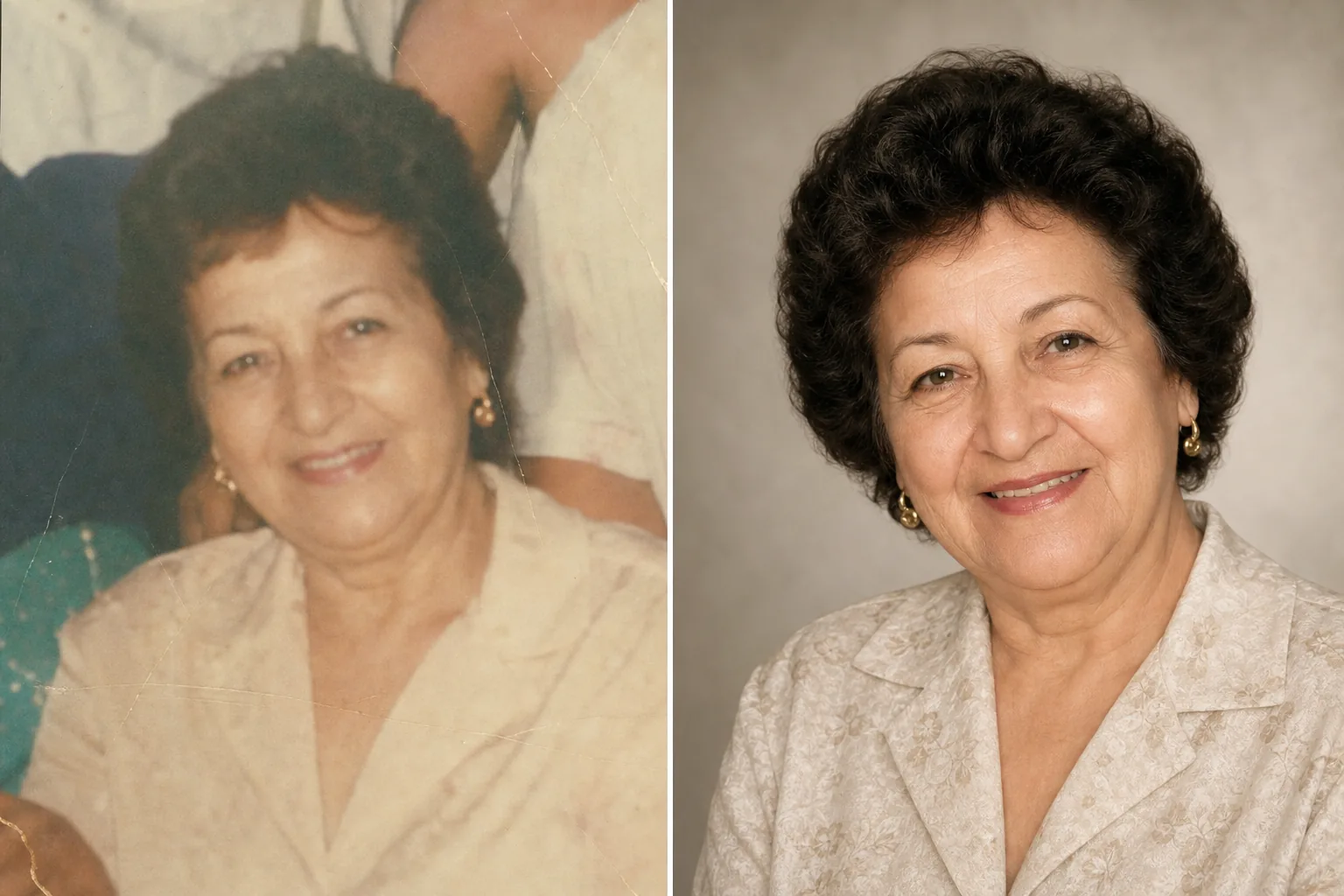
Ehren Sie geliebte Menschen mit einem wunderschön aufbereiteten Gedenkfoto. Diese Vorlage stellt ältere Fotos behutsam wieder her, verbessert Schärfe und Farbe verblasster Originale, entfernt störende Hintergründe und liefert ein würdevolles, druckfertiges Porträt, das sich für Trauerfeiern, Nachrufe und dauerhafte Gedenkdarstellungen eignet.
Diese Vorlage kostenlos testenPersonal template preview
Was diese Vorlage leistet
Bereitet Porträtfotos für Trauerfeiern, Nachrufe, Trauerprogramme, Gedenkdarstellungen und Tributmontagen mit der Sorgfalt und dem Respekt vor, den der Anlass verlangt. Oft wurde das beste verfügbare Foto eines geliebten Menschen vor Jahren aufgenommen – es kann ein beiläufiger Schnappschuss sein, ein Gruppenfoto, aus dem die Person herausgelöst werden muss, oder ein verblasster, eingescannter Abzug. AI Enhance stellt Farbe und Schärfe älterer oder verblasster Fotos wieder her, hellt unterbelichtete Bilder auf und glättet kleine Unvollkommenheiten behutsam, während die authentische Ähnlichkeit der Person erhalten bleibt. Magic Eraser entfernt störende Elemente im Hintergrund und kann eine einzelne Person aus einem Gruppenfoto herauslösen. Der Gesamtton ist warm, würdevoll und respektvoll – niemals überbearbeitet.
Vorlageneinstellungen
| Fotorestaurierung | Farbe und Details aus verblassten oder gealterten Fotos zurückgewinnen |
| Hintergrund | Sanfter neutraler Verlauf, einfarbig oder vereinfachtes Original |
| Farbabstufung | Warm, würdevoll (natürliche Hauttöne, sanfte Wärme) |
| Verbesserungsgrad | Dezent und respektvoll (bewahrt die authentische Ähnlichkeit) |
| Ausgabeabmessungen | 8×10 Zoll bei 300 DPI (Standard-Gedenkporträt) oder individuell |
So verwenden Sie diese Vorlage
Porträtfoto hochladen
Laden Sie das beste verfügbare Foto der Person hoch – ein eigenständiges Porträt, einen Ausschnitt aus einem Gruppenfoto oder den Scan eines gedruckten Fotos. Die Vorlage verarbeitet Fotos aus jeder Epoche und in jedem Zustand, einschließlich alter Abzüge mit Farbverblassen, Knicken und kleineren Schäden.
Wiederherstellen und verbessern
AI Enhance gewinnt verblasste Farben zurück, schärft weich gewordene Details und korrigiert den gelben oder blauen Farbstich, der in alternden Fotos entsteht. Bei von Abzügen gescannten Fotos werden Scan-Artefakte und Papierstruktur reduziert. Die Verbesserung ist bewusst dezent – das Ziel ist, die Person so darzustellen, wie sie war, mit Klarheit und Wärme, ohne ihr Aussehen zu verändern.
Hintergrund und Bildausschnitt
Der Hintergrund wird durch eine sanfte, neutrale Option ersetzt – einen zarten Verlauf, eine gedämpfte einfarbige Fläche oder eine weich gezeichnete Version des ursprünglichen Umfelds. Stammt das Foto aus einer Gruppe, wird die Person herausgelöst und als eigenständiges Porträt ausgerichtet. Die Komposition wird an die Standardproportionen eines Gedenkporträts angepasst.
Für Feiern und Darstellung exportieren
Laden Sie in 8×10 Zoll bei 300 DPI für den Druck im Bestattungsinstitut und bei der Trauerfeier herunter oder in individuellen Abmessungen für Nachruf-Veröffentlichungen, Gedenkkarten und digitale Gedenkdarstellungen. Das Ergebnis eignet sich sowohl für den Farb- als auch für den Schwarz-Weiß-Druck.
Profi-Tipps für die besten Ergebnisse
- ✓Wählen Sie ein Foto, auf dem der Ausdruck und die Persönlichkeit der Person zur Geltung kommen, auch wenn die technische Qualität nicht perfekt ist. Die Vorlage kann die Bildqualität erheblich verbessern, aber die emotionale Verbindung zum Foto zählt mehr als die Auflösung.
- ✓Verwenden Sie beim Scannen gedruckter Fotos die höchste DPI-Zahl, die Ihr Scanner unterstützt (mindestens 600 DPI), und scannen Sie auf einer sauberen, ebenen Fläche. Hochauflösende Scans geben der Vorlage mehr Daten, um Details wiederherzustellen und Verblassen zu korrigieren.
- ✓Wenn kein Einzelporträt vorhanden ist, kann die Vorlage eine Person aus einem Gruppenfoto herauslösen. Wählen Sie ein Gruppenfoto, auf dem das Gesicht der Person klar sichtbar, unverdeckt und der Kamera zugewandt ist, um das beste Ergebnis beim Herauslösen zu erzielen.
- ✓Erwägen Sie, sowohl eine Farb- als auch eine Schwarz-Weiß-Version zu erstellen. Schwarz-Weiß-Gedenkporträts haben eine zeitlose, würdevolle Qualität und eignen sich gut, wenn das ursprüngliche Farbfoto stark verblasst ist oder Farbschäden aufweist, die nicht vollständig behoben werden können.
Häufige Fragen
Kann damit stark beschädigte Fotos wiederhergestellt werden?
+
Die Vorlage bewältigt mäßige Schäden – Verblassen, Farbverschiebungen, leichte Knicke und altersbedingte Unschärfe. Schwere Schäden wie große Risse, starke Wasserflecken oder erheblich fehlende Bereiche erfordern eine manuelle Restaurierung durch einen professionellen Retuscheur. Die Vorlage ist am wirksamsten, wenn Gesicht und wesentliche Merkmale im Original sichtbar und intakt sind.
Wird das verbesserte Foto natürlich aussehen?
+
Ja. Die Verbesserung ist so abgestimmt, dass sie dezent und respektvoll bleibt. Die Person wird wie sie selbst aussehen – nicht jünger, nicht älter, nicht anders. Das Ziel ist, das Foto so darzustellen, als wäre es bei besserem Licht, mit einer besseren Kamera und an einem besseren Tag aufgenommen worden, während jeder Aspekt dessen, wer die Person war, bewahrt bleibt.
Kann ich das für eine Video-Gedenk-Diashow verwenden?
+
Ja. Verarbeiten Sie jedes Foto mit der Vorlage unter Verwendung einheitlicher Hintergrund- und Farbeinstellungen für eine stimmige Diashow. Die einheitliche Bearbeitung verbindet Fotos aus verschiedenen Epochen und Quellen zu einem geschlossenen visuellen Tribut.
Ein Gedenkfoto, so schön wie die Erinnerungen
Laden Sie ein beliebiges Foto eines geliebten Menschen hoch und erhalten Sie ein behutsam wiederhergestelltes, warm aufbereitetes Porträt, bereit für Trauerfeiern und dauerhaftes Gedenken.
Kostenlos testenRelated templates
More personal templates for your workflow.
Erstellen Sie konforme Ausweisfotos für Visa, Führerscheine und Personalausweise mit der richtigen Hintergrundfarbe, Kopfgröße und Gesichtsausdrucksanforderungen.
Verbessern Sie Ihre Abschlussfotos durch Hintergrundbereinigung, Kappen- und Talarkorrektur, Entfernung von Fehlern und druckfertige Schärfung von Rahmen und Ankündigungen.
Verbessern Sie Konzert- und Veranstaltungsfotos mit Rauschunterdrückung bei schlechten Lichtverhältnissen, Bühnenbeleuchtung Farbkorrektur, Entfernung von Ablenkungen durch Menschenmengen und Detailwiederherstellung aus Aufnahmen an dunklen Veranstaltungsorten.
Erstellen Sie wunderschöne Fotos für die Geburtsankündigungskarte mit weichem Hintergrund, sanfter Farbabstufung, Beseitigung von Unordnung im Krankenhaus und druckfertigen Abmessungen für den Versand.
Bereiten Sie Familien- und Porträtfotos für Feiertagsgrußkarten mit festlichem Hintergrund, warmen Farbabstufungen, Schneeeffekten und Standardkartengrößen zum Drucken vor.
Verwandeln Sie Fotos von Tierheimen und Rettungstieren mit Hintergrundersetzung, Lichtkorrektur und Verbesserung der Felldetails, damit Tiere schneller ihr Zuhause finden.