
Twitch-Banner-Foto
Gestalten Sie ein professionelles Twitch-Kanal-Banner, das Ihren Stream schon beim ersten Besuch etabliert wirken lässt. Diese Vorlage isoliert Ihr Porträt von jedem Hintergrund, platziert es auf Gaming-Hintergründen oder Hintergründen in Ihren Markenfarben und gibt es in den exakten Twitch-Banner-Abmessungen aus, mit Sicherheitszonen für die Überlagerung durch das Profilbild und die Navigationselemente des Kanals.
Diese Vorlage kostenlos testenSocial Media template preview
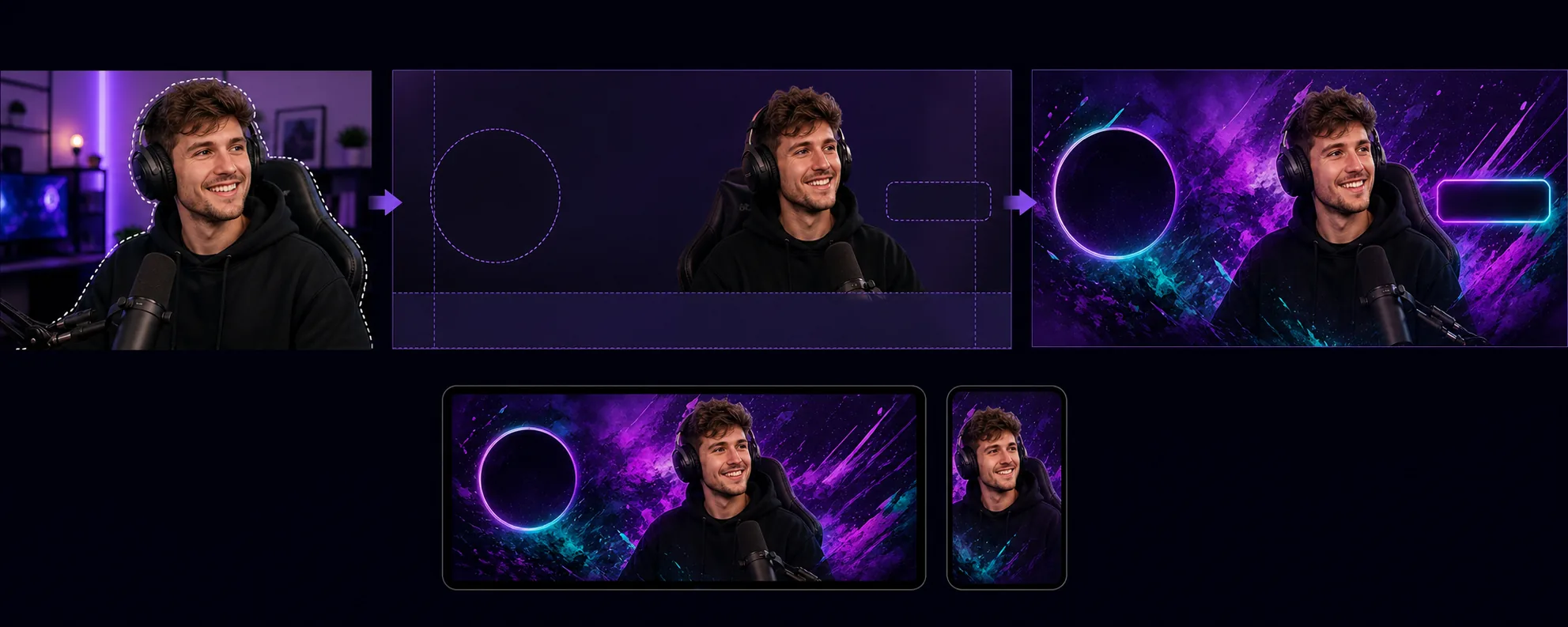
Was diese Vorlage leistet
Erstellt Kanal-Banner, die auf die einzigartigen Layout-Anforderungen von Twitch optimiert sind, bei denen das Profilbild, der Folgen-Button und die Kanalnavigation bestimmte Bereiche des Banners überlagern. Background Eraser isoliert Ihr Streamer-Porträt oder Ihr Teamfoto aus jeder Umgebung und platziert es auf einem Hintergrund, der zur visuellen Identität Ihres Kanals passt — einfarbige Markenfarben, Farbverläufe, abstrakte Gaming-Themen oder dezente Muster. Die Vorlage respektiert die Sicherheitszonen von Twitch, sodass wichtige visuelle Inhalte niemals hinter dem Profilbildkreis (linke Seite) oder den Kanalpunkte-/Abonnieren-Buttons (rechte Seite) verborgen werden. Die Ausgabe hat eine Größe von 1200×480px (die empfohlene Banner-Abmessung) und ist für gute Sichtbarkeit sowohl in der Desktop-Browseransicht als auch in den Headern der mobilen App abgestimmt, wo das Banner unterschiedlich zugeschnitten wird.
Vorlageneinstellungen
| Banner-Größe | 1200×480px (von Twitch empfohlenes Profil-Banner) |
| Sicherheitszonen | Links 250px (Profil-Überlagerung), rechts 200px (Buttons), unten 80px (Navigationsleiste) |
| Hintergrund | Einfarbig, Farbverlauf, abstraktes Gaming-Muster oder eigenes Bild |
| Porträt-Platzierung | Rechts-mittig oder mittig, unter Vermeidung der Überlappungszone des Profilbilds |
| Farbintensität | Verstärkt für gute Sichtbarkeit auf der dunkelvioletten Oberfläche von Twitch |
So verwenden Sie diese Vorlage
Laden Sie Ihr Streamer-Foto hoch
Laden Sie ein Foto von sich selbst, Ihrem Streaming-Setup oder Ihrem Team hoch. Oberkörperaufnahmen mit ausdrucksstarken Posen eignen sich am besten für Banner. Die Vorlage verarbeitet Webcam-Aufnahmen, Handy-Selfies und professionelle Fotos.
Isolieren und positionieren
Background Eraser entfernt den ursprünglichen Hintergrund und positioniert Ihr Porträt innerhalb der Sicherheitszonen des Banners. Die linken 250 Pixel werden für die Überlagerung durch den Profilbildkreis frei gehalten, und die unteren 80 Pixel vermeiden die Navigationsleiste. Ihr Bild wird dort platziert, wo es sowohl auf dem Desktop als auch auf dem Mobilgerät die größte visuelle Wirkung erzielt.
Hintergrund und Branding anwenden
Wählen Sie einen Hintergrund, der zur Identität Ihres Kanals passt. Kräftige Farbverläufe und Gaming-Muster wirken gut auf dem dunkelvioletten Chrome von Twitch. Wenn Ihr Kanal etablierte Markenfarben hat, verwenden Sie diese, um den Wiedererkennungswert zu stärken, wenn Zuschauer auf Ihrer Kanalseite landen.
Exportieren und hochladen
Laden Sie in 1200×480px herunter, optimiert für Twitch. Die Datei ist kleiner als 10MB (das Limit von Twitch) und komprimiert, damit sie für Zuschauer mit langsameren Verbindungen schnell lädt. Sehen Sie sich in der Vorschau an, wie das Banner mit dem überlagerten Profilbild und der Navigation aussieht, bevor Sie es auf Ihren Kanal hochladen.
Profi-Tipps für beste Ergebnisse
- ✓Verwenden Sie ein Foto mit einer ausdrucksstarken oder energiegeladenen Pose — in die Kamera zeigen, jubeln oder sich nach vorne lehnen. Statische Posen gehen im schmalen Banner-Format unter, während dynamische Posen visuelle Energie erzeugen, die Zuschauer zum Bleiben animiert.
- ✓Testen Sie Ihr Banner sowohl auf dem Desktop als auch auf dem Mobilgerät. Twitch schneidet das Banner auf Mobilgeräten anders zu und zeigt hauptsächlich den mittleren Teil. Platzieren Sie Ihre wichtigsten visuellen Inhalte in den mittleren 700 Pixeln, damit es geräteübergreifend kompatibel ist.
- ✓Passen Sie die Farben Ihres Banners an Ihre Twitch-Akzentfarbeneinstellung an. Wenn der Farbverlauf des Banners in dieselbe Akzentfarbe übergeht, die für den Abonnieren-Button und hervorgehobenen Text Ihres Kanals verwendet wird, wirkt die gesamte Seite stimmig und professionell gebrandet.
Häufige Fragen
Welche Abmessungen verlangt Twitch für Banner?
+
Twitch empfiehlt 1200×480 Pixel für Profil-Banner. Die maximale Dateigröße beträgt 10MB. Die Vorlage gibt genau diese Abmessungen mit angemessener Komprimierung aus.
Kann ich Text auf dem Banner einfügen?
+
Die Vorlage erzeugt das visuelle Layout ohne Textüberlagerung. Sie können Ihren Kanalnamen, Ihren Zeitplan oder Ihre Social-Media-Handles anschließend mit einem beliebigen Bildbearbeitungsprogramm hinzufügen. Die Hilfslinien der Sicherheitszonen zeigen genau, wo Text sichtbar bleibt und nicht von den UI-Elementen von Twitch verdeckt wird.
Funktioniert das auch für Twitch-Offline-Bildschirme?
+
Die Vorlage ist auf das Profil-Banner ausgelegt. Bilder für Twitch-Offline-Bildschirme verwenden ein Seitenverhältnis von 16:9 (1920×1080). Sie können einen ähnlichen Arbeitsablauf nutzen — Porträt isolieren, Hintergrund anwenden — sollten aber die Abmessungen des Offline-Bildschirms separat auswählen.
Lassen Sie Ihren Twitch-Kanal vom ersten Tag an etabliert wirken
Laden Sie ein Foto hoch und erhalten Sie ein professionelles Kanal-Banner, das das Layout von Twitch respektiert und Ihren Stream hervorhebt.
Kostenlos testenRelated templates
More social media templates for your workflow.
Für Instagram optimierte quadratische Zuschnittvorlage mit 1080 x 1080 Pixel. Klare Hintergründe, lebendige Farben und scharfe Details, die im Feed hervorstechen.
YouTube-Bannervorlage mit 2560 x 1440 Pixeln und Anleitungen für sichere Zonen. Saubere Hintergrundentfernung für Erstellerfotos, gerätespezifisches Layout und markenkonsistente Kanalgrafiken.
Facebook-Titelbildvorlage mit 820×312 Pixel für den Desktop und 640×360 Pixel für den mobilen Zuschnitt. Saubere Markenbilder mit geeigneten sicheren Zonen für die Überlappung von Profilbildern und die Platzierung von CTA-Buttons.
Erstellen Sie professionelle Twitter/X-Header-Bilder mit der exakten Größe 1500×500 Pixel. Berücksichtigt die Überlappung von Profilbildern und funktioniert sowohl im dunklen als auch im hellen Modus.
Verbessern Sie Dating-Profilfotos mit natürlicher Hautglättung, Hintergrundbereinigung, Beleuchtungskorrektur und subtiler Farbkorrektur, die authentisch aussieht – nicht gefiltert.
Erstellen Sie fesselnde Pinterest-Pin-Bilder mit klarem Hintergrund, optimalen vertikalen Abmessungen von 2:3, lebendiger Farbverstärkung und pin-bereiter Komposition.