
Reiseblog-Foto
Verwandeln Sie überfüllte Reiseschnappschüsse in Reisezielfotos in Publikationsqualität. Diese Vorlage entfernt mit Magic Eraser Touristen, Bildstörer und visuelle Unordnung aus Aufnahmen von Sehenswürdigkeiten und Landschaften und korrigiert anschließend mit AI Enhance die schwierigen Belichtungsbedingungen, die in der Reisefotografie häufig sind – grelle Mittagssonne, dunkle Tempelinnenräume, Sonnenuntergänge im Gegenlicht – und verstärkt die natürlichen Farben für Bilder, die Leser dazu bringen, die Reise zu buchen.
Diese Vorlage kostenlos testenPersonal template preview
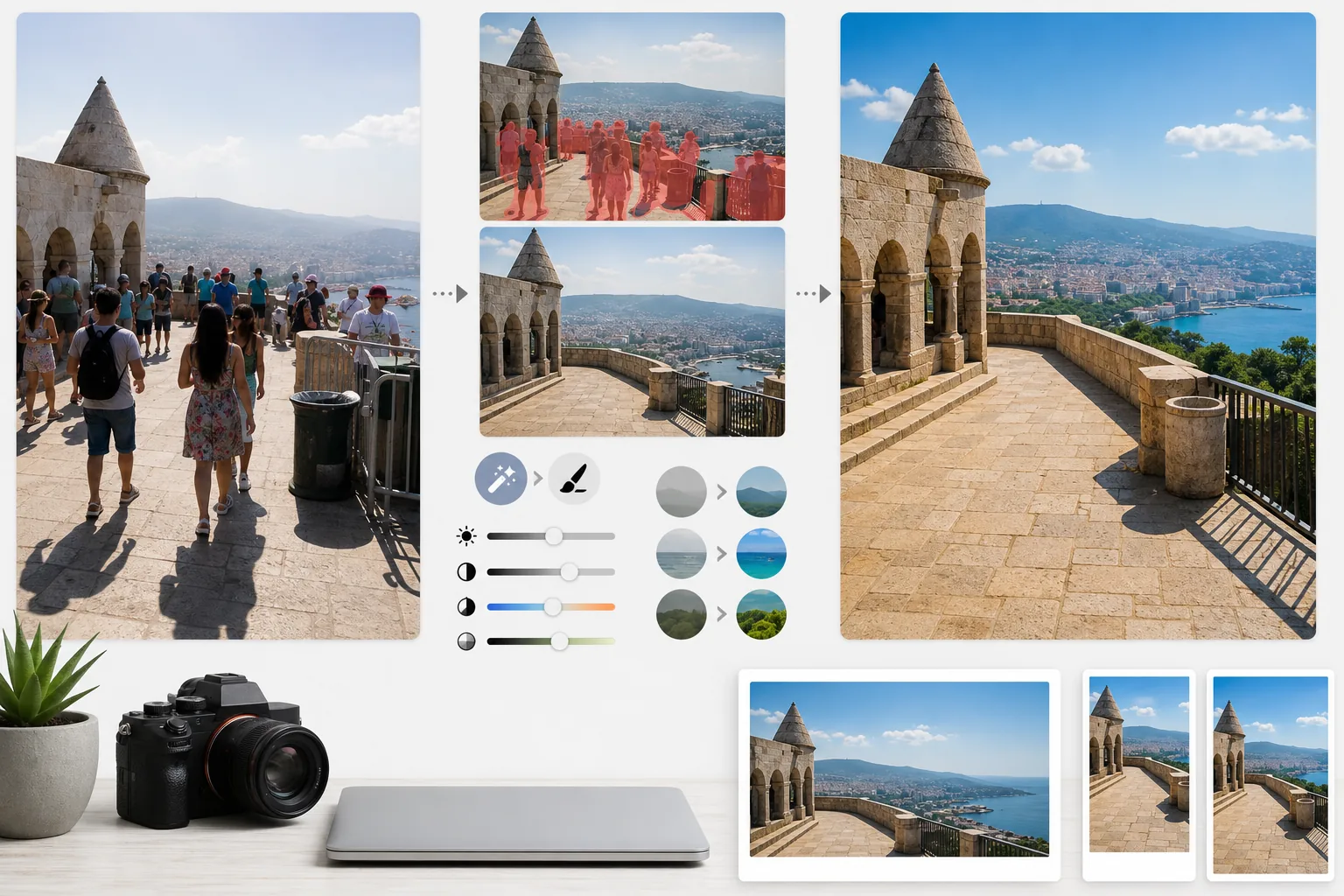
Was diese Vorlage leistet
Sie löst die zwei größten Probleme der Reisefotografie: Menschenmengen und schlechtes Licht. Magic Eraser entfernt Touristen, die vor Denkmälern stehen, Bildstörer, die durch Ihren Bildausschnitt laufen, und visuelle Unordnung wie Mülltonnen, Bauzäune und temporäre Beschilderung, die das Gefühl für den Ort zerstören. Die KI rekonstruiert die Architektur, das Pflaster und die Landschaft hinter entfernten Personen und Objekten anhand des umgebenden Kontexts. AI Enhance bewältigt anschließend die für Reisen typischen Belichtungsherausforderungen – Innenaufnahmen von Kathedralen und Tempeln, bei denen die Fenster ausgebrannt und die Schatten schwarz sind, grelle Mittagssonne, die Farben an tropischen Zielen verflacht, und Sonnenuntergangsszenen im Gegenlicht, bei denen der Vordergrund als Silhouette erscheint. Die Farben werden verstärkt, um wiederzugeben, wie das Reiseziel dem menschlichen Auge tatsächlich erscheint – etwas, das Kameras im Dynamikumfang durchweg unterrepräsentieren.
Vorlageneinstellungen
| Touristen entfernen | Personen auf Aufnahmen von Sehenswürdigkeiten und Landschaften automatisch erkennen und entfernen |
| Belichtungskorrektur | HDR-artige Wiederherstellung von Lichtern und Schatten bei schwierigem Licht |
| Farbverbesserung | Natürliche Sättigung (Himmel, Wasser, Laub) verstärken, ohne künstlich zu wirken |
| Dunstentfernung | Atmosphärischen Dunst durchdringen für klarere Fernlandschaften |
| Ausgabeauflösung | 4000px an der langen Kante (Blog-Hero-Bilder in Retina-Qualität) |
So verwenden Sie diese Vorlage
Laden Sie Ihr Reisefoto hoch
Laden Sie ein beliebiges Reisefoto hoch – überfüllte Sehenswürdigkeiten, weite Landschaften, Straßenszenen, Innenarchitektur. Die Vorlage verarbeitet JPEGs von Smartphones, spiegellosen Kameras und Actionkameras. RAW-Dateien werden ebenfalls akzeptiert, für maximale Bearbeitungsflexibilität.
Menschenmengen und Unordnung entfernen
Magic Eraser erkennt Personen im Bild und entfernt sie. Sie können wählen, alle Personen zu entfernen, bestimmte Personen (sich selbst oder Reisebegleiter) zu behalten oder gezielt nur jene zu entfernen, die wichtige architektonische oder landschaftliche Elemente verdecken. Die KI füllt die fehlenden Bereiche mit rekonstruiertem Boden, Wänden und Landschaft auf.
Licht und Farbe verbessern
AI Enhance wendet eine HDR-artige Verarbeitung an, die ausgebrannte Himmel wiederherstellt und tiefe Schatten aufhellt – häufig in Tempelinnenräumen und engen europäischen Gassen. Die Farben werden so verstärkt, dass sie dem entsprechen, was Ihre Augen am Reiseziel gesehen haben, besonders das Himmelblau, das Meeresgrün und das Laubgrün. Atmosphärischer Dunst wird für klarere Berg- und Stadtpanoramen reduziert.
Für Blog und Social Media exportieren
Laden Sie mit 4000px an der langen Kante für Blog-Hero-Bilder in Retina-Qualität herunter oder in plattformspezifischen Größen für Instagram, Pinterest und Facebook. Die Datei behält optimierte EXIF-Daten für Fotografen bei, die ihre Arbeiten mit Geotags versehen.
Profi-Tipps für beste Ergebnisse
- ✓Machen Sie mehrere Aufnahmen derselben Szene im Abstand von wenigen Sekunden. Wenn sich Touristen zwischen den Bildern bewegen, verfügt die KI über Referenzinformationen zum Boden und zu den Wänden hinter ihnen und erzielt sauberere Rekonstruktionen als mit einem einzelnen Bild.
- ✓Belichten Sie bei Innenaufnahmen von Kirchen, Tempeln und Museen beim Fotografieren leicht über. Es ist für die KI einfacher, helle Lichter wiederherzustellen, als extrem dunkle Schatten aufzuhellen, und Innenaufnahmen sind standardmäßig oft unterbelichtet.
- ✓Fotografieren Sie Landschaften nach Möglichkeit zur goldenen oder blauen Stunde. AI Enhance kann Farben im flachen Mittagslicht verstärken, aber das gerichtete warme Licht der goldenen Stunde erzeugt in Landschaften Schatten und Tiefe, die keine noch so gute Farbkorrektur nachbilden kann.
Häufige Fragen
Kann ich selbst auf dem Foto bleiben, aber andere Touristen entfernen?
+
Ja. Sie können sich selbst oder Ihre Reisebegleiter als geschützte Motive markieren. Die KI entfernt alle anderen Personen aus der Szene, während die geschützten Personen mit ihrer ursprünglichen Position, Beleuchtung und ihrem Schatten unverändert an ihrem Platz bleiben.
Wie gut funktioniert das bei sehr überfüllten Szenen?
+
Am besten funktioniert es, wenn die Menschenmenge weniger als etwa 40 % des Bildes bedeckt. Extrem überfüllte Szenen – etwa ein voller Platz, auf dem man den Boden zwischen den Menschen nicht sieht – bieten zu wenig Hintergrundreferenz für eine saubere Rekonstruktion. In solchen Fällen liefert das teilweise Entfernen der vordersten Reihen oft ein überzeugendes Ergebnis.
Lässt die Dunstentfernung das Foto unnatürlich wirken?
+
Die Dunstreduzierung ist auf ein natürlich wirkendes Ergebnis abgestimmt. Sie entfernt die blaugraue atmosphärische Streuung, die ferne Berge und Gebäude verdeckt, bewahrt aber die feine Luftperspektive, die Landschaftsfotos Tiefe verleiht. Das Ergebnis sieht aus wie eine Aufnahme an einem klaren, frischen Tag und nicht wie ein gefiltertes oder überbearbeitetes Bild.
Zeigen Sie jedes Reiseziel von seiner besten, menschenleeren Seite
Laden Sie Reisefotos hoch und erhalten Sie touristenfreie, farboptimierte Bilder, die Ihren Lesern Lust machen, die Koffer zu packen.
Kostenlos testenRelated templates
More personal templates for your workflow.
Erstellen Sie konforme Ausweisfotos für Visa, Führerscheine und Personalausweise mit der richtigen Hintergrundfarbe, Kopfgröße und Gesichtsausdrucksanforderungen.
Verbessern Sie Ihre Abschlussfotos durch Hintergrundbereinigung, Kappen- und Talarkorrektur, Entfernung von Fehlern und druckfertige Schärfung von Rahmen und Ankündigungen.
Verbessern Sie Konzert- und Veranstaltungsfotos mit Rauschunterdrückung bei schlechten Lichtverhältnissen, Bühnenbeleuchtung Farbkorrektur, Entfernung von Ablenkungen durch Menschenmengen und Detailwiederherstellung aus Aufnahmen an dunklen Veranstaltungsorten.
Erstellen Sie wunderschöne Fotos für die Geburtsankündigungskarte mit weichem Hintergrund, sanfter Farbabstufung, Beseitigung von Unordnung im Krankenhaus und druckfertigen Abmessungen für den Versand.
Bereiten Sie Familien- und Porträtfotos für Feiertagsgrußkarten mit festlichem Hintergrund, warmen Farbabstufungen, Schneeeffekten und Standardkartengrößen zum Drucken vor.
Stellen Sie Erinnerungsfotos wieder her und verbessern Sie sie mit sanfter Retusche, Vereinfachung des Hintergrunds, warmer, respektvoller Farbabstufung und druckfertigen Abmessungen für Gottesdienste.