
Tattoo-Portfolio-Foto
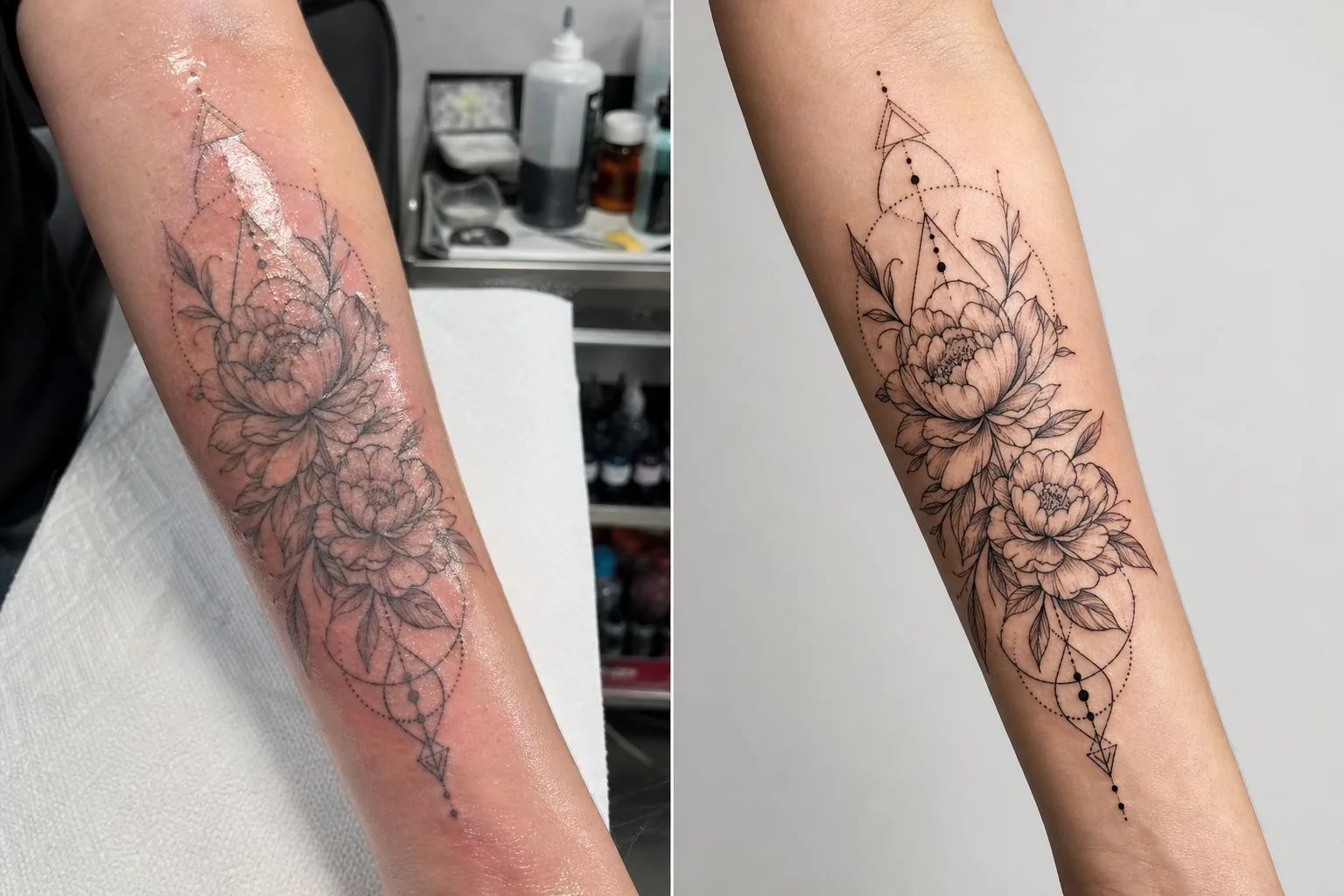
Präsentieren Sie Ihre Tattoo-Arbeiten mit der Detailgenauigkeit und Farbtreue, die neue Kunden anzieht. Diese Vorlage verstärkt die Tintensättigung und die Schärfe der Linien, reduziert Hautrötungen und Schwellungen nach der Sitzung, korrigiert das Studiolicht für echte Tintenfarben und erstellt saubere Portfolio-Präsentationen, bei denen das Werk für sich selbst spricht.
Diese Vorlage kostenlos testenBusiness template preview
Was diese Vorlage leistet
Behandelt die spezifischen fotografischen Herausforderungen, mit denen Tätowierer bei der Dokumentation ihrer Arbeit konfrontiert sind. Frische Tattoos werden unter Studiobedingungen mit Mischlicht fotografiert, und die Haut um die neue Tinte ist gerötet, geschwollen und mit überschüssiger Tinte und Salbe bedeckt — nichts davon entspricht dem endgültigen verheilten Ergebnis. Diese Vorlage nutzt AI Enhance, um die Beleuchtung zu korrigieren, sodass die Tintenfarben so erscheinen, wie sie im verheilten Zustand aussehen werden, schärft feine Linienarbeit und Dotwork-Details und reduziert Rötungen und Schwellungen um frische Tattoos. Magic Eraser entfernt störendes Beiwerk im Hintergrund des Tätowierplatzes, einschließlich Tintenfläschchen, Papiertüchern, Handschuhen und Ausrüstung, und schafft einen sauberen Hintergrund, der die Aufmerksamkeit voll und ganz auf das Werk lenkt.
Vorlageneinstellungen
| Tintenverstärkung | Farbsättigungsboost für schwarze, farbige und Aquarell-Tattoostile |
| Linienschärfung | Mikrodetail-Verstärkung für feine Linien und Dotwork |
| Hautkorrektur | Reduziert Rötungen, Schwellungen und Salbenglanz um frische Tattoos |
| Lichtkorrektur | Korrigiert gemischtes Studiolicht zu neutralem Tageslicht für echte Tintenfarben |
| Hintergrund | Sauberer einfarbiger oder unscharfer Hintergrund (störendes Beiwerk entfernen) |
| Ausgabeabmessungen | 2000 × 2000 px (Instagram-Quadrat) oder 4000px für den Portfoliodruck |
So verwenden Sie diese Vorlage
Laden Sie Ihr Tattoo-Foto hoch
Laden Sie ein Foto des fertigen Tattoos hoch — frisch oder verheilt. Fotografieren Sie das Tattoo frontal, um Perspektivverzerrungen zu minimieren. Die Vorlage bewältigt Detail-Nahaufnahmen, Übersichtsaufnahmen des gesamten Werks und umlaufende Kompositionen auf gewölbten Körperflächen wie Armen, Beinen und Rippen.
Tinten- und Linienverstärkung
AI Enhance erhöht die Tintensättigung, sodass schwarze Tattoos tief und satt wirken, während farbige Tattoos ihre volle Lebendigkeit zeigen. Feine Linien, Dotwork und geometrische Muster werden geschärft, um die Präzision Ihrer Nadelarbeit hervorzuheben. Die Verstärkung respektiert verschiedene Tattoostile — kräftig traditionell, feine Linie, Aquarell und Blackwork erhalten jeweils eine angemessene Behandlung.
Haut- und Hintergrundkorrektur
Bei frischen Tattoos werden Rötungen und Schwellungen um die Tinte reduziert, um sich dem verheilten Erscheinungsbild anzunähern. Salbenglanz und überschüssige Tinte auf der umliegenden Haut werden abgeschwächt. Magic Eraser entfernt den Hintergrund des Tätowierplatzes — Tintenbecher, Papiertücher, Handschuhe und Ausrüstung — und ersetzt ihn durch einen sauberen Hintergrund.
Export für Portfolio und Social Media
Laden Sie im Quadratformat 2000 × 2000 px für Instagram-Portfolio-Beiträge herunter oder mit 4000px an der langen Kante für Website-Portfolios und gedruckte Lookbooks. Das Farbprofil bewahrt das gesamte Spektrum der Tattoo-Tintenfarben, einschließlich der subtilen Farbtonvariationen in Aquarell- und Neo-Traditional-Stilen.
Profi-Tipps für beste Ergebnisse
- ✓Fotografieren Sie das Tattoo unter tageslichtausgewogenem Licht (5000–5500K) aus einem gleichbleibenden Winkel. So erhält die Vorlage die genauesten Farbdaten zur Verarbeitung. Warmes Glühlampenlicht lässt die Tinte gelb-oranger erscheinen, und die Korrektur liefert zwar wirksame, aber bessere Ergebnisse, wenn man von neutraler Beleuchtung ausgeht.
- ✓Wischen Sie überschüssige Tinte und Salbe von der Hautoberfläche, bevor Sie fotografieren. Die Vorlage reduziert den Salbenglanz, doch eine saubere, trocken getupfte Oberfläche zeigt die Tintenarbeit deutlicher und erzielt ein besseres verstärktes Ergebnis.
- ✓Fotografieren Sie nach Möglichkeit sowohl die frische als auch die verheilte Version desselben Tattoos. Das durch die Vorlage verarbeitete frische Foto liefert Ihnen sofortigen Portfolio-Inhalt, und das verheilte Foto bestätigt das tatsächliche abgeklungene Ergebnis. Beide Versionen in Ihrem Portfolio zeigen Professionalität.
- ✓Machen Sie bei großen Motiven, die sich um Gliedmaßen winden, zusätzlich zur Gesamtübersicht mehrere überlappende Detailaufnahmen. Die Vorlage schärft Details, die in weiten Übersichtsaufnahmen verloren gehen, und Nahaufnahmen herausragender Elemente ergeben überzeugende einzelne Portfolio-Beiträge.
Häufige Fragen
Kann damit ein frisches Tattoo verheilt aussehen?
+
Die Vorlage reduziert Rötungen und Schwellungen, um sich dem verheilten Erscheinungsbild anzunähern, doch das Ergebnis ist eine Verbesserung, keine perfekte Vorhersage der Heilung. Die individuelle Heilung variiert je nach Hauttyp, Tintenart und Körperstelle. Das verbesserte frische Foto wird verheilt nahekommen, kann aber vom tatsächlichen verheilten Ergebnis abweichen.
Funktioniert das für alle Tattoostile?
+
Ja. Die Vorlage erkennt und verstärkt kräftig traditionelle, japanische, feine Linien-, Dotwork-, geometrische, Aquarell-, Neo-Traditional-, Blackwork- und realistische Porträtstile angemessen. Jeder Stil erhält eine andere Schärfung und Farbbehandlung, die darauf abgestimmt ist, was für diese Ästhetik am besten aussieht.
Was ist mit Cover-up-Tattoos?
+
Cover-up-Tattoos werden wie jedes andere Tattoo verarbeitet. Die Vorlage verstärkt die sichtbare Tinte, also das Cover-up-Design. Wenn Sie das Vorher-Nachher zeigen möchten (Original gegenüber Cover-up), verarbeiten Sie jedes Foto separat für die einheitlichste Portfolio-Präsentation.
Ein Portfolio, das Ihren Stuhl ausbucht
Laden Sie Tattoo-Fotos hoch und erhalten Sie detailscharfe, farbgetreue Portfoliobilder, die Ihr Können zeigen und neue Kunden anziehen.
Kostenlos testenRelated templates
More business templates for your workflow.
Polnische Unternehmensteamfotos mit einheitlichen Hintergründen, professioneller Lichtkorrektur, markengerechter Farbkorrektur und einheitlicher Bildqualität im gesamten Team.
Verbessern Sie Fitnessstudio- und Fitnessfotos mit Verbesserung der Muskeldefinition, dynamischer Beleuchtungskorrektur, Hintergrundbereinigung und kontrastreicher Farbkorrektur für Sportler.
Erstellen Sie ein ausgefeiltes Lebenslauf-Headshot mit Hintergrundersetzung, Hautglättung und Beleuchtungskorrektur. Ideal für Lebensläufe, Jobportale und Unternehmensverzeichnisse.
Erstellen Sie professionelle Team- und Einzelspielerfotos mit Hintergrundaustausch, Trikotfarbverstärkung und Stadion- oder Studiohintergründen für Kader und Programme.
Erstellen Sie professionelle Promofotos von Bands und Musikern mit Hintergrundersetzung, dramatischer Beleuchtungsverbesserung und druckfertigen Ausgaben für Pressemappen und Veranstaltungsort-Einreichungen.
Präsentieren Sie Nagelkunst mit Detailverbesserung auf Makroebene, echter Gel- und Lackfarbgenauigkeit und sauberer Handpositionierung für Instagram-Portfolios und Buchungsseiten.