
Unternehmens-Teamfoto
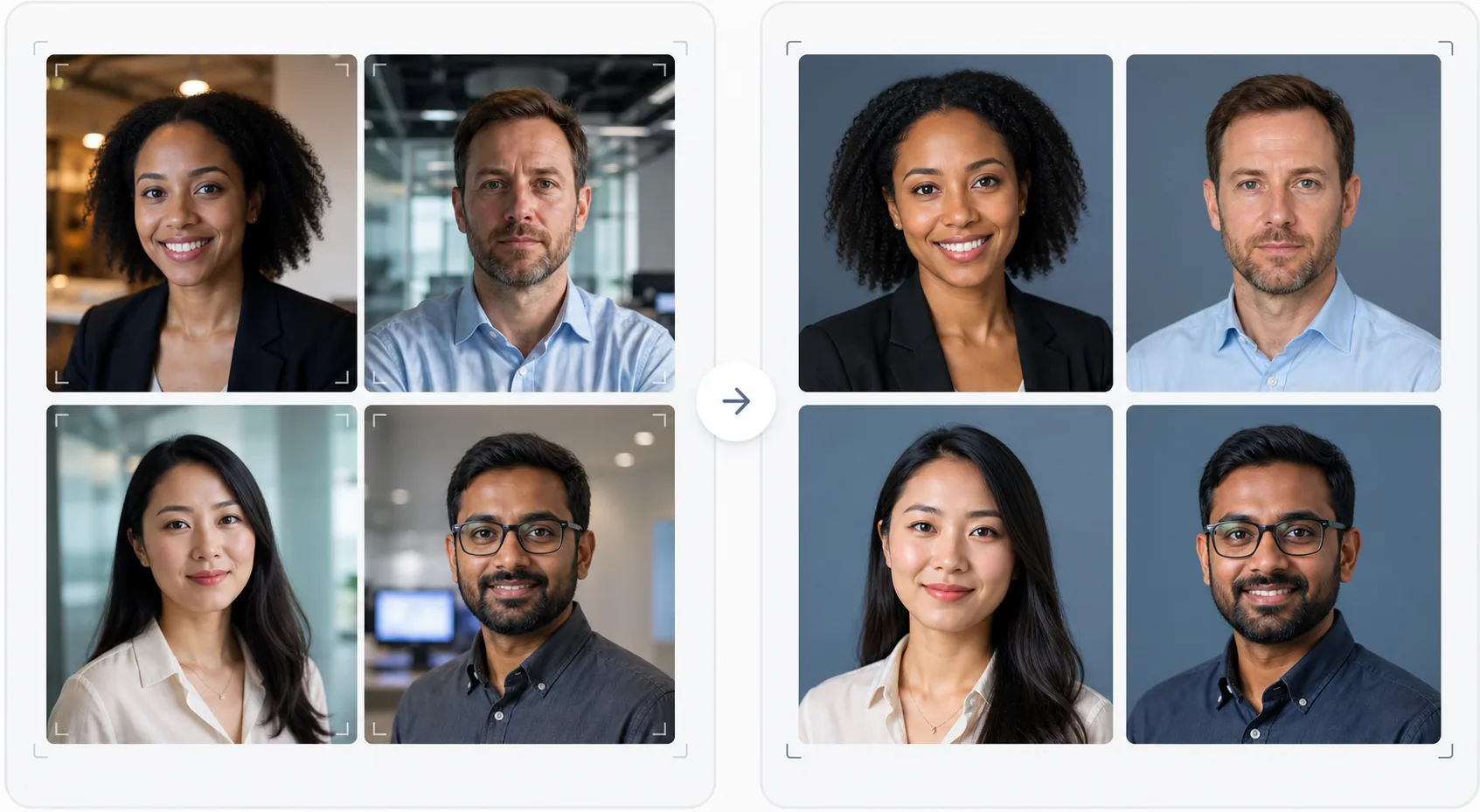
Verleihen Sie Ihrer Teamseite einen professionellen, einheitlichen Look ohne teuren Fotografen. Diese Vorlage vereinheitlicht die Hintergründe einzelner Portraitfotos, korrigiert gemischtes Bürolicht zu neutralen professionellen Tönen, glättet die Haut dezent und sorgt dafür, dass das Foto jedes Teammitglieds denselben Stil und dieselbe Qualität hat.
Diese Vorlage kostenlos testenBusiness template preview
Was diese Vorlage macht
Erstellt visuell einheitliche Teamfotos für Unternehmenswebsites, LinkedIn-Unternehmensseiten und Marketingmaterialien. Wenn Teamportraits zu unterschiedlichen Zeiten, von verschiedenen Personen und mit verschiedenen Kameras aufgenommen werden, entsteht eine uneinheitliche Teamseite, die unprofessionell wirkt. Diese Vorlage löst das, indem sie Hintergründe, Farbtemperatur, Lichtstil und Bildausschnitt über alle Portraits hinweg vereinheitlicht. Background Eraser entfernt die unterschiedlichen Bürohintergründe und ersetzt sie durch einen einheitlichen einfarbigen Hintergrund oder Farbverlauf in Ihrer Markenfarbe. AI Enhance normalisiert die Belichtung, korrigiert den Grünstich von Büroleuchtstoffröhren und glättet die Haut dezent, sodass jedes Teammitglied gepflegt und professionell aussieht.
Vorlageneinstellungen
| Hintergrund | Einheitliche Volltonfarbe, Farbverlauf oder Büroweichzeichnung (markenspezifisch konfigurierbar) |
| Bildausschnitt | Kopf und Schultern, zentriert, einheitlich über alle Teamfotos |
| Lichtnormalisierung | Neutral professionell (korrigiert Mischung aus Leuchtstoff, LED und Fensterlicht) |
| Hautverbesserung | Dezente Reduzierung von Hautunreinheiten und Korrektur der Augenringe |
| Ausgabegröße | 800 × 800 px (Web-Teamseite) und 400 × 400 px (Verzeichnis) |
So verwenden Sie diese Vorlage
Fotos der Teammitglieder hochladen
Laden Sie Portraitfotos der Teammitglieder hoch — sie können von verschiedenen Kameras, Orten und Zeiträumen stammen. Die Vorlage bewältigt alles, von professionellen Portraits bis hin zu Smartphone-Selfies am Schreibtisch. Laden Sie das gesamte Team im Stapel hoch, um es effizient zu verarbeiten.
Hintergründe vereinheitlichen
Background Eraser entfernt den ursprünglichen Hintergrund jedes Fotos und ersetzt ihn durch eine einheitliche Option für alle Teammitglieder. Wählen Sie zwischen einfarbigen Markenfarben, professionellen Farbverläufen oder einem standardisierten Büroweichzeichnungseffekt. Alle Fotos erhalten dieselbe Hintergrundbehandlung für visuelle Einheitlichkeit.
Licht normalisieren und verbessern
AI Enhance korrigiert das Licht jedes Fotos zu einem einheitlichen neutralen professionellen Ton. Grüne Leuchtstoffstiche, warme Glühlichtstiche und gemischtes Licht werden alle korrigiert. Dezentes Glätten der Haut reduziert Unreinheiten und Augenringe. Die Augen werden sanft aufgehellt, um ein engagiertes, zugängliches Erscheinungsbild zu schaffen.
Für Web und Verzeichnis exportieren
Laden Sie den kompletten Satz in 800 × 800 px für Website-Teamseiten und in 400 × 400 px für interne Verzeichnisse und E-Mail-Signaturen herunter. Alle Bilder werden mit demselben Farbprofil, derselben Komprimierung und derselben Dateibenennungskonvention exportiert, um den Stapel-Upload in Ihr CMS zu erleichtern.
Profi-Tipps für beste Ergebnisse
- ✓Geben Sie den Teammitgliedern ein einfaches Foto-Briefing: direkt in die Kamera blicken, ein einfarbiges Oberteil tragen, das sich vom Hintergrund abhebt, für gutes Licht im Gesicht sorgen (wenn möglich zum Fenster wenden) und einen natürlichen Ausdruck mit einem leichten Lächeln bewahren. Bessere Ausgangsfotos erfordern weniger KI-Korrektur.
- ✓Wählen Sie eine Hintergrundfarbe, die in Ihren Markenrichtlinien vorkommt — typischerweise ein neutrales Grau, Marineblau oder die Sekundärfarbe Ihrer Marke. So wird die Teamseite zu einem Marken-Asset statt nur zu einer Sammlung von Fotos.
- ✓Verarbeiten Sie neue Teammitglieder bei ihrem Eintritt mit denselben Einstellungen über die Vorlage. So bleibt die visuelle Einheitlichkeit im Laufe der Zeit erhalten, selbst wenn das Team wächst und sich verändert.
- ✓Für die Geschäftsleitung und Führungsebene können Sie einen leicht abweichenden Bildausschnitt erwägen (engerer Ausschnitt, etwas wärmerer Ton), um die Führungsebene visuell vom übrigen Team abzuheben und dabei denselben Hintergrund und Stil beizubehalten.
Häufige Fragen
Kann ich das gesamte Team auf einmal verarbeiten?
+
Ja. Laden Sie alle Fotos der Teammitglieder in einem einzigen Stapel hoch. Die Vorlage wendet auf jedes Bild denselben Hintergrund, dieselbe Lichtkorrektur und denselben Bildausschnitt an und sorgt so für perfekte Einheitlichkeit. Die Fotos werden mit übereinstimmenden Abmessungen, Komprimierung und Farbprofilen zurückgegeben.
Was ist, wenn die Teammitglieder sehr unterschiedliche Fotoqualität haben?
+
Die Vorlage gleicht Qualitätsunterschiede zwischen Smartphone-Selfies und DSLR-Portraits aus, indem sie Schärfe, Rauschreduzierung und Komprimierung anpasst. Eine DSLR-Quelle liefert zwar immer ein etwas schärferes Ergebnis, doch die verarbeiteten Ausgaben sind visuell einheitlich genug, sodass Qualitätsunterschiede in einem Website-Raster nicht auffallen.
Funktioniert das auch für Remote-Teams?
+
Das ist der ideale Anwendungsfall für Remote-Teams, bei denen ein persönliches Fotoshooting nicht praktikabel ist. Jedes Teammitglied macht ein Selfie oder lässt sich zu Hause fotografieren, und die Vorlage vereinheitlicht alle so, als wären sie in derselben Studio-Session aufgenommen worden.
Eine professionelle Teamseite ohne Fotoshooting
Laden Sie einzelne Portraitfotos aus beliebigen Quellen hoch und erhalten Sie ein visuell einheitliches, markengerechtes Teamfoto-Set, das für Ihre Website bereit ist.
Kostenlos testenRelated templates
More business templates for your workflow.
Verbessern Sie Fitnessstudio- und Fitnessfotos mit Verbesserung der Muskeldefinition, dynamischer Beleuchtungskorrektur, Hintergrundbereinigung und kontrastreicher Farbkorrektur für Sportler.
Verbessern Sie Tattoo-Portfoliofotos mit lebendiger Tintenfarbe, Schärfung von Liniendetails, Reduzierung von Hautrötungen und sauberen Hintergründen für Künstlerportfolios und Instagram.
Erstellen Sie ein ausgefeiltes Lebenslauf-Headshot mit Hintergrundersetzung, Hautglättung und Beleuchtungskorrektur. Ideal für Lebensläufe, Jobportale und Unternehmensverzeichnisse.
Erstellen Sie professionelle Team- und Einzelspielerfotos mit Hintergrundaustausch, Trikotfarbverstärkung und Stadion- oder Studiohintergründen für Kader und Programme.
Erstellen Sie professionelle Promofotos von Bands und Musikern mit Hintergrundersetzung, dramatischer Beleuchtungsverbesserung und druckfertigen Ausgaben für Pressemappen und Veranstaltungsort-Einreichungen.
Präsentieren Sie Nagelkunst mit Detailverbesserung auf Makroebene, echter Gel- und Lackfarbgenauigkeit und sauberer Handpositionierung für Instagram-Portfolios und Buchungsseiten.