
Bewerbungsfoto
Verwandeln Sie jedes beliebige Schnappschussfoto in ein bewerbungstaugliches Porträt für Lebensläufe, LinkedIn-Profile und Bewerbungsportale. Diese Vorlage entfernt ablenkende Hintergründe, ersetzt sie durch einen sauberen einfarbigen oder Farbverlaufshintergrund, wendet eine natürliche Hautretusche an und korrigiert ungleichmäßige Beleuchtung, damit Sie in jeder Bewerbung selbstbewusst und sympathisch wirken.
Diese Vorlage kostenlos testenBusiness template preview
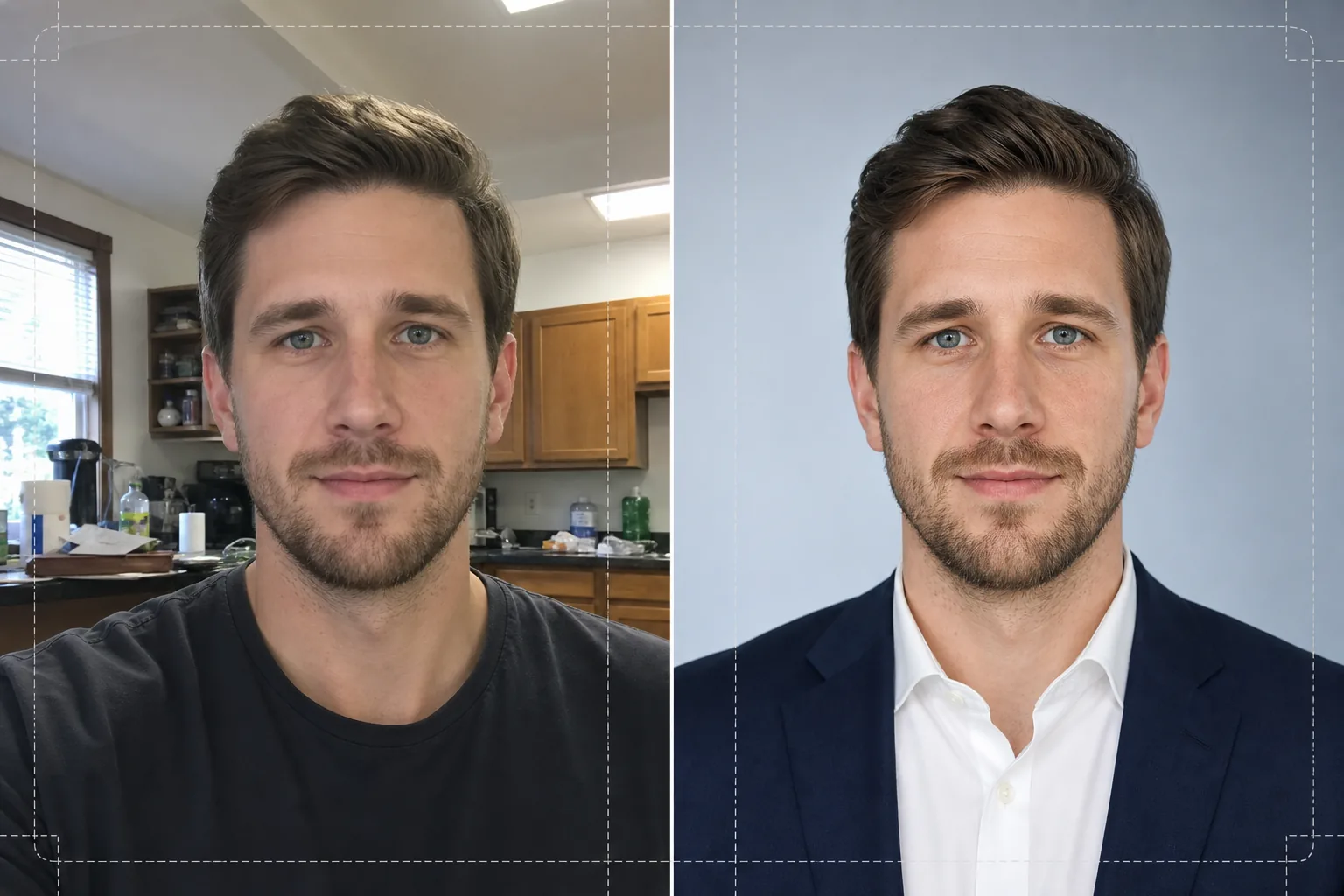
Was diese Vorlage leistet
Verwandelt Selfies, Handy-Schnappschüsse und informelle Porträts in gepflegte Bewerbungsfotos, die sich für Lebensläufe und berufliche Profile eignen. Background Eraser löst Ihren Kopf und Ihre Schultern aus jeder Umgebung heraus — Küche, Park, Bürokabine — und ersetzt den Hintergrund durch ein einfarbiges Weiß, helles Grau oder einen sanften blauen Farbverlauf, der den Gepflogenheiten von Unternehmen entspricht. AI Enhance korrigiert anschließend Belichtungsunterschiede durch Deckenleuchtstoffröhren oder hartes Fensterlicht, glättet die Hauttextur und bewahrt dabei die natürliche Porenstruktur und schärft die Augen, sodass die Aufmerksamkeit des Betrachters auf Ihr Gesicht gelenkt wird. Das Ergebnis ist ein gleichmäßig ausgeleuchtetes, ablenkungsfreies Porträt, das auf einem Lebenslauf sauber in 2x2 Zoll gedruckt wird oder als 400x400-Avatar auf Jobbörsen gestochen scharf erscheint.
Vorlageneinstellungen
| Hintergrund | Einfarbiges Weiß, helles Grau (#F0F0F0) oder sanfter blauer Farbverlauf |
| Hautretusche | Natürlich glatt (reduziert Unreinheiten, bewahrt die Porenstruktur) |
| Beleuchtungskorrektur | Gleichmäßiges Frontlicht mit dezentem Glanzpunkt in den Augen |
| Zuschnittverhältnis | 3:4 Hochformat (Standardproportion für Bewerbungsfotos) |
| Ausgabeauflösung | 1200x1600px (Druck mit 300 DPI bis zu 4x5.3 Zoll) |
So verwenden Sie diese Vorlage
Foto hochladen
Laden Sie ein beliebiges Foto hoch, auf dem Ihr Gesicht und Ihre Schultern deutlich zu sehen sind. Selfies, Webcam-Aufnahmen und zugeschnittene Gruppenfotos funktionieren alle. Die Vorlage verarbeitet Bilder von jedem Gerät und gleicht die bei Frontkameras von Handys übliche Objektivverzerrung aus.
Hintergrund entfernen und ersetzen
Background Eraser erkennt automatisch Ihren Kopf und Ihre Schultern und entfernt alles hinter Ihnen. Wählen Sie einen einfarbig weißen, neutral grauen oder dezent blauen Farbverlaufshintergrund. Die Kantenerkennung bewahrt einzelne Haarsträhnen und Kragendetails für einen natürlichen Freisteller.
Verbessern und retuschieren
AI Enhance gleicht die Beleuchtung über Ihr gesamtes Gesicht aus und reduziert harte Schatten unter Kinn und Nase. Die Hautretusche entfernt vorübergehende Unreinheiten und gleicht den Hautton an, ohne einen künstlichen Look zu erzeugen. Das Schärfen der Augen fügt einen dezenten Glanzpunkt hinzu, der das Porträt wach und präsent wirken lässt.
Herunterladen und verwenden
Exportieren Sie das fertige Porträt in 1200x1600px. Die Datei ist sowohl für den Druck (Einfügen in den Lebenslauf mit 300 DPI) als auch für die digitale Nutzung (Profilfotos auf LinkedIn, Indeed, Glassdoor) optimiert. JPEG- und PNG-Formate sind verfügbar — verwenden Sie PNG, wenn der Hintergrund für individuelle Layouts transparent bleiben soll.
Profi-Tipps für beste Ergebnisse
- ✓Verwenden Sie ein Foto, auf dem Sie mit leicht angewinkelten Schultern in die Kamera blicken. Eine leichte Dreiviertel-Drehung verleiht Tiefe und wirkt natürlicher als eine vollkommen frontale Pose.
- ✓Vermeiden Sie Fotos mit starkem Gegenlicht — vor einem hellen Fenster zu stehen lässt Ihr Gesicht zur Silhouette werden und schränkt ein, wie viele Details die KI in den Schattenbereichen wiederherstellen kann.
- ✓Tragen Sie ein einfarbiges Oberteil, das sich vom geplanten Hintergrund abhebt. Ein weißes Hemd vor weißem Hintergrund verschmilzt an den Schultern und lässt die Kontur Ihrer Gestalt verschwinden.
Häufige Fragen
Kann ich ein mit meinem Handy aufgenommenes Selfie verwenden?
+
Ja. Die Vorlage korrigiert die leichte tonnenförmige Verzeichnung von Frontkameras, durch die Nasen breiter erscheinen als in Wirklichkeit. Sie berücksichtigt auch die geringe Schärfentiefe, die für Handykameras typisch ist, sodass Ihre Ohren und Schultern scharf bleiben.
Wird die Retusche auffällig aussehen?
+
Nein. Die Hautretusche bewahrt die natürliche Porenstruktur und entfernt nur vorübergehende Unreinheiten wie Pickel und Rötungen. Das Ergebnis sieht aus wie Sie an einem guten Tag bei gutem Licht und nicht wie weichgezeichnet.
Welche Hintergrundfarbe sollte ich für einen geschäftlichen Lebenslauf wählen?
+
Einfarbiges Weiß ist die sicherste Wahl für gedruckte Lebensläufe. Helles Grau eignet sich gut für Profile auf dem Bildschirm, da es den harten Kontrast von reinem Weiß auf einem hintergrundbeleuchteten Display vermeidet. Ein blauer Farbverlauf passt zu Tech- und Kreativbranchen.
Sichern Sie sich Ihr nächstes Vorstellungsgespräch mit einem professionellen Bewerbungsfoto
Laden Sie ein beliebiges Foto hoch und erhalten Sie in Sekunden ein gepflegtes, bewerbungstaugliches Porträt für Ihren Lebenslauf, LinkedIn und Jobportale.
Kostenlos testenRelated templates
More business templates for your workflow.
Polnische Unternehmensteamfotos mit einheitlichen Hintergründen, professioneller Lichtkorrektur, markengerechter Farbkorrektur und einheitlicher Bildqualität im gesamten Team.
Verbessern Sie Fitnessstudio- und Fitnessfotos mit Verbesserung der Muskeldefinition, dynamischer Beleuchtungskorrektur, Hintergrundbereinigung und kontrastreicher Farbkorrektur für Sportler.
Verbessern Sie Tattoo-Portfoliofotos mit lebendiger Tintenfarbe, Schärfung von Liniendetails, Reduzierung von Hautrötungen und sauberen Hintergründen für Künstlerportfolios und Instagram.
Erstellen Sie professionelle Team- und Einzelspielerfotos mit Hintergrundaustausch, Trikotfarbverstärkung und Stadion- oder Studiohintergründen für Kader und Programme.
Erstellen Sie professionelle Promofotos von Bands und Musikern mit Hintergrundersetzung, dramatischer Beleuchtungsverbesserung und druckfertigen Ausgaben für Pressemappen und Veranstaltungsort-Einreichungen.
Präsentieren Sie Nagelkunst mit Detailverbesserung auf Makroebene, echter Gel- und Lackfarbgenauigkeit und sauberer Handpositionierung für Instagram-Portfolios und Buchungsseiten.