
Band-Promo-Foto
Verwandeln Sie Aufnahmen aus dem Proberaum und beiläufige Schnappschüsse in Promofotos in Pressemappen-Qualität für Ihre Band oder Ihr Soloprojekt. Diese Vorlage entfernt unaufgeräumte Hintergründe — Garagen, Keller, chaotische Backstage-Räume — und ersetzt sie durch dramatische oder klare Kulissen. AI Enhance fügt Lichteffekte im Konzertstil hinzu, schärft Instrumentendetails und erzeugt Bilder, die sofort für Spotify-Künstlerprofile, Veranstaltungsort-Einreichungen und EPK-Presseseiten bereit sind.
Diese Vorlage kostenlos testenBusiness template preview
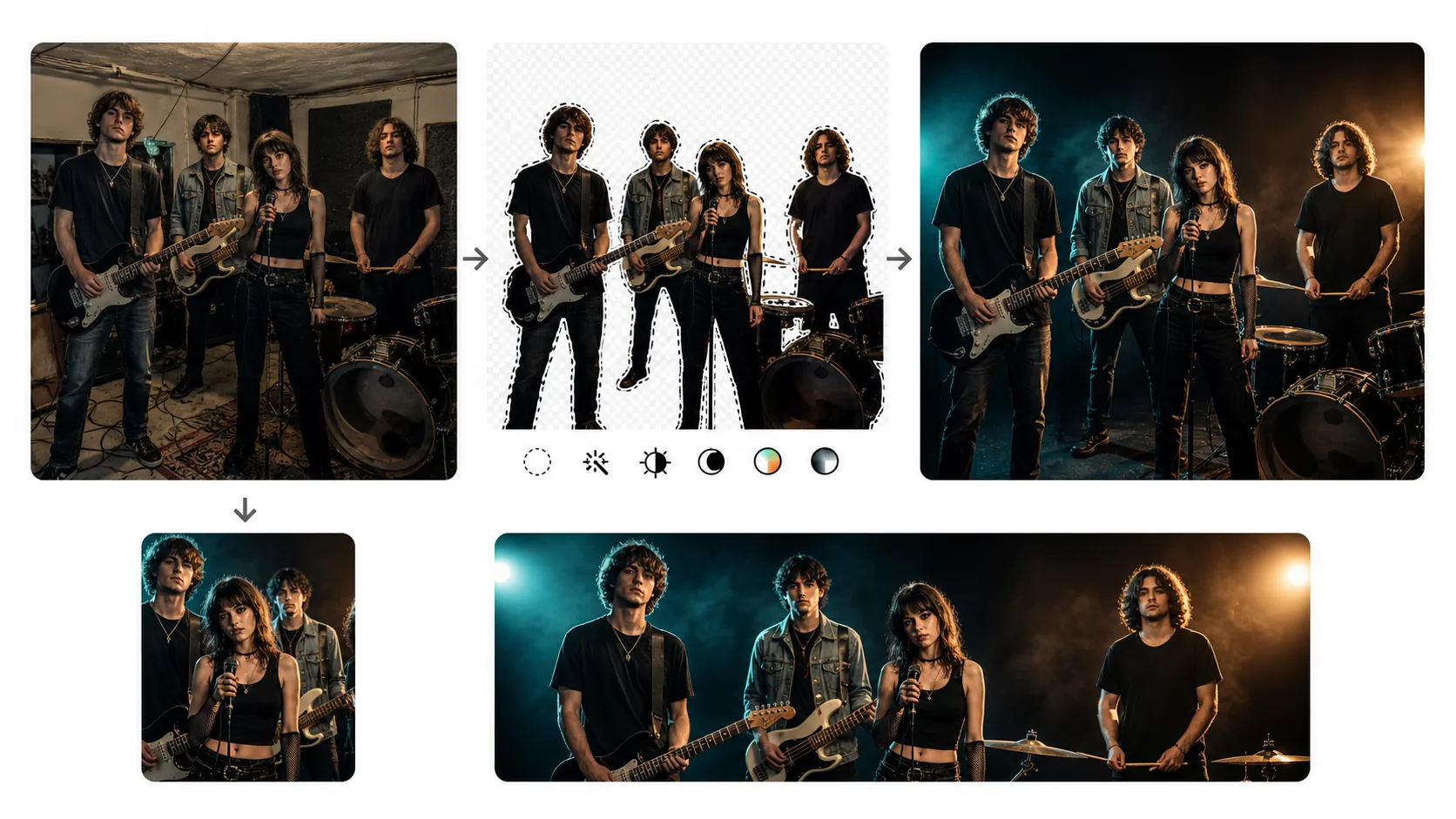
Was diese Vorlage macht
Gibt unabhängigen Musikern und Bands die visuelle Qualität, die Labels ihren unter Vertrag stehenden Künstlern bieten. Background Eraser entfernt die ablenkenden Umgebungen, in denen die meisten Bandfotos tatsächlich entstehen — Proberäume mit freiliegenden Kabeln, schummrige Bar-Ecken während des Soundchecks, jemandes unaufgeräumtes Wohnzimmer. Der Hintergrund wird durch Optionen ersetzt, die von einem klaren Studio-Look (für EPK und Veranstaltungsort-Einreichungen) bis hin zu dramatischen Umgebungen im Konzertstil mit stimmungsvoller Beleuchtung und Raucheffekten reichen. AI Enhance passt die Beleuchtung dramatischer an — vertieft Schatten, fügt ein subtiles Konturlicht hinzu, um die Bandmitglieder vom Hintergrund abzuheben, und wärmt die Hauttöne für einen vorteilhaften, redaktionellen Look. Instrumente werden geschärft, sodass Gitarren, Schlagzeug und Mikrofone genauso detailliert sind wie die Musiker, die sie halten.
Vorlageneinstellungen
| Hintergrund | Studio-Schwarz, Konzertbühne, Ziegelwand, urbane Gasse oder Farbverlauf |
| Beleuchtungsstil | Dramatisch (tiefe Schatten, Konturlicht) oder klares Studio (gleichmäßig, hell) |
| Hautton | Warm und redaktionell mit natürlichem Schattenverlauf auf den Gesichtszügen |
| Instrumentendetail | Gitarrengriffbretter, Schlagzeug-Hardware und Mikrofongitter schärfen |
| Farbabstimmung | Konzert-stimmungsvoll (Teal/Orange-Splittoneffekt) oder klar redaktionell (neutral) |
| Ausgabeauflösung | 4000×2667px (3:2-Querformat für Pressemappen und Web-Header) |
So verwenden Sie diese Vorlage
Laden Sie Ihr Bandfoto hoch
Laden Sie ein Gruppenfoto oder ein Foto einzelner Mitglieder hoch. Aufnahmen aus dem Proberaum, Live-Auftrittsaufnahmen, beiläufige Außenaufnahmen und Handy-Selfies funktionieren alle. Die Vorlage bewältigt Gruppenkompositionen vom Duo bis zur kompletten Band mit sechs oder mehr Mitgliedern.
Hintergrund entfernen
Background Eraser isoliert alle Bandmitglieder und ihre Instrumente aus der ursprünglichen Umgebung. Die Kantenerkennung bewahrt Gitarrenköpfe, Beckenränder, Drumstick-Spitzen und Mikrofonständer — die feinen Details, die der Musikfotografie ihre Energie verleihen.
Beleuchtung und Farbabstimmung anwenden
Wählen Sie zwischen dramatischer Beleuchtung im Konzertstil (mit tiefen Schatten und farbigen Konturlichtern) oder klarer Studiobeleuchtung für formelle Pressemappen. Die Optionen zur Farbabstimmung reichen von stimmungsvollen Teal-und-Orange-Splittönen, die in der Konzertfotografie beliebt sind, bis zu neutralen redaktionellen Tönen, die von Publikationen und Veranstaltungsort-Promotern bevorzugt werden.
Für Presse und Promo exportieren
Laden Sie in 4000×2667px für gedruckte Pressemappen und hochauflösende Web-Nutzung herunter. Zusätzliche Exporte in 1500×1500px (quadratisch für das Spotify-Künstlerprofil), 1500×500px (Twitter/X-Header) und 820×312px (Facebook-Seitencover) sind in einem einzigen Stapel verfügbar.
Profi-Tipps für beste Ergebnisse
- ✓Lassen Sie alle Bandmitglieder Kleidung in einem ähnlichen Tonbereich tragen — alle dunkel, alle neutral oder alle kräftig. Gemischte Garderoben, bei denen eine Person Neon und eine andere Schwarz trägt, erzeugen ein visuelles Ungleichgewicht, das selbst die beste Beleuchtung nicht vereinheitlichen kann.
- ✓Nehmen Sie Instrumente ins Bild auf. Eine Band, die ihre Instrumente hält, vermittelt Genre und Energie, bevor auch nur eine einzige Note erklingt. Die Instrumentenschärfung der Vorlage sorgt dafür, dass Gitarren, Drumsticks und Mikrofone scharf und detailliert aussehen.
- ✓Beginnen Sie für den dramatischen Konzert-Lichteffekt mit einem Foto, das etwas Kontrast hat — keine flache, gleichmäßig beleuchtete Aufnahme. Die KI baut auf der vorhandenen Lichtrichtung auf. Ein Foto mit natürlichem Seitenlicht von einem Fenster erzeugt die überzeugendste dramatische Verbesserung.
Häufige Fragen
Kann ich ein Live-Konzertfoto als Ausgangspunkt verwenden?
+
Ja. Live-Aufnahmen mit starker Bühnenbeleuchtung, Farbfolien und Bewegungsunschärfe können verwendet werden. Background Eraser entfernt die Menge und den Veranstaltungsort und bewahrt die Bühnenbeleuchtung auf den Musikern. Die Vorlage verstärkt die vorhandene Konzertbeleuchtung, anstatt sie zu ersetzen, und bewahrt so die authentische Live-Energie.
Funktioniert das für einen Solokünstler oder DJ?
+
Ja. Die Vorlage bewältigt Fotos einzelner Personen genauso effektiv wie Gruppenfotos. Bei DJs können der Plattenspieler oder Controller ins Bild aufgenommen werden und werden bei der Hintergrundentfernung mit Detailschärfung an Reglern und Fadern bewahrt.
Welches Format bevorzugen Veranstaltungsorte und Pressestellen?
+
Die meisten Veranstaltungsorte und Pressestellen verlangen Querformat mit 300 DPI oder höher im JPEG-Format, mit der Band zentriert im Bild. Die Querformat-Ausgabe in 4000×2667px im 3:2-Verhältnis erfüllt diesen Standard. Einige Stellen verlangen auch ein hochauflösendes PNG für den Druck — beide Formate sind verfügbar.
Sehen Sie aus wie ein Vertragskünstler ohne das Budget eines Labels
Laden Sie ein beliebiges Bandfoto hoch und erhalten Sie Promobilder in Pressemappen-Qualität, bereit für Spotify, Veranstaltungsorte und Medien.
Kostenlos testenRelated templates
More business templates for your workflow.
Polnische Unternehmensteamfotos mit einheitlichen Hintergründen, professioneller Lichtkorrektur, markengerechter Farbkorrektur und einheitlicher Bildqualität im gesamten Team.
Verbessern Sie Fitnessstudio- und Fitnessfotos mit Verbesserung der Muskeldefinition, dynamischer Beleuchtungskorrektur, Hintergrundbereinigung und kontrastreicher Farbkorrektur für Sportler.
Verbessern Sie Tattoo-Portfoliofotos mit lebendiger Tintenfarbe, Schärfung von Liniendetails, Reduzierung von Hautrötungen und sauberen Hintergründen für Künstlerportfolios und Instagram.
Erstellen Sie ein ausgefeiltes Lebenslauf-Headshot mit Hintergrundersetzung, Hautglättung und Beleuchtungskorrektur. Ideal für Lebensläufe, Jobportale und Unternehmensverzeichnisse.
Erstellen Sie professionelle Team- und Einzelspielerfotos mit Hintergrundaustausch, Trikotfarbverstärkung und Stadion- oder Studiohintergründen für Kader und Programme.
Präsentieren Sie Nagelkunst mit Detailverbesserung auf Makroebene, echter Gel- und Lackfarbgenauigkeit und sauberer Handpositionierung für Instagram-Portfolios und Buchungsseiten.