
Sportmannschaftsfoto
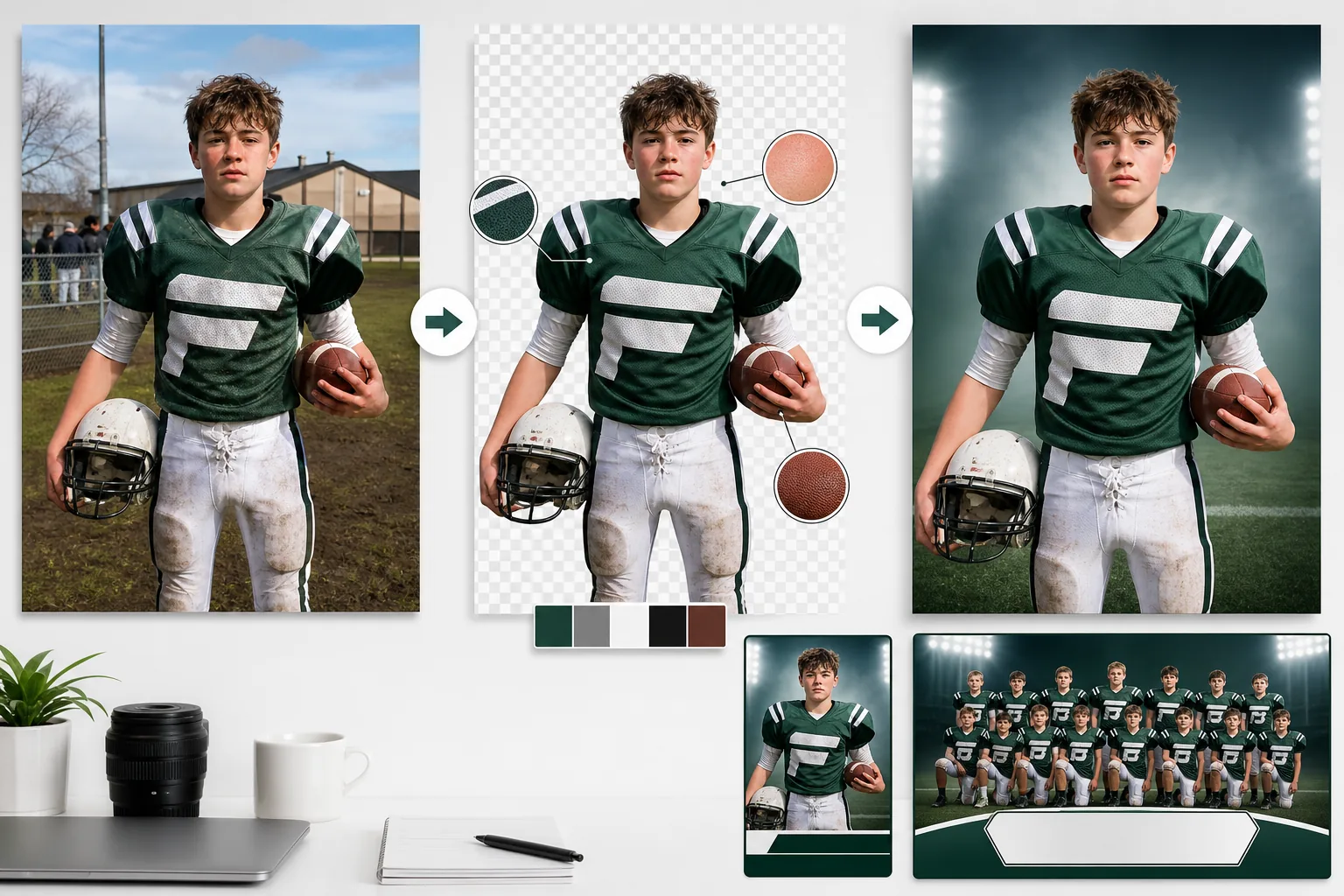
Erstellen Sie professionelle Kaderfotos, Spieltagsprogramme und Mannschaftsbanner aus Fotos, die auf jedem Platz, Court oder in jeder Halle aufgenommen wurden. Diese Vorlage entfernt unruhige Hintergründe und ersetzt sie durch Vereinsfarben, Stadionkulissen oder Studiohintergründe. Die Uniformfarben werden so verstärkt, dass sie den echten Mannschaftsfarben entsprechen, und AI sharpening hebt Trikotnummern, Vereinslogos und Ausrüstungsdetails hervor.
Diese Vorlage kostenlos testenBusiness template preview
Was diese Vorlage leistet
Löst das häufige Problem der Mannschaftsfotografie, bei der unruhige Hintergründe, ungleichmäßiges Spielfeldlicht und hektische Fototermine Bilder erzeugen, die auf Kadern und Programmen amateurhaft wirken. Background Eraser isoliert einzelne Spieler oder die gesamte Mannschaft von Parkplätzen, Hallentribünen und matschigen Trainingsplätzen. AI Enhance korrigiert die Belichtungsunterschiede beim Fotografieren im Freien – die halbe Mannschaft in der Sonne, die andere im Schatten – und normalisiert die Uniformfarben, sodass jedes Trikot im selben kräftigen Farbton der Mannschaftsfarbe erscheint. Trikotnummern, Namensschilder und Vereinslogos werden für die Lesbarkeit geschärft. Das Ergebnis ist eine Reihe professioneller, einheitlicher Kaderfotos, die dem visuellen Standard von College- und Profiprogrammen entsprechen.
Vorlageneinstellungen
| Hintergrund | Einfarbige Mannschaftsfarbe, Verlauf, Stadionumgebung oder Studiograu |
| Uniformverbesserung | Farbnormalisierung auf die echten Mannschaftsfarben bei allen Lichtverhältnissen |
| Detailschärfung | Trikotnummern, Namensschilder und Vereinslogos für die Lesbarkeit verstärkt |
| Belichtungsnormalisierung | Sonne-/Schatten-Unterschiede bei Gruppen- und Einzelaufnahmen ausgleichen |
| Zuschnittoptionen | Ganzkörper-, Dreiviertel- oder Porträtzuschnitt für Kaderkarten |
| Ausgabeauflösung | 2400×3200px (3:4-Hochformat für Kaderseiten und Programme) |
So verwenden Sie diese Vorlage
Mannschafts- oder Spielerfotos hochladen
Laden Sie Einzelfotos von Spielern oder Gruppenaufnahmen der gesamten Mannschaft hoch. Fotos, die im Freien auf Plätzen, in Hallen oder sogar auf Parkplätzen vor den Spielen aufgenommen wurden, funktionieren alle. Die Vorlage bewältigt ungleichmäßiges Außenlicht und gemischte Innen-/Tageslichtsituationen.
Hintergrund entfernen und freistellen
Background Eraser trennt die Spieler von ihrer Umgebung. Bei Gruppenaufnahmen wird die gesamte Mannschaft als Einheit freigestellt. Bei Einzelfotos wird jeder Spieler mit einer Kantenerkennung ausgeschnitten, die Helmformen, Schulterpolster-Konturen und Ausrüstung wie Schläger, Rackets und Sticks erhält.
Uniformen und Details verbessern
AI Enhance normalisiert die Trikotfarben über alle Fotos hinweg, sodass sie der echten Mannschaftsfarbe entsprechen – unabhängig davon, ob die Aufnahme in hellem Sonnenlicht, im Schatten oder unter Hallen-Leuchtstoffröhren entstand. Trikotnummern und Namensschilder werden geschärft. Die Gesichtsbelichtung wird ausgeglichen, sodass kein Spieler unterbelichtet oder ausgewaschen wirkt.
Für Kader und Programme exportieren
Laden Sie Einzelbilder der Spieler für Kaderkarten, das Mannschaftsgesamtbild für Programmcover und web-optimierte Versionen für die Mannschaftswebsite herunter. Alle Bilder teilen dieselben Hintergrund- und Verbesserungseinstellungen für eine einheitliche visuelle Identität über den gesamten Kader hinweg.
Profi-Tipps für die besten Ergebnisse
- ✓Fotografieren Sie die Spieler in derselben Uniformkonfiguration – Trikot in der Hose oder darüber, Stutzen hoch oder runter, Ausrüstung stets gleich gehalten. Die KI normalisiert Licht und Farbe, kann aber nicht vereinheitlichen, wie die Ausrüstung getragen wird.
- ✓Lassen Sie für individuelle Kaderfotos jeden Spieler an derselben Stelle in derselben Pose stehen. Eine einheitliche Körperhaltung in Kombination mit dem einheitlichen Hintergrund und der Verbesserung der Vorlage erzeugt eine professionelle Kaderseite, die wie ein einziges, koordiniertes Shooting aussieht.
- ✓Fotografieren Sie nach Möglichkeit bei bedecktem Himmel. Helle Sonne erzeugt harte Schatten unter Helmrändern, die die Gesichter verdecken. Bedecktes Licht ist flach und gleichmäßig und liefert der KI die meisten Gesichtsdetails, mit denen sie beim Verbessern der finalen Bilder arbeiten kann.
Häufige Fragen
Kann ich einen kompletten Mannschaftskader auf einmal verarbeiten?
+
Ja. Laden Sie alle Einzelfotos der Spieler im Stapel hoch, und die Vorlage wendet auf jedes denselben Hintergrund, dieselbe Farbnormalisierung und Verbesserung an. Das Ergebnis ist ein visuell einheitliches Set, das bereit für Kaderseiten, Programme und die Mannschaftswebsite ist.
Werden Helmschatten auf den Gesichtern korrigiert?
+
AI Enhance holt Schattendetails unter Helmrändern und Mützenschirmen hervor. Bei mäßigen Schatten werden die Gesichtszüge vollständig wiederhergestellt. Bei sehr tiefen Schatten, in denen die Augen völlig dunkel sind, verbessert die Optimierung die Sichtbarkeit erheblich, erreicht aber möglicherweise nicht die Qualität eines gut ausgeleuchteten Originals.
Funktioniert das für Jugendligen und Freizeitmannschaften?
+
Absolut. Die Vorlage ist am wertvollsten für Jugendligen, Freizeitmannschaften und Schulprogramme, die kein Budget für professionelle Fotografie haben. Jeder Elternteil oder Freiwillige mit einem Smartphone kann die Originalfotos aufnehmen, und diese Vorlage liefert Ergebnisse, die mit professionellen Sportfotografie-Diensten vergleichbar sind.
Geben Sie Ihrer Mannschaft den professionellen Kader, den sie verdient
Laden Sie Spielerfotos von jedem Platz oder aus jeder Halle hoch und erhalten Sie einheitliche, ausgefeilte Kaderbilder, die bereit für Programme und Websites sind.
Kostenlos testenRelated templates
More business templates for your workflow.
Polnische Unternehmensteamfotos mit einheitlichen Hintergründen, professioneller Lichtkorrektur, markengerechter Farbkorrektur und einheitlicher Bildqualität im gesamten Team.
Verbessern Sie Fitnessstudio- und Fitnessfotos mit Verbesserung der Muskeldefinition, dynamischer Beleuchtungskorrektur, Hintergrundbereinigung und kontrastreicher Farbkorrektur für Sportler.
Verbessern Sie Tattoo-Portfoliofotos mit lebendiger Tintenfarbe, Schärfung von Liniendetails, Reduzierung von Hautrötungen und sauberen Hintergründen für Künstlerportfolios und Instagram.
Erstellen Sie ein ausgefeiltes Lebenslauf-Headshot mit Hintergrundersetzung, Hautglättung und Beleuchtungskorrektur. Ideal für Lebensläufe, Jobportale und Unternehmensverzeichnisse.
Erstellen Sie professionelle Promofotos von Bands und Musikern mit Hintergrundersetzung, dramatischer Beleuchtungsverbesserung und druckfertigen Ausgaben für Pressemappen und Veranstaltungsort-Einreichungen.
Präsentieren Sie Nagelkunst mit Detailverbesserung auf Makroebene, echter Gel- und Lackfarbgenauigkeit und sauberer Handpositionierung für Instagram-Portfolios und Buchungsseiten.