
Fitnessstudio- und Fitnessfoto
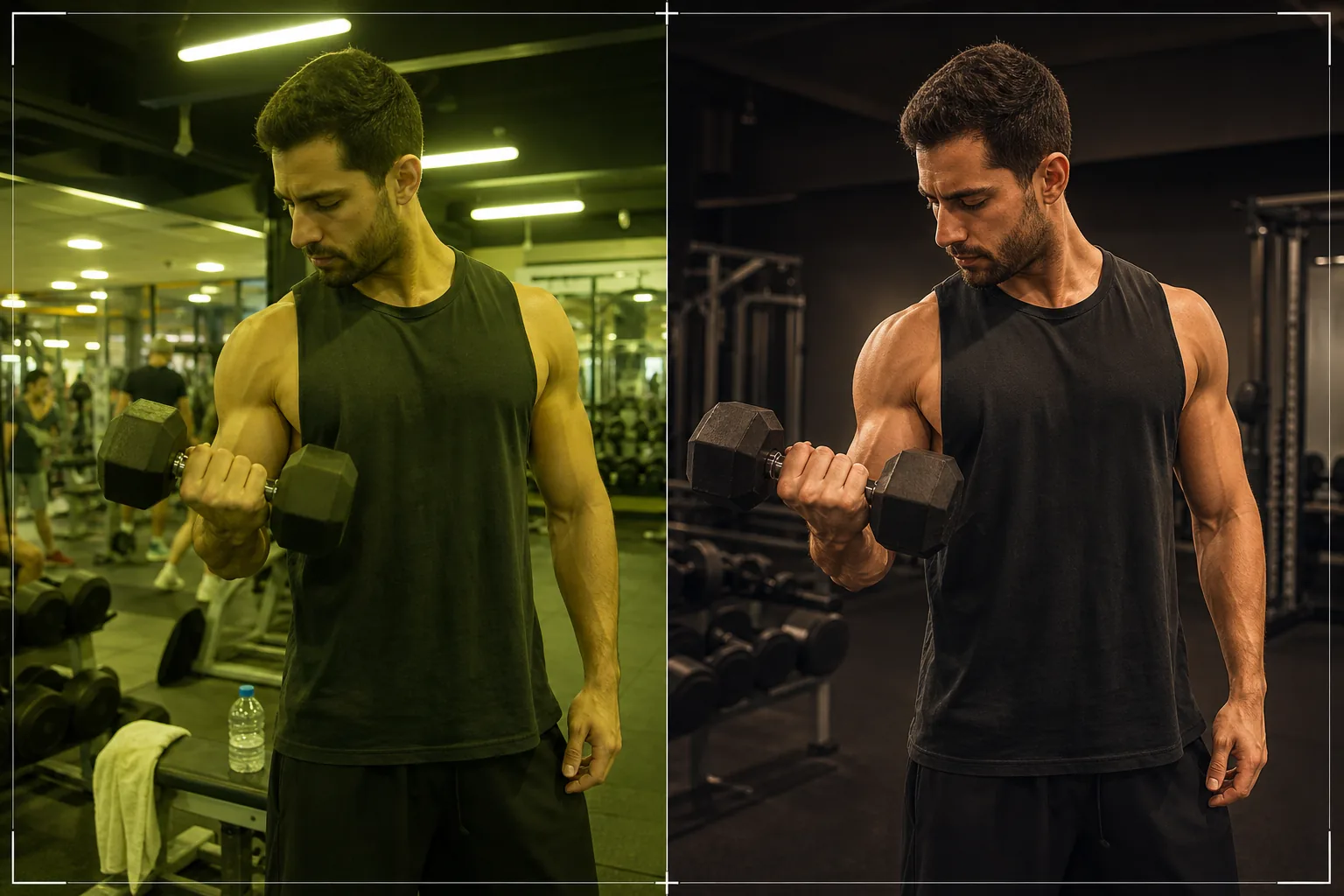
Verwandeln Sie Selfies aus dem Fitnessstudio und Trainingsaufnahmen in professionelle Fitnessinhalte. Diese Vorlage verbessert die Muskeldefinition durch das Modellieren von Licht und Schatten, korrigiert die harte Beleuchtung im Fitnessstudio, entfernt störende Elemente im Hintergrund sowie andere Trainierende und wendet eine sportliche Farbkorrektur an, die Kraft und Energie betont.
Diese Vorlage kostenlos testenBusiness template preview
Was diese Vorlage macht
Verwandelt alltägliche Fitnessstudio-Fotos in Fitnessinhalte in Profiqualität, die sich für Portfolios von Personal Trainern, Fitnessstudio-Websites, Profile in Fitness-Apps und soziale Medien eignen. Fitnessstudios stellen besondere fotografische Herausforderungen dar: gemischte Leuchtstoff- und LED-Deckenbeleuchtung erzeugt unvorteilhafte Grünstiche, Spiegel und Geräte sorgen für unruhige Hintergründe, und dem üblichen Studio-Selfie fehlt die dramatische Beleuchtung, die Fitnessfotos überzeugend macht. AI Enhance modelliert Licht und Schatten, um die Muskeldefinition hervorzuheben, korrigiert den Farbstich der Studiobeleuchtung zu natürlichen warmen Tönen und erhöht den Kontrast, um den dynamischen, energiegeladenen Look professioneller Fitnessfotografie zu erzeugen. Magic Eraser entfernt andere Studiobesucher, störende Geräte im Hintergrund und ablenkende Schilder.
Vorlageneinstellungen
| Muskeldefinition | Modellieren mit gerichtetem Licht (verstärkte Schatten in den Muskelkonturen) |
| Beleuchtungskorrektur | Korrigiert die Leuchtstoff-/LED-Mischung des Studios zu warmen, natürlichen Hauttönen |
| Farbkorrektur | Kontrastreich sportlich (tiefe Schatten, warme Lichter, entsättigter Hintergrund) |
| Hintergrundbereinigung | Entfernt andere Studiobesucher, störende Geräte und Schilder |
| Ausgabeabmessungen | 1080 × 1350 px (Instagram-Hochformat) oder 2000px fürs Portfolio |
So verwenden Sie diese Vorlage
Laden Sie Ihr Fitnessstudio-Foto hoch
Laden Sie ein Trainingsfoto, ein Studio-Selfie, ein Fortschrittsfoto oder ein posiertes Fitnessfoto hoch. Die Vorlage kommt mit Spiegel-Selfies, Aufnahmen per Selbstauslöser und von einem Trainingspartner gemachten Fotos zurecht. Für beste Ergebnisse sollten Sie darauf achten, dass die gewünschte Muskelgruppe sichtbar ist und der Körper so positioniert ist, dass er den Körperwinkel zeigt, den Sie hervorheben möchten.
Beleuchtungs- und Muskelverbesserung
AI Enhance korrigiert die flache, unvorteilhafte Studiobeleuchtung, indem es ein gerichtetes Licht-Modelling hinzufügt, das Schatten in den Muskelkonturen erzeugt – die Technik, die professionelle Fitnessfotografen verwenden, um Muskeln definierter erscheinen zu lassen. Der Hautton wird vom grün-gelben Studiostich zu warmen, natürlichen Tönen korrigiert.
Hintergrundbereinigung
Magic Eraser entfernt andere Studiobesucher (für Privatsphäre und Komposition), unaufgeräumte Geräteständer, Wasserflaschen, Handtücher und Werbeschilder. Das Studioumfeld wird zu einem sauberen, fokussierten Hintergrund vereinfacht, der die Aufmerksamkeit auf das Motiv lenkt.
Mit sportlicher Farbkorrektur exportieren
Laden Sie das Bild mit angewendeter kontrastreicher sportlicher Farbkorrektur herunter – tiefe Schatten, warme Hautlichter und ein leicht entsättigter Hintergrund, der das Motiv hervortreten lässt. Ausgabe mit 1080 × 1350 px für Instagram oder 2000px an der langen Kante für Portfolio und Website.
Profi-Tipps für beste Ergebnisse
- ✓Machen Sie Ihre Fotos während oder unmittelbar nach einem Satz, wenn die Muskeln gepumpt und durchblutet sind. Die Vorlage verstärkt die vorhandene Muskeldefinition durch Beleuchtung, aber ein gepumpter Muskel bietet der KI mehr Konturen zum Arbeiten.
- ✓Positionieren Sie sich so, dass die Hauptlichtquelle des Studios seitlich statt direkt über Ihnen ist. Seitenlicht erzeugt natürliche Schatten, die die Muskelform definieren. Die Vorlage kann gerichtetes Licht simulieren, aber echtes Seitenlicht liefert das authentischste Ergebnis.
- ✓Behalten Sie bei Fortschrittsfotos über die Trainingseinheiten hinweg dieselbe Pose, denselben Winkel und denselben Abstand bei. Die Vorlage wendet eine einheitliche Verbesserung an, sodass Unterschiede zwischen den Fotos den tatsächlichen körperlichen Fortschritt genau widerspiegeln und nicht fotografische Variablen.
- ✓Vermeiden Sie nach Möglichkeit Studiospiegel im Bild – fotografieren Sie mit Selbstauslöser oder lassen Sie jemanden das Foto machen. Spiegel-Selfies funktionieren, schränken aber die Fähigkeit der Vorlage ein, Hintergrundelemente zu entfernen, da der Hintergrund sowohl direkt hinter Ihnen als auch in der Spiegelung erscheint.
Häufige Fragen
Verändert dies die Körperform?
+
Nein. Die Vorlage verstärkt die Muskeldefinition durch Licht und Schatten – dieselbe Technik, die in der professionellen Fitnessfotografie verwendet wird – verändert aber nicht die Körperproportionen, -größe oder -form. Die gezeigte Figur ist exakt Ihre eigene, nur besser ausgeleuchtet.
Funktioniert das für Yoga- und Beweglichkeitsfotos?
+
Ja. Bei Yoga- und Beweglichkeitsinhalten reduziert die Vorlage den sportlichen Kontrast und verwendet eine weichere, wärmere Verbesserung, die Form und Bewegungsfluss statt Muskeldefinition betont. Die Hintergrundbereinigung und Beleuchtungskorrektur funktionieren bei jeder Fitnessdisziplin auf dieselbe Weise.
Was ist mit Trainingsfotos im Freien?
+
Außenaufnahmen werden gut verarbeitet – die Vorlage korrigiert harte Schatten der Mittagssonne und wertet die natürliche Umgebung auf. Bei Außenaufnahmen konzentriert sich die Hintergrundbereinigung auf das Entfernen von Passanten, Müll und ablenkenden Elementen, während der Park, der Strand oder die urbane Kulisse erhalten bleibt.
Fitnessinhalte, die professionell aufgenommen aussehen
Laden Sie Fitnessstudio-Fotos hoch und erhalten Sie dramatische, saubere, professionell abgestimmte Bilder, die Ihren Körper und Ihre Marke ins beste Licht rücken.
Kostenlos testenRelated templates
More business templates for your workflow.
Polnische Unternehmensteamfotos mit einheitlichen Hintergründen, professioneller Lichtkorrektur, markengerechter Farbkorrektur und einheitlicher Bildqualität im gesamten Team.
Verbessern Sie Tattoo-Portfoliofotos mit lebendiger Tintenfarbe, Schärfung von Liniendetails, Reduzierung von Hautrötungen und sauberen Hintergründen für Künstlerportfolios und Instagram.
Erstellen Sie ein ausgefeiltes Lebenslauf-Headshot mit Hintergrundersetzung, Hautglättung und Beleuchtungskorrektur. Ideal für Lebensläufe, Jobportale und Unternehmensverzeichnisse.
Erstellen Sie professionelle Team- und Einzelspielerfotos mit Hintergrundaustausch, Trikotfarbverstärkung und Stadion- oder Studiohintergründen für Kader und Programme.
Erstellen Sie professionelle Promofotos von Bands und Musikern mit Hintergrundersetzung, dramatischer Beleuchtungsverbesserung und druckfertigen Ausgaben für Pressemappen und Veranstaltungsort-Einreichungen.
Präsentieren Sie Nagelkunst mit Detailverbesserung auf Makroebene, echter Gel- und Lackfarbgenauigkeit und sauberer Handpositionierung für Instagram-Portfolios und Buchungsseiten.