
Nail-Art-Portfolio
Zeigen Sie Ihre Nagelkunst mit dem Detail und der Farbgenauigkeit, die sie verdient. Diese Vorlage verbessert Nahaufnahmen von Nägeln mit einer Schärfung auf Makroebene, die jedes winzige Designelement sichtbar macht, korrigiert Lack- und Gelfarben zu ihren wahren Farbtönen unter neutralem Licht und bereinigt die umgebende Haut sowie den Hintergrund, sodass sich Kundinnen ganz auf Ihre Kunstfertigkeit konzentrieren.
Diese Vorlage kostenlos testenBusiness template preview
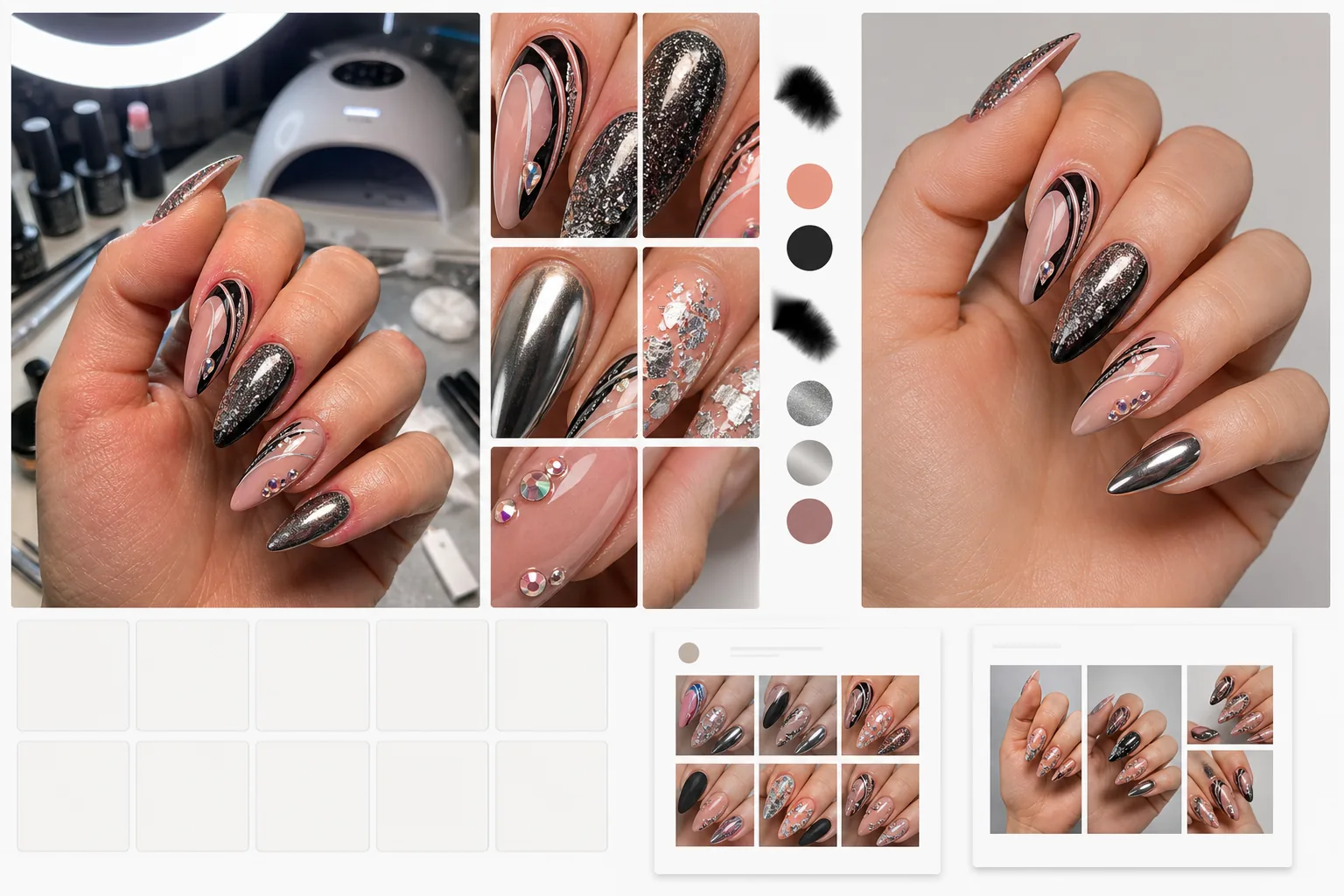
Was diese Vorlage leistet
Verwandelt Handyfotos, die am Salonplatz aufgenommen wurden, in Bilder in Portfolioqualität, die handwerkliches Können in Szene setzen. AI Enhance wendet eine Schärfung auf Makroebene an, die feine Details hervorhebt — Glitzerpartikel, handgemalte Linienführung, Foliemuster, Chrom-Finishes und winzige platzierte Steinchen —, die Handykameras aus der Nähe verwischen. Lack- und Gelfarben werden durch Entfernen des warmen oder kühlen Farbstichs von Salonbeleuchtung, UV-Lampen und Ringlichtern auf den echten Herstellerfarbton korrigiert. Magic Eraser bereinigt die umgebende Haut — entfernt Rötungen an der Nagelhaut, Niednägel und trockene Stellen — und beseitigt störende Elemente im Hintergrund wie UV-Lampen, Lackflaschen und Salonausrüstung, sodass sich das Portfoliobild ganz auf die Nagelkunst konzentriert.
Vorlageneinstellungen
| Detailschärfung | Makroebene (Glitzer, Linienführung, Folien, Steinchen und Textur sichtbar) |
| Farbkorrektur | Echter Lack-/Gelfarbton nach dem neutralen Lichtstandard D50 |
| Hautbereinigung | Glatte Nagelhaut, reduzierte Rötungen und gleichmäßiger Hautton rund um die Nägel |
| Hintergrund | Sauberes Weiß, einfarbig oder unscharfe Salonumgebung |
| Ausgabeauflösung | 2000×2000px (1:1 quadratisch für das Instagram-Raster) |
So verwenden Sie diese Vorlage
Laden Sie Ihr Nagelfoto hoch
Laden Sie eine Nahaufnahme des fertigen Nagelsets hoch. Handyfotos, die am Salonplatz unter jeder Beleuchtung aufgenommen wurden — LED-Tischlampen, Ringlichter, UV-Aushärtungslampen oder natürliches Fensterlicht —, funktionieren alle. Gehen Sie so nah heran, wie es Ihr Handy zulässt, um maximale Details festzuhalten.
Detail und Farbe verbessern
AI Enhance schärft die Nagelkunst, um Mikrodetails sichtbar zu machen, die Handykameras aus der Nähe nicht auflösen können. Lack- und Gelfarben werden durch Entfernen des Farbstichs der Salonbeleuchtung auf ihren echten Farbton korrigiert. Chrom-, Holografie- und Cat-Eye-Finishes werden hervorgehoben, um ihre lichtwechselnden Eigenschaften zu zeigen.
Haut und Hintergrund bereinigen
Magic Eraser glättet Rötungen der Nagelhaut und trockene Haut rund um die Nägel, ohne die Hände künstlich wirken zu lassen. Störende Elemente im Hintergrund — UV-Lampen, Lackflaschen, Handauflagen und Wattepads — werden entfernt oder durch einen sauberen Hintergrund ersetzt. Der Fokus wird ganz auf die Nagelkunst gelenkt.
Für das Portfolio exportieren
Laden Sie in 2000×2000px im quadratischen Format herunter, um ein einheitliches Instagram-Rasterlayout zu erhalten. Rechteckige Zuschnitte sind für Pinterest-Pins und Website-Galerien verfügbar. Das einheitliche Styling schafft ein stimmiges Portfolio, das Ihre professionelle Marke aufwertet.
Profi-Tipps für beste Ergebnisse
- ✓Fotografieren Sie die Nägel direkt nach Fertigstellung des Sets, bevor die Kundin irgendetwas berührt. Frische Nagelkunst hat die saubersten Lacklinien, die intaktesten Steinchen und die höchste Glanzoberfläche — all das verstärkt die KI-Verbesserung.
- ✓Legen Sie die Hand flach oder leicht gekrümmt auf eine saubere Oberfläche. Leicht gespreizte Finger zeigen jeden Nagel einzeln und verhindern, dass der Schatten eines Nagels auf den nächsten fällt, was Details selbst nach der KI-Verbesserung verdeckt.
- ✓Verwenden Sie den Porträt- oder Makromodus Ihres Handys, falls verfügbar. Diese Modi erfassen mehr Nahaufnahmedetails und bieten der KI einen hochwertigeren Ausgangspunkt zum Schärfen feiner Nagelkunstelemente.
Häufige Fragen
Sehen Chrom- und Holografie-Finishes naturgetreu aus?
+
Die Verbesserung bewahrt und verstärkt die lichtwechselnden Eigenschaften von Chrom-, Holografie-, Cat-Eye- und Duochrom-Finishes. Da diese Finishes unter jedem Lichtwinkel anders aussehen, zeigt die Vorlage sie so, wie sie unter neutralem Oberlicht erscheinen, was die am universellsten erkennbare Darstellung ist.
Kann ich eine Vorher-Nachher-Verwandlung der Nägel zeigen?
+
Ja. Laden Sie sowohl das Vorher-Foto (natürliche Nägel) als auch das Nachher-Foto (fertiges Set) hoch, und die Vorlage verbessert beide mit denselben Einstellungen. Das einheitliche Styling macht Vorher-Nachher-Vergleiche im Marketing wirkungsvoller.
Funktioniert das für Nagelkunst auf Tips oder Farbstäbchen?
+
Ja. Die Vorlage erkennt, ob sich die Nägel an einer menschlichen Hand oder auf Präsentations-Tips und Farbstäbchen befinden, und passt die Hautbereinigung entsprechend an. Farbstäbchen werden freigestellt und genau wie Fotos an der Hand auf einem sauberen Hintergrund dargestellt.
Zeigen Sie jedes Detail Ihrer Nagelkunst
Laden Sie Salonfotos hoch und erhalten Sie Bilder in Portfolioqualität mit echten Farben, Makrodetails und sauberer Präsentation.
Kostenlos testenRelated templates
More business templates for your workflow.
Polnische Unternehmensteamfotos mit einheitlichen Hintergründen, professioneller Lichtkorrektur, markengerechter Farbkorrektur und einheitlicher Bildqualität im gesamten Team.
Verbessern Sie Fitnessstudio- und Fitnessfotos mit Verbesserung der Muskeldefinition, dynamischer Beleuchtungskorrektur, Hintergrundbereinigung und kontrastreicher Farbkorrektur für Sportler.
Verbessern Sie Tattoo-Portfoliofotos mit lebendiger Tintenfarbe, Schärfung von Liniendetails, Reduzierung von Hautrötungen und sauberen Hintergründen für Künstlerportfolios und Instagram.
Erstellen Sie ein ausgefeiltes Lebenslauf-Headshot mit Hintergrundersetzung, Hautglättung und Beleuchtungskorrektur. Ideal für Lebensläufe, Jobportale und Unternehmensverzeichnisse.
Erstellen Sie professionelle Team- und Einzelspielerfotos mit Hintergrundaustausch, Trikotfarbverstärkung und Stadion- oder Studiohintergründen für Kader und Programme.
Erstellen Sie professionelle Promofotos von Bands und Musikern mit Hintergrundersetzung, dramatischer Beleuchtungsverbesserung und druckfertigen Ausgaben für Pressemappen und Veranstaltungsort-Einreichungen.