
Social-Media-Story-Vorlage
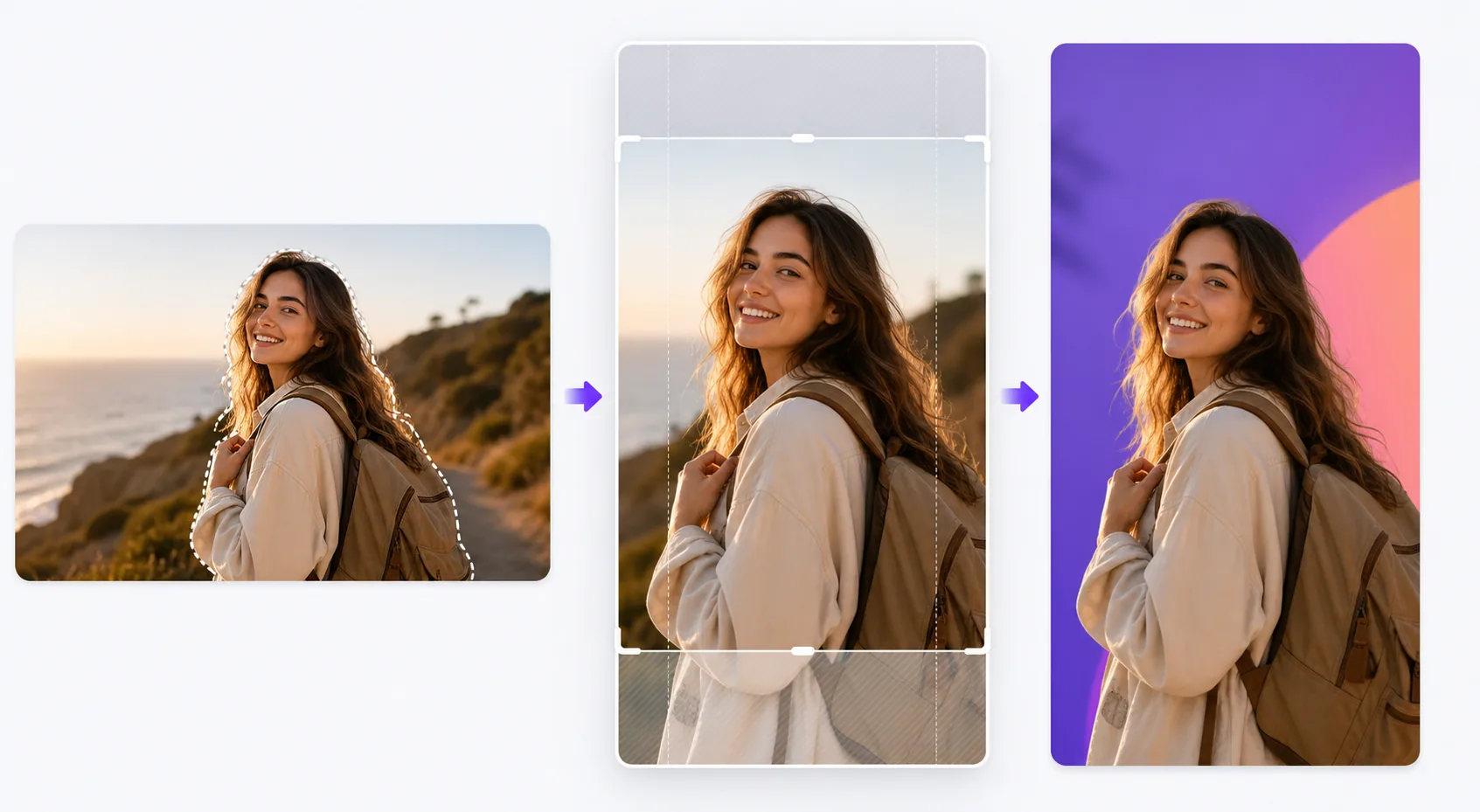
Gestalten Sie vertikale 9:16-Storys, die für Instagram, TikTok, Snapchat und YouTube Shorts optimiert sind. Diese Vorlage schneidet Fotos für das hohe vertikale Format zu und positioniert sie neu, entfernt oder ersetzt Hintergründe für visuelle Wirkung und stellt sicher, dass Ihr Motiv innerhalb der textsicheren Zonen platziert ist, sodass Overlays, Sticker und Bildunterschriften den Brennpunkt niemals verdecken.
Diese Vorlage kostenlos testenSocial Media template preview
Was diese Vorlage leistet
Löst die Formatierungsherausforderung, die das Engagement auf Story-Plattformen beeinträchtigt: horizontale Fotos, die mit schwarzen Balken in vertikale Rahmen gequetscht werden, Motive, die an ungünstigen Stellen abgeschnitten sind, und wichtige visuelle Details, die hinter Oberflächenelementen verborgen bleiben. Die Vorlage schneidet Ihr Foto intelligent auf 9:16 zu, zentriert das Motiv und wendet KI-gestützte Neugestaltung an, wenn sich die ursprüngliche Komposition nicht gut auf das vertikale Format übertragen lässt. Mit Background Eraser können Sie Ihr Motiv auf kräftige Volltonfarben, Verläufe oder unscharfe Umgebungshintergründe setzen, die die Story im Feed hervorstechen lassen. Hilfslinien für sichere Zonen stellen sicher, dass die oberen 15 % (wo sich Profilsymbole und Zeitstempel befinden) und die unteren 20 % (wo Wisch-nach-oben-Aufforderungen und Bildunterschriften erscheinen) frei von wichtigen visuellen Inhalten bleiben.
Vorlageneinstellungen
| Seitenverhältnis | 9:16 (1080×1920px) — nativ für Instagram-, TikTok- und Snapchat-Storys |
| Hintergrundstil | Volltonfarbe, Verlauf, unscharfes Original oder benutzerdefiniertes Bild |
| Motivpositionierung | KI-Neugestaltung, um das Motiv in der vertikalen sicheren Zone zu zentrieren |
| Sichere Zonen | Obere 15 % und untere 20 % werden für Oberflächenelemente der Plattform frei gehalten |
| Ausgabeformat | JPEG mit 95 % Qualität oder PNG mit Transparenz zur weiteren Bearbeitung |
So verwenden Sie diese Vorlage
Laden Sie Ihr Foto hoch
Laden Sie ein beliebiges Foto hoch — horizontal, vertikal oder quadratisch. Die KI erkennt das Hauptmotiv (Person, Produkt, Brennpunkt der Szene) und ermittelt den besten vertikalen Zuschnitt, der das Motiv hervorhebt und die Komposition im 9:16-Rahmen ausgewogen hält.
Wählen Sie die Hintergrundbearbeitung
Behalten Sie den ursprünglichen Hintergrund (zugeschnitten zur Anpassung) bei, ersetzen Sie ihn für grafische Wirkung durch eine Volltonfarbe oder einen Verlauf oder verwischen Sie den Hintergrund, um eine Tiefentrennung zu erzeugen. Background Eraser liefert einen sauberen Freisteller, wenn Sie das Motiv auf einen völlig neuen Hintergrund montieren möchten.
Positionieren Sie innerhalb der sicheren Zonen
Die Vorlage zeigt Ihnen, wo die Oberflächenelemente der Plattform das Bild überlagern werden — Zeitstempel und Profilsymbole oben sowie Wisch-nach-oben-Aufforderungen oder Bildunterschriftenbereiche unten. Ihr Motiv wird automatisch in der zentralen sicheren Zone platziert, und Sie können die Position bei Bedarf anpassen.
Exportieren Sie zum Posten
Laden Sie mit 1080×1920px herunter, der nativen Auflösung für Story-Formate. Die Datei ist so optimiert, dass Komprimierungsartefakte minimiert werden, wenn die Plattformen den Upload neu kodieren. Der PNG-Export ist verfügbar, wenn Sie vor dem Posten in einer anderen App Text, Sticker oder weitere Bearbeitungen hinzufügen möchten.
Profi-Tipps für beste Ergebnisse
- ✓Verwenden Sie kräftige, kontrastreiche Hintergrundfarben hinter freigestellten Motiven. Ein leuchtend korallenroter oder elektroblauer Hintergrund lässt ein Produkt oder eine Person visuell vor den neutralen Feeds hervorstechen, durch die die meisten Nutzer scrollen, und erhöht die Chance, dass sie bei Ihrer Story innehalten.
- ✓Halten Sie die unteren 20 % des Rahmens visuell einfach. Auf Instagram befinden sich die Antwortleiste und der Bildunterschriftentext in diesem Bereich. Wichtige visuelle Inhalte dort zu platzieren, garantiert, dass sie verdeckt werden, wenn die Zuschauer die Story ansehen.
- ✓Behalten Sie bei Karussell-Storys über alle Bilder hinweg dieselbe Hintergrundfarbe und Motivposition bei. Visuelle Konsistenz lässt die Serie absichtlich und ausgefeilt wirken, was die Durchwischrate erhöht.
Häufige Fragen
Kann ich horizontale Querformatfotos verwenden?
+
Ja. Die KI gestaltet die Komposition neu, indem sie das Schlüsselmotiv identifiziert und auf einen vertikalen Ausschnitt zuschneidet, der die visuelle Wirkung erhält. Bei sehr breiten Panoramaaufnahmen kann die Neugestaltung erheblich zuschneiden, daher funktionieren Bilder mit einem zentrierten Motiv am besten.
Funktioniert das auch für Video-Thumbnails?
+
Die Vorlage verarbeitet Standbilder. Sie können das exportierte Bild jedoch als Coverframe für eine Video-Story verwenden, das die Plattformen vor dem Abspielen des Videos und in den Rastern der Story-Highlights anzeigen.
Welche Plattformen verwenden das 9:16-Format?
+
Instagram Stories und Reels, TikTok, Snapchat, YouTube Shorts, Facebook Stories, Pinterest Idea Pins und LinkedIn Stories verwenden alle das vertikale 9:16-Format. Die Ausgabe mit 1080×1920px ist die Standardauflösung, die von allen akzeptiert wird.
Machen Sie jede Story unmöglich zu überscrollen
Laden Sie ein beliebiges Foto hoch und erhalten Sie in Sekunden ein perfekt formatiertes, plattformoptimiertes vertikales Story-Bild.
Kostenlos testenRelated templates
More social media templates for your workflow.
Für Instagram optimierte quadratische Zuschnittvorlage mit 1080 x 1080 Pixel. Klare Hintergründe, lebendige Farben und scharfe Details, die im Feed hervorstechen.
YouTube-Bannervorlage mit 2560 x 1440 Pixeln und Anleitungen für sichere Zonen. Saubere Hintergrundentfernung für Erstellerfotos, gerätespezifisches Layout und markenkonsistente Kanalgrafiken.
Facebook-Titelbildvorlage mit 820×312 Pixel für den Desktop und 640×360 Pixel für den mobilen Zuschnitt. Saubere Markenbilder mit geeigneten sicheren Zonen für die Überlappung von Profilbildern und die Platzierung von CTA-Buttons.
Erstellen Sie professionelle Twitter/X-Header-Bilder mit der exakten Größe 1500×500 Pixel. Berücksichtigt die Überlappung von Profilbildern und funktioniert sowohl im dunklen als auch im hellen Modus.
Verbessern Sie Dating-Profilfotos mit natürlicher Hautglättung, Hintergrundbereinigung, Beleuchtungskorrektur und subtiler Farbkorrektur, die authentisch aussieht – nicht gefiltert.
Erstellen Sie fesselnde Pinterest-Pin-Bilder mit klarem Hintergrund, optimalen vertikalen Abmessungen von 2:3, lebendiger Farbverstärkung und pin-bereiter Komposition.