
Tieradoptionsfoto
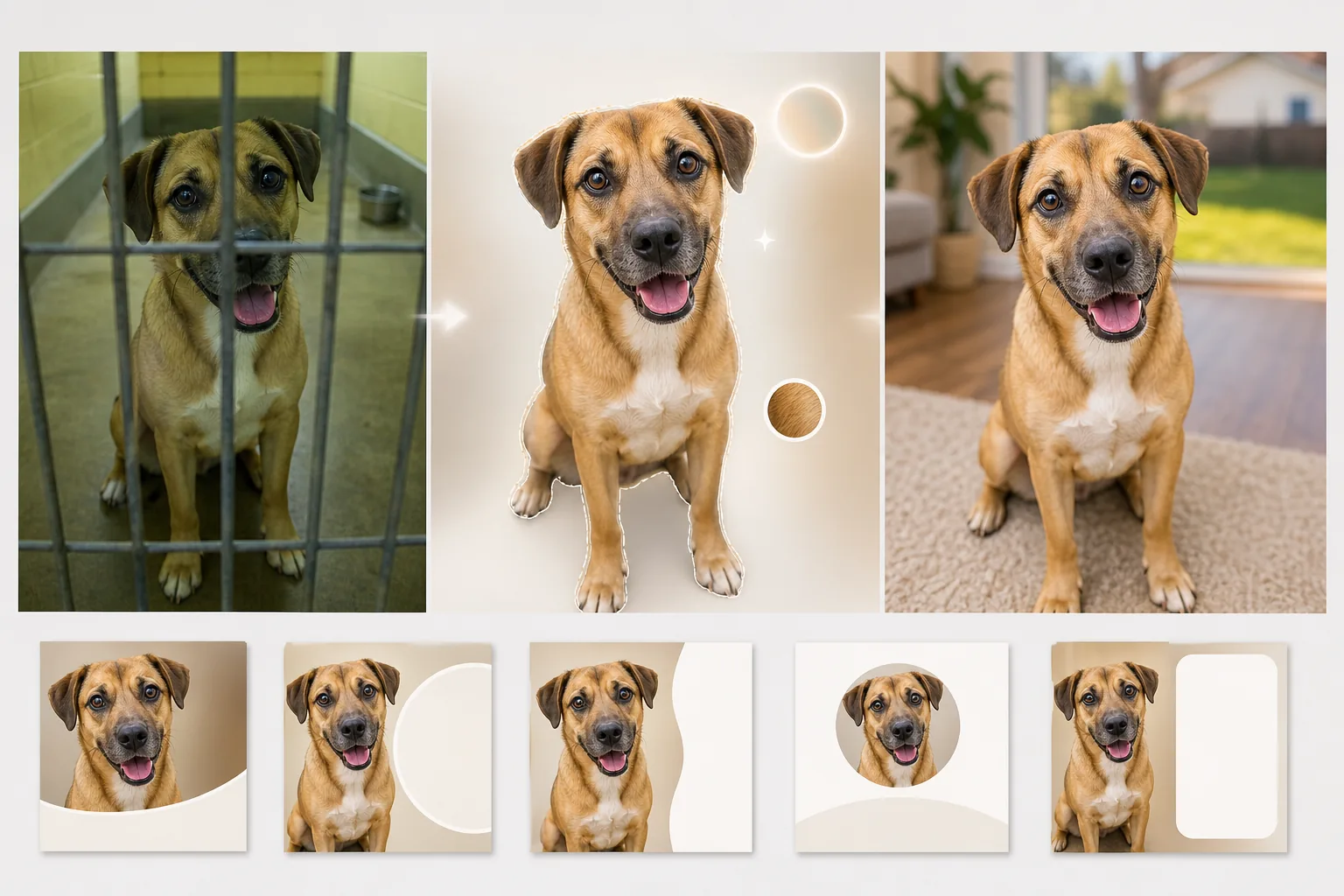
Helfen Sie Tierheimtieren mit Fotos, die ihre Persönlichkeit statt eines Betonzwingers zeigen, ein Zuhause fürs Leben zu finden. Diese Vorlage entfernt Gitterstäbe, Zwingerböden und Tierheimhintergründe und ersetzt sie durch warme, wohnliche Umgebungen oder saubere, einfarbige Hintergründe. Die Lichtkorrektur hellt dunkle Tierheimfotos auf, und die Verbesserung der Felldetails zeigt die echte Farbe und Struktur des Fells jedes Tieres.
Diese Vorlage kostenlos testenPersonal template preview
Was diese Vorlage leistet
Sie meistert die besonderen Herausforderungen der Tierheimfotografie, bei der das Licht schlecht ist, die Hintergründe anstaltsartig wirken und Tiere oft durch Gitterstäbe oder in engen Betonläufen fotografiert werden. Background Eraser entfernt Zwingergitter, Maschendrahtzäune und Tierheimumgebungen und ersetzt sie durch warme, einladende Hintergründe — einen Rasen im Garten, einen gemütlichen Wohnzimmerboden oder eine saubere, einfarbige Fläche, die die ganze Aufmerksamkeit auf das Tier lenkt. AI Enhance korrigiert die in der Tierheimfotografie häufige Unterbelichtung (Leuchtstoffröhren an der Decke, keine Fenster), hellt die oft im Schatten verborgenen Augen auf und bringt die echte Farbe und Struktur von Fell, Federn oder Schuppen zur Geltung, damit potenzielle Adoptanten sehen können, wie das Tier bei natürlichem Licht wirklich aussieht.
Vorlageneinstellungen
| Hintergrund | Rasen im Garten, Wohnzimmerboden, einfarbiges Pastell oder transparent |
| Entfernung von Gitterstäben | Automatisches Erkennen und Entfernen von Zwingergittern, Maschendraht und Drahtzäunen |
| Lichtkorrektur | Unterbelichtete Tierheimfotos auf das Äquivalent von natürlichem Tageslicht aufhellen |
| Augenverbesserung | Augen aufhellen und schärfen, um Persönlichkeit und Aufmerksamkeit zu zeigen |
| Felldetail | Fellstruktur verbessern und Farbstich durch Leuchtstoffbeleuchtung korrigieren |
| Ausgabeauflösung | 2000×2000px (quadratisch für Petfinder, Adopt-a-Pet und soziale Medien) |
So verwenden Sie diese Vorlage
Tierheimfoto hochladen
Laden Sie ein Foto des Tieres hoch, das im Tierheim, in der Pflegestelle oder bei einer Veranstaltung im Freien aufgenommen wurde. Fotos durch Gitterstäbe, in dunklen Zwingern und auf Betonböden werden alle verarbeitet. Die Vorlage funktioniert für Hunde, Katzen, Kaninchen, Vögel und andere Tierheimtiere.
Tierheimumgebung entfernen
Background Eraser entfernt den Zwinger, die Gitterstäbe, die Betonböden und den anstaltsartigen Tierheimhintergrund. Das Tier wird mit einer Kantenerkennung freigestellt, die den natürlichen Umriss von Fell, Schnurrhaaren und Ohren bewahrt — einschließlich der feinen Konturen langhaariger Rassen.
Licht und Details verbessern
AI Enhance hellt das Bild auf, um natürliches Tageslicht zu simulieren, korrigiert den grün-gelben Farbstich der Leuchtstoffröhren im Tierheim und schärft Fellstruktur und Augendetails. Die echte Fellfarbe und das Muster des Tieres werden sichtbar, und seine Augen erhalten den hellen, wachen Blick, der Adoptanten anzieht.
Für Adoptionsanzeigen exportieren
Laden Sie in 2000×2000px im quadratischen Format herunter, optimiert für Petfinder, Adopt-a-Pet und die Websites von Rettungsorganisationen. Das Format eignet sich auch direkt für Adoptionsbeiträge auf Instagram und Facebook ohne zusätzlichen Zuschnitt.
Profi-Tipps für beste Ergebnisse
- ✓Gehen Sie beim Fotografieren auf Augenhöhe des Tieres herunter. Aufnahmen von oben herab lassen Tiere kleiner und weniger ansprechend wirken. Fotos auf Augenhöhe schaffen eine Verbindung zwischen Betrachter und Tier, die Adoptionsanfragen fördert.
- ✓Halten Sie ein Leckerli oder Spielzeug direkt über die Kamera, um einen aufmerksamen Ausdruck mit nach vorn gerichteten Ohren einzufangen. Die KI kann müde Augen aufhellen und das Fell verbessern, aber sie kann einen desinteressierten Ausdruck nicht in einen engagierten verwandeln.
- ✓Achten Sie bei schwarzen Hunden und Katzen — deren Merkmale auf Tierheimfotos oft verschwinden — darauf, dass etwas Licht von vorne auf das Gesicht fällt. Schon eine seitlich gehaltene Handytaschenlampe schafft genug Tiefe, damit die KI Gesichtsdetails und Augenkonturen wiederherstellen kann.
Häufige Fragen
Kann das Gitterstäbe vor dem Tier entfernen?
+
Ja. Die KI erkennt das regelmäßige Muster von Zwingergittern und Maschendrahtzäunen, die das Tier überlagern, und entfernt sie, wobei das Fellmuster und die Gesichtszüge hinter den Stäben rekonstruiert werden. Dicke Stäbe, die einen großen Teil des Gesichts verdecken, können leichte Artefakte hinterlassen, die eine kleine manuelle Nachbearbeitung erfordern.
Wirkt das Foto irreführend in Bezug auf das Aussehen des Tieres?
+
Nein. Die Vorlage korrigiert die schlechte Tierheimbeleuchtung und entfernt die anstaltsartige Umgebung, ändert aber nicht die körperlichen Merkmale, das Fellmuster, die Größe oder die Färbung des Tieres. Ziel ist es zu zeigen, wie das Tier bei gutem Licht und in einer normalen Umgebung tatsächlich aussieht.
Können Tierheime das kostenlos nutzen?
+
Der kostenlose Tarif umfasst genug Verarbeitung für einzelne Pflegehelfer und kleine Rettungsorganisationen. Tierheime mit hohem Aufkommen können uns für gemeinnützige Preise bei der Stapelverarbeitung kontaktieren.
Helfen Sie jedem Tierheimtier, sich von seiner besten Seite zu zeigen
Laden Sie Tierheimfotos hoch und erhalten Sie warme, einladende Adoptionsbilder, die die wahre Persönlichkeit jedes Tieres zeigen.
Kostenlos testenRelated templates
More personal templates for your workflow.
Erstellen Sie konforme Ausweisfotos für Visa, Führerscheine und Personalausweise mit der richtigen Hintergrundfarbe, Kopfgröße und Gesichtsausdrucksanforderungen.
Verbessern Sie Ihre Abschlussfotos durch Hintergrundbereinigung, Kappen- und Talarkorrektur, Entfernung von Fehlern und druckfertige Schärfung von Rahmen und Ankündigungen.
Verbessern Sie Konzert- und Veranstaltungsfotos mit Rauschunterdrückung bei schlechten Lichtverhältnissen, Bühnenbeleuchtung Farbkorrektur, Entfernung von Ablenkungen durch Menschenmengen und Detailwiederherstellung aus Aufnahmen an dunklen Veranstaltungsorten.
Erstellen Sie wunderschöne Fotos für die Geburtsankündigungskarte mit weichem Hintergrund, sanfter Farbabstufung, Beseitigung von Unordnung im Krankenhaus und druckfertigen Abmessungen für den Versand.
Bereiten Sie Familien- und Porträtfotos für Feiertagsgrußkarten mit festlichem Hintergrund, warmen Farbabstufungen, Schneeeffekten und Standardkartengrößen zum Drucken vor.
Stellen Sie Erinnerungsfotos wieder her und verbessern Sie sie mit sanfter Retusche, Vereinfachung des Hintergrunds, warmer, respektvoller Farbabstufung und druckfertigen Abmessungen für Gottesdienste.