
Foto für gemeinnützige Spendenaktionen
Verwandeln Sie Schnappschüsse von Veranstaltungen und Programmdokumentationsfotos in überzeugende Bilder für Spendenaufrufe, Jahresberichte und Zuschussanträge. Diese Vorlage korrigiert die schwierige Beleuchtung von Banketthallen, Veranstaltungen im Freien und Programmstandorten, entfernt störende Bildelemente und wendet eine warme Farbkorrektur an, die die Energie und Wirkung der Arbeit Ihrer Organisation vermittelt.
Diese Vorlage kostenlos testenBusiness template preview
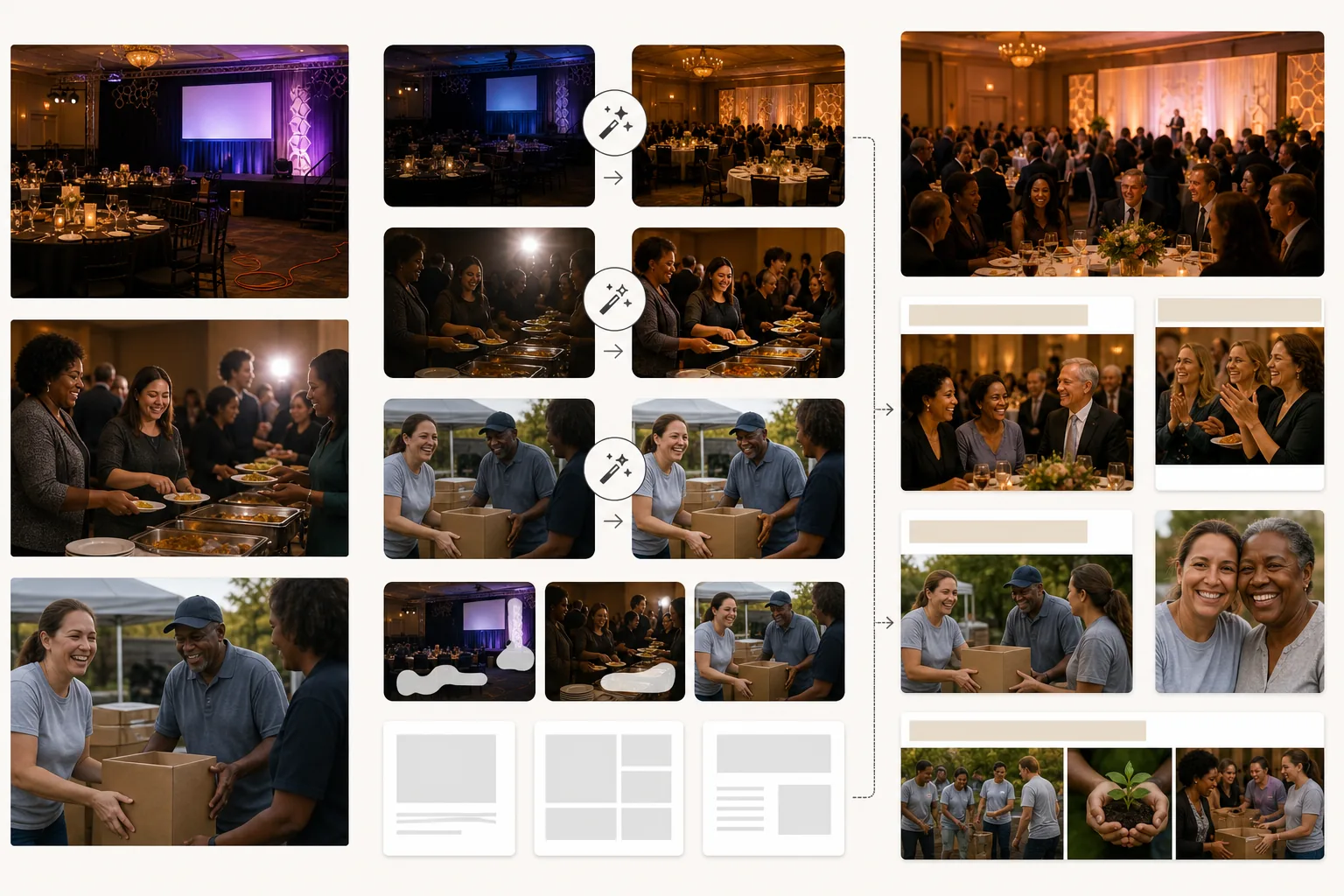
Was diese Vorlage leistet
Hebt die visuelle Qualität gemeinnütziger Kommunikation an, ohne ein professionelles Fotografiebudget zu erfordern. Die meisten gemeinnützigen Fotos werden von Freiwilligen oder Mitarbeitern mit privaten Smartphones in schwierigen Umgebungen aufgenommen — dunkle Banketthallen, belebte Veranstaltungen im Freien, überfüllte Programmstandorte. AI Enhance korrigiert Unterbelichtung, gleicht gemischtes Licht von Kronleuchtern, Bühnenstrahlern und Tischkerzen aus und stellt Details in Gesichtern wieder her, die im Schatten verloren gehen oder vom Kamerablitz überstrahlt sind. Magic Eraser entfernt störende Elemente, die die professionelle Qualität von Spendenmaterialien beeinträchtigen — sichtbare Kabel und Verlängerungsschnüre bei Galas, Müll und Pappteller bei Veranstaltungen im Freien, Baugeräte auf Baustellen sowie Marken-Beschilderung von Unternehmenssponsoren, die in bestimmten Kommunikationen nicht erscheinen sollte. Die warme Farbkorrektur vermittelt menschliche Verbundenheit und positive Wirkung, was laut Forschung zur gemeinnützigen Kommunikation die Reaktion der Spender fördert.
Vorlageneinstellungen
| Beleuchtungskorrektur | Voreinstellungen für Banketthalle, Veranstaltung im Freien und Programmstandort in Innenräumen |
| Blitzkorrektur | Reduziert harte Blitz-Glanzpunkte und rote Augen bei gleichzeitigem Erhalt der Umgebungswärme |
| Hintergrundbereinigung | Entfernt Kabel, temporäre Beschilderung und Veranstaltungsunordnung |
| Farbkorrektur | Warme Gemeinschaft (betont menschliche Verbundenheit und positive Energie) |
| Ausgabeauflösung | 3000×2000px (3:2 für Jahresberichte, Newsletter und Web) |
So verwenden Sie diese Vorlage
Veranstaltungs- oder Programmfotos hochladen
Laden Sie Fotos von Spendengalas, Freiwilligenveranstaltungen, Programmaktivitäten, Gemeinwesenarbeit und jeder organisatorischen Aktivität hoch. Handyfotos, Schnappschüsse von Kompaktkameras und DSLR-Bilder funktionieren alle. Die Vorlage bewältigt die breite Palette von Lichtverhältnissen, denen gemeinnützige Organisationen begegnen.
Beleuchtung und Belichtung korrigieren
AI Enhance hellt unterbelichtete Fotos von Banketthallen und Abendveranstaltungen auf, korrigiert die gemischten Farbstiche von Kronleuchtern und Bühnenbeleuchtung und reduziert harte Blitzartefakte. Gesichter in der Menge, die zu dunkel oder zu hell waren, werden für ein natürliches, warmes Aussehen ausgeglichen.
Ablenkungen entfernen
Magic Eraser entfernt störende Bildelemente, die die professionelle Qualität Ihrer Kommunikation beeinträchtigen — Verlängerungsschnüre, Cateringausrüstung, Sponsorenbanner (wenn unangebracht) und Aufbaumaterial der Veranstaltung. Die KI rekonstruiert Boden, Wände und Hintergrund hinter den entfernten Objekten.
Für die Spenderkommunikation exportieren
Laden Sie in 3000×2000px für Jahresberichte und Zuschussanträge herunter oder in weboptimierten Größen für E-Mail-Kampagnen, soziale Medien und die Website der Organisation. Die warme, professionelle Qualität signalisiert den Spendern, dass ihre Beiträge gut verwaltete Programme finanzieren.
Profi-Tipps für beste Ergebnisse
- ✓Halten Sie Momente echter Interaktion fest — ein Freiwilliger und ein Teilnehmer, die zusammen lachen, ein Spender, der einem Programmleiter die Hand schüttelt, Kinder, die in eine Aktivität vertieft sind. Genau auf diese authentischen Verbindungsmomente reagieren Spender, und die KI-Verbesserung lässt sie selbst dann strahlen, wenn sie unter dunklen, unvollkommenen Bedingungen aufgenommen wurden.
- ✓Bestimmen Sie bei jeder Veranstaltung eine Person als Fotografen. Selbst ein Mitarbeiter mit einem Handy erzielt bessere Ergebnisse, als sich auf zufällige Schnappschüsse zu verlassen, denn bewusste Bildgestaltung und Timing fangen die Momente ein, die die Geschichte Ihrer Organisation erzählen.
- ✓Bearbeiten Sie alle Fotos einer einzelnen Veranstaltung mit denselben Einstellungen. Eine einheitliche Beleuchtungskorrektur und Farbkorrektur über eine Reihe von Fotos hinweg schafft eine stimmige visuelle Geschichte für den Jahresbericht oder die Kampagnenseite, statt einer zusammenhanglosen Sammlung zufälliger Schnappschüsse.
Häufige Fragen
Kann ich Sponsorenlogos aus Veranstaltungsfotos entfernen?
+
Ja. Magic Eraser kann Markenbanner, Logo-Displays und Sponsorenbeschilderung aus Veranstaltungsfotos entfernen. Das ist nützlich, wenn Fotos einer gesponserten Veranstaltung in Kontexten verwendet werden, in denen die Hervorhebung dieses bestimmten Sponsors unangebracht ist — etwa bei Zuschussanträgen an konkurrierende Geldgeber oder im allgemeinen Marketing der Organisation.
Funktioniert das für Bau- und Freiwilligenveranstaltungen im Freien?
+
Ja. Freiwilligenveranstaltungen im Freien — Hausbau, Parkreinigungen, Gemeinschaftsgärten — haben ihre eigenen Herausforderungen, darunter grelle Sonne, gemischter Schatten und unruhige Hintergründe mit Baumaterialien. Die Vorlage korrigiert diese Bedingungen und entfernt ablenkende Ausrüstung und Materialien aus dem Bild.
Kann ich das für Fotos in Zuschussanträgen verwenden?
+
Absolut. Zuschussanträge mit professionellen Programmfotos belegen organisatorische Kompetenz und eine wirksame Programmumsetzung. Die Vorlage erzeugt Bilder, die dem visuellen Standard entsprechen, den Geldgeber von etablierten Organisationen erwarten.
Zeigen Sie Spendern die Wirkung jedes Euros
Laden Sie Veranstaltungs- und Programmfotos hoch und erhalten Sie ausgefeilte Bilder, die Spendenaufrufe, Jahresberichte und Zuschussanträge stärken.
Kostenlos testenRelated templates
More business templates for your workflow.
Polnische Unternehmensteamfotos mit einheitlichen Hintergründen, professioneller Lichtkorrektur, markengerechter Farbkorrektur und einheitlicher Bildqualität im gesamten Team.
Verbessern Sie Fitnessstudio- und Fitnessfotos mit Verbesserung der Muskeldefinition, dynamischer Beleuchtungskorrektur, Hintergrundbereinigung und kontrastreicher Farbkorrektur für Sportler.
Verbessern Sie Tattoo-Portfoliofotos mit lebendiger Tintenfarbe, Schärfung von Liniendetails, Reduzierung von Hautrötungen und sauberen Hintergründen für Künstlerportfolios und Instagram.
Erstellen Sie ein ausgefeiltes Lebenslauf-Headshot mit Hintergrundersetzung, Hautglättung und Beleuchtungskorrektur. Ideal für Lebensläufe, Jobportale und Unternehmensverzeichnisse.
Erstellen Sie professionelle Team- und Einzelspielerfotos mit Hintergrundaustausch, Trikotfarbverstärkung und Stadion- oder Studiohintergründen für Kader und Programme.
Erstellen Sie professionelle Promofotos von Bands und Musikern mit Hintergrundersetzung, dramatischer Beleuchtungsverbesserung und druckfertigen Ausgaben für Pressemappen und Veranstaltungsort-Einreichungen.