
Medizinisch Vorher & Nachher
Erstellen Sie klinisch standardisierte Vorher-Nachher-Fotos für Praxen in Dermatologie, plastischer Chirurgie, Zahnmedizin und ästhetischer Medizin. Diese Vorlage vereinheitlicht Beleuchtung und Farbe über die Vergleichspaare hinweg, ersetzt uneinheitliche Hintergründe aus dem Behandlungsraum durch saubere klinische Hintergründe und bietet datenschutzbewusste Zuschnitt- und Schwärzungswerkzeuge – so erhalten Ihre Marketingbilder die Einheitlichkeit und Professionalität, die das Vertrauen der Patienten aufbauen.
Diese Vorlage kostenlos testenBusiness template preview
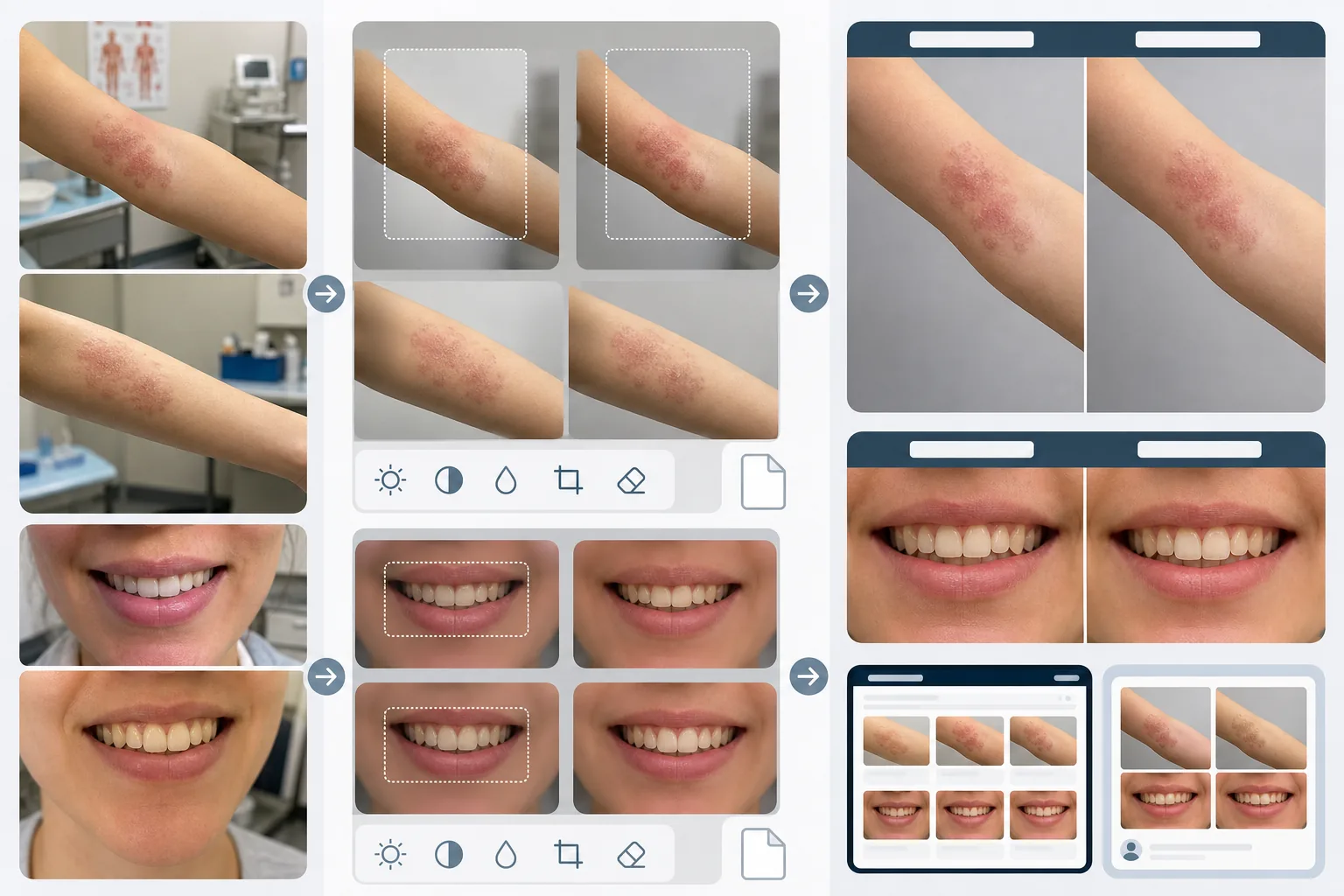
Was diese Vorlage leistet
Schafft die visuelle Einheitlichkeit, die medizinische Vorher-Nachher-Vergleiche glaubwürdig und überzeugend macht. Das größte Problem der klinischen Fotografie ist, dass Vorher- und Nachher-Bilder im Abstand von Wochen oder Monaten unter unterschiedlichen Lichtverhältnissen, mit unterschiedlichen Kameras und manchmal in unterschiedlichen Räumen aufgenommen werden. AI Enhance vereinheitlicht Belichtung, Farbtemperatur und Weißabgleich über beide Bilder hinweg, sodass jeder sichtbare Unterschied auf den Eingriff zurückzuführen ist und nicht auf die Fotografie. Magic Eraser entfernt das Durcheinander im Behandlungsraum – medizinische Instrumente auf Ablagen, Diagramme an den Wänden, Gerätewagen im Hintergrund – und ersetzt es durch einen neutralen klinischen Hintergrund. Zu den Datenschutzfunktionen gehören die automatische Erkennung und Schwärzung identifizierender Merkmale, die Möglichkeit, auf bestimmte Körperregionen zuzuschneiden, und das Entfernen von Metadaten zum Schutz der Patientendaten.
Vorlageneinstellungen
| Vereinheitlichung der Beleuchtung | Belichtung, Farbtemperatur und Weißabgleich zwischen Vorher/Nachher-Paar angleichen |
| Hintergrund | Klinisches neutrales Grau, sauberes Weiß oder blaues OP-Tuch |
| Datenschutz-Schwärzung | Identifizierende Merkmale außerhalb des Behandlungsbereichs automatisch weichzeichnen |
| Maßstabskonsistenz | Bildausschnitt und Vergrößerung zwischen Vorher- und Nachher-Bildern angleichen |
| Entfernen von Metadaten | EXIF-Standort-, Geräte- und Zeitstempeldaten zur HIPAA-Bewusstheit entfernen |
| Ausgabeauflösung | 2400×1600px pro Bild (nebeneinander zusammengesetzt bei 4800×1600px) |
So verwenden Sie diese Vorlage
Vorher- und Nachher-Fotos hochladen
Laden Sie das Vorher-Bild und das entsprechende Nachher-Bild hoch. Die Vorlage verarbeitet Fotos, die mit klinischen Kameraaufbauten, Smartphones und Kompaktkameras aufgenommen wurden. Laden Sie sie als Paar hoch, damit die KI die Vereinheitlichungseinstellungen zwischen beiden Bildern angleichen kann.
Beleuchtung und Bildausschnitt vereinheitlichen
AI Enhance gleicht Belichtung, Farbtemperatur und Weißabgleich zwischen den beiden Bildern an. Wenn sich der Bildausschnitt unterscheidet – näher in einer Aufnahme, weiter in der anderen – passt die Vorlage den Zuschnitt an, sodass der Behandlungsbereich in beiden Bildern denselben Maßstab und dieselbe Position hat, für einen fairen visuellen Vergleich.
Hintergrund bereinigen und Datenschutz anwenden
Magic Eraser entfernt das Durcheinander im Behandlungsraum und ersetzt den Hintergrund durch einen neutralen klinischen Hintergrund. Die Datenschutz-Schwärzung zeichnet identifizierende Merkmale außerhalb des Behandlungsbereichs weich oder schneidet sie heraus. EXIF-Metadaten mit Standort, Geräteinformationen und Zeitstempeln werden entfernt.
Für das Praxismarketing exportieren
Laden Sie einzelne Bilder oder ein nebeneinander zusammengesetztes Bild mit beschrifteten 'Before'- und 'After'-Kopfzeilen herunter. Die Ausgaben sind für Website-Galerien, Bildschirme im Beratungsraum und soziale Medien dimensioniert. Die einheitliche klinische Darstellung baut Glaubwürdigkeit bei potenziellen Patienten auf, die Ihre Ergebnisgalerie durchsehen.
Profi-Tipps für beste Ergebnisse
- ✓Richten Sie in Ihrer Praxis eine einheitliche Fotostation mit fester Beleuchtung und neutralem Hintergrund ein. Auch wenn die Vorlage unterschiedliche Lichtverhältnisse vereinheitlichen kann, liefert der Start von einem einheitlichen Aufbau den präzisesten Vergleich und verringert das Risiko von Vereinheitlichungsartefakten.
- ✓Verwenden Sie für Vorher- und Nachher-Aufnahmen dieselbe Brennweite und denselben Kameraabstand. Die Vorlage gleicht Unterschiede im Bildausschnitt aus, aber Perspektivverzerrungen durch unterschiedliche Objektiv-zu-Motiv-Abstände können das Erscheinungsbild von Gesichtszügen oder Körperkonturen subtil verändern, was die Glaubwürdigkeit des Vergleichs untergraben kann.
- ✓Holen Sie vor der Verarbeitung der Bilder immer die schriftliche Einwilligung des Patienten für die Vorher-Nachher-Fotografie und deren beabsichtigte Verwendung ein. Die Vorlage bietet Datenschutzfunktionen, ersetzt jedoch nicht die gesetzliche Anforderung der informierten Einwilligung.
Häufige Fragen
Ist dies HIPAA-konform?
+
Die Vorlage bietet datenschutzbewusste Funktionen – Entfernen von Metadaten, Schwärzung identifizierender Merkmale und Zuschnitt auf den Behandlungsbereich –, die die HIPAA-Konformität unterstützen. Die HIPAA-Konformität ist jedoch eine organisatorische Verantwortung. Die Vorlage ist ein Werkzeug, kein Compliance-Programm. Wenden Sie sich an Ihren Compliance-Beauftragten bezüglich der spezifischen Anforderungen Ihrer Praxis.
Kann ich zahnmedizinische Vorher-Nachher-Fotos verarbeiten?
+
Ja. Die Vorlage verarbeitet intraorale Fotos, Lächel-Nahaufnahmen und zahnmedizinische Fotos des gesamten Gesichts. Die Vereinheitlichung der Beleuchtung ist besonders bei Zahnfotos wertvoll, bei denen das Vorher-Bild oft unter Behandlungsraumlicht und das Nachher-Bild mit einem Ringblitz aufgenommen wird.
Werden Unterschiede in der Hauttextur korrekt erhalten?
+
Ja. Die Vereinheitlichung passt Beleuchtung und Farbe an, ohne die Hauttextur zu glätten. Das ist entscheidend – Verbesserungen der Hauttextur durch dermatologische Eingriffe müssen im Vergleich sichtbar sein. Die Vorlage wendet bei medizinischen Vorher-Nachher-Bildern bewusst keine Haut-Retusche an.
Bauen Sie mit einheitlicher klinischer Fotografie das Vertrauen der Patienten auf
Laden Sie Vorher-Nachher-Fotos hoch und erhalten Sie standardisierte, datenschutzbewusste Vergleichsbilder für Ihr Praxismarketing.
Kostenlos testenRelated templates
More business templates for your workflow.
Polnische Unternehmensteamfotos mit einheitlichen Hintergründen, professioneller Lichtkorrektur, markengerechter Farbkorrektur und einheitlicher Bildqualität im gesamten Team.
Verbessern Sie Fitnessstudio- und Fitnessfotos mit Verbesserung der Muskeldefinition, dynamischer Beleuchtungskorrektur, Hintergrundbereinigung und kontrastreicher Farbkorrektur für Sportler.
Verbessern Sie Tattoo-Portfoliofotos mit lebendiger Tintenfarbe, Schärfung von Liniendetails, Reduzierung von Hautrötungen und sauberen Hintergründen für Künstlerportfolios und Instagram.
Erstellen Sie ein ausgefeiltes Lebenslauf-Headshot mit Hintergrundersetzung, Hautglättung und Beleuchtungskorrektur. Ideal für Lebensläufe, Jobportale und Unternehmensverzeichnisse.
Erstellen Sie professionelle Team- und Einzelspielerfotos mit Hintergrundaustausch, Trikotfarbverstärkung und Stadion- oder Studiohintergründen für Kader und Programme.
Erstellen Sie professionelle Promofotos von Bands und Musikern mit Hintergrundersetzung, dramatischer Beleuchtungsverbesserung und druckfertigen Ausgaben für Pressemappen und Veranstaltungsort-Einreichungen.