
Foto einer Kirchenveranstaltung
Verwandeln Sie schwach beleuchtete Fotos von Kirchen- und Gemeindeveranstaltungen in warme, einladende Bilder für Bulletins, Websites und soziale Medien. Diese Vorlage korrigiert die schwierige Innenbeleuchtung von Gottesdiensträumen – gemischte Farbtemperaturen von Buntglasfenstern, Bühnenlicht und Deckenleuchten – während Magic Eraser visuelle Ablenkungen wie Mikrofonständer, Kabel und temporäre Beschilderung entfernt, die den Moment stören.
Diese Vorlage kostenlos testenPersonal template preview
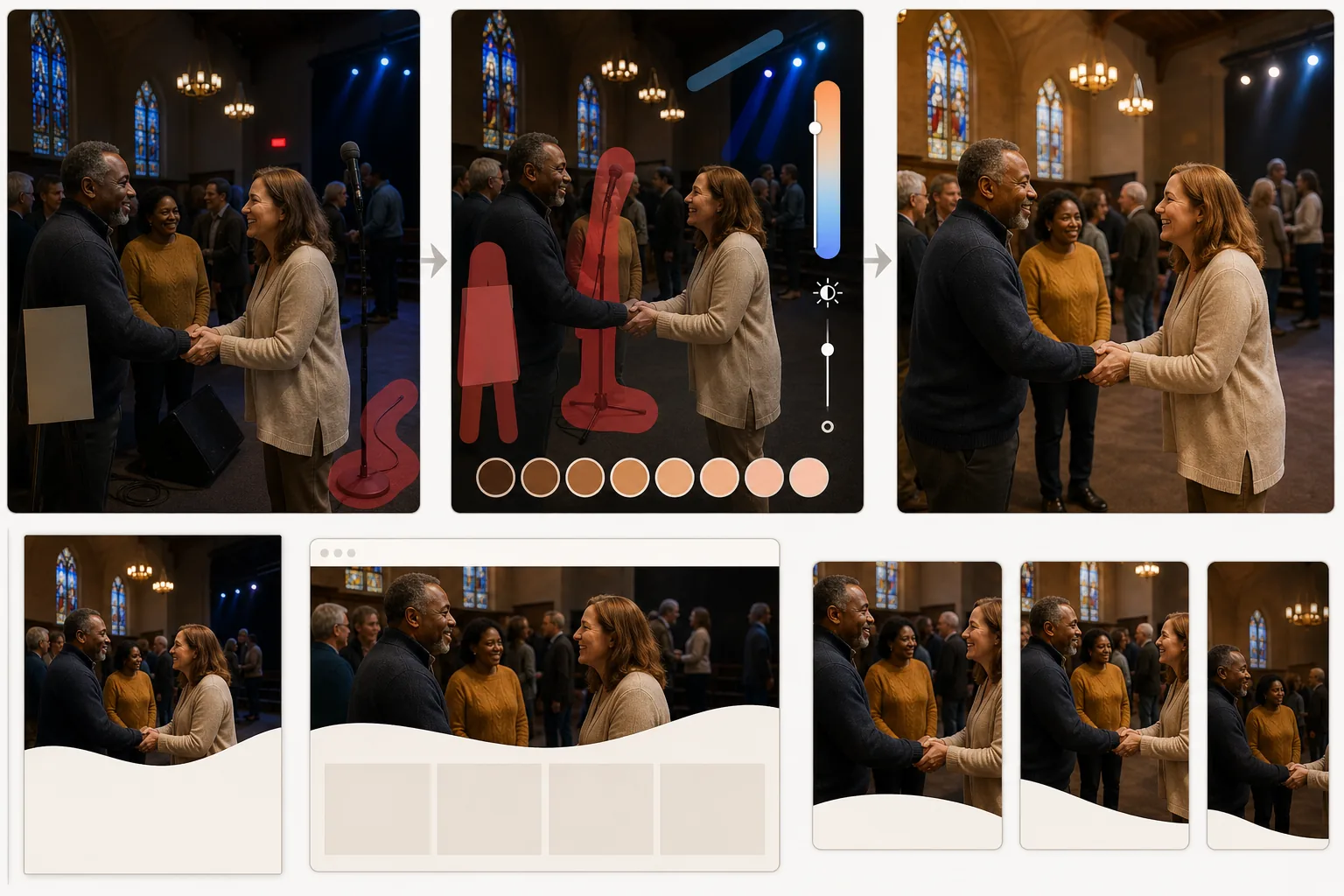
Was diese Vorlage bewirkt
Löst die besonderen fotografischen Herausforderungen von Kirchen- und Glaubensgemeinschaftsräumen. In Gottesdiensträumen treffen warme Glühlampen-Kronleuchter, kühles LED-Bühnenlicht und farbiges Licht aus Buntglasfenstern aufeinander und erzeugen gemischte Farbstiche, die die Haut von Menschen auf Fotos unnatürlich wirken lassen. AI Enhance normalisiert diese gemischten Lichtquellen, um warme, schmeichelhafte Hauttöne zu erzeugen, während die atmosphärische Qualität des Raumes erhalten bleibt. Magic Eraser entfernt störende Elemente – Mikrofonständer, Bühnenmonitore, über Gänge verlaufende Verlängerungskabel, temporäre Banner und Notausgangsschilder –, die die Aufmerksamkeit von den Menschen und dem Moment ablenken. Die gesamte Farbabstimmung ist warm und einladend und spiegelt den Gemeinschaftsgeist der Veranstaltungen wider.
Vorlageneinstellungen
| Beleuchtungskorrektur | Normalisierung gemischter Innenlichtquellen mit Priorität auf warme Hauttöne |
| Farbtemperatur | Warme Gemeinschaft (3800K–4200K ausgewogen für schmeichelhafte Haut) |
| Entfernung von Ablenkungen | Mikrofonständer, Kabel, Notausgangsschilder und temporäre Beschilderung |
| Schattenwiederherstellung | Dunkle Bereiche aufhellen und dabei die atmosphärische Stimmungsbeleuchtung bewahren |
| Ausgabeauflösung | 3000×2000px (3:2 für Bulletins, Websites und soziale Medien) |
So verwenden Sie diese Vorlage
Laden Sie Ihr Veranstaltungsfoto hoch
Laden Sie Fotos von Gottesdiensten, Jugendgruppenveranstaltungen, Gemeinschaftsessen, Feiertagsfeiern, Taufen oder jeder anderen kirchlichen Gemeindeveranstaltung hoch. Die Vorlage bewältigt die große Bandbreite an Innenbeleuchtungsbedingungen in Gottesdiensträumen, Gemeindesälen und auf Kirchengeländen im Freien.
Beleuchtung und Farbe korrigieren
AI Enhance analysiert die gemischten Lichtquellen im Bild und normalisiert sie. Farbstiche durch Bühnenbeleuchtung werden korrigiert, unterbelichtete Bereiche der Gemeinde aufgehellt und Hauttöne zu einem natürlichen, schmeichelhaften Ton erwärmt. Die atmosphärische Qualität von Kerzenlicht und Buntglaslicht bleibt erhalten, während die unvorteilhaften Farbverschiebungen, die sie auf Gesichtern verursachen, entfernt werden.
Ablenkungen entfernen
Magic Eraser entfernt Mikrofonständer, Bühnenmonitore, Kabel und Verlängerungskabel, temporäre Veranstaltungsbanner, Notausgangsschilder und andere zweckmäßige Elemente, die das Bild überladen. Die KI rekonstruiert die Wand, den Boden oder die Kirchenbank hinter den entfernten Objekten für ein sauberes Ergebnis.
Für die Kirchenkommunikation exportieren
Laden Sie in 3000×2000px für Kirchenbulletins, Website-Header und Newsletter-Beiträge herunter. Für das Web optimierte Exporte in kleineren Größen sind für E-Mail-Kampagnen und Beiträge in sozialen Medien verfügbar. Die warme Farbabstimmung sorgt dafür, dass die Bilder auf allen Plattformen einladend wirken.
Profi-Tipps für die besten Ergebnisse
- ✓Fotografieren Sie von einer Position aus, bei der sich die Hauptlichtquelle hinter Ihnen oder seitlich befindet. Wenn Sie in Richtung heller Fenster oder Bühnenlichter fotografieren, erscheinen Gesichter als Silhouette, und obwohl die KI einige Schattendetails wiederherstellen kann, liefern von vorne oder seitlich beleuchtete Gesichter immer bessere Ergebnisse.
- ✓Halten Sie spontane Momente der Verbundenheit fest – Händedrücke, gemeinsames Lachen, in Aktivitäten vertiefte Kinder. Diese authentischen Interaktionen vermitteln die Wärme der Gemeinschaft im Kirchenmarketing weitaus wirkungsvoller als gestellte Gruppenaufnahmen.
- ✓Schalten Sie bei großen Gruppenfotos in Gemeindesälen vor der Aufnahme jedes verfügbare Licht ein. Die KI bewältigt gemischte Farbtemperaturen gut, aber sehr dunkle Umgebungen erzeugen Bildrauschen, das begrenzt, wie viel Verbesserung möglich ist.
Häufige Fragen
Bleiben die Farben der Buntglasfenster erhalten?
+
Ja. Die Vorlage unterscheidet zwischen dem beabsichtigten farbigen Licht der Buntglasfenster (das sie als atmosphärisches Element bewahrt) und dem unvorteilhaften Farbstich, den dieses Licht auf nahen Gesichtern und Oberflächen erzeugt (den sie korrigiert). Sie erhalten die Schönheit der Fenster ohne die grünen oder blauen Hauttöne, die sie verursachen können.
Kann ich Personen entfernen, die nicht auf dem Foto sein sollten?
+
Ja. Magic Eraser kann bei Bedarf bestimmte Personen aus Gruppenaufnahmen entfernen. Die KI rekonstruiert die Kirchenbank, den Stuhl oder den Hintergrund hinter der entfernten Person. Das ist nützlich für Fotos, auf denen jemand die Gemeinde verlassen hat, oder aus Datenschutzgründen.
Funktioniert das auch für Kirchenveranstaltungen im Freien?
+
Ja. Veranstaltungen im Freien wie Picknicks, Feste und Gottesdienste im Freien haben ihre eigenen Herausforderungen – grelle Sonne, ungleichmäßiger Schatten und heller Himmel hinter der Gruppe. Die Vorlage korrigiert diese Belichtungsprobleme im Freien genauso effektiv wie Probleme mit der Innenbeleuchtung.
Teilen Sie die Momente Ihrer Gemeinschaft in ihrem wärmsten Licht
Laden Sie Fotos von Kirchenveranstaltungen hoch und erhalten Sie wunderschön beleuchtete, ablenkungsfreie Bilder für Bulletins, Websites und soziale Medien.
Kostenlos testenRelated templates
More personal templates for your workflow.
Erstellen Sie konforme Ausweisfotos für Visa, Führerscheine und Personalausweise mit der richtigen Hintergrundfarbe, Kopfgröße und Gesichtsausdrucksanforderungen.
Verbessern Sie Ihre Abschlussfotos durch Hintergrundbereinigung, Kappen- und Talarkorrektur, Entfernung von Fehlern und druckfertige Schärfung von Rahmen und Ankündigungen.
Verbessern Sie Konzert- und Veranstaltungsfotos mit Rauschunterdrückung bei schlechten Lichtverhältnissen, Bühnenbeleuchtung Farbkorrektur, Entfernung von Ablenkungen durch Menschenmengen und Detailwiederherstellung aus Aufnahmen an dunklen Veranstaltungsorten.
Erstellen Sie wunderschöne Fotos für die Geburtsankündigungskarte mit weichem Hintergrund, sanfter Farbabstufung, Beseitigung von Unordnung im Krankenhaus und druckfertigen Abmessungen für den Versand.
Bereiten Sie Familien- und Porträtfotos für Feiertagsgrußkarten mit festlichem Hintergrund, warmen Farbabstufungen, Schneeeffekten und Standardkartengrößen zum Drucken vor.
Stellen Sie Erinnerungsfotos wieder her und verbessern Sie sie mit sanfter Retusche, Vereinfachung des Hintergrunds, warmer, respektvoller Farbabstufung und druckfertigen Abmessungen für Gottesdienste.