
Piercings von Fotos entfernen
Entfernen Sie Nasenringe, Lippenringe, Augenbrauenpiercings, Ohrstöpsel und andere sichtbare Piercings aus Porträtaufnahmen und Porträts. Magic Eraser entfernt den Schmuck und rekonstruiert natürliche Haut und Knorpel – so entsteht eine saubere Version für den professionellen Einsatz.
Zuletzt aktualisiert
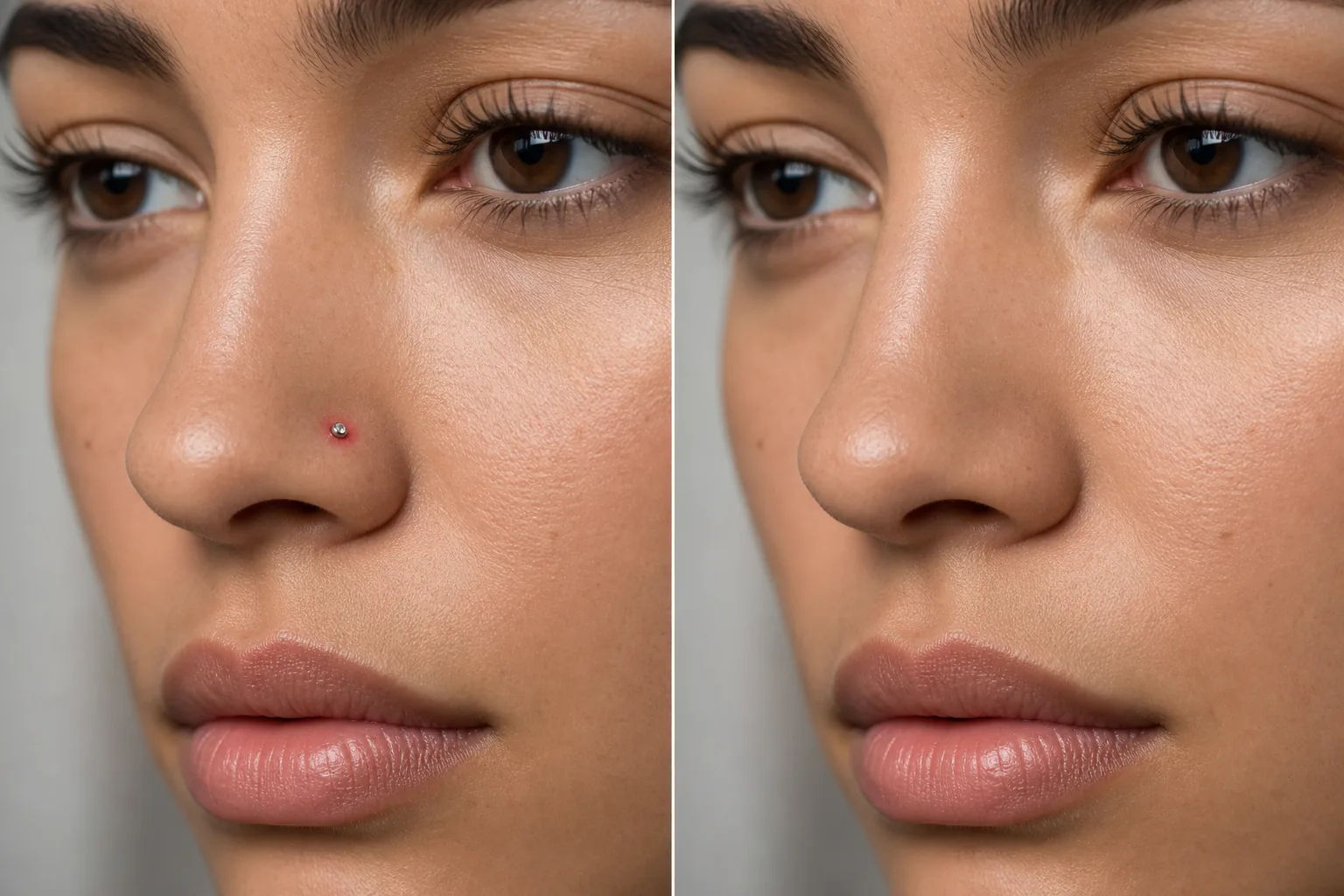
Wenn Piercings eine professionelle Version brauchen
Um ein Piercing aus einem Foto zu entfernen, öffnest du Magic Eraser im Web, auf iOS oder Android, lädst das Porträt hoch, malst mit dem Pinsel über den Schmuck — den Stecker, Ring oder Tunnel sowie den Schatten, den er wirft — und tippst auf „Löschen“. Die KI füllt die Piercing-Stelle und baut die natürliche Haut, die Nasenflügel-Rundung oder den Ohrknorpel darunter wieder auf. Es ist kostenlos und ohne Anmeldung. Ein häufiger Schritt für Ausweis- und Passfotos, Firmenausweise und seriöse Porträts, bei denen eine gepflegte Version verlangt wird — und diese Version erstellst du aus demselben Shooting, statt neu fotografieren zu müssen. Piercings sind eine persönliche Stilentscheidung, aber im beruflichen Kontext ist manchmal eine saubere Version eines Porträtfotos erforderlich. Unternehmensausweise, Porträtfotos konservativer Branchen, Militär- und Regierungsfotos, bestimmte Casting-Aufrufe und Familienporträts für Großeltern – all das führt zu Anfragen nach einer Piercing-freien Version. Anstatt Piercings für separate Fotosessions zu entfernen und wieder einzusetzen, werden bei der digitalen Entfernung beide Versionen aus einem einzigen Shooting erstellt. Die Herausforderung besteht darin, dass Piercings kleine, detaillierte Objekte an gut sichtbaren Gesichtsbereichen sind – ein Nasenstecker sitzt genau dort, wo Licht auf die Nase fällt, ein Lippenring sitzt dort, wo jedes Lächeln die Aufmerksamkeit auf sich zieht. Eine nicht überzeugende Entfernung fällt sofort ins Auge. Die KI von Magic Eraser bewältigt die spezifischen Herausforderungen: Sie entfernt den Schmuck und alle Schatten, die er wirft, füllt das Piercingloch oder die Piercingmarkierung und rekonstruiert die natürliche Haut, die Nasenlochkrümmung oder den Ohrknorpel, die der Schmuck bedeckte.
Entfernen Sie ein Piercing in drei Schritten
- 1
Laden Sie Ihr Foto hoch
Öffnen Sie Magic Eraser im Internet, auf iOS oder Android und laden Sie das Porträt oder Porträt hoch, das das Piercing enthält, das Sie entfernen möchten.
- 2
Streichen Sie über das Piercing
Übermalen Sie den Schmuck und alle sichtbaren Piercinglöcher. Berücksichtigen Sie für eine vollständige Entfernung den Schattenwurf des Schmucks. Bei kleinen Bolzen funktioniert eine dichte Bürste, die nur den Bolzen und das Loch abdeckt, am besten. Decken Sie bei Ringen und Creolen den gesamten sichtbaren Schmuckbereich ab.
- 3
Löschen und überprüfen
Tippen Sie auf "Löschen“ und die KI entfernt das Piercing und rekonstruiert die natürliche Haut, Nasenlochform oder Ohrkontur. Vergrößern Sie die Ansicht, um sicherzustellen, dass der Bereich natürlich aussieht und keine Rückstände oder Artefakte vorhanden sind. Exportieren Sie die Version mit sauberem Erscheinungsbild.
Am besten für
- Unternehmensporträts für konservative Branchen
- Fotos von Regierungs- und Militärausweisen
- Casting-Einreichungen, die ein sauberes Erscheinungsbild erfordern
- Schulfotos mit Kleiderordnung
- Erstellen Sie in einer Sitzung sowohl gepiercte als auch nicht gepiercte Versionen
- Bewerbungsfotos für traditionelle Arbeitgeber
- Förmliche Familienporträts auf Wunsch eines Verwandten
- Pass- und Visumfotos, bei denen Schmuck Probleme verursachen kann
Tipps zur Entfernung natürlicher Piercings
Nasenstecker und kleine Piercings lassen sich am einfachsten entfernen – der Schmuck ist klein und die umgebende Haut bietet einen klaren Bezug. Bei Nasenringen und Septumpiercings rekonstruiert die KI die Nasenlochkurve und die Knorpelform; Schließen Sie den vollständigen Ring und alle Schatten in Ihre Auswahl ein. Lippenringe erfordern eine Rekonstruktion der Lippenoberfläche und -farbe – die KI passt sich dem umgebenden Lippenton an. Augenbrauenpiercings überlassen es der KI, die Augenbrauenhaare und die Haut zu rekonstruieren; Das Ergebnis ist am natürlichsten, wenn die umgebende Braue gut definiert ist. Ohrpiercings (Standard-Ohrstecker) sind einfache Entfernungen; Ohrstöpsel und gedehnte Piercings erfordern eine stärkere Rekonstruktion der Ohrläppchenform. Wenn Sie mehrere Piercings an derselben Person haben, streichen Sie über alle, bevor Sie auf "Löschen“ tippen – die KI verarbeitet sie gleichzeitig, um konsistente Ergebnisse zu erzielen. Sollte ein Piercing-Loch auch ohne Schmuck sichtbar sein (ein dunkler Punkt auf Nase oder Ohr), bürsten Sie es auf die gleiche Weise ab.
Häufig gestellte Fragen
- Kann es einen Nasenring überzeugend entfernen?
- Ja. Die KI entfernt den Ring und rekonstruiert die natürliche Nasenlochform und -haut. Das Ergebnis sieht natürlich aus, wenn der umliegende Nasenbereich eine gute Referenz für die Rekonstruktion bietet.
- Funktioniert es bei gedehnten Ohrpiercings?
- Bei kleinen bis mäßig gedehnten Piercings rekonstruiert die KI eine natürliche Ohrläppchenform. Sehr große Spurweiten erfordern mehr Rekonstruktion und können im rekonstruierten Bereich eine leichte Glättung aufweisen.
- Kann ich einige Piercings behalten und andere entfernen?
- Ja. Streichen Sie nur über die Piercings, die Sie entfernen möchten. Ohrringe, die Sie behalten möchten, bleiben beispielsweise unberührt, während ein Nasenring entfernt wird.
- Ist die Entfernung des Piercings kostenlos?
- Ja. Das kostenlose Kontingent von Magic Eraser deckt die Entfernung von Piercings bei Kopfschüssen und Porträts ab. Laden Sie Ihr Foto hoch, streichen Sie über den Schmuck und exportieren Sie das saubere Ergebnis.
- Kann ich ein Piercing für ein Ausweis- oder Passfoto entfernen?
- Ja — das ist einer der häufigsten Gründe, warum die Funktion genutzt wird. Male mit dem Pinsel über den Stecker oder Ring und tippe auf „Löschen“, um aus demselben Foto eine gepflegte Version zu erhalten. Ein Hinweis: Manche Ausweis- und Passbehörden verlangen, dass das Foto deinem alltäglichen Aussehen entspricht, und haben eventuell eigene Vorgaben. Prüfe daher die konkreten Anforderungen, bevor du ein bearbeitetes Foto einreichst.
- Wie entferne ich ein Piercing auf dem Handy aus einem Foto?
- Öffne Magic Eraser in einem beliebigen mobilen Browser oder in der iOS- bzw. Android-App, lade das Porträt aus deiner Galerie und zoome mit zwei Fingern an das Piercing heran. Male mit dem Finger nur über den Schmuck und tippe auf „Löschen“. Das Heranzoomen ist hier wichtig — ein Nasenstecker oder Lippenring ist klein und liegt direkt neben Haut, die du behalten möchtest. Mit genug Nähe deckst du den Schmuck ab, ohne die Lippe oder den Nasenflügel zu berühren.
- Kann die Funktion mehrere Piercings entfernen, ohne sichtbare Spuren zu hinterlassen?
- Ja. Male über jedes Schmuckstück — eine Reihe von Ohr-Piercings, eine Nasen-Lippen-Kombination — und die KI baut die Haut oder den Knorpel unter jedem davon wieder auf. Die saubersten Ergebnisse bekommst du, wenn du den Schmuck samt des winzigen Lochs oder der Vertiefung mit übermalst; bleibt eine schwache Spur, zoome heran und male nur über diese Stelle. Ein größerer gedehnter Tunnel ist schwieriger als ein kleiner Stecker und braucht eventuell einen zweiten Durchgang, um das Ohrläppchen vollständig wiederherzustellen.