




Skip to content

Remove objects from photos with a fast AI editing workflow

Use Magic Eraser's AI object remover to erase unwanted objects, people, text, or clutter from photos in seconds. Clean up product images, portraits, travel shots, and social media content with natural-looking results.

Magic Eraser Remove Objects is an AI-powered tool that erases unwanted objects, people, text, and visual clutter from photos in seconds. Users brush over the area to remove and the AI reconstructs the background automatically, producing clean, natural-looking results for product shots, travel photos, portraits, and social media content.

Remove Unwanted Objects from Product Photos with AI

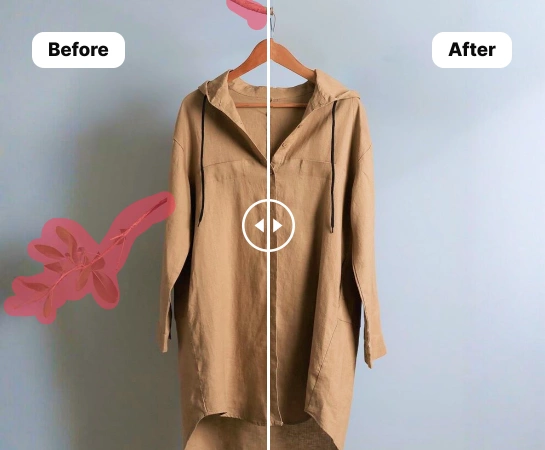
Save time cleaning up product photos with AI-powered object removal. Create polished, professional images for your e-commerce store and Amazon listings without tedious manual editing. Just swipe over the area you want to erase, and the AI photo eraser will handle the rest. It instantly rebuilds the background for a smooth, natural-looking result.

Open remove object editor
Remove unwanted objects from product photos
Natural cleanup

Cut costs and move faster with AI photo retouching

Traditional photo editing can be time-consuming, costly, and hard to scale consistently. Whether you’re an independent seller or an expanding brand, retouch product images in bulk with an AI object remover. E-commerce teams and marketplaces using AI-powered product photography tools are cutting editing costs by over 93% and bringing new products to market up to 4x faster.

Open remove object editor
AI retouch example
Up to 4x faster

Remove unwanted objects from every kind of product photo

No matter what you sell, create clean, high-converting e-commerce images at scale. From fashion and furniture to beauty products and food, remove people, props, or distracting background clutter from any type of product photo. Prepare polished visuals for your online store or marketplace while keeping a consistent brand style across every sales channel.

Open remove object editor
Multiple product categories
Fashion to food

Increase sales with end-to-end AI product photography

Losing sales because inconsistent e-commerce visuals confuse customers? With the right AI photo editing tools, you can do more than remove unwanted objects and keep every image aligned with your brand. Create custom backgrounds that fit your visual style, place products in lifestyle or real-world scenes, and instantly resize images for marketplaces, ads, and social media. From object removal to AI backgrounds, virtual models, and product staging, get everything you need to create studio-quality product photography in one platform.

Open remove object editor
Studio quality product photo
One platform

How to remove objects from a picture with AI

Step 1

Select an image

Choose the product photo you want to remove an object from. Upload it to the photo editor. Magic Eraser supports multiple image dimensions and PNG or JPG files.

Step 2

Highlight the unwanted object

Use the brush tool to swipe over the object you want to remove from your picture, adjusting the brush size as needed. The AI detects the unwanted object and erases distracting elements.

Step 3

Click Remove

After highlighting the unwanted area, trigger the Remove button to let the AI erase the object and rebuild the background automatically with a clean, realistic result.

Step 4

Download your new product photo

Download your image as a PNG, JPEG, or WEBP file, then upload it to your website, marketplace listing, or repurpose it for social media selling.

All the AI image editing tools you need

Explore the main editing capabilities currently available in Magic Eraser Web, from cleanup and enhancement to generation and design.

Remove Objects icon

Remove Objects

Erase unwanted people, props, text, or distractions from your image with AI-powered cleanup.

AI Enhance icon

AI Enhance

Improve image quality, detail, and overall clarity with fast AI enhancement tools.

Remove Background icon

Remove Background

Cut out the subject and replace the background with a cleaner scene in one workflow.

AI Expand icon

AI Expand

Extend image edges and create more room for new layouts or wider compositions.

Design icon

Design

Add text and build lightweight design layouts directly on top of your images.

AI Create icon

AI Create

Generate fresh visuals from prompts to create new image directions with AI.

AI Filter icon

AI Filter

Apply AI-powered style and look transformations to refresh the mood of your image.

AI Fill icon

AI Fill

Replace selected areas and rebuild missing parts with a more natural visual result.

What users are saying about Magic Eraser

These comments are drawn from real user reviews describing object removal, background cleanup, resizing, and fast editing workflows inside Magic Eraser.

"Needed to remove text from a picture, that was straight across to figures in the photo. Everything that I searched for would only allow me to extract the text but not remove it, until I found this! Even though I'm only doing the 7-day trial this is going to help me edit quite a few of the pictures that I have I'm really impressed!"

Mz J1πX1
February 17, 2025 • 1,151 helpful

"EXCELLENT!!! I'm making a collage of my grandkids playing sports. This Magic Eraser App allows me to remove ALL the unwanted objects, backgrounds and more. It's makes the work so easy and fast."

M Metellus
February 14, 2026 • 24 helpful

"Magic Eraser is, in my experience, one of the most impressive and practical photo editing features available today. It transforms ordinary photos into polished, professional-looking images with minimal effort and zero technical expertise."

Master stanoo Stanoo
February 15, 2026 • 13 helpful

"I love this app. I'm getting pictures ready for a funeral and this app made it so easy and so quick, resizing and removing backgrounds is what I used. If you want an easy app, this is it!"

RockyMtnGobblers
March 15, 2026

Frequently asked questions

Upload a photo, brush over the object you want to remove, then tap Remove. Magic Eraser rebuilds the cleared area automatically so the result looks cleaner and more natural.

Yes. You can use it to remove people, text, logos, small distractions, or messy background details from product photos, portraits, travel shots, and everyday images.

Yes. After you highlight the unwanted area and run the remove action, the app uses AI Fill to recreate the missing background instead of leaving an empty cutout.

Yes. In addition to object removal, Magic Eraser Web also includes tools like Remove Background, AI Enhance, AI Expand, AI Fill, AI Filter, and Design depending on the workflow you need.

The main flow is simple: upload your image, highlight what you want to change, run the edit, review the result, and export the final image. It is designed to keep cleanup fast without heavy manual retouching.

Other comparisons

See how Magic Eraser compares to other photo editing tools.

Magic Eraser vs TouchRetouch: Which Object Remover Is Better?

TouchRetouch is a popular paid mobile app for removing objects and blemishes. Magic Eraser offers free AI-powered editing on any device with no install required. See how they compare across features, pricing, and ease of use.

Magic Eraser vs Cleanup.pictures

Cleanup.pictures is a free web tool with one generic eraser brush. Magic Eraser gives you 100+ purpose-built removal tools — one for emoji, glasses, watermarks, sky, power lines, and dozens more — plus background removal, AI enhance, and mobile apps, in 16 languages. See how breadth changes the result.

Magic Eraser vs Photoroom

Two powerful AI photo editors with different strengths. Magic Eraser offers a broader set of generative AI tools for creative editing, while Photoroom excels at e-commerce product photography and batch processing. See which fits your workflow.

Best AI Photo Editors in 2025 — Compared

We tested and compared the top AI photo editing tools so you don't have to. From object removal to background replacement, see which editor delivers the best results for your workflow.

Magic Eraser vs Photoshop: Which Photo Editor Fits Faster Workflows?

Photoshop is the industry standard for deep image editing, but many people only need fast object removal, clean backgrounds, and AI-powered fixes. Magic Eraser focuses on those jobs with a lighter workflow that works in seconds on web and mobile.

Magic Eraser vs Canva: Dedicated AI Cleanup or a Design Tool That Also Edits?

Canva is a design platform that bundles some photo editing; object removal is a side feature, often Pro-gated. Magic Eraser is a dedicated AI photo editor with 100+ task-specific removal tools. This comparison shows when you need cleanup-first power vs a design canvas.

Related use cases

See how professionals use these tools in real-world workflows.

Remove Unwanted Objects from Real Estate Photos in Seconds

Listing photos cluttered with personal items, parked cars, or construction equipment can turn buyers away. Magic Eraser uses AI to clean up your property photos instantly — no Photoshop skills required.

Clean Product Photos That Actually Sell

Blurry backgrounds and cluttered product shots cost you sales every day. Magic Eraser helps you create clean, professional product images in seconds — no Photoshop skills required. Just upload, erase distractions, and list with confidence.

Edit Photos for Instagram, TikTok & Social Media with AI

Photobombers ruining your travel pics? Messy backgrounds killing your selfie game? Stop wasting hours in Photoshop. Magic Eraser removes distractions, cleans up cluttered shots, and expands your photos to fit any platform format — all in one tap.

Remove text, captions, date stamps, and overlays from any photo

Dealing with screenshots cluttered by captions, old photos stamped with dates, or images covered in text overlays? Magic Eraser's AI text remover erases unwanted text from any image and rebuilds the background naturally, so your photos look clean and professional.

Wedding Photo Editing Made Faster with AI

Wedding photos deserve perfection, but manual retouching takes hours. Magic Eraser helps photographers and couples remove distracting elements, clean backgrounds, and enhance details so every shot looks its best.

Car Photo Editing for Dealerships and Sellers

Vehicle listings with clean, professional photos sell faster. Magic Eraser helps dealers, private sellers, and automotive marketers remove background clutter, fix reflections, and enhance car images without a photo studio.