
Удалить толпу с фотографий
Избавьтесь от плотной толпы незнакомцев перед памятником, зрителей, заполняющих места на стадионе, покупателей в рыночных проходах, зрителей парада на тротуаре. Magic Eraser убирает толпу и восстанавливает землю, площадь или фон под ней — даже для групп от десятков до сотен человек. Бесплатно в Интернете, iOS и Android.
Последнее обновление
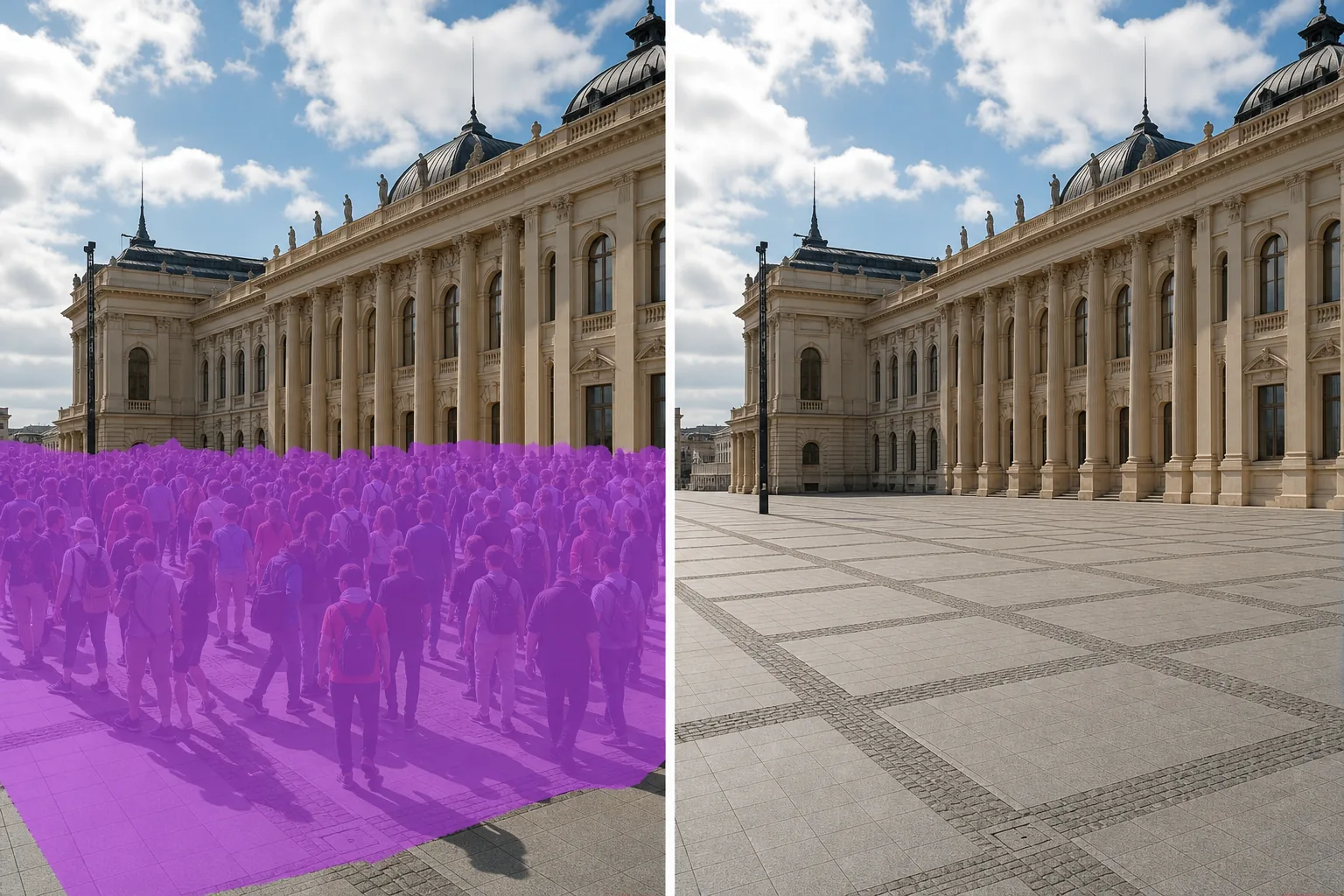
Чем плотная толпа отличается от одинокого незнакомца
Удаление одного незнакомца с туристической фотографии — чистая проблема: один объект, один фон для восстановления, четко очерченные края. Плотные толпы бывают разными: объекты накладываются друг на друга, тени сгущаются, земля или пол большей частью скрыты, и глаз воспринимает толпу как текстурированный узор, а не как отдельных людей. Ручное редактирование здесь непрактично, потому что вам придется клонировать сотни патчей и рассуждать о сотнях теней. Magic Eraser обрабатывает всю толпу как область — очистите всю массу, и ИИ перестраивает площадь, пол стадиона, рыночный проход или тротуар под ним, используя видимые поля в качестве ориентира. Работает как в небольших группах из дюжины человек, так и на заполненных спортивных стадионах.
Удалите толпу за три шага
- 1
Загрузите свою фотографию
Откройте Magic Eraser в Интернете, на iOS или Android и добавьте фотографию концерта, стадиона, рынка, парада, общественной площади или места проведения мероприятия. Поддерживаются JPEG, PNG, HEIC и WebP.
- 2
Очистите толпу как регион
Закрасьте всю массу толпы — не пытайтесь выделить отдельных людей. Щедрое закрашивание всей группы дает ИИ четкую область для восстановления и позволяет быстрее, чем отслеживать края. Включите тени, которые толпа отбрасывает на землю или пол в вашей области кисти; оставление теней делает очистку очевидной. Для частичного скопления людей (только на переднем плане, оставляя нетронутой заднюю часть помещения) чистите только массу на переднем плане.
- 3
Нажмите «Стереть и проверить».
Magic Eraser восстанавливает пол, площадь, стадион или рынок за считанные секунды. Сканируйте с масштабом 100% на предмет остатков силуэтов, выполните второй проход для любого оставшегося артефакта, а затем экспортируйте в полном разрешении для портфолио, публикации в социальных сетях, редакционного или коммерческого использования.
Лучшее для
- Фотографии из путешествий у знаменитых памятников (Эйфелева башня, Тадж-Махал, Колизей), где толпа портит архитектурный снимок.
- Фотографии концертов и музыкальных фестивалей, на которых вы хотите, чтобы была видна сцена, осветительная установка или интерьер площадки.
- Фотографии спортивных стадионов, где эстетика пустого стадиона имеет значение (архитектурные портфолио, объявления о недвижимости для спортивных комплексов)
- Фотографии рынков, базаров и базаров, на которых изображены проходы, дизайн прилавков или витрины товаров.
- Фотографии парадов и уличных фестивалей, в которых объектом внимания являются платформы, артисты или сам маршрут.
- Фотографии общественных площадей (Тяньаньмэнь, Трафальгар, Таймс-сквер), на которых изображена архитектура.
- Внешний вид свадебного зала во время приема, когда толпа заполняет двор или террасу
- Фотографии стенда на выставке, где вы хотите, чтобы дизайн стенда был чистым и без других посетителей.
Крайние случаи и советы
Удаление толпы работает лучше всего, когда толпа находится на относительно непрерывном фоне — площади, поле стадиона, рыночном проходе, фасаде здания. Два типа сцен сложнее. Во-первых: когда толпа наслоена на архитектуру с глубокой перспективой (ряды колонн, уходящие вдаль, интерьер длинного рыночного зала), ИИ может сгладить перспективу при перестройке; запускайте меньшие проходы для каждой плоскости глубины (сначала толпа на переднем плане, затем фигуры на среднем плане, затем фигуры на заднем ряду) для более четких пространственных сигналов. Во-вторых: когда толпа является объектом переднего плана откровенной композиции (уличная фотография, где толпа является центром внимания), их стирание оставляет неловкую пустую сцену — правильный ответ обычно — пересъемка в другое время, а не стирание толпы. Для коммерческого, редакционного и журналистского использования с высокими ставками раскрывайте фотографии толпы, очищенные искусственным интеллектом, в соответствии с соответствующим отраслевым стандартом — и будьте осторожны с новостными и документальными контекстами, где удаление людей существенно меняет правду о сцене.
Часто задаваемые вопросы
- Бесплатно ли убрать толпу с фотографии?
- Да. Уровень бесплатного пользования Magic Eraser включает удаление толпы с ежедневными ограничениями на использование. Обновление до Premium (29,99 долларов США в год) снимает ограничения и открывает возможности экспорта с более высоким разрешением, что полезно для печатных редакционных статей, архитектурных портфолио и коммерческого лицензирования.
- Могу ли я убрать многотысячную толпу стадиона?
- Да. Magic Eraser обрабатывает большие скопления людей в масштабе — модель рассматривает толпу как текстурированную область, а не как отдельные объекты. Зачистите всю чашу сиденья, и ИИ восстановит сиденья под ней. Для очень больших скоплений людей выполните два или три прохода, охватывающих разные секции (нижнюю чашу, верхнюю палубу, конечные зоны), чтобы получить более чистые результаты, чем одну гигантскую замаскированную область.
- А как насчет теней толпы на земле?
- Добавьте тени в область кисти. Оставление теней позади — самый распространенный признак того, что толпа была стерта: глаз читает тени, даже когда люди ушли. Нанесите щедрый край вокруг каждой тени, чтобы ИИ имел четкую ссылку на текстуру земли без загрязнения теней.
- Будет ли очищенная площадь, стадион или улица выглядеть явно отредактированной?
- На большинстве фотографий нет — ИИ подбирает текстуру земли, освещение и перспективу видимых полей. Места, которые он может отображать, — это сцены с высокодетализированными рисунками земли (булыжники под определенным углом, нарисованные линии двора на спортивной площадке, плитка на полу рыночного прилавка с регулярным узором), где перестроенная область может немного смягчить рисунок; Эту проблему обычно решает подкраска кистью меньшего размера.
- Должен ли я раскрыть редактирование для редакционного или коммерческого использования?
- В новостной и документальной фотографии удаление толпы меняет смысл сцены — большинство редакционных правил (AP, Reuters, Кодекс этики NPPA) запрещают внесение существенных изменений, которые могут ввести зрителя в заблуждение. Для фотографий путешествий, недвижимости, архитектуры и продуктов широко принимаются фотографии толпы, очищенные искусственным интеллектом, с раскрытием в соответствии с соответствующим отраслевым стандартом (FTC для рекламных объявлений, статья 12 Кодекса этики NAR для использования в сфере недвижимости).