
Magic Eraser vs Photoshop: quale editor si adatta ai flussi di lavoro più rapidi?
Photoshop è lo standard di settore per l'editing approfondito delle immagini, ma a molti serve solo una rapida rimozione di oggetti, sfondi puliti e correzioni con IA. Magic Eraser si concentra su questi compiti con un flusso più leggero, che opera in pochi secondi su web e mobile.
Last updated
Prova Magic Eraser gratisComparison rows are editorial summaries from the latest page review, not a guarantee of current pricing, limits, watermark policy, batch support, speed, or platform availability.
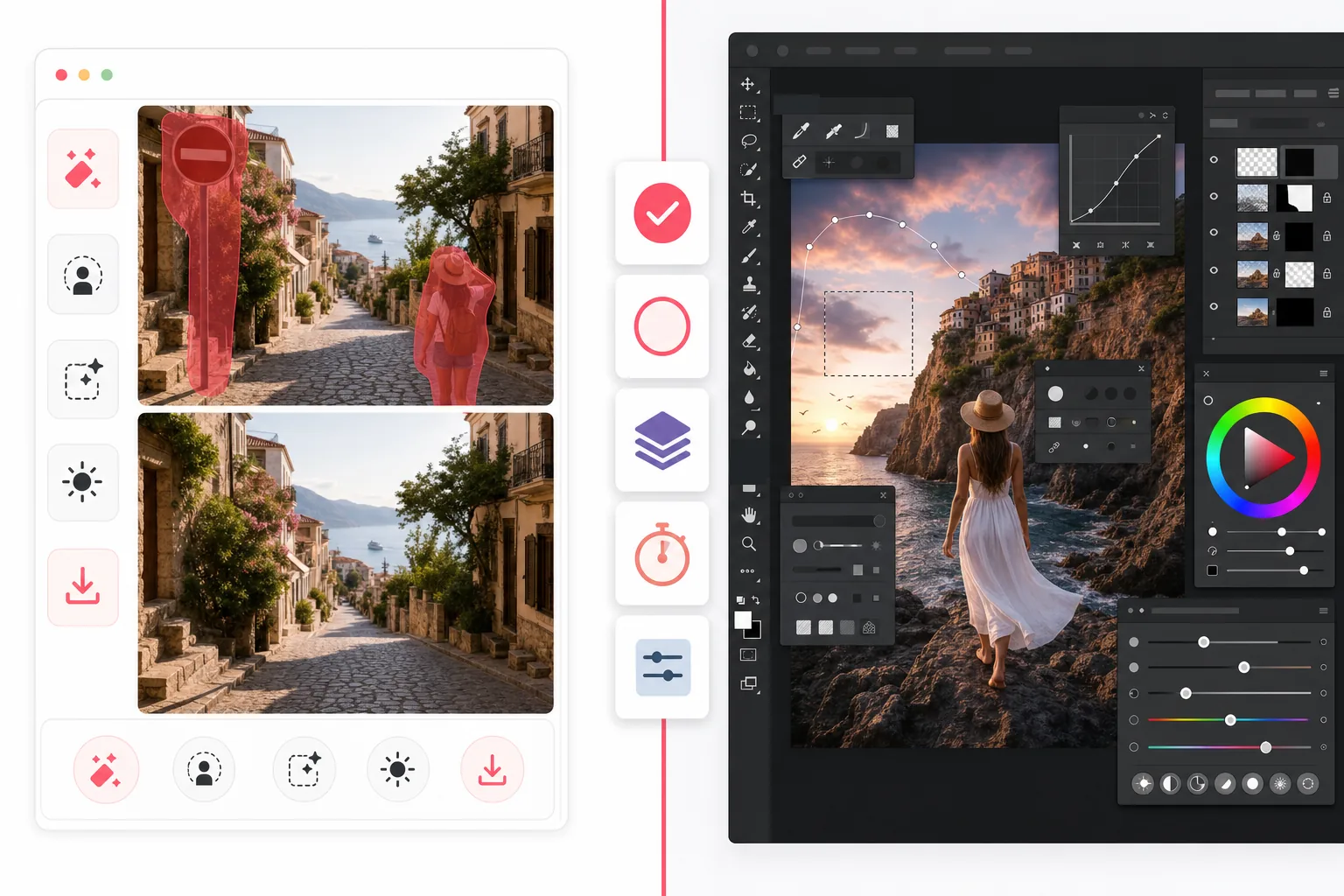
Panoramica
Magic Eraser è un editor fotografico con IA pensato per attività di pulizia rapide come rimuovere persone, cancellare elementi di disturbo, sostituire sfondi, migliorare immagini sfocate e riempire aree mancanti, senza una ripida curva di apprendimento.
Adobe Photoshop è una suite completa di editing professionale con livelli avanzati, mascheratura, ritocco, riempimento generativo e strumenti di compositing, progettata per un controllo creativo dettagliato su desktop e iPad.
Confronto delle funzioni
Magic Eraser è un editor fotografico con IA pensato per attività di pulizia rapide come rimuovere persone, cancellare elementi di disturbo, sostituire sfondi, migliorare immagini sfocate e riempire aree mancanti, senza una ripida curva di apprendimento.
Adobe Photoshop è una suite completa di editing professionale con livelli avanzati, mascheratura, ritocco, riempimento generativo e strumenti di compositing, progettata per un controllo creativo dettagliato su desktop e iPad.
| Feature | Magic Eraser | Adobe Photoshop |
|---|---|---|
| Rimozione oggetti | Sì — pennello IA | Sì — strumenti content-aware |
| Rimozione sfondo | Sì — un clic | Sì — manuale + IA |
| Riempimento generativo | Sì — flusso semplificato | Sì — strumenti di prompt avanzati |
| Curva di apprendimento | Adatto ai principianti | Alta |
| Piattaforma | Web + iOS + Android | Desktop + iPad + beta web |
| Editing in batch | Sì | Sì — più configurazione |
| Abbonamento richiesto | No per iniziare | Sì |
| Ideale per | Modifiche quotidiane rapide | Lavoro di produzione professionale |
Feature rows summarize visible product positioning and should be rechecked against official product pages before purchase, migration, or compliance decisions.
- Last content review May 1, 2026
- Adobe Photoshop source: official product site (https://www.adobe.com/products/photoshop.html)
- Magic Eraser source: https://magiceraser.live/it/product/magic-eraser
- Pricing, feature availability, platform support, and limits can change; recheck official sources before relying on a buying decision.
Confronto dei prezzi
| Plan | Magic Eraser | Adobe Photoshop |
|---|---|---|
| Piano gratuito | Gratis — modifiche limitate | Prova di 7 giorni |
| Mensile | $9,99/mese | $22,99/mese |
| Annuale | $4,99/mese (fatturato annualmente) | $20,99/mese (fatturato annualmente) |
Prezzi aggiornati a maggio 2026. Verifica le tariffe attuali con ciascun fornitore.
Pricing rows are snapshots from review time. Free tiers, subscriptions, trials, export limits, and regional availability can change without notice.
- Last content review May 1, 2026
- Adobe Photoshop source: official product site (https://www.adobe.com/products/photoshop.html)
- Magic Eraser source: https://magiceraser.live/it/product/magic-eraser
- Pricing, feature availability, platform support, and limits can change; recheck official sources before relying on a buying decision.
Perché scegliere Magic Eraser
Più veloce dal primo clic all'esportazione
Magic Eraser elimina il tempo di preparazione. Apri l'editor, evidenzia l'elemento di disturbo e lascia che l'IA ricostruisca l'area senza navigare tra livelli, maschere o menu complessi.
Pensato per la pulizia pratica delle foto
Se il tuo obiettivo è rimuovere turisti, cartelli, imperfezioni, fili, testo o sfondi disordinati, Magic Eraser arriva a quel risultato direttamente, senza chiederti di imparare un'intera suite creativa.
Funziona ovunque
Photoshop brilla ancora nei flussi di lavoro desktop approfonditi, ma Magic Eraser funziona nel browser e su dispositivi mobili, rendendo più facile per marketer, venditori, creator e team modificare da qualsiasi luogo.
Meno attrito per i team
Magic Eraser è più facile da standardizzare in un team che necessita di modifiche rapide e coerenti per foto di prodotto, asset social, schede e annunci, senza acquistare software creativo completo per tutti.
Strumenti
Domande frequenti
Magic Eraser sostituisce Photoshop?
+
Per pulizia rapida, rimozione sfondo e correzioni foto con IA, sì. Per compositing avanzato, lavoro di design ricco di livelli e ritocco professionale dettagliato, Photoshop offre ancora più profondità.
Quale strumento è più facile per i principianti?
+
Magic Eraser è molto più facile per i principianti perché è costruito attorno ad attività di editing IA guidate anziché a uno spazio di lavoro professionale completo.
Photoshop offre un controllo migliore?
+
Sì. Photoshop offre più controllo manuale, soprattutto per ritocco e compositing professionali. Magic Eraser rinuncia a parte di quella profondità in cambio di un editing quotidiano molto più rapido.
Posso usare Magic Eraser su mobile?
+
Sì. Magic Eraser è disponibile su iOS e Android e funziona anche sul web, così puoi passare da un dispositivo all'altro senza cambiare strumento.
Quale è migliore per le foto di prodotto e-commerce?
+
Magic Eraser è spesso la scelta più rapida per rimuovere sfondi, eliminare distrazioni e preparare grandi set di immagini di prodotto. Photoshop è migliore quando ogni immagine richiede un ritocco personalizzato a livello di design.
Hai bisogno di modifiche rapide senza la complessità di Photoshop?
Prova Magic Eraser gratis e pulisci le foto in pochi secondi con rimozione oggetti, pulizia dello sfondo e riempimento generativo basati su IA.
Prova Magic Eraser gratisCasi d'uso correlati
Scopri come i professionisti utilizzano questi strumenti nei flussi di lavoro reali.
Le foto degli annunci piene di oggetti personali, auto parcheggiate o materiali di cantiere allontanano gli acquirenti. Magic Eraser usa l'IA per ripulire le foto dei tuoi immobili all'istante — senza bisogno di Photoshop.
Sfondi disordinati e foto prodotto trascurate ti costano vendite ogni giorno. Magic Eraser ti aiuta a creare immagini prodotto professionali in pochi secondi — senza competenze di Photoshop. Carica, cancella le distrazioni e pubblica con sicurezza.
Sconosciuti che rovinano le tue foto di viaggio? Sfondi disordinati che uccidono i tuoi selfie? Basta sprecare ore su Photoshop. Magic Eraser rimuove le distrazioni, pulisce le immagini e adatta le foto a qualsiasi formato — tutto con un tocco.
Guide correlate
Esplora altre guide e contenuti editoriali relativi a questo flusso di lavoro.
Scopri come usare Magic Eraser per rimuovere oggetti, persone, testo e distrazioni dalle foto con risultati AI più puliti.
Scopri come rimuovere persone dalle foto con l'IA in pochi secondi. Guida per foto di viaggio, immobiliari e prodotti.
Guida passo passo per rimuovere filigrane dalle tue foto con l'IA. Quando è appropriato, tecniche e consigli.
Altri confronti
Scopri come Magic Eraser si confronta con altri strumenti di editing fotografico.
Abbiamo testato e confrontato i migliori strumenti di editing foto AI per te. Dalla rimozione di oggetti alla sostituzione dello sfondo, scopri quale editor offre i risultati migliori per il tuo flusso di lavoro.
Adobe Photoshop è potente, ma la maggior parte delle persone ne usa solo una piccola parte delle funzioni. Magic Eraser offre gli strumenti di pulizia delle foto di cui hai davvero bisogno — rimozione di oggetti, rimozione dello sfondo, miglioramento con AI e riempimento generativo — in un'interfaccia più semplice che funziona su web e dispositivi mobili, senza abbonamento richiesto per iniziare.
Tried to remove an object or background and hit a Pro paywall in Canva, Adobe Express/Photoshop, or Fotor? Magic Eraser does the same job — object removal, background removal, watermark cleanup, and enhancement — for free. No subscription, and no watermark stamped on your download.
Confronta Magic Eraser con magic-eraser.io. Scopri funzionalità, prezzi e facilità d'uso a confronto. Scopri perché Magic Eraser è la scelta migliore per il fotoritocco AI.
Confronta Magic Eraser con Pixelcut. Scopri funzionalità, prezzi e facilità d'uso a confronto. Scopri perché Magic Eraser è la scelta migliore per il fotoritocco AI.
Scopri i migliori Strumenti per rimuovere emoji per il fotoritocco. Abbiamo confrontato funzionalità, prezzi e capacità AI per aiutarti a scegliere lo strumento giusto.