
Modifica foto annuario con strumenti AI
Le foto dell'annuario necessitano di sfondi coerenti, illuminazione uniforme e ritratti puliti. Magic Eraser aiuta scuole, studi e genitori a ottenere risultati dall'aspetto professionale senza costosi flussi di lavoro di ritocco.
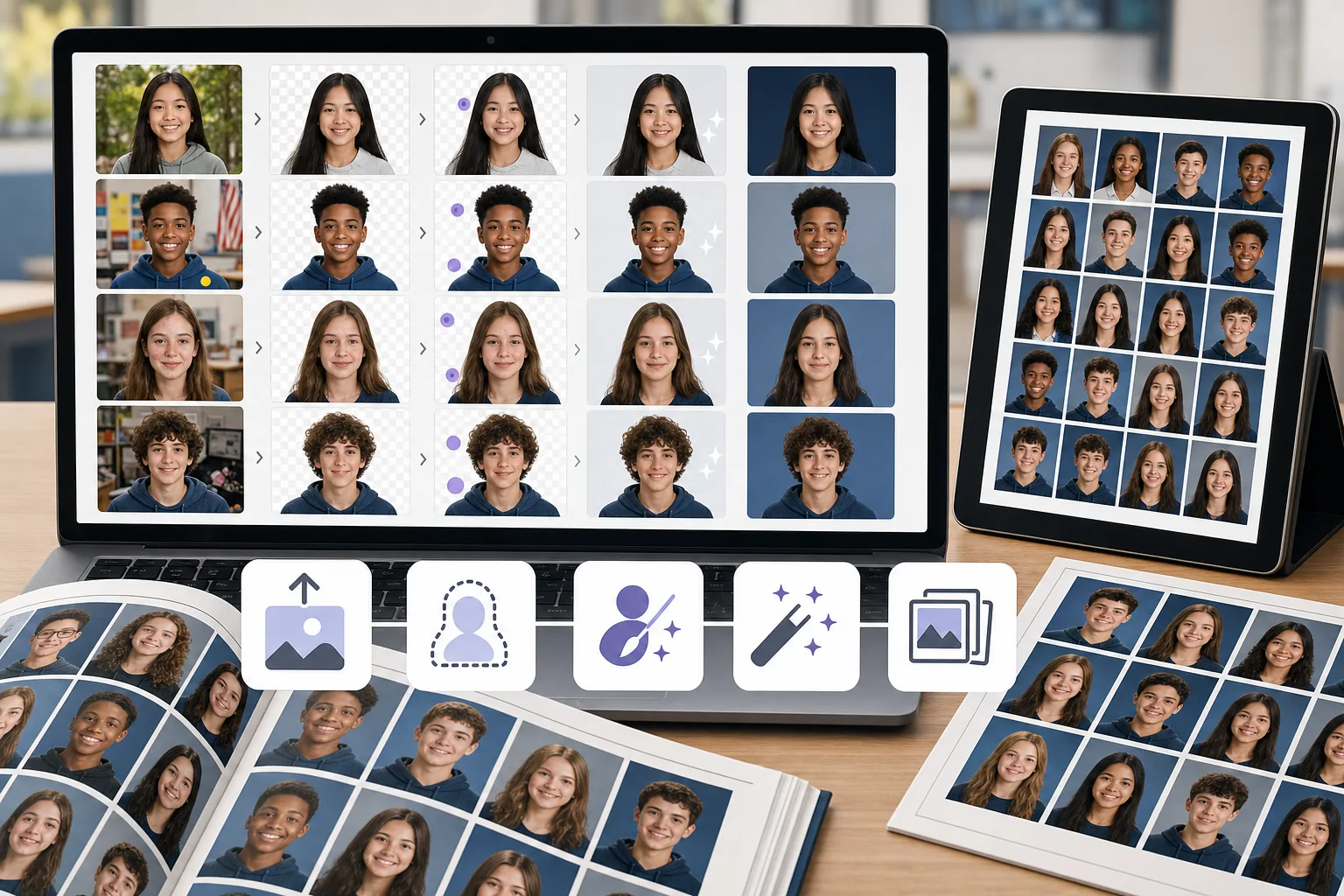
Sfondi incoerenti tra le foto
Studenti diversi ripresi in luoghi diversi o in giorni diversi significano che gli sfondi variano in colore, consistenza e illuminazione. Standardizzarli manualmente richiede molto tempo.
Imperfezioni e distrazioni nei ritratti
Peli randagi, macchie della pelle, adesivi sui vestiti e oggetti sullo sfondo necessitano tutti di essere ripuliti per produrre ritratti raffinati dell'annuario.
Lotti di grandi dimensioni con scadenze ravvicinate
I team dell'annuario elaborano centinaia di ritratti entro una scadenza. Qualsiasi collo di bottiglia relativo alla modifica per immagine si moltiplica per l'intero elenco delle classi.
In che modo Magic Eraser aiuta con le foto dell'annuario
Carica il ritratto
Apri Magic Eraser e carica il ritratto di uno studente o una serie di foto che necessitano di pulizia.
Rimuovi o sostituisci lo sfondo
Usa la rimozione dello sfondo per isolare il soggetto, quindi posizionalo su uno sfondo dell'annuario pulito e coerente.
Elimina le distrazioni
Cancella imperfezioni, oggetti vaganti o artefatti di illuminazione irregolare con lo strumento Gomma AI.
Valorizzare ed esportare
Applica AI Enhancement per rendere più nitido il ritratto e bilanciare l'esposizione, quindi esporta alla risoluzione di stampa.
Strumenti
Domande frequenti
Magic Eraser può sostituire gli sfondi fotografici dell'annuario?
+
SÌ. Utilizza la rimozione dello sfondo per isolare lo studente, quindi posiziona il ritratto su qualsiasi sfondo solido o con marchio per un aspetto coerente dell'annuario.
È adatto per i team degli annuari scolastici?
+
SÌ. Magic Eraser è abbastanza facile da utilizzare per i membri del comitato dell'annuario e i genitori volontari senza esperienza di editing professionale.
Posso rimuovere le imperfezioni dai ritratti degli studenti?
+
SÌ. Lo strumento gomma funziona bene per rimuovere imperfezioni della pelle, adesivi e piccole distrazioni dai ritratti.
Magic Eraser funziona anche per le foto di gruppo?
+
SÌ. Puoi ripulire le foto di gruppo rimuovendo le distrazioni dello sfondo, migliorando l'illuminazione e risolvendo i problemi di composizione.
A quale risoluzione posso esportare le foto dell'annuario?
+
Le dimensioni di esportazione disponibili dipendono dalle opzioni di miglioramento e dell’account selezionate. Prima della consegna, confronta le dimensioni in pixel del file scaricato con formato e DPI richiesti dalla tipografia dell’annuario.
Ottieni i ritratti dell'annuario dall'aspetto migliore
Prova Magic Eraser sfondi gratuiti e puliti, correggi le distrazioni e migliora i ritratti degli studenti senza software costosi.
Prova Magic Eraser gratuitamenteCasi d'uso correlati
Scopri come i professionisti utilizzano questi strumenti nei flussi di lavoro reali.
Le foto degli annunci piene di oggetti personali, auto parcheggiate o materiali di cantiere allontanano gli acquirenti. Magic Eraser usa l'IA per ripulire le foto dei tuoi immobili all'istante — senza bisogno di Photoshop.
Sfondi disordinati e foto prodotto trascurate ti costano vendite ogni giorno. Magic Eraser ti aiuta a creare immagini prodotto professionali in pochi secondi — senza competenze di Photoshop. Carica, cancella le distrazioni e pubblica con sicurezza.
Questure e consolati rifiutano migliaia di fototessere ogni giorno per sfondi non conformi. Magic Eraser rimuove qualsiasi sfondo e lo sostituisce con il colore esatto richiesto in pochi secondi.
Confronti correlati
Scopri come Magic Eraser si confronta con strumenti simili.
TouchRetouch è una popolare app mobile a pagamento per rimuovere oggetti e imperfezioni. Magic Eraser offre editing IA gratuito su qualsiasi dispositivo senza installazione. Confronta funzionalità, prezzi e facilità d'uso.
Cleanup.pictures è uno strumento web gratuito per rimuovere rapidamente gli oggetti. Magic Eraser offre 8 strumenti di editing IA, app mobili e un'elaborazione avanzata. Scopri il confronto.
remove.bg è il leader di mercato per la rimozione sfondo, con una potente API e integrazioni con Photoshop e Figma. Magic Eraser offre otto strumenti IA — dalla rimozione oggetti e riempimento generativo al miglioramento IA e design — tutto in un unico editor.
Due potenti editor foto IA con punti di forza diversi. Magic Eraser offre un set più ampio di strumenti IA generativi, mentre Photoroom eccelle nella fotografia di prodotti e-commerce e nell'elaborazione batch. Scopri quale si adatta al tuo flusso di lavoro.
Guide correlate
Esplora altre guide e contenuti editoriali relativi a questo flusso di lavoro.
Scopri come usare Magic Eraser per rimuovere oggetti, persone, testo e distrazioni dalle foto con risultati AI più puliti.
Scopri come rimuovere persone dalle foto con l'IA in pochi secondi. Guida per foto di viaggio, immobiliari e prodotti.
Guida passo passo per rimuovere filigrane dalle tue foto con l'IA. Quando è appropriato, tecniche e consigli.