
Vintage Car Show Photo
Capture the beauty of classic automobiles without the car show crowds. This template removes spectators, neighboring vehicles, and event clutter from your car show photos, then enhances chrome details, deepens paint luster, and applies period-appropriate color grading that makes every classic car look like it just rolled off the showroom floor.
Try this template freePersonal template preview
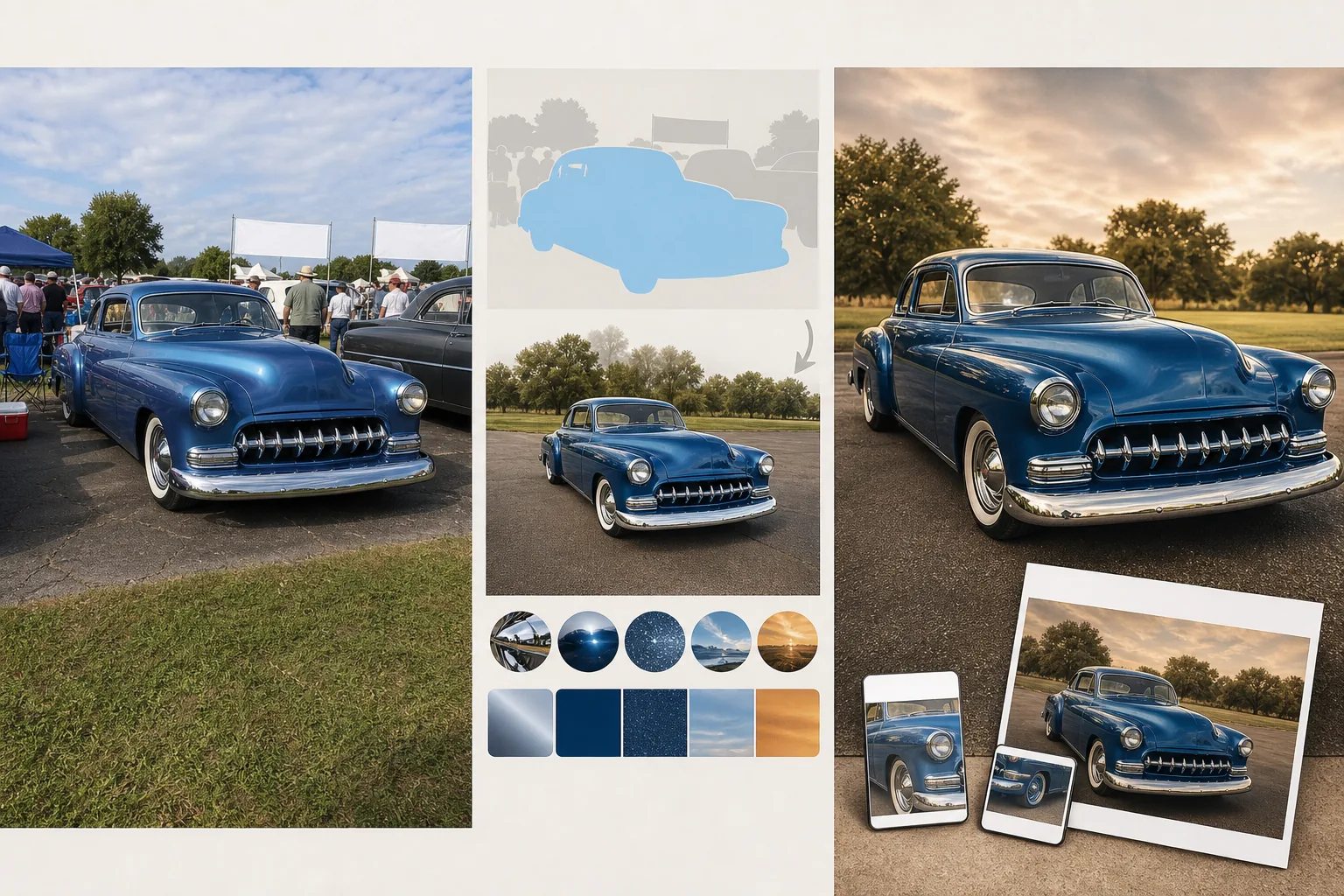
What this template does
Solves the fundamental challenge of car show photography: you are surrounded by hundreds of people, other vehicles inches away, event tents, and sponsor banners — none of which belong in a photo meant to celebrate the car itself. Magic Eraser removes spectators leaning on adjacent cars, neighboring vehicles parked bumper-to-bumper, folding chairs, coolers, and event signage. The AI reconstructs the pavement and grass behind removed elements to create a clean setting. AI Enhance then does what the car's owner spent hundreds of hours in the garage doing — it makes the finish shine. Chrome bumpers, grilles, and trim are sharpened to mirror-finish clarity. Paint depth is enhanced so metallic flake sparkles and candy coats show their color-shift layers. Period-accurate color grading options match the aesthetic of the car's era, from 1950s saturated Kodachrome warmth to 1970s muted earth tones.
Template settings
| Crowd removal | Auto-detect and remove spectators and event clutter from around the car |
| Chrome enhancement | Mirror-finish sharpening on bumpers, grilles, and trim pieces |
| Paint enhancement | Deepen metallic flake, candy coat layers, and clear coat reflection |
| Color grade | Period-accurate (1950s Kodachrome, 1960s Ektachrome, 1970s earth tones, or neutral) |
| Adjacent vehicle removal | Remove neighboring cars parked in frame |
| Output resolution | 5000×3333px (3:2 landscape for prints and enthusiast magazines) |
How to use this template
Upload your car show photo
Upload photos taken at car shows, cruise-ins, and concours events. The template handles the challenging conditions of car shows — crowds, tight spacing between vehicles, mixed outdoor and tent lighting, and reflections of neighboring cars in the subject vehicle's paint and chrome.
Remove crowds and clutter
Magic Eraser removes spectators, neighboring vehicles, folding chairs, coolers, event tents, and sponsor banners. The AI reconstructs the ground surface — whether asphalt, grass, or gravel — behind removed elements. For cars photographed in very tight spaces, the AI generates a plausible continuation of the setting.
Enhance chrome and paint
Chrome bumpers, grilles, door handles, and trim are sharpened to a mirror-finish clarity that shows every reflection and highlight. Paint is enhanced to show the full depth of the finish — metallic flake particles, candy coat color-shift layers, and the wet-look gloss of a freshly detailed clear coat.
Apply color grade and export
Choose a period-accurate color grade that matches the car's era, or use the neutral option that maximizes detail and color accuracy. Export at 5000×3333px for prints, automotive forum posts, and magazine submissions. The high resolution captures every detail of restoration craftsmanship.
Pro tips for best results
- ✓Photograph at the three-quarter front angle that shows the full grille, one headlight, and the side body line. This classic automotive photography angle displays the most chrome and the longest paint panel in a single frame, maximizing the impact of the AI enhancement.
- ✓Shoot during the first hour of the car show when crowds are thinnest. Fewer people to remove means cleaner ground reconstruction, and morning light is softer and more flattering on chrome and paint than harsh midday sun.
- ✓Get low — photograph at bumper height or even lower. A low angle makes the car look commanding and reduces the visible ground area behind the car, which means less reconstruction is needed when removing crowds and neighboring vehicles.
Common questions
Can this remove the reflection of other cars in the paint?
+
The chrome and paint enhancement reduces the visibility of unwanted reflections by boosting the underlying paint color and metallic depth. However, strong reflections of adjacent vehicles in highly polished surfaces are only partially reduced — a bright red car reflected in a white door panel is toned down but may remain faintly visible.
Will the period color grade affect paint accuracy?
+
The period color grades shift the overall image tone to match era-appropriate film stocks but do not alter the fundamental paint color. A candy apple red 1957 Chevrolet will still appear red under the 1950s Kodachrome grade — the grade adds warmth and saturation character while preserving the specific hue.
Can I process photos of motorcycles and trucks?
+
Yes. The template handles classic motorcycles, vintage trucks, hot rods, and custom builds. The chrome and paint enhancement works on any vehicle surface, and crowd removal functions the same regardless of the vehicle type.
Show every classic car at its absolute finest
Upload car show photos and get crowd-free, chrome-perfect images worthy of your restoration effort.
Try it freeRelated templates
More personal templates for your workflow.
Create compliant ID photos for visas, driver's licenses, and national IDs with proper background color, head sizing, and facial expression requirements.
Enhance graduation photos with background cleanup, cap and gown color correction, blemish removal, and print-ready sharpening for frames and announcements.
Enhance concert and event photos with low-light noise reduction, stage lighting color correction, crowd distraction removal, and detail recovery from dark venue shots.
Create beautiful newborn announcement card photos with soft backgrounds, gentle color grading, hospital clutter removal, and print-ready dimensions for mailing.
Prepare family and portrait photos for holiday greeting cards with festive backgrounds, warm color grading, snow effects, and standard card dimensions for printing.
Restore and enhance memorial tribute photos with gentle retouching, background simplification, warm respectful color grading, and print-ready dimensions for services.