
Memorial Tribute Photo
Honor loved ones with a beautifully enhanced tribute photo. This template gently restores older photos, enhances clarity and color from faded originals, removes distracting backgrounds, and outputs a dignified, print-ready portrait suitable for memorial services, obituaries, and lasting remembrance displays.
Try this template freePersonal template preview
What this template does
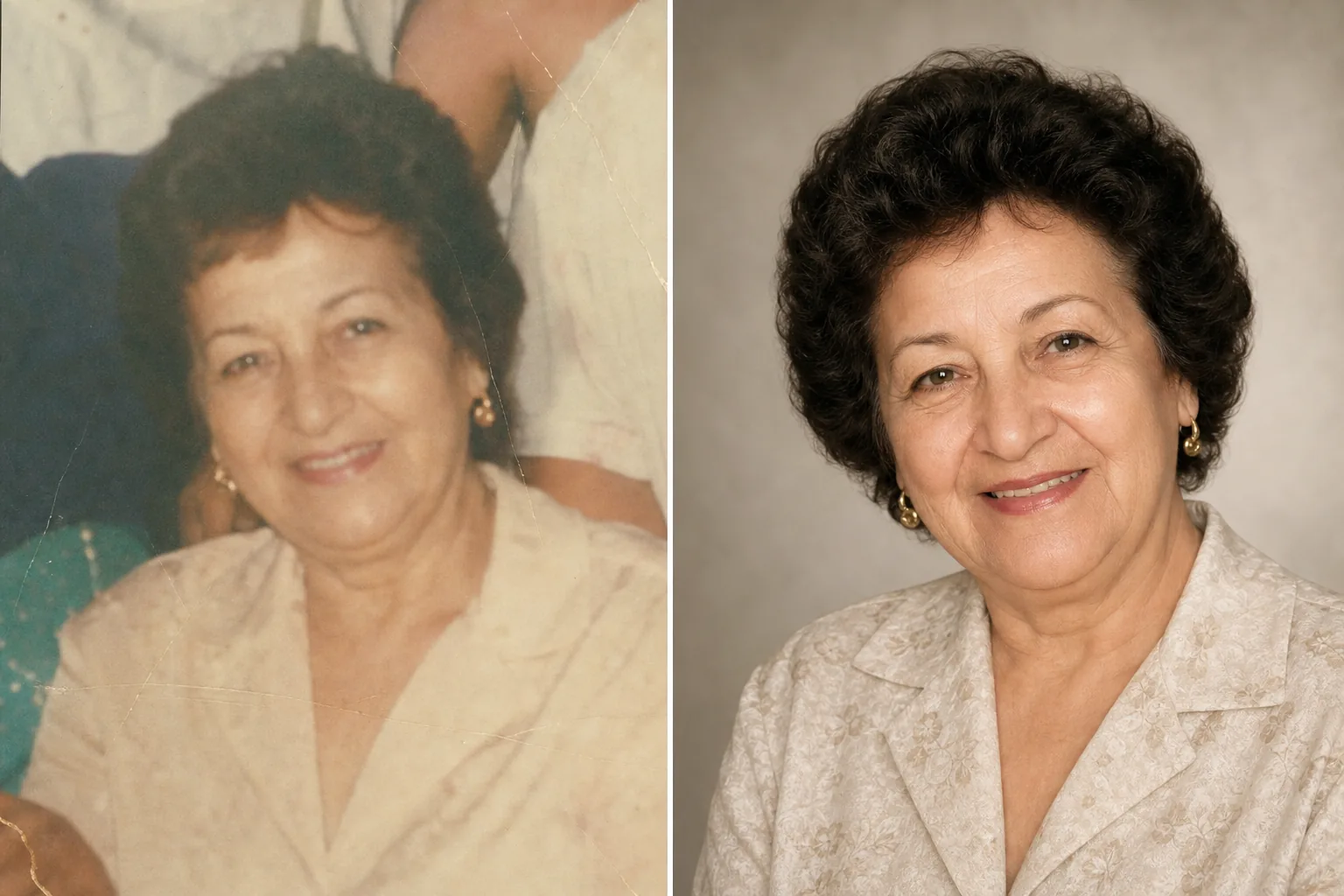
Prepares portrait photos for memorial services, obituaries, funeral programs, remembrance displays, and tribute montages with the care and respect the occasion demands. Often the best available photo of a loved one was taken years ago — it may be a casual snapshot, a group photo where they need to be isolated, or a faded print that has been scanned. AI Enhance restores color and sharpness to older or faded photos, brightens underexposed images, and gently smooths minor imperfections while preserving the authentic likeness of the person. Magic Eraser removes background distractions and can isolate an individual from a group photo. The overall tone is warm, dignified, and respectful — never over-processed.
Template settings
| Photo restoration | Recover color and detail from faded or aged photos |
| Background | Soft neutral gradient, solid color, or simplified original |
| Color grade | Warm, dignified (natural skin tones, gentle warmth) |
| Enhancement level | Subtle and respectful (preserves authentic likeness) |
| Output dimensions | 8×10 in at 300 DPI (standard memorial portrait) or custom |
How to use this template
Upload the portrait photo
Upload the best available photo of the person — a dedicated portrait, a crop from a group photo, or a scan of a printed photograph. The template handles photos from any era and condition, including old prints with color fading, creases, and minor damage.
Restore and enhance
AI Enhance recovers faded colors, sharpens softened detail, and corrects the yellow or blue color cast that develops in aging photographs. For photos scanned from prints, scan artifacts and paper texture are reduced. The enhancement is deliberately subtle — the goal is to present the person as they were, with clarity and warmth, not to alter their appearance.
Background and framing
The background is replaced with a soft, neutral option — a gentle gradient, a solid muted color, or a softened version of the original setting. If the photo is from a group, the individual is isolated and framed as a standalone portrait. The composition is adjusted for standard memorial portrait proportions.
Export for services and display
Download at 8×10 inches at 300 DPI for funeral home and memorial service printing, or at custom dimensions for obituary publications, remembrance cards, and digital tribute displays. The output is suitable for both color and black-and-white printing.
Pro tips for best results
- ✓Choose a photo where the person's expression and personality shine through, even if the technical quality is not perfect. The template can improve image quality significantly, but the emotional connection to the photo matters more than the resolution.
- ✓When scanning printed photos, use the highest DPI your scanner supports (600 DPI minimum) and scan on a clean, flat surface. Higher-resolution scans give the template more data to work with when restoring detail and correcting fading.
- ✓If no solo portrait exists, the template can isolate an individual from a group photo. Choose a group photo where the person's face is clearly visible, unobstructed, and turned toward the camera for the best isolation result.
- ✓Consider enhancing both a color and a black-and-white version. Black-and-white memorial portraits have a timeless, dignified quality and work well when the original color photo has significant fading or color damage that cannot be fully restored.
Common questions
Can this restore heavily damaged photos?
+
The template handles moderate damage — fading, color shifts, mild creases, and softness from age. Severe damage like large tears, heavy water stains, or significant missing portions requires manual restoration by a professional retoucher. The template is most effective when the face and key features are visible and intact in the original.
Will the enhanced photo look natural?
+
Yes. The enhancement is calibrated to be subtle and respectful. The person will look like themselves — not younger, not older, not different. The goal is to present the photo as if it were taken with better lighting, a better camera, and on a better day, while preserving every aspect of who the person was.
Can I use this for a video tribute slideshow?
+
Yes. Process each photo through the template with consistent background and color settings for a cohesive slideshow. The consistent treatment ties together photos from different eras and sources into a unified visual tribute.
A tribute photo as beautiful as the memories
Upload any photo of a loved one and receive a gently restored, warmly enhanced portrait ready for memorial services and lasting remembrance.
Try it freeRelated templates
More personal templates for your workflow.
Create compliant ID photos for visas, driver's licenses, and national IDs with proper background color, head sizing, and facial expression requirements.
Enhance graduation photos with background cleanup, cap and gown color correction, blemish removal, and print-ready sharpening for frames and announcements.
Enhance concert and event photos with low-light noise reduction, stage lighting color correction, crowd distraction removal, and detail recovery from dark venue shots.
Create beautiful newborn announcement card photos with soft backgrounds, gentle color grading, hospital clutter removal, and print-ready dimensions for mailing.
Prepare family and portrait photos for holiday greeting cards with festive backgrounds, warm color grading, snow effects, and standard card dimensions for printing.
Transform shelter and rescue pet photos with background replacement, lighting correction, and fur detail enhancement to help animals find homes faster.